ORB-36 Strata
Orburis Watch- USK ab 0 JahrenAltersfreigabe
- PersonalisierungKategorie
- 22.08.2026Aktualisiert
- 1,09 €Preis
Verlinkt auf den offiziellen Google Play-Eintrag von com.watchfacestudio.orb36. Zuletzt geprüft am 14.11.2026.
Über diese App
Automatische Übersetzung von Google. Originalsprache: Englisch (Vereinigtes Königreich).
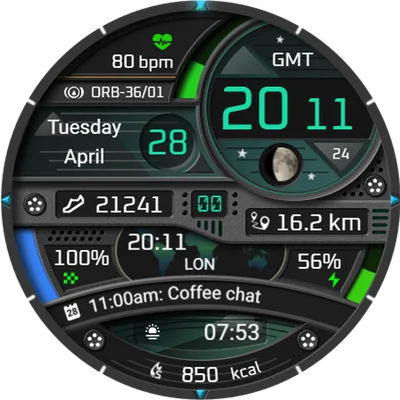
Ein Zifferblatt für WearOS mit 3D-Textur und hohem Informationsgehalt
Dieses digitale Zifferblatt ist übersichtlich in Ebenen strukturiert und überzeugt durch hohe Informationsdichte, vielfältige Farbkombinationen und die Möglichkeit, die angezeigten Daten in einigen Feldern individuell anzupassen.
Hauptmerkmale:
9 Zeitfarben
9 Hintergrundfarben für die Uhr
9 Hintergrundfarben für das Wetterfenster
2 anpassbare Datenfelder
Fünf anpassbare App-Schnellzugriffstasten
Binäre Sekundenanzeige (optional)
Hinweis: Zu den mit einem „*“ gekennzeichneten Elementen in der Beschreibung finden Sie weitere Details im Abschnitt „Funktionshinweise“.
Details:
Farbkombinationen, Entfernungseinheiten und Konfigurationsfelder – einstellbar über die Funktion „Anpassen“, die durch langes Drücken auf das Zifferblatt aufgerufen wird:
Angezeigte Daten:
• Uhrzeit (Stunden, Minuten, Sekunden) im 12- oder 24-Stunden-Format, wie auf dem Smartphone des Nutzers eingestellt
• Datum (Wochentag, Tag des Monats, Monat)
• AM/PM/24-Anzeige
• Zeitzone
• Kurzes, vom Nutzer konfigurierbares Informationsfenster, geeignet für die Anzeige von Informationen wie Wetter oder Sonnenaufgangs-/Sonnenuntergangszeiten
• Langes, vom Nutzer konfigurierbares Informationsfenster, ideal für die Anzeige von Informationen wie dem nächsten Kalendereintrag
• Akkuladestand in Prozent und Meter
• Schrittzähler
• Schrittziel* in Prozent und Meter
• Zurückgelegte Strecke* (km/Meilen)
• Herzfrequenzmesser (5 Zonen)
◦ <60 Schläge/min, blaue Zone
◦ 60–99 Schläge/min, grüne Zone
◦ 100–139 Schläge/min, violette Zone
◦ 140–169 Schläge pro Minute, gelbe Zone
◦ ≥ 170 Schläge pro Minute, rote Zone
Schrittzähler*
Weltzeit
Sekunden im Binärcode (6 LEDs um das Sekundenfeld)
Always-on-Display:
Ein Always-on-Display sorgt dafür, dass wichtige Daten immer angezeigt werden.
Anpassungen (langes Drücken auf das Zifferblatt und Wischen nach links):
Farbe – Farbe für Uhrzeit/Datum und Sekunden
Entfernungseinheiten – Meilen/km auswählen
Uhrfarbe – Hintergrundfarbe für Uhrzeit/Datum
Wetterfarbe – Hintergrundfarbe des Wetterfensters
Kurz- und Langinfofenster sowie fünf App-Schnellzugriffstasten
*Hinweise zur Funktionalität:
- Schrittziel: Für Nutzer von Geräten mit Wear OS 3.x ist dieses auf 6000 Schritte festgelegt. Für Geräte mit Wear OS 4 oder höher entspricht es dem Schrittziel der gewählten Gesundheits-App.
Zurückgelegte Strecke: Die Entfernung wird wie folgt geschätzt: 1 km = 1312 Schritte, 1 Meile = 2100 Schritte.
Schritt-Kalorien: Ungefährer Kalorienverbrauch pro Schritt (Schrittzahl * 0,04).
Hinweis: Installieren Sie das Zifferblatt am besten direkt aus dem Play Store auf Ihre Smartwatch, indem Sie Ihre Smartwatch als Zielgerät auswählen. Sollte dies nicht möglich sein, steht Ihnen eine Begleit-App zur Verfügung, die auf Ihrem Smartphone installiert wird. Diese App dient ausschließlich der Installation des Zifferblatts auf Ihrer Smartwatch. Nach der Installation finden Sie das Zifferblatt auf Ihrer Smartwatch, indem Sie lange auf das Display tippen, nach links wischen und „Zifferblatt hinzufügen“ auswählen. Scrollen Sie anschließend zum Abschnitt „Heruntergeladen“.
Die Begleit-App kann nach der Installation von Ihrem Smartphone entfernt werden.
Wir freuen uns über eine Bewertung im Play Store.
Support: Bei Fragen zu diesem Zifferblatt kontaktieren Sie uns bitte unter support@orburis.com. Wir werden Ihre Anfrage prüfen und Ihnen antworten.
Weitere Informationen zu diesem und anderen Orburis-Zifferblättern:
Instagram: https://www.instagram.com/orburis.watch/
Facebook: https://www.facebook.com/orburiswatch/
Website: https://orburis.com
Entwicklerseite: https://play.google.com/store/apps/dev?id=5545664337440686414
======
ORB-36 verwendet die folgenden Open-Source-Schriftarten:
Oxanium
DSEG14-Classic
Sowohl Oxanium als auch DSEG14 sind unter der SIL Open Font License, Version 1.1, lizenziert. Diese Lizenz sowie häufig gestellte Fragen (FAQ) finden Sie unter http://scripts.sil.org/OFL.
=====
Originaltext anzeigen
This digital watchface is broadly structured in layers and packs a punch with high information density and a wide range of colour combinations, as well as the ability customise the data displayed by some fields.
Key features:
9 time colours
9 clock-section background colours
9 weather window background colours
2 customisable data fields
Five customisable app-shortcut buttons
Binary second display (just for fun)
Note: Items in the description annotated with a ‘*’ have further details in the ‘Functionality Notes’ section.
Details:
Colour combinations, distance units and configuration fields – set via the ‘Customise’ function, accessible by long-pressing the watch face:
Data displayed:
• Time (Hours, minutes, seconds), in 12 or 24h format as set on the user’s phone
• Date (Day-of-week, Day-of-month, Month)
• AM/PM/24 indicator
• Time zone
• Short user-configurable information window, suitable for displaying items such as weather or sunrise/sunset times
• Long user-configurable information window, ideal for displaying items such as the next calendar appointment
• Battery charge level percentage and meter
• Step count
• Step goal* percentage and meter
• Distance travelled* (km/miles)
• Heart rate meter (5 zones)
◦ <60 bpm, blue zone
◦ 60-99 bpm, green zone
◦ 100-139 bpm, purple zone
◦ 140-169 bpm, yellow zone
◦ >=170bpm, red zone
• Step-cals*
• World Time
• Seconds in binary code (6 LEDs around the seconds field)
Always on Display:
• An always-on display ensures that key data is always displayed.
Customisations (long press the watch face and swipe left):
• Colour – The time/date and seconds colour
• Distance Units – select miles/km
• Clock Colour – the clock/date background colour
• Weather colour – the background colour of the weather window
• Short and Long info windows, and five app shortcut buttons
*Functionality Notes:
- Step goal: For users of devices running Wear OS 3.x, this is fixed at 6000 steps. For Wear OS 4 or later devices, it is the step goal sync’d with the wearer’s chosen health app.
- Distance travelled: Distance is approximated as: 1km = 1312 steps, 1 mile = 2100 steps.
- Step-cals: Approximate calories expended by step count (Step count * 0.04)
Note – It is best to install the watchface directly to the watch from Play Store by selecting your watch as the target device for installation. However, if this is not possible, a 'companion app' is also available which installs to your phone. The companion app’s only function is to facilitate the installation of the watchface on your watch device. After installation, the watch face can be found onto your watch by long pressing the watch display, scrolling left and selecting 'Add Watch Face', then scrolling down to the 'Downloaded' section.
Post installation, the companion app can be removed from your phone.
Please consider leaving us a review in Play Store.
Support:
If you have any questions about this watchface you can contact support@orburis.com and we will review and respond.
More information on this watch face and on other Orburis watch faces:
Instagram: https://www.instagram.com/orburis.watch/
Facebook: https://www.facebook.com/orburiswatch/
Web: https://orburis.com
Developer Page: https://play.google.com/store/apps/dev?id=5545664337440686414
======
ORB-36 uses the following open source fonts:
Oxanium
DSEG14-Classic
Both Oxanium and DSEG14 are licensed under the SIL Open Font License, Version 1.1. This license is available with a FAQ at http://scripts.sil.org/OFL
=====
Datensicherheit
Was Orburis Watch bei Google Play zu den Daten angibt, die diese App erfasst und weitergibt.
- Keine Daten werden mit Drittunternehmen oder -organisationen geteiltWeitere Informationen dazu, wie Entwickler Angaben zur Weitergabe von Daten machen
- Keine Daten erhobenWeitere Informationen dazu, wie Entwickler Angaben zur Datenerhebung machen
Neue Funktionen
22.08.2026
Updated to API Level 36 as required by Google
Kontakt zum Entwickler
- Websiteorburis.com
- E-Mailsupport@orburis.com
- Datenschutzerklärungsites.google.com
- Adresse38 Baxter Road SALE M33 3AL United Kingdom
Informationen
- Angeboten von
- Orburis Watch
- Kategorie
- Personalisierung
- Aktualisiert
- 22.08.2026
- Veröffentlicht
- 04.05.2026
- Altersfreigabe
- USK ab 0 Jahren
- Preis
- 1,09 €
- Paketname
- com.watchfacestudio.orb36