Owl Watch Face
Watch Face Maker- USK ab 0 JahrenAltersfreigabe
- PersonalisierungKategorie
- 06.08.2026Aktualisiert
- 1,09 €Preis
Verlinkt auf den offiziellen Google Play-Eintrag von com.glgjing.watchface.owl. Zuletzt geprüft am 21.11.2026.
Über diese App
Automatische Übersetzung von Google. Originalsprache: Englisch (Vereinigte Staaten).
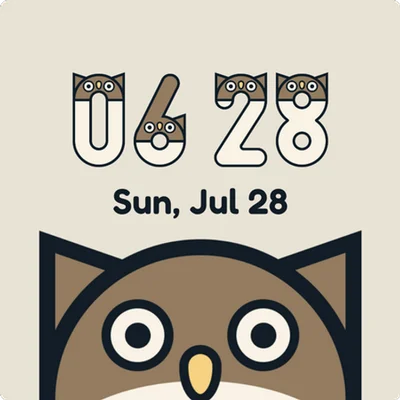
Niedliches Eulen-Zifferblatt für Wear OS-Smartwatches
Niedliches Eulen-Zifferblatt für Wear OS-Smartwatches: Huawei Watch, Sony SmartWatch, Motorola Moto 360, Tag Heuer, Fossil Q, LG G Watch, Asus ZenWatch usw. Stilvoll und elegant. Dieses Zifferblatt ist mit allen Wear OS-Uhren kompatibel.
Merkmale des Eulen-Zifferblatts – vollständige Anleitung:
✔ Zifferblatt kompatibel mit allen Wear OS-Uhren:
* Motorola Moto 360,
* Motorola Moto 360 2.,
* LG G Watch R,
* LG G-Uhr,
* LG Urban,
* LG Urban 2.,
* Sony Smartwatch 3,
* Samsung Gear Live,
* Huawei-Uhr,
* Asus ZenWatch,
✔ Umgebungsmodus
Zeigt das Zifferblatt im Umgebungsmodus mit den einfachen Farben Weiß und Schwarz im Energiesparmodus an.
So verwenden Sie das Zifferblatt für Wear OS-Smartwatches:
1. Wenn Sie die App vom Mobiltelefon aus installieren, wird das Zifferblatt automatisch auf Ihre Uhr übertragen. Das kann ein paar minuten dauern. Möglicherweise müssen Sie eine Weile warten.
2. Wenn Sie die App aus dem Play Store der Uhr installieren, können Sie das Zifferblatt direkt in der Uhr auswählen
2. Nachdem Sie die App installiert haben, können Sie das Zifferblatt von Smartwatches auswählen: Drücken Sie lange auf Ihr Zifferblatt und wählen Sie das von Ihnen installierte aus, oder Sie können das Zifferblatt von Mobilgeräten auswählen: Führen Sie die „Wear OS“-App aus und tippen Sie auf Schaltfläche „Mehr“ im Bereich „Zifferblatt“.
3. Genießen Sie endlich Ihr neues Zifferblatt für Wear OS!
Weitere Zifferblätter:
Besuchen Sie unsere exklusive Sammlung im Play Store: https://play.google.com/store/apps/dev?id=8033310955272052059
Originaltext anzeigen
Cute owl watch face for Wear OS smartwatches: Huawei Watch, Sony SmartWatch, Motorola Moto 360, Tag Heuer, Fossil Q, LG G Watch, Asus ZenWatch etc. Stylish and Elegant. This watch face is compatible with all Wear OS watches.
Features of owl watch face - complete guide:
✔ Watch face compatible with all Wear OS Watches:
* Motorola Moto 360,
* Motorola Moto 360 2nd,
* LG G Watch R,
* LG G Watch,
* LG Urban,
* LG Urban 2nd,
* Sony SmartWatch 3,
* Samsung Gear Live,
* Huawei Watch,
* Asus ZenWatch,
✔ Ambient mode
Displayed the ambient mode watch face with simple white and black colors in the low-power mode.
How to use watch face for Wear OS smartwatches:
1. If you install the app from the mobile, the watch face will be automatically transferred to your watch. This may take a few minutes. You may have to wait for a while.
2. If you install the app from the watch play store, you can choose the watch face directly in the watch
2. After you install the app, you can choose the watch face from smartwatches: Long press your watch face and select the one that you have installed, or you can choose the watch face from mobile: run the "Wear OS" app and tap "More" button in the watch face section.
3. Finally enjoy your new watch face for Wear OS!
More watch faces:
Visit our exclusive collection on the Play Store : https://play.google.com/store/apps/dev?id=8033310955272052059
Datensicherheit
Was Watch Face Maker bei Google Play zu den Daten angibt, die diese App erfasst und weitergibt.
- Diese App kann die folgenden Datentypen an Dritte weitergebenFotos
- Keine Daten erhobenWeitere Informationen dazu, wie Entwickler Angaben zur Datenerhebung machen
- Daten werden nicht verschlüsselt
- Daten können nicht gelöscht werden
Neue Funktionen
06.08.2026
Upgrade the Target API to API 36
Kontakt zum Entwickler
- E-Mailpitaohappy@gmail.com
- Datenschutzerklärungglgjing.wixsite.com
- Adresse群上村582号群上社区集体户 美兰区, 海口市, 海南省 China 100020
Informationen
- Angeboten von
- Watch Face Maker
- Kategorie
- Personalisierung
- Aktualisiert
- 06.08.2026
- Veröffentlicht
- 10.03.2022
- Altersfreigabe
- USK ab 0 Jahren
- Preis
- 1,09 €
- Paketname
- com.glgjing.watchface.owl