PER43 Digital Watch Face
Persona Watch Face- USK ab 0 JahrenAltersfreigabe
- PersonalisierungKategorie
- 19.09.2026Aktualisiert
- 1,39 €Preis
Verlinkt auf den offiziellen Google Play-Eintrag von com.watchfacestudio.per43. Zuletzt geprüft am 13.11.2026.
Über diese App
Automatische Übersetzung von Google. Originalsprache: Englisch (Vereinigte Staaten).
PER43 Digitales Zifferblatt für WearOS
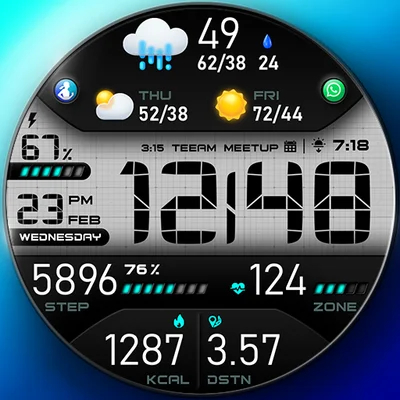
⚡ **PER43 Digitales Zifferblatt: Dein Stil, deine Entscheidung** Bereit für ein Smartwatch-Erlebnis der Extraklasse? Das PER43 Pixel Digital-Zifferblatt vereint Funktionalität und Stil in Perfektion. Egal, ob du deine täglichen Ziele verfolgst oder einfach nur ein elegantes Design suchst – dieses Zifferblatt ist die ideale Wahl.
🎨 Personalisiere dein PER43 Digital-Zifferblatt
10 einzigartige Hintergründe
6 Musterdesigns
6 LED-Beleuchtungsstufen
20 ausdrucksstarke Farbkombinationen
4 individuelle Komplikationen
✨ Kombiniere diese Elemente nach Belieben und kreiere ein Zifferblatt, das sich einzigartig anfühlt!
📊 Intelligente Funktionen des PER43 Digital-Zifferblatts
Wettertyp und Temperatur (°F / °C)
Höchst- und Tiefsttemperatur (°F / °C)
Wettertyp der nächsten 2 Tage
Temperatur der nächsten 2 Tage (°F / °C)
Schritte, Tagesziel und Distanz (km / Meilen)
Akkustand von Smartphone und Uhr
Verbrannte Kalorien, zurückgelegte Stockwerke
Herzfrequenzmesser
UV-Index, Regenwahrscheinlichkeit
Mondphase, Sonnenaufgang/Sonnenuntergang
Zeitzone, Luftdruckmesser
Erinnerung an den nächsten Termin
Always-On-Display mit anpassbaren Farben
❓ Fehlerbehebung bei Wetterinformationen
Dies hängt in der Regel damit zusammen, wie die Uhr die Wetterdaten abruft.
Bitte führen Sie folgende Schritte aus:
1. Installieren Sie „Simple Weather“ auf Ihrem Smartphone und Ihrer Uhr.
https://play.google.com/store/apps/details?id=com.thewizrd.simpleweather
2. Stellen Sie das Aktualisierungsintervall auf 1 Stunde ein.
3. Warten Sie einige Minuten, bis die Daten synchronisiert sind.
Sollte das Problem weiterhin bestehen, senden Sie mir bitte eine E-Mail.
🛠️ Einfacher Anpassungsmodus
Durch einfaches Berühren und Halten können Sie die angezeigten Daten personalisieren – Wetter, Sonnenaufgang/Sonnenuntergang, Zeitzone und mehr.
⚡ Akkustand des Smartphones
Sie benötigen die Begleit-App „Phone Battery Complication“ auf Ihrem Smartphone und Ihrer Smartwatch:
https://play.google.com/store/apps/details?id=com.weartools.phonebattcomp
🌐 Weitere Informationen:
https://persona-wf.com/portfolios/per43/
📖 Installationsanleitung
Bevor Sie eine Bewertung abgeben, lesen Sie bitte die Installationsanleitung und die FAQ, um eine reibungslose Nutzung zu gewährleisten:
👉 https://persona-wf.com/installation/
⌚ Unterstützte Geräte
Kompatibel mit allen Wear OS-Geräten (API-Level 35+), einschließlich:
SAMSUNG: Galaxy Watch Ultra 2 – Ultra, Watch 9 – 8 – 7 – 6 – 5 – 4 (Classic & FE)
GOOGLE: Pixel Watch 5 – 4 – 3 – 2 – 1
ONEPLUS / OPPO: OnePlus Watch 4 – 3 – 2R – 2, OPPO Watch X3 – X2 - X
XIAOMI: Watch 5 - 2 Pro - 2
FITBIT: Fitbit Ace LTE
🚀 Hervorragender Support
Brauchen Sie Hilfe? Wir sind für Sie da.
📩 support@persona-wf.com
💜 Werden Sie Teil unserer Community! Erhalten Sie die neuesten Designs und exklusive Angebote.
🌐 https://persona-wf.com
📩 Newsletter
https://persona-wf.com/register
👍 Facebook
https://www.facebook.com/Persona-Watch-Face
📸 Instagram
https://www.instagram.com/persona_watch_face
💬 Telegram
https://t.me/persona_watchface
▶️ YouTube
https://www.youtube.com/c/PersonaWatchFace
💖💖💖 Vielen Dank, dass Sie sich für PERSONA entschieden haben!
Wir hoffen, unser Design verschönert Ihnen den Tag und Ihr Handgelenk 😊
Mit Liebe entworfen von Ayla Gokmen
Originaltext anzeigen
⚡ **PER43 Digital Watch Face: Your Style, Your Way**
Ready to elevate your smartwatch experience? The PER43 Pixel Digital Watch Face combines functionality and style to perfection. Whether you’re tracking daily goals or just looking for a sleek design to flaunt, this watch face is the ideal choice.
🎨 Customize your PER43 Digital Watch Face
10 unique backgrounds
6 pattern designs
6 led light levels
20 bold color combinations
4 custom complications
✨ Mix and match these elements to create a watch face that feels uniquely yours!
📊 Smart Features of PER43 Digital Watch Face
Weather type and temperature (°F / °C)
High & Low temperature (°F / °C)
Next 2 days' weather type
Next 2 days' temperature (°F / °C)
Steps, daily goal & distance (KM / Miles)
Phone & watch battery level
Active burned calories, floors
Heart rate monitor
UV index, rain possibility
Moon phase, sunset/sunrise
Time zone, barometer
Next appointment reminder
Always-On display with adjustable colors
❓ Troubleshooting Weather Information
This is usually related to how the watch fetches weather data.
Please follow these steps:
1- Install “Simple Weather” on both phone and watch
https://play.google.com/store/apps/details?id=com.thewizrd.simpleweather
2- Set its update interval to 1 hour
3- Wait a few minutes for data to sync
If it still continues, please send me an email.
🛠️ Easy Customization Mode
Simply touch and hold to personalize what data you see — weather, sunrise/sunset, time zone, and more.
⚡ Phone Battery Level
You’ll need to install a companion app on both your phone and watch:
Phone Battery Complication
https://play.google.com/store/apps/details?id=com.weartools.phonebattcomp
🌐 More Details:
https://persona-wf.com/portfolios/per43/
📖 Installation Guide
Before leaving a review, make sure to check the installation guide and FAQ for a smooth experience:
👉 https://persona-wf.com/installation/
⌚ Supported Devices
Compatible with all Wear OS devices (API Level 35+), including:
SAMSUNG: Galaxy Watch Ultra 2 - Ultra, Watch 9 - 8 - 7 - 6 - 5 - 4 (Classic & FE)
GOOGLE: Pixel Watch 5 - 4 - 3 - 2 - 1
ONEPLUS / OPPO: OnePlus Watch 4 - 3 - 2R - 2, OPPO Watch X3 - X2 - X
XIAOMI: Watch 5 - 2 Pro - 2
FITBIT: Fitbit Ace LTE
🚀 Exceptional Support
Need assistance? We’re here for you
📩 support@persona-wf.com
💜 Join Our Community
Get the latest designs & exclusive offers
🌐 https://persona-wf.com
📩 Newsletter
https://persona-wf.com/register
👍 Facebook
https://www.facebook.com/Persona-Watch-Face
📸 Instagram
https://www.instagram.com/persona_watch_face
💬 Telegram
https://t.me/persona_watchface
▶️ YouTube
https://www.youtube.com/c/PersonaWatchFace
💖💖💖 Thank You for Choosing PERSONA!
We hope our design brightens your day and your wrist 😊
Designed with love by Ayla GOKMEN
Datensicherheit
Was Persona Watch Face bei Google Play zu den Daten angibt, die diese App erfasst und weitergibt.
- Keine Daten werden mit Drittunternehmen oder -organisationen geteiltWeitere Informationen dazu, wie Entwickler Angaben zur Weitergabe von Daten machen
- Keine Daten erhobenWeitere Informationen dazu, wie Entwickler Angaben zur Datenerhebung machen
Neue Funktionen
19.09.2026
• POWER EFFICIENCY: Smarter battery usage and lower-power AOD mode
• VISUAL IMPROVEMENTS: Enhanced contrast, updated typography, and new color options
• UNDER THE HOOD: Native support for the latest Watch Face Format (WFF)
• PERFORMANCE: Faster loading times, smoother rendering, and bug fixes
Kontakt zum Entwickler
- Websitepersona-wf.com
- E-Mailsupport@persona-wf.com
- Datenschutzerklärungiubenda.com
- AdresseALACAATLI MAH. SİNPAŞ KMEV. NO:E1 BLK 15/1 06810 MERKEZ ÇANKAYA/Ankara Türkiye
Informationen
- Angeboten von
- Persona Watch Face
- Kategorie
- Personalisierung
- Aktualisiert
- 19.09.2026
- Veröffentlicht
- 29.01.2025
- Altersfreigabe
- USK ab 0 Jahren
- Preis
- 1,39 €
- Paketname
- com.watchfacestudio.per43