perslot28
퍼슬랏- USK ab 0 JahrenAltersfreigabe
- PersonalisierungKategorie
- 23.12.2025Aktualisiert
- KostenlosPreis
Verlinkt auf den offiziellen Google Play-Eintrag von com.watchfacestudio.perslot28. Zuletzt geprüft am 13.11.2026.
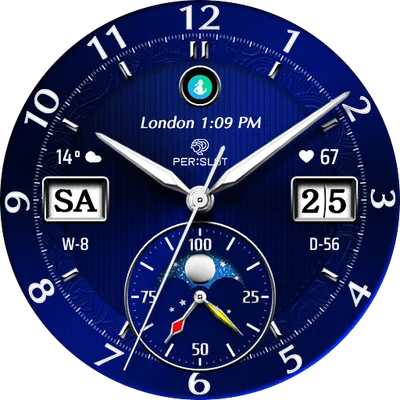
Über diese App
Automatische Übersetzung von Google. Originalsprache: Englisch (Vereinigte Staaten).
Dieses Zifferblatt unterstützt Wear OS 5-Geräte.
+++++++++++++++++++++++++++++++++++++++++++++++++
[Installation]
Stellen Sie sicher, dass Ihre Smartwatch ausgewählt ist, bevor Sie auf die Zahlungsschaltfläche tippen. Wählen Sie Ihre Smartwatch aus, indem Sie auf das kleine Dreieck neben der Zahlungsschaltfläche tippen.
Gehen Sie im Play Store oben rechts auf das Menüsymbol (drei Punkte) > Teilen > Chrome-Browser > Auf anderen Geräten installieren > Uhr und fahren Sie fort.
Nach der Installation wählen Sie die App in der Downloadliste aus, speichern Sie sie als Favorit und verwenden Sie sie. Die Downloadliste finden Sie, indem Sie ganz rechts in der Favoritenliste, die beim Tippen auf die Smartwatch erscheint, auf „Smartwatch-Bildschirm hinzufügen“ tippen.
++++++++++++++++++++++++++++++++++++++++++++++++
[Funktionen]
- Always-on-Display (AOD)
- Tagesinformationen
- Akkuanzeige (%)
+++++++++++++++++++++++++++++++++++++++++++++++
Bei Fragen kontaktieren Sie uns bitte unter der unten angegebenen E-Mail-Adresse.
gpandkorea@gmail.com
Weitere Funktionen und Designs finden Sie im Play Store unter dem Suchbegriff „JWSTUDIO“.
Originaltext anzeigen
+++++++++++++++++++++++++++++++++++++++++++++++
[How to install]
Before pressing the payment button, make sure your watch is selected.
Select your watch by pressing the small triangle next to the payment button.
Select the menu at the top right of the Play Store app (three dots) > Share > Chrome browser > Install on other devices > Clock and proceed.
After installation, select it from the download list, register it as a favorite, and use it. You can view the download list by clicking 'Add Watch Screen' on the far right of the favorites list that appears when you press the watch screen.
+++++++++++++++++++++++++++++++++++++++++++++++
[function]
- AOD screen
- Day info
- Battery % info
+++++++++++++++++++++++++++++++++++++++++++++++
For inquiries, please contact the email below.
gpandkorea@gmail.com
For more features and designs, search for "JWSTUDIO" on Play Store.
Datensicherheit
Was 퍼슬랏 bei Google Play zu den Daten angibt, die diese App erfasst und weitergibt.
- Keine Daten werden mit Drittunternehmen oder -organisationen geteiltWeitere Informationen dazu, wie Entwickler Angaben zur Weitergabe von Daten machen
- Keine Daten erhobenWeitere Informationen dazu, wie Entwickler Angaben zur Datenerhebung machen
Kontakt zum Entwickler
- E-Mailgpandpm@gmail.com
- Datenschutzerklärungperslot.kr
- Adresse대한민국 15012 경기도 시흥시 서울대학로 59-21 717호 (배곧동,로얄팰리스테크노1차)
Informationen
- Angeboten von
- 퍼슬랏
- Kategorie
- Personalisierung
- Aktualisiert
- 23.12.2025
- Veröffentlicht
- 23.12.2025
- Altersfreigabe
- USK ab 0 Jahren
- Preis
- Kostenlos
- Paketname
- com.watchfacestudio.perslot28