Pink Bubble Watch Face
Women Watch Faces- USK ab 0 JahrenAltersfreigabe
- PersonalisierungKategorie
- 18.08.2026Aktualisiert
- 1,19 €Preis
Verlinkt auf den offiziellen Google Play-Eintrag von com.watchfacestudio.pinkbubble.wf. Zuletzt geprüft am 13.11.2026.
Über diese App
Automatische Übersetzung von Google. Originalsprache: Englisch (Vereinigte Staaten).
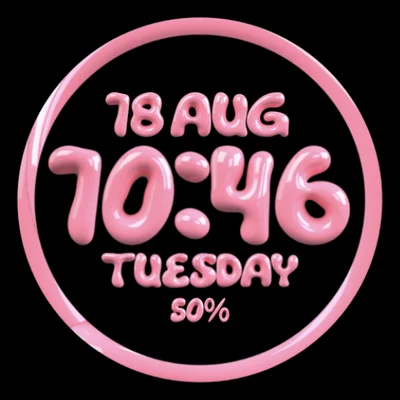
Spielerisches Design: Datum, Uhrzeit, Wochentag, Akku, Hell- und Dunkelmodus, Always-on-Display
Ein fröhliches und verspieltes pinkes Bubble-Zifferblatt mit zwei Farbvarianten: Schwarz und ein sanfter Farbverlauf von Rosa zu Weiß. Für Frauen, die einen süßen und femininen Stil am Handgelenk lieben.
Dieses Zifferblatt benötigt Wear OS API 33+ (Wear OS 4 oder neuer). Kompatibel mit Samsung Galaxy Watch 4/5/6/7/Ultra und neueren Modellen, Pixel Watch und anderen Smartwatches mit Wear OS 4 oder neuer.
Bitte verwenden Sie für den Kauf dasselbe Google-Konto, das auf Ihrer Smartwatch registriert ist. Die Installation startet nach wenigen Augenblicken automatisch.
Nach der Installation auf Ihrer Uhr gehen Sie wie folgt vor, um das Zifferblatt anzuwenden:
1. Tippen und halten Sie das aktuelle Zifferblatt auf Ihrer Uhr.
2. Scrollen Sie, um das Zifferblatt „Pink Bubble“ zu finden.
3. Tippen Sie darauf, um es anzuwenden.
Funktionen:
- Uhrzeit, Datum und Wochentag
- Akkuanzeige in Prozent
- Schwarzes Design und Farbverlauf von Rosa zu Weiß
- Always-On-Display (AOD): Die Uhrzeit wird auf schwarzem Hintergrund angezeigt.
Um zwischen den Designs zu wechseln, tippen und halten Sie das Zifferblatt, gehen Sie zum Menü „Anpassen“ und wählen Sie Option 1 (Schwarz) oder Option 2 (Farbverlauf von Rosa).
Speziell entwickelter Always-On-Display-Modus: Aktivieren Sie Always-On-Display in den Einstellungen Ihrer Uhr, um im Standby-Modus eine energiesparende Anzeige zu nutzen. Bitte beachten Sie, dass diese Funktion mehr Akku verbraucht.
Originaltext anzeigen
A fun and playful pink bubble watch face with two color themes black and a soft pink-to-white gradient. Designed for women who love cute and feminine style on their wrist.
This watch face requires Wear OS API 33+ (Wear OS 4 or newer). Compatible with Samsung Galaxy Watch 4/5/6/7/Ultra Series and newer, Pixel Watch series, and other watches with Wear OS 4 or newer.
Make sure you are purchasing using the same Google account registered on your watch. The installation should begin automatically on the watch after a few moments.
After installation is completed on your watch, do these steps to apply the watch face:
1. Tap and hold the current watch face on your watch
2. Scroll to find Pink Bubble Watch Face
3. Tap on it to apply
Features:
- Time, date, and day of the week
- Battery percentage
- Black theme and pink-to-white gradient theme
- Always-on display (AOD) mode showing time on a clean black background
To switch between themes, tap and hold the watch face, go to the Customize menu, and scroll to select Option 1 (black) or Option 2 (pink gradient).
Special designed Always On Display ambient mode. Turn on Always On Display in your watch settings to show a low power display on idle. Please be aware, this feature will use more battery.
Datensicherheit
Was Women Watch Faces bei Google Play zu den Daten angibt, die diese App erfasst und weitergibt.
- Keine Daten werden mit Drittunternehmen oder -organisationen geteiltWeitere Informationen dazu, wie Entwickler Angaben zur Weitergabe von Daten machen
- Keine Daten erhobenWeitere Informationen dazu, wie Entwickler Angaben zur Datenerhebung machen
Neue Funktionen
18.08.2026
Pink Bubble WF APP
Kontakt zum Entwickler
- E-Mailnastyapav3690@gmail.com
- Datenschutzerklärungsites.google.com
- Adressestr. Padurii 6 Bl A6, Ap 1001 077175 Stefanestii de Jos Romania
Informationen
- Angeboten von
- Women Watch Faces
- Kategorie
- Personalisierung
- Aktualisiert
- 18.08.2026
- Veröffentlicht
- 18.08.2026
- Altersfreigabe
- USK ab 0 Jahren
- Preis
- 1,19 €
- Paketname
- com.watchfacestudio.pinkbubble.wf