Quasar
Eugeniy Radzivill- USK ab 0 JahrenAltersfreigabe
- PersonalisierungKategorie
- 25.08.2025Aktualisiert
- 0,69 €Preis
Verlinkt auf den offiziellen Google Play-Eintrag von com.watchfacestudio.kvazar3. Zuletzt geprüft am 13.11.2026.
Über diese App
Automatische Übersetzung von Google. Originalsprache: Englisch (Vereinigte Staaten).
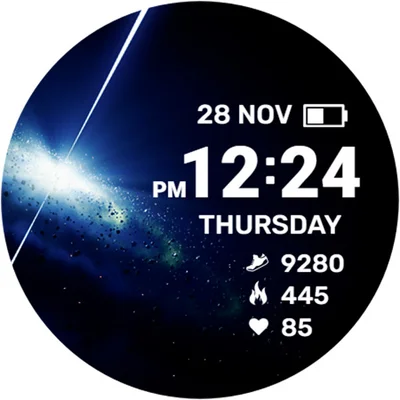
Zifferblatt für Wear OS-Smartwatches
Das Zifferblatt für Wear OS-Smartwatches unterstützt die folgenden Funktionen:
- Anzeige der aktuellen Uhrzeit mit automatischer Umschaltung des 12-/24-Stunden-Modus. Der Anzeigemodus der Uhr wird mit dem eingestellten Modus auf Ihrem Smartphone synchronisiert
- Anzeige des aktuellen Datums. Der Wochentag und der Monat sind mehrsprachig. Die Anzeigesprache wird mit den Einstellungen Ihres Smartphones synchronisiert
- Anzeige von Informationen über die Anzahl der durchgeführten Schritte
- Anzeige der Anzahl der verbrannten Kalorien
- Anzeige der aktuellen Herzfrequenz
ANPASSUNG:
Für die Anzeige von Zeit- und Fitnessdaten können Sie eines der Farbschemata wählen
Um das Wetter anzuzeigen, müssen Sie in den Einstellungen des Zifferblatts die Anzeige von Daten aus der Wetteranwendung der Informationszone zuweisen. Sie können Daten einer anderen auf der Uhr installierten Anwendung anzeigen. Allerdings gibt es in diesem Fall keine Garantie für die korrekte Darstellung der Daten, da nicht alle Anwendungen dafür optimiert sind.
WICHTIG! Ich kann die korrekte Funktion der Informationszone nur auf Samsung-Uhren garantieren. Bei Uhren anderer Hersteller kann ich die Funktion leider nicht garantieren. Bitte berücksichtigen Sie dies beim Kauf eines Zifferblatts.
Es gibt auch eine Funktion bei der Anzeige des Wetters auf der Samsung Galaxy Watch Ultra: Ab dem 28.11.24 werden Wetterdaten (Standard-Samsung-Anwendung) in dieser Uhr softwarebedingt falsch angezeigt. Sie können Wetterdaten von Drittanbieteranwendungen verwenden.
Für dieses Zifferblatt habe ich einen Original-AOD-Modus erstellt. Damit es angezeigt wird, müssen Sie es im Menü Ihrer Uhr aktivieren. In diesem Fall kann der AOD-Modus in zwei Modi arbeiten
- Economy ist standardmäßig aktiviert (hat im Menü den Wert „AOD Dark“)
- Hell (hat im Menü den Wert „AOD Bright“). Bitte beachten Sie! In diesem Modus ist der Batterieverbrauch höher
Für Kommentare und Vorschläge schreiben Sie bitte an E-Mail: eradzivill@mail.ru
Treten Sie uns in den sozialen Netzwerken bei
https://vk.com/eradzivill
https://radzivill.com
https://t.me/eradzivill
https://www.facebook.com/groups/radzivill
Aufrichtig,
Eugeniy Radzivill
Originaltext anzeigen
Watch face for Wear OS smartwatches supports the following functionality:
- Display of the current time with automatic switching of 12/24 hour modes. The watch display mode is synchronized with the set mode on your smartphone
- Display of the current date. The day of the week and month are multilingual. The display language is synchronized with the settings of your smartphone
- Display of information about the number of steps taken
- Display of the number of calories burned
- Display of the current heart rate
CUSTOMIZATION:
You can choose one of the color schemes for displaying time and fitness data
To display the weather, you need to assign the display of data from the Weather application to the information zone in the watch face settings. You can display data from another application installed on the watch. But in this case, there is no guarantee that the data will be displayed correctly, since not all applications are optimized for this.
IMPORTANT! I can guarantee the correct operation of the information zone only on Samsung watches. Unfortunately, I cannot guarantee operation on watches from other manufacturers. Please take this into account when purchasing a watch face.
There is also one feature in displaying the weather on the Samsung Galaxy Watch Ultra - as of 11/28/24, weather data (stock Samsung application) in this watch is displayed incorrectly due to software. You can use weather data from third-party applications.
I made an original AOD mode for this watch face. In order for it to be displayed, you need to activate it in the menu of your watch. In this case, the AOD mode can work in two modes
- Economy is enabled by default (has the value "AOD Dark" in the menu)
- Bright (has the value "AOD Bright" in the menu). Please note! In this mode, battery consumption will be higher
For comments and suggestions, please write to e-mail: eradzivill@mail.ru
Join us on social networks
https://vk.com/eradzivill
https://radzivill.com
https://t.me/eradzivill
https://www.facebook.com/groups/radzivill
Sincerely,
Eugeniy Radzivill
Datensicherheit
Was Eugeniy Radzivill bei Google Play zu den Daten angibt, die diese App erfasst und weitergibt.
- Keine Daten werden mit Drittunternehmen oder -organisationen geteiltWeitere Informationen dazu, wie Entwickler Angaben zur Weitergabe von Daten machen
- Keine Daten erhobenWeitere Informationen dazu, wie Entwickler Angaben zur Datenerhebung machen
Kontakt zum Entwickler
- Websiteradzivill.com
- E-Maileradzivill@mail.ru
- Datenschutzerklärungeradzivill.wixsite.com
- Adresseдер. Терновка, ул. Песочная, д. 4 Наро-Фоминск Московская область Россия 143300
Informationen
- Angeboten von
- Eugeniy Radzivill
- Kategorie
- Personalisierung
- Aktualisiert
- 25.08.2025
- Veröffentlicht
- 28.11.2024
- Altersfreigabe
- USK ab 0 Jahren
- Preis
- 0,69 €
- Paketname
- com.watchfacestudio.kvazar3