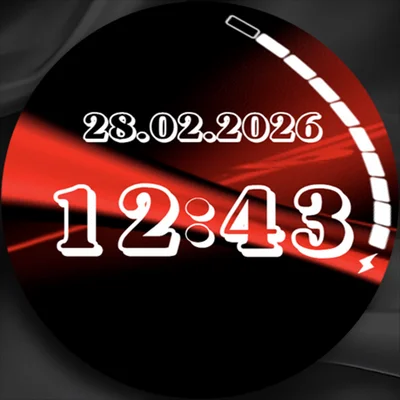
Red background clock face
Freiberg watches- USK ab 0 JahrenAltersfreigabe
- PersonalisierungKategorie
- 09.08.2026Aktualisiert
- 1,19 €Preis
Verlinkt auf den offiziellen Google Play-Eintrag von com.watchfacestudio.AnimatedWatchFaceRED2. Zuletzt geprüft am 13.11.2026.
Über diese App
Automatische Übersetzung von Google. Originalsprache: Spanisch (Vereinigte Staaten).
Animiertes Wear OS-Zifferblatt
Wear OS-Zifferblatt.
Begleit-App für Wear OS-Uhren:
Unmittelbar nach der Installation der mobilen App wird beim Öffnen eine Meldung angezeigt.
Tippen Sie auf das Zifferblattbild, um die Installation des Zifferblatts auf Ihrer Uhr zu starten. (Um die Verbindung zu beschleunigen und den Ladevorgang zu beschleunigen, öffnen Sie die GALAXY WEARABLE App oder ein anderes Uhrverwaltungsprogramm. Der Download auf Ihre Uhr beginnt sofort.)
Nach Abschluss der Installation kann die Begleit-App gelöscht werden.
Suchen Sie nach der Installation in der Zifferblattbibliothek nach dem passenden Zifferblatt.
WICHTIG NACH DER INSTALLATION: Nach der Installation öffnet das Telefon einen Link zur Rückerstattung, der auf der Uhr angezeigt wird. Um ein Zifferblatt zu finden, drücken Sie nicht auf „Rückerstattung“ und suchen Sie in der Zifferblattbibliothek nach einem.
Hauptfunktionen:
– Animiertes Zifferblatt (Die Animation kann deaktiviert und durch eines der animierten Bilder ersetzt werden.)
– AM/PM-Markierung (für 12-Stunden-Zeitformat).
– Digitales Zifferblatt umschaltbar auf 12/24 Stunden in den Telefoneinstellungen.
- Datum.
- Akkuladestand.
- Veränderbare Farben (Tippen und halten, um Farben anzupassen und zu ändern).
- Anpassbare Anzeige (Tippen und halten, um anzupassen und zu ändern).
- Schnellzugriff auf den Alarm.
- Schnellzugriff auf den Kalender.
- Schnellzugriff auf den Akku.
- Schnellzugriff auf 2 benutzerdefinierte Tastenkombinationen (Tippen und halten, um die Tastenkombination für die gewünschte Aktion anzupassen und zu ändern).
- Immer auf dem Display.
Hinweis:
E-Mail für Feedback und Vorschläge: ===> freibergclockfaces@gmail.com
Originaltext anzeigen
Wear OS clock face.
Wear OS watch screen companion app for Phone:
Immediately after installing the mobile application, a message will appear when you open the application.
You need to tap on the watch face image to start the process of installing the watch face on your watch (To speed up connection and loading, open the GALAXY WEARABLE app or other clock management program. Downloading to your watch will begin immediately.).
Once the installation process is complete, the companion app can be deleted.
After installation, browse the watch face library to find the screen face.
IMPORTANT AFTER INSTALLATION - after installation, the phone will open a refund link that will be visible on the watch. To find a watch face don't press refund and browse the watch face library to find a watch face.
Main Features:
- Animated Watch face display (The animation can be turned off and replaced with one of the animated pictures.).
- AM/PM marker (For 12-hour time format).
- Digital watch face switchable to 12/24 hour via Phone Settings.
- Date.
- Battery level status.
- Changeable colors (tap & hold to customize & change colors).
- Customizable display (tap and hold to adjust and change).
- Quick access to Alarm.
- Quick access to the calendar.
- Quick access to the battery.
- Quick access to 2 custom shortcuts(Tap and hold to customize and change shortcut to your chosen action).
- Always on display.
Note:
Email for feedback and suggestions ===> freibergclockfaces@gmail.com
Datensicherheit
Was Freiberg watches bei Google Play zu den Daten angibt, die diese App erfasst und weitergibt.
- Keine Daten werden mit Drittunternehmen oder -organisationen geteiltWeitere Informationen dazu, wie Entwickler Angaben zur Weitergabe von Daten machen
- Keine Daten erhobenWeitere Informationen dazu, wie Entwickler Angaben zur Datenerhebung machen
- Hat sich verpflichtet, den Google Play-Richtlinien für familienfreundliche Inhalte zu folgen
Kontakt zum Entwickler
- E-Mailfreibergclockfaces@gmail.com
- Datenschutzerklärungsites.google.com
- AdresseKokneses pagasts, Burtnieki Aizkraukles novads, Latvija, LV-5113 Latvia
Informationen
- Angeboten von
- Freiberg watches
- Kategorie
- Personalisierung
- Aktualisiert
- 09.08.2026
- Veröffentlicht
- 29.05.2024
- Altersfreigabe
- USK ab 0 Jahren
- Preis
- 1,19 €
- Paketname
- com.watchfacestudio.AnimatedWatchFaceRED2