ReS75 - Summer Time
AstraTimeEnthält Werbung
- USK ab 0 JahrenAltersfreigabe
- PersonalisierungKategorie
- 13.10.2026Aktualisiert
- 1,79 €Preis
Verlinkt auf den offiziellen Google Play-Eintrag von com.A0Re.reseasonal75. Zuletzt geprüft am 21.11.2026.
Über diese App
Automatische Übersetzung von Google. Originalsprache: Englisch (Vereinigte Staaten).
Sommerliches Zifferblatt – individuell anpassbar
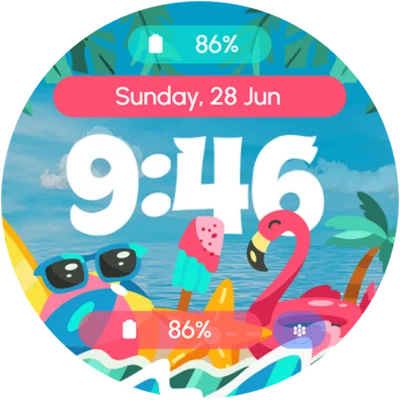
Tropische Sommer-Vibes: Flamingos, Eiscreme und fruchtiger Spaß am Handgelenk! 🌴🍦🍉✨
⌚Powered by Watch Face Format
⚙️ App-Funktionen
Die Smartphone-App dient lediglich der einfacheren Installation und dem Auffinden des Zifferblatts auf Ihrer Wear OS-Smartwatch. Nur die mobile App enthält Werbung.
⚙️ Zifferblattfunktionen
• 12/24-Stunden-Digitalzeit
• Datum
• Akku
• Schrittzähler
• 2 anpassbare Komplikationen
• 1 anpassbare Verknüpfung
• 3 Szenen
• Always-On-Display
🎨 Anpassen
1. Display berühren und gedrückt halten
2. Auf Anpassen tippen
🎨 Komplikationen
Berühren und halten Sie das Display, um den Anpassungsmodus zu öffnen. Sie können die Felder mit beliebigen Daten anpassen.
🔋 Akku
Für eine bessere Akkulaufzeit empfehlen wir, den Always-On-Display-Modus zu deaktivieren.
✅ Kompatible Geräte: Google Pixel (API-Level 34+), Galaxy Watch 4, 5, 6, 7, 8, 9 und andere Wear OS-Modelle.
Installation und Fehlerbehebung: Folgen Sie diesem Link: https://www.recreative-watch.com/help/#installation-methodes
Zifferblätter werden nach der Installation nicht automatisch auf Ihrer Uhr angezeigt. Sie müssen sie daher manuell auf Ihrer Uhr einstellen.
💌 Schreiben Sie an support@recreative-watch.com, wenn Sie Hilfe benötigen.
Originaltext anzeigen
Tropical Summer Vibes: Flamingos, ice cream, and fruity fun on your wrist! 🌴🍦🍉✨
⌚Powered by Watch Face Format
⚙️ Phone App Features
The phone app is simply a tool to facilitate installation and locating the watch face on your Wear OS watch. Only the mobile app contains ads.
⚙️ Watch Face Features
• 12/24h Digital Time
• Date
• Battery
• Steps Count
• 2 customizable Complications
• 1 customizable Shortcut
• 3 scenes
• Always ON Display
🎨 Customization
1 - Touch and hold display
2 - Tap on Customize option
🎨 Complications
Touch and hold display to open customization mode. You can customize the field with any data you want.
🔋 Battery
For better battery performance of the watch, we recommend disabling the "Always On Display" mode.
✅ Compatible devices include API level 34+ Google Pixel, Galaxy Watch 4, 5, 6, 7, 8, 9 and other Wear OS models.
Installation and troubleshooting
Follow this link: https://www.recreative-watch.com/help/#installation-methodes
Watch faces don't automatically apply on your watch screen after the installation. That's why you must set it on your watch's screen.
💌 Write to support@recreative-watch.com for assistance.
Datensicherheit
Was AstraTime bei Google Play zu den Daten angibt, die diese App erfasst und weitergibt.
- Keine Daten werden mit Drittunternehmen oder -organisationen geteiltWeitere Informationen dazu, wie Entwickler Angaben zur Weitergabe von Daten machen
- Diese App kann die folgenden Datentypen erhebenStandort, Personenbezogene Daten und 3 weitere
- Daten werden bei der Übertragung verschlüsselt
- Du kannst das Löschen der Daten beantragen
Kontakt zum Entwickler
- E-Mailwear@recreative-watch.com
- Datenschutzerklärungrecreative-watch.com
- AdresseMihail Eminescu 2, nr 18 545100 Iernut Romania
Informationen
- Angeboten von
- AstraTime
- Kategorie
- Personalisierung
- Aktualisiert
- 13.10.2026
- Veröffentlicht
- 01.07.2026
- Altersfreigabe
- USK ab 0 Jahren
- Preis
- 1,79 €
- Paketname
- com.A0Re.reseasonal75