Rings Watch Face
themaEnthält Werbung · In-App-Käufe
- USK ab 0 JahrenAltersfreigabe
- PersonalisierungKategorie
- 04.09.2026Aktualisiert
- KostenlosPreis
Verlinkt auf den offiziellen Google Play-Eintrag von fr.thema.wear.watch.rings. Zuletzt geprüft am 13.11.2026.
Über diese App
Automatische Übersetzung von Google. Originalsprache: Englisch (Vereinigte Staaten).
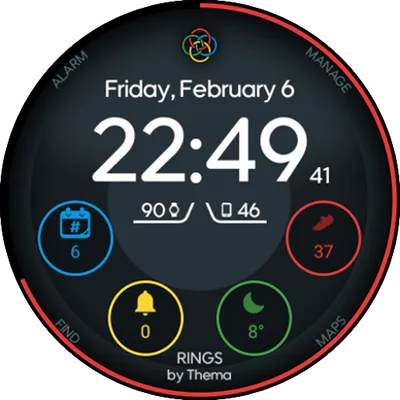
Das Zifferblatt „Rings“ bietet 4 Komplikationen und erweiterte Anpassungsmöglichkeiten.
Rings-Zifferblatt für Wear OS!
★ Funktionen des Rings-Zifferblatts ★
- Designfarben auswählen
- Tag & Monat
- Akkuanzeige der Uhr
- Akkuanzeige des Smartphones (App erforderlich)
- Unbegrenztes Datenvolumen mit 4 Komplikationen
Die Einstellungen des Zifferblatts finden Sie in der Wear OS-App auf Ihrem Smartphone. Tippen Sie einfach auf das Zahnradsymbol über der Zifferblattvorschau, um die Einstellungen zu öffnen!
★ KOSTENLOSE Einstellungen ★
🔸Wear OS 6.X
- Designfarben auswählen
- Datumsformat auswählen
- Zifferblattnamen anzeigen (optional)
- Markennamen anzeigen (optional)
- Verknüpfungen anzeigen (optional)
- Akkuanzeige für Uhr/Smartphone anzeigen (optional)
- ... und mehr
★ PREMIUM-Einstellungen ★
🔸Wear OS 6.X
- Vertikales/Horizontal-Design auswählen
- Komplikationsdaten:
+ Gewünschte Daten für Widgets festlegen
+ Datenaktivität durch Antippen der Widgets starten (falls verfügbar)
- Interaktivität
+ Zugriff auf detaillierte Daten durch Antippen eines Widgets
+ Verknüpfungen anpassen: Wählen Sie Ihre Verknüpfung aus allen auf Ihrer Uhr installierten Apps!
★ Zusätzliche Funktionen auf dem Smartphone ★
- Benachrichtigungen für neue Designs
- Zugriff auf den Support
- ... und mehr
★ Installation ★
🔸Wear OS 6.X
Installieren Sie die Watch-App, um das Zifferblatt zu verwalten: Die kostenlose Version wird automatisch installiert. Verwenden Sie anschließend die Schaltfläche „VERWALTEN“ in der Verknüpfung oben rechts auf dem Zifferblatt, um Ihr Zifferblatt zu aktualisieren.
★ Weitere Zifferblätter
Besuchen Sie meine Zifferblattsammlung für Wear OS im Play Store unter https://goo.gl/CRzXbS
** Bei Problemen oder Fragen kontaktieren Sie mich bitte per E-Mail (auf Englisch oder Französisch), bevor Sie eine negative Bewertung abgeben. Vielen Dank!
Website: https://www.themaapps.com/
YouTube: https://youtube.com/ThomasHemetri
Twitter: https://x.com/ThomasHemetri
Instagram: https://www.instagram.com/thema_watchfaces
Originaltext anzeigen
Rings Watch Face for Wear OS!
★ Features of Rings Watch Face ★
- Choose design colors
- Day & Month
- Watch battery
- Mobile battery (requires phone app)
- Unlimited data with 4 complications
The settings of the watch face are located in the "Wear OS" app of your mobile.
Just hit the gear icon over the watch face preview and the settings screen will show up!
★ FREE Settings ★
🔸Wear OS 6.X
- Choose design colors
- Choose date format
- Display watchface name or not
- Display brand name or not
- Display shortcuts or not
- Display watch / mobile battery indicators or not
- ... and more
★ PREMIUM Settings ★
🔸Wear OS 6.X
- Choose vertical/horizontal design
- Complication data:
+ Set the data you want on the widgets
+ Touch the widgets to start the data activity if available
- Interactivity
+ Access to detailed data by touching a widget
+ Modify the shortcuts: choose your shortcut among all applications installed on your watch!
★ Additional features on phone ★
- Notifications for new designs
- Access to support
- ... and more
★ Installation ★
🔸Wear OS 6.X
Install the watch app to manage the watchface: the free version is automatically installed. Then use the "MANAGE" button in the top right shortcut of the watchface to update/upgrade your watch face.
★ More watch faces
Visit my watch faces collection for Wear OS on the Play Store at https://goo.gl/CRzXbS
** If you have any issues or questions, feel free to contact me by email (English or French language) before giving a bad rating. Thanks!
Website: https://www.themaapps.com/
Youtube: https://youtube.com/ThomasHemetri
Twitter: https://x.com/ThomasHemetri
Instagram: https://www.instagram.com/thema_watchfaces
Datensicherheit
Was thema bei Google Play zu den Daten angibt, die diese App erfasst und weitergibt.
- Keine Daten werden mit Drittunternehmen oder -organisationen geteiltWeitere Informationen dazu, wie Entwickler Angaben zur Weitergabe von Daten machen
- Diese App kann die folgenden Datentypen erhebenApp-Aktivitäten und App-Informationen und -Leistung
- Daten werden bei der Übertragung verschlüsselt
- Daten können nicht gelöscht werden
Neue Funktionen
04.09.2026
2.26.09.0501
- Fix startup crash
- Bump wear compatibility target to 35
- Bump mobile compatibility target to 36
- Fix wear app install status
- Bump library versions
Requires app update on both Watch & Mobile.
If you have any issue, please let me know by email at thema.apps@gmail.com
Kontakt zum Entwickler
- Websitethemaapps.com
- E-Mailthema.apps@gmail.com
- Datenschutzerklärungthemaapps.com
- Adresse7 Rue Alfred Sisley 78370 Plaisir France
Informationen
- Angeboten von
- thema
- Kategorie
- Personalisierung
- Aktualisiert
- 04.09.2026
- Veröffentlicht
- 07.02.2026
- Altersfreigabe
- USK ab 0 Jahren
- Preis
- Kostenlos
- In-App-Käufe
- 1,19 €–11,99 € bei Abrechnung über Google Play
- Paketname
- fr.thema.wear.watch.rings