Rosey
Titanium Cyborg Systems (TCS) Services- USK ab 0 JahrenAltersfreigabe
- PersonalisierungKategorie
- 29.07.2023Aktualisiert
- KostenlosPreis
Verlinkt auf den offiziellen Google Play-Eintrag von com.rajcolab.rosey. Zuletzt geprüft am 26.11.2026.
Über diese App
Automatische Übersetzung von Google. Originalsprache: Englisch (Vereinigte Staaten).
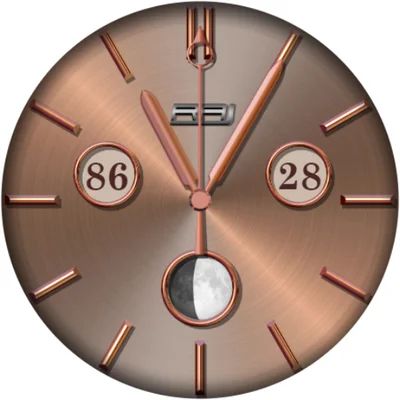
Klassisches elegantes analoges Gesicht
Rosig
Der aktive Hintergrund scheint das Licht einzufangen und zu reflektieren, wenn Sie Ihr Handgelenk drehen.
Zu sehen sind der Batteriestand und das Datum, aber wir mussten diese Komplikationen einfach verbergen, um dieses Juwel zu zeigen, aber keine Sorge, sie sind da, damit Sie Ihre Vitalwerte überprüfen oder Ihren bevorzugten Kontakt anrufen können, es liegt an Ihnen.
Vielen Dank, dass Sie unser Zifferblatt heruntergeladen haben. Wir hoffen, dass Sie es genauso genießen werden, wie wir es genossen haben, es zu erstellen.
INSTALLATION:
1. Bitte stellen Sie sicher, dass Ihre Uhr über Bluetooth mit Ihrem Telefon verbunden ist
2. Sie können dieses Zifferblatt auch installieren, indem Sie im Webbrowser auf einem PC oder Laptop mit demselben Konto, von dem Sie den Kauf getätigt haben, auf den Google Play Store zugreifen, um doppelte Gebühren zu vermeiden.
3. Wenn kein PC/Laptop verfügbar ist, können Sie den Webbrowser des Telefons verwenden. Gehen Sie zur Play Store App und dann zum Zifferblatt. Klicken Sie auf die 3 Punkte in der oberen rechten Ecke und dann auf Teilen. Verwenden Sie den verfügbaren Browser, ich schlage die Samsung Internet App vor, melden Sie sich bei dem Konto an, von dem Sie den Kauf getätigt haben, und installieren Sie es dort.
4. Sie können sich auch das Video von Samsung Developers zur Installation des Wear OS-Zifferblatts auf vielfältige Weise ansehen: https://youtu.be/vMM4Q2-rqoM
Bitte haben Sie etwas Geduld mit uns, bis der Play Store dieses Problem behebt. Bitte haben Sie Verständnis dafür, dass wir keine Kontrolle über das Installationsproblem haben. Unsere Watchface-Apps werden gründlich auf einem echten Gerät (Galaxy Watch 4 Classic) getestet und vom Google Play Store-Team überprüft und genehmigt, bevor sie veröffentlicht werden. Wir lieben es, unsere Arbeit zu teilen und sicherzustellen, dass die Benutzer unsere Zifferblätter genießen werden.
MERKMALE:
- Analoguhr
- 3 voreingestellte Shortcuts -
Einstellungen, Batterie, Kalender
- 2 vom Benutzer einstellbare Komplikationen, versteckt
- Aktiver Schimmer
Genießen Sie bitte!
ANPASSUNG:
1. Halten Sie das Display gedrückt und klicken Sie dann auf „Anpassen“.
2. Streichen Sie nach links und rechts, um auszuwählen, was Sie anpassen möchten.
3. Streichen Sie nach oben und unten, um die verfügbaren Optionen auszuwählen.
4. Klicken Sie auf „OK“.
Sehen Sie sich RAJ CoLab-Updates an unter:
Facebook-Seite: https://www.facebook.com/RAJCoLab/
Siehe unsere Entwicklerseite hier:
https://play.google.com/web/store/apps/dev?id=5910798788508387665
Für Unterstützung und Anfragen können Sie mir eine E-Mail an TiBorg.iot@gmail.com senden
Originaltext anzeigen
Rosey
Active background seems to catch and reflect the light at twist of your wrist.
On view is the battery level and the date, but we just had to leave those complications hidden to show off this Jewel, but dont worry they are there for you to check your vitals or call your favorite contact, its up to you.
Thank you for downloading our watch face. We hope you will enjoy using it as much as we enjoyed creating it.
INSTALLATION:
1. Please make sure you watch is connected to your phone via Bluetooth
2. You can also install this watch face by accessing the Google Play Store in the web browser in a PC or Laptop with the same account you made the purchase from to avoid double charge.
3. If PC/laptop not available, you can use the phone web browser. Head over to the Play Store app, then to the watch face. Click the 3 dots in the upper right hand corner then Share. Use the available browser, I suggest Samsung Internet app, login the account you made the purchase from and install it there.
4. You can also check the Samsung Developers video installing Wear OS watch face in so many ways: https://youtu.be/vMM4Q2-rqoM
Please be patient with us until Play Store fixes this issue. Please understant that we don't have control over the installation issue. Our watch face apps are thoroughly tested in a real device (Galaxy Watch 4 Classic) and are reviewed and approved by the Google Play Store team before publishing them. We love to share our work and make sure users will enjoy our watch faces.
FEATURES:
- Analog Watch
- 3 PreSet Shortcuts -
Settings, Battery, Calendar
- 2 User Settable Complications, hidden
- Active shimmer
Please enjoy!
CUSTOMIZATION:
1. Press and hold display then hit "Customize".
2. Swipe left and right to choose what to customize.
3. Swipe up and down to choose options available.
4. Hit "OK".
Check out RAJ CoLab updates at:
Facebook page: https://www.facebook.com/RAJCoLab/
See our Developer Page here:
https://play.google.com/web/store/apps/dev?id=5910798788508387665
For support and request, you can email me at TiBorg.iot@gmail.com
Datensicherheit
Was Titanium Cyborg Systems (TCS) Services bei Google Play zu den Daten angibt, die diese App erfasst und weitergibt.
- Keine Daten werden mit Drittunternehmen oder -organisationen geteiltWeitere Informationen dazu, wie Entwickler Angaben zur Weitergabe von Daten machen
- Keine Daten erhobenWeitere Informationen dazu, wie Entwickler Angaben zur Datenerhebung machen
Kontakt zum Entwickler
- Websitefacebook.com
- E-Mailtiborg.iot@gmail.com
- Datenschutzerklärungfreeprivacypolicy.com
- Adresse2497 Highland Rd Roanoke, VA 24014-3911 United States
Informationen
- Angeboten von
- Titanium Cyborg Systems (TCS) Services
- Kategorie
- Personalisierung
- Version
- 1.3.0
- Aktualisiert
- 29.07.2023
- Veröffentlicht
- 11.02.2023
- Erfordert
- Android 9 oder höher
- Altersfreigabe
- USK ab 0 Jahren
- Preis
- Kostenlos
- Paketname
- com.rajcolab.rosey