RoVinicia
Mohamed Nabil Elewa- USK ab 0 JahrenAltersfreigabe
- PersonalisierungKategorie
- 04.08.2026Aktualisiert
- 0,63 €Preis
Verlinkt auf den offiziellen Google Play-Eintrag von com.watchfacestudio.RoVinicia. Zuletzt geprüft am 25.11.2026.
Über diese App
Automatische Übersetzung von Google. Originalsprache: Englisch (Vereinigte Staaten).
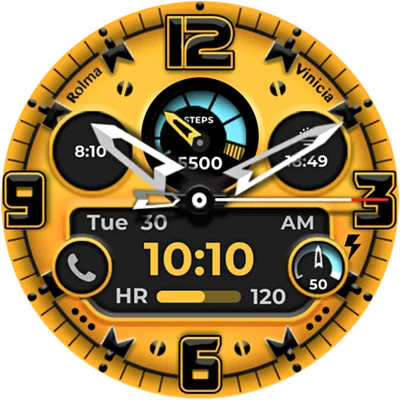
Einzigartige Hybriduhr in gelblicher Optik.
Das Zifferblatt „RoVinicia“ ist ein einzigartiges, gelbliches Hybrid-Zifferblatt für Wear OS-Geräte.
Dieses Zifferblatt wurde mit dem Watch Face Studio-Tool erstellt.
Hinweis: Zifferblätter für runde Uhren sind nicht für rechteckige oder quadratische Uhren geeignet.
INSTALLATION:
1. Verbinden Sie Ihre Uhr mit Ihrem Smartphone.
2. Installieren Sie das Zifferblatt auf Ihrer Uhr. Nach der Installation finden Sie die Zifferblattliste auf Ihrer Uhr, indem Sie das Display gedrückt halten, nach rechts wischen und auf „Zifferblatt hinzufügen“ tippen. Dort sehen Sie das neu installierte Zifferblatt und können es aktivieren.
3. Nach der Installation können Sie Folgendes überprüfen:
I. Bei Samsung-Uhren: Überprüfen Sie die Galaxy Wearable-App auf Ihrem Smartphone (installieren Sie sie gegebenenfalls). Unter „Zifferblätter“ > „Heruntergeladen“ finden Sie das neu installierte Zifferblatt. Wenden Sie es anschließend auf Ihre verbundene Uhr an.
II. Bei anderen Smartwatch-Marken und Wear OS-Geräten: Überprüfen Sie die auf Ihrem Smartphone installierte Uhren-App, die mit Ihrer Smartwatch-Marke geliefert wurde, und suchen Sie das neu installierte Zifferblatt in der Zifferblattgalerie oder -liste.
ANPASSUNG:
1. Halten Sie das Display gedrückt und tippen Sie dann auf „Anpassen“.
2. Wischen Sie nach links und rechts, um die gewünschten Anpassungen vorzunehmen.
3. Wischen Sie nach oben und unten, um die verfügbaren Optionen anzuzeigen.
4. Tippen Sie auf „OK“.
FUNKTIONEN:
- Gelbes Hybrid-Zifferblatt
- Digitale 12/24-Stunden-Anzeige mit Datumsanzeige
- 2 benutzerdefinierte Komplikationen
- 3 Sekundenzeigerfarben
- Analoge Herzfrequenzanzeige mit digitalem Zähler
- Analoge Akkuanzeige rechts
- Analoge Schrittprozentanzeige (Zielwert: 0–20.000 Schritte)
- Digitaler Schrittzähler
- App-Aktionssymbol links
- 2 benutzerdefinierte App-Verknüpfungen
- Always-on-Display
Bei Fragen oder Problemen kontaktieren Sie mich bitte per E-Mail unter mhmdnabil2050@gmail.com
Originaltext anzeigen
The "RoVinicia" is a unique yellowish look Hybrid watch face for Wear OS devices.
This watch face was designed using Watch Face Studio tool.
Note: watch faces for the a round watches are not suitable for rectangular or square watches.
INSTALLATION:
1. Keep your watch connected to your phone.
2. Install in the watch. After installation, check your watch face list in your watch by pressing and hold display then swipe to the right end and click Add watch face. There you can see the newly installed watch face and just activate it.
3. After installation, you can also check the following:
I. For Samsung watches, check your Galaxy Wearable app in your phone (install it if not yet installed). Under Watch faces > Downloaded, there you can see the newly installed watch face and then just apply it to connected watch.
II. For other smartwatch brands, for other Wear OS devices, please check the watch app installed in your phone that comes with your smartwatch brand and find the newly installed watch face in the watch face gallery or list.
CUSTOMIZATION:
1. Press and hold display then hit "Customize".
2. Swipe left and right to choose what to customize.
3. Swipe up and down to choose options available.
4. Hit "OK".
FEATURES:
- Yellow Color Hybrid watch face..
- 12/24H Digital Time with full date.
- 2X Custom Complication.
- 3X Second Hand colors.
- Analog Heart rate indicator with digital counter.
- Analog Battery indicator on the right.
- Analog steps percentage of the goal, the target
steps value is (0-20000).
- Digital steps counter.
- Phone app action tap on the left.
- 2X Custom App Shortcuts.
- Always on display.
For support and request, Do not hesitate emailing me at mhmdnabil2050@gmail.com
Datensicherheit
Was Mohamed Nabil Elewa bei Google Play zu den Daten angibt, die diese App erfasst und weitergibt.
- Keine Daten werden mit Drittunternehmen oder -organisationen geteiltWeitere Informationen dazu, wie Entwickler Angaben zur Weitergabe von Daten machen
- Keine Daten erhobenWeitere Informationen dazu, wie Entwickler Angaben zur Datenerhebung machen
Kontakt zum Entwickler
- E-Mailmhmdnabil2050@gmail.com
- Datenschutzerklärungtermsfeed.com
- Adresse6 Fathalla Refaat Street, Nasr City 3 Cairo القاهرة 11371 Egypt
Informationen
- Angeboten von
- Mohamed Nabil Elewa
- Kategorie
- Personalisierung
- Aktualisiert
- 04.08.2026
- Veröffentlicht
- 22.07.2026
- Altersfreigabe
- USK ab 0 Jahren
- Preis
- 0,63 €
- Paketname
- com.watchfacestudio.RoVinicia