Splashy - Simple Watch Face
Interactive Awesome Apps- USK ab 0 JahrenAltersfreigabe
- PersonalisierungKategorie
- 12.10.2026Aktualisiert
- 0,39 €Preis
Verlinkt auf den offiziellen Google Play-Eintrag von com.watchfacestudio.splashy. Zuletzt geprüft am 23.11.2026.
Über diese App
Automatische Übersetzung von Google. Originalsprache: Englisch (Vereinigte Staaten).
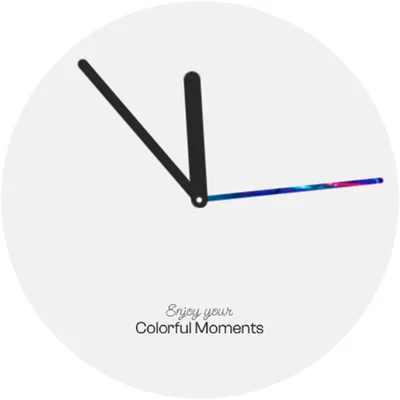
Auffällig – Einfaches analoges Wear OS-Zifferblatt
Interactive Awesome Apps präsentiert stolz ein weiteres duales und individuell anpassbares Zifferblatt: Splashy!
Splashy bietet folgende Funktionen:
- 8 Sekundenzeiger-Hintergründe [auf der Uhr bearbeitbar]
- 5 Textdesigns [auf der Uhr bearbeitbar]
- 20 Farboptionen [auf der Uhr bearbeitbar]
HINWEIS: Die oben genannten Funktionen können nur auf der Uhr bearbeitet werden (Zifferblatt gedrückt halten und dann auf „Anpassungen“ tippen).
- (Stunden-/Minuten-/Sekunden-)Zeiger
- Always-on-Display (AOD) mit allen Indikatoren und durchschnittlich weniger als 3,1 % aktiven Pixeln
HINWEIS: Diese App ist nur für Wear OS 5 oder höher mit API 33+ geeignet. Aktualisieren Sie Ihre Smartwatch auf Wear OS 5, um diese Funktionen sofort nutzen zu können.
Wählen Sie im Dropdown-Menü „INSTALLIEREN“ nur Ihr Smartwatch-Gerät aus. Alternativ können Sie unsere Begleit-App für Ihr Smartphone verwenden, um das Zifferblatt direkt auf Ihrer Smartwatch zu installieren.
Nutzer der Galaxy Watch 4/5/6/7/8/Ultra: Suchen und installieren Sie das Zifferblatt in der Kategorie „Downloads“ der Galaxy Wearable App auf Ihrem Smartphone.
HINWEIS: Die beigefügten Bilder zeigen Ihnen alle verfügbaren Funktionen und App-Verknüpfungen.
Dieses Zifferblatt ist mit Wear OS 5 und höher kompatibel. Es läuft jedoch am besten und flüssigsten auf neueren Geräten mit den aktuellsten Wear OS-Versionen. Alle unsere Zifferblätter wurden auf der Samsung Galaxy Watch 4 und 7 getestet und funktionieren einwandfrei.
Für die volle Funktionalität aller Anzeigen aktivieren Sie bitte nach der Installation alle Sensorberechtigungen. Vielen Dank!
KONTAKT: qasimghumang@gmail.com
Bei Fragen, Problemen oder Feedback kontaktieren Sie uns bitte per E-Mail – wir helfen Ihnen gerne!
Kundenzufriedenheit hat für uns höchste Priorität. Wir nehmen jeden Kommentar, Vorschlag und jede Beschwerde sehr ernst und beantworten jede E-Mail innerhalb von 24 Stunden.
Mehr von Interactive Awesome Apps:
https://play.google.com/store/apps/dev?id=8552910097760453185
Besuchen Sie unseren YouTube-Kanal:
https://www.youtube.com/@interactive-apps
Besuchen Sie unsere Website:
https://hayattech.com
Pinterest:
https://pin.it/5b5DJQBNU
Vielen Dank, dass Sie unsere Zifferblätter verwenden. Wir wünschen Ihnen einen schönen Tag!
Originaltext anzeigen
Interactive Awesome Apps is proud to present another dual & customizable watch face, Splashy!
Splashy features:
- 8 second hand backgrounds [can be edited on watch]
- 5 text designs [can be edited on watch]
- 20 theme color options [can be edited on watch]
NOTE: the feature provided above can be only edited on watch ( tap and hold on the watch face and then tap on customizations to change them).
- (Hour/Minute/Second) Hands
- AOD showing all indicators, averaging less then 3.1% active pixels
NOTE - This app is made only for Wear OS 5 or above with API 33+ devices.
Update your watch to Wear OS 5 to use these features instantly.
Select only your watch device from the "INSTALL" drop-down menu.
Alternatively, use our provided phone companion app to help you install the watch face directly on your watch.
Galaxy Watch 4/5/6/7/8/Ultra users: Find and apply the watch face from the "Downloads" category in the Galaxy Wearable app on your phone.
NOTE:
Please see the provided visuals for detailed info on all available features and app shortcuts!
This watch face is compatible with Wear OS 5 or above devices, but keep in mind that it will run best and smoothest on newer devices with latest Wear OS software versions.
All our watch faces are tested on Samsung Galaxy Watch 4 and 7, where they are confirmed to work without any issues.
For full functionality of all indicators enable all Sensors permissions after installation, thank you!
CONTACT:
qasimghumang@gmail.com
E-mail us for any questions, issues or general feedback - we're here for you!
Customer satisfaction is our main priority, and we take every comment, suggestion and complaint very seriously, making sure to respond to each e-mail within 24 hours.
More from Interactive Awesome Apps:
https://play.google.com/store/apps/dev?id=8552910097760453185
Visit our Youtube channel:
https://www.youtube.com/@interactive-apps
Visit our Website:
https://hayattech.com
Pinterest:
https://pin.it/5b5DJQBNU
Thank you for using our watch faces, have a great day!
Datensicherheit
Was Interactive Awesome Apps bei Google Play zu den Daten angibt, die diese App erfasst und weitergibt.
- Keine Daten werden mit Drittunternehmen oder -organisationen geteiltWeitere Informationen dazu, wie Entwickler Angaben zur Weitergabe von Daten machen
- Keine Daten erhobenWeitere Informationen dazu, wie Entwickler Angaben zur Datenerhebung machen
Neue Funktionen
Version 1.0.0 · 12.10.2026
Splashy - Simple Analogue Wear OS Watch Face
Kontakt zum Entwickler
- E-Mailqasimghumang@gmail.com
- Datenschutzerklärungprojects.hayattech.com
- AdresseHouse 39, Liaqat Avenue Jinnah Gardens, Phase 1 Islamabad, 44000 Pakistan
Informationen
- Angeboten von
- Interactive Awesome Apps
- Kategorie
- Personalisierung
- Version
- 1.0.0
- Aktualisiert
- 12.10.2026
- Veröffentlicht
- 17.11.2025
- Altersfreigabe
- USK ab 0 Jahren
- Preis
- 0,39 €
- Paketname
- com.watchfacestudio.splashy