Summit Watch Face
amoledwatchfaces™- USK ab 0 JahrenAltersfreigabe
- EffizienzKategorie
- 27.10.2026Aktualisiert
- 1,79 €Preis
Verlinkt auf den offiziellen Google Play-Eintrag von com.amoledwatchfaces.summit. Zuletzt geprüft am 13.11.2026.
Über diese App
Automatische Übersetzung von Google. Originalsprache: Englisch (Vereinigte Staaten).
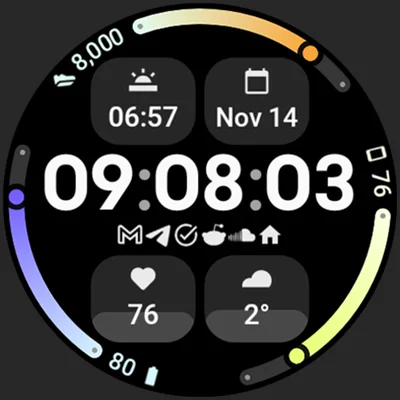
Individuelle Komplikationen, schlankes Design, Zeitmodi und endlose Stiloptionen.
Nur für Wear OS 4+-Geräte
// Nicht für rechteckige Uhren geeignet
Unterstützt von Watch Face Format
Haftungsausschluss für Galaxy Watch-Benutzer: Der Zifferblatt-Editor in der Samsung Wearable-App kann komplexe Zifferblätter wie dieses oft nicht laden. Dies ist kein Problem mit dem Zifferblatt selbst. Es wird empfohlen, das Zifferblatt direkt auf der Uhr anzupassen, bis Samsung dieses Problem behebt.
amoledwatchfaces.com
KAUFEN SIE EINEN, ERHALTEN SIE EIN ANGEBOT!
amoledwatchfaces.com/bogo
BENUTZERDEFINIERTE KOMPLIKATIONS-APPS
amoledwatchfaces.com/apps
FUNKTIONEN
• Zifferblattformat 1/2
• Flavors-Funktionsunterstützung (Wear OS 5)
• 8 benutzerdefinierte Komplikationsplätze (maximal)
• umfasst gängige Komplikationstypen – SHORT_TEXT, LONG_TEXT, RANGED_VALUE, MONOCHROMATIC_ICON, SMALL_IMAGE
• Unterstützung bei Komplikationen bei Telefonbenachrichtigungen*
• Wählen Sie zwischen dem Zeitmodus hh:mm und hh:mm:ss
• mehrsprachig
• optionale Digitaluhr-Schriftarten
• Materialfarbthemen (Palette)
• Machen Sie es zu Ihrem eigenen, kombinieren Sie Themen und separate Bogenfarbthemen
• Optionales Abzeichen für die Anzahl der ungelesenen Benachrichtigungen von morgens bis abends
• drei optionale AOD-Stile
• 12/24-Stunden-Zeitformat mit führender Null
* erfordert die App „Phone Battery Complication“.
https://play.google.com/store/apps/details?id=com.weartools.phonebattcomp
BENUTZERKONFIGURATIONEN
• Materialthema (60+)
• Arc 1-Thema (60+)
• Arc 2-Thema (60+)
• Arc 3-Thema (60+)
• Zeitmodus (hh:mm:ss, hh:mm)
• Digitaluhr-Schriftart (3x)
• AOD (3x)
• Abzeichen (Keine, Vormittags bis Nachmittags, Anzahl ungelesener Benachrichtigungen)
• Sekunden hervorheben (umschalten)
• Hollow AOD (Umschalten)
• Benutzerdefinierte Komplikationen (8x)
Anleitung zur Installation und Fehlerbehebung
amoledwatchfaces.com/guide
Bitte senden Sie alle Problemberichte oder Hilfeanfragen an unsere Support-Adresse
support@amoledwatchfaces.com
Treten Sie unserer Telegram-Gruppe für Live-Support und Diskussionen bei
t.me/amoledwatchfaces
Newsletter
amoledwatchfaces.com/contact#newsletter
amoledwatchfaces™ – Awf
Originaltext anzeigen
Only for Wear OS 4+ devices
// Not suitable for rectangular watches
Powered by Watch Face Format
Disclaimer for Galaxy Watch Users: The watch face editor in the Samsung Wearable app often fails to load complex watch faces like this one. This is not an issue with the watch face itself. It is recommended to customize the watch face directly on the watch until Samsung resolves this issue.
amoledwatchfaces.com
BUY ONE GET ONE OFFER!
amoledwatchfaces.com/bogo
CUSTOM COMPLICATION APPS
amoledwatchfaces.com/apps
FEATURES
• Watch Face Format 1 / 2
• flavors feature support (Wear OS 5)
• 8 custom complication slots (max)
• includes common complication types - SHORT_TEXT, LONG_TEXT, RANGED_VALUE, MONOCHROMATIC_ICON, SMALL_IMAGE
• phone notifications complication support*
• choose between hh:mm and hh:mm:ss time mode
• multilanguage
• optional digital clock fonts
• material color themes (palette)
• make it your own, combine theme & separate arc color themes
• am-pm & unread notification count optional badge
• three optional AOD styles
• 12/24 h time format with leading zero
* requires Phone Battery Complication app
https://play.google.com/store/apps/details?id=com.weartools.phonebattcomp
USER CONFIGURATIONS
• Material Theme (60+)
• Arc 1 Theme (60+)
• Arc 2 Theme (60+)
• Arc 3 Theme (60+)
• Time Mode (hh:mm:ss, hh:mm)
• Digital Clock Font (3x)
• AOD (3x)
• Badge (None, Am-Pm, Unread Notification Count)
• Highlight Seconds (Toggle)
• Hollow AOD (Toggle)
• Custom Complications (8x)
Installation and troubleshooting guide
amoledwatchfaces.com/guide
Please send any issues reports or help requests to our support address
support@amoledwatchfaces.com
Join our Telegram group for live support and discussion
t.me/amoledwatchfaces
Newsletter
amoledwatchfaces.com/contact#newsletter
amoledwatchfaces™ - Awf
Datensicherheit
Was amoledwatchfaces™ bei Google Play zu den Daten angibt, die diese App erfasst und weitergibt.
- Keine Daten werden mit Drittunternehmen oder -organisationen geteiltWeitere Informationen dazu, wie Entwickler Angaben zur Weitergabe von Daten machen
- Keine Daten erhobenWeitere Informationen dazu, wie Entwickler Angaben zur Datenerhebung machen
Neue Funktionen
27.10.2026
v1.0.7
• small improvements
v1.0.3
• replaced default font with Cal Sans
v1.0.2
• removed GOAL_PROGRESS (Readiness complication now supports RANGED_VALUE)
• SMALL_IMAGE mask fix (Favorite Contact complication)
v1.0.1
• initial release
Kontakt zum Entwickler
- Websiteamoledwatchfaces.com
- E-Mailsupport@amoledwatchfaces.com
- Datenschutzerklärungamoledwatchfaces.com
- Adresse51 Nižný Kručov 09301 Nižný Kručov Slovakia
Informationen
- Angeboten von
- amoledwatchfaces™
- Kategorie
- Effizienz
- Aktualisiert
- 27.10.2026
- Veröffentlicht
- 23.11.2024
- Altersfreigabe
- USK ab 0 Jahren
- Preis
- 1,79 €
- Paketname
- com.amoledwatchfaces.summit