Tempordious Watch Face
Cave Club- USK ab 0 JahrenAltersfreigabe
- PersonalisierungKategorie
- 07.09.2026Aktualisiert
- 0,99 €Preis
Verlinkt auf den offiziellen Google Play-Eintrag von com.caveclub.tempordious. Zuletzt geprüft am 27.11.2026.
Über diese App
Automatische Übersetzung von Google. Originalsprache: Englisch (Vereinigte Staaten).
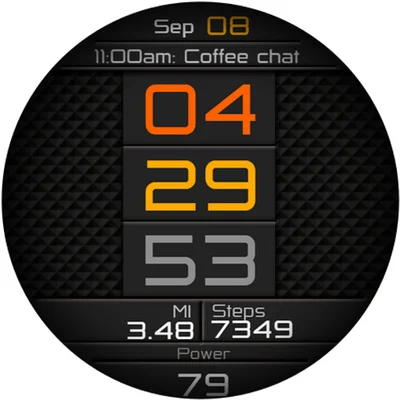
Digitales Wear OS-Zifferblatt
Digitales Zifferblatt.
Techno- und Gaming-Stil.
Hinweis vor dem Kauf:
Keine Sorge Google berechnet Ihnen den Kaufpreis für Inhalte, die über dasselbe Google-Konto (Play Store) erworben wurden, nur einmal. Manchmal dauert es etwas länger, bis der Play Store Ihren Kauf der Zifferblatt-App bestätigt. Zusätzliche Bestellungen werden von Google automatisch erstattet.
Es ist nicht möglich, dasselbe Zifferblatt zweimal zu bezahlen.
Dieses Zifferblatt ist für Wear OS optimiert.
★ Funktionen:
• Uhrzeit (12/24 Stunden, automatisch)
• Datum & Wochentag
• Wetter (bearbeitbar)
• Kilometer/Meilen (vom Benutzer bearbeitbar)
• Schritte
• Akkustand
• Herzfrequenz
• Insgesamt 6 bearbeitbare Bereiche, Komplikationen frei anpassbar
• 30 Farbstile
• Always-on-Display (AOD)
+ 4 App-Verknüpfungen (Telefon, Nachrichten, Kalender & Akku)
Anpassung:
1. Berühren und halten Sie das Zifferblatt.
2. Tippen Sie auf „Anpassen“.
* // Kilometer in Meilen // Sie können die Umrechnung von Kilometern in Meilen direkt auf der Uhr vornehmen – bearbeiten Sie die Einstellungen unter „Komplikation“.
//
★ INSTALLATIONSHINWEISE:
Stellen Sie sicher, dass die Uhr per Bluetooth mit Ihrem Smartphone verbunden ist.
Wählen Sie Ihr Smartwatch-Gerät im Dropdown-Menü „Installieren“ aus. Wählen Sie das Zielgerät in der Play Store App aus dem Dropdown-Menü und tippen Sie auf „Installieren“. Der Download-Status wird auf Ihrer Smartwatch angezeigt. Installieren Sie das Zifferblatt und wählen Sie es anschließend aus (aktivieren Sie es). Diese Methode wird empfohlen. Sollten Probleme auftreten, können Sie das Zifferblatt alternativ über die zugehörige Smartphone-App oder über einen Webbrowser installieren.
1. Stellen Sie sicher, dass Ihre Smartwatch ordnungsgemäß mit Ihrem Smartphone verbunden ist. Öffnen Sie die Smartphone-App und folgen Sie den Anweisungen auf Ihrer Smartwatch.
Nach wenigen Minuten ist das Zifferblatt installiert. Sie können das installierte Zifferblatt auswählen. Die auf Ihrem Smartphone installierte App dient lediglich als Platzhalter, um die Installation und das Auffinden des Zifferblatts auf Ihrer Wear OS Smartwatch zu vereinfachen.
oder
2. Alternativ können Sie versuchen, das Zifferblatt über einen Webbrowser auf Ihrem PC zu installieren.
- Öffnen Sie den Link zum Zifferblatt in einem Webbrowser (Chrome, Firefox, Safari usw.) auf Ihrem PC oder Mac. Dieser Link:
https://play.google.com/store/apps/details?id=com.caveclub.tempordious
Sie können das Zifferblatt auf play.google.com suchen oder einen Link aus der Play Store App teilen.
Klicken Sie auf „Auf weiteren Geräten installieren“ und wählen Sie Ihre Smartwatch aus. Sie müssen mit demselben Google-Konto angemeldet sein.
// Hinweis zur Zahlungsschleife // Falls Sie in der Zahlungsschleife hängen bleiben (der Play Store fordert Sie erneut zur Zahlung auf), könnte dies ein Synchronisierungsproblem zwischen Ihrer Smartwatch und dem Google Play-Server sein. Versuchen Sie, die Smartwatch von Ihrem Smartphone zu trennen und anschließend wieder zu verbinden. Aktivieren Sie dazu für 10 Sekunden den Flugmodus auf Ihrer Smartwatch. Bitte beachten Sie die Hinweise unter „Vor dem Kauf“ und „Installationshinweise“.
Kontaktieren Sie uns gerne unter: clubnemanja@gmail.com
Originaltext anzeigen
Digital Watch Face.
Tech, game style.
Note before purchasing:
You don't have to worry , Google can charge you only one time for the content purchased from the same Google (Play Store) Account.
Sometimes the Play Store takes a little longer to confirm that you already bought the face watch app. Any additional order will be automatically refunded by Google, you will receive the money back.
There is no way to pay twice for the same watch face.
This watch face is designed for Wear OS
★ Features:
• Time 12/24 (Auto)
• Date & day
• Weather (Editable)
• Km/Miles (User Editable)
• Steps
• Battery status
• Heart rate
• Total 6 editable places, free to edit complications
• 30 Color style options
• AOD
+ 4 App shortcut's (Phone, Msg, Calendar & Battery)
Customization:
1. Touch and hold watch display
2. Tap on customize option
* // Km to Miles //
You can switch Km to Ml on watch directly - edit inside "Complication"
//
★ INSTALLATION NOTES:
Make sure that Watch is connected to the phone via Bluetooth.
You have to select your watch device from the install drop-down menu.
Select the target device in the Play Store app from the drop-down and tap on install. Download status will appear on watch, install and then select (activate) watch face. This way is preferred, if you have a problem, you can install it in two other ways, listed under, via phone companion app or web browser.
1. Make sure the watch is properly connected to the phone, open the Phone App on the phone and follow instructions on watch.
After a few minutes, the watch face will be installed. You can choose the installed watch face.
App downloaded to your phone serves only as a placeholder to make it easier to install & find the watch face on your Wear OS watch.
or
2. Alternatively, try installing the watch face from a web browser on your PC.
- Open watch face link in a web browser (Chrome, Firefox, Safari...)
on PC or Mac.
This Link:
https://play.google.com/store/apps/details?id=com.caveclub.tempordious
You can search for the watch face in
play.google.com or share a link from the Play Store app.
- Click 'Install on more devices' and select your watch. You must be logged with the same Google Account.
// LOOP Note //
If you're stuck at the payment loop (Play Store asks you to pay again), this could be a sync problem between your watch and Google Play server. You can try disconnecting / reconnecting the watch from your phone and try again. To do this quickly, set the "Airplane mode" on watch for 10 seconds. Please see "Note before purchasing" and "Installation Notes".
Feel free to contact: clubnemanja@gmail.com
Datensicherheit
Was Cave Club bei Google Play zu den Daten angibt, die diese App erfasst und weitergibt.
- Keine Daten werden mit Drittunternehmen oder -organisationen geteiltWeitere Informationen dazu, wie Entwickler Angaben zur Weitergabe von Daten machen
- Keine Daten erhobenWeitere Informationen dazu, wie Entwickler Angaben zur Datenerhebung machen
Neue Funktionen
07.09.2026
Club watch face
Kontakt zum Entwickler
- E-Mailclubnemanja@gmail.com
- Datenschutzerklärungecamreset.com
- AdressePrvomajska 4 11080 Beograd, Zemun Serbia
Informationen
- Angeboten von
- Cave Club
- Kategorie
- Personalisierung
- Aktualisiert
- 07.09.2026
- Veröffentlicht
- 13.03.2026
- Altersfreigabe
- USK ab 0 Jahren
- Preis
- 0,99 €
- Paketname
- com.caveclub.tempordious