Time and Track
Gondwana Software- USK ab 0 JahrenAltersfreigabe
- LifestyleKategorie
- 01.04.2025Aktualisiert
- KostenlosPreis
Verlinkt auf den offiziellen Google Play-Eintrag von au.gondwanasoftware.timeandtrack. Zuletzt geprüft am 21.11.2026.
Über diese App
Automatische Übersetzung von Google. Originalsprache: Englisch (Vereinigte Staaten).
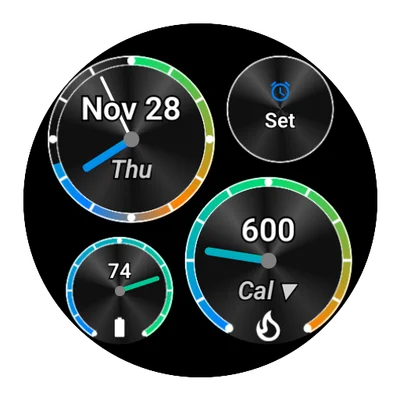
Ein Wear OS-Zifferblatt, das eine Hauptkomplikation hervorhebt.
Time and Track ist ein Wear OS-Zifferblatt mit einer analogen Uhr, einem großen Komplikationssteckplatz und zwei kleinen Komplikationssteckplätzen. Es ist für diejenigen gedacht, die sich gerne auf eine Hauptkomplikation konzentrieren möchten, wie zum Beispiel die Schrittzahl oder den Kalorienverbrauch. Es funktioniert am besten mit Bereichswertkomplikationen, unterstützt aber auch kurze Texte, kleine Bilder und Symboltypen.
Aus Gründen der Konsistenz bei Komplikationen mit Bereichswerten zeigt Time and Track Sekunden mithilfe eines Bogens an, der sich um den Umfang der Uhr bewegt. Die Farben des Bogens entsprechen denen der großen Komplikation.
Komplikationen zeigen den Verlauf normalerweise anhand eines Farbverlaufs von blau (gering) zu grün (gut) an. Wenn eine Komplikation jedoch auf einen symmetrischen Bereichswerttyp eingestellt ist (d. h. einer mit einem negativen Minimalwert und einem positiven Maximalwert derselben Größenordnung), wird ein dreifarbiges Schema verwendet: Blau (unten), Grün (nahe). ) und Orange (oben). In diesem Fall befindet sich die Nullposition an der Spitze der Komplikation.
Mit einer Einstellung können Sie auswählen, ob die Komplikationsfortschrittsbögen mit Bereichswert immer vollständig um die Komplikation herum verlaufen sollen oder ob sie beim aktuellen Wert der Komplikation anhalten sollen.
Da die Komplikationen von Time and Track umfangreich sind, können Symbole nur im „Always-On“-Modus angezeigt werden, wenn die Komplikationsquelle tönbare Bilder im Umgebungsmodus bereitstellt.
Originaltext anzeigen
Time and Track is a Wear OS watchface that features an analog clock, one large complication slot, and two small complication slots. It is intended for those who like to focus on one main complication, such as step count or calories burned. It works best with ranged value complications, but it also supports short text, small image and icon types.
For consistency with ranged value complications, Time and Track displays seconds using an arc that moves around the perimeter of the clock. The colours of the arc match those of the large complication.
Complications normally display progress using a blue (low) to green (good) colour gradient. However, if a complication is set to a symmetrical ranged value type (ie, one with a negative minimum value and a positive maximum value of the same magnitude), a three-colour scheme will be used: blue (below), green (close) and orange (above). In this case, the zero position will be at the top of the complication.
A setting allows you to select whether ranged value complication progress arcs should always go fully around the complication, or whether they should stop at the current value of the complication.
Because Time and Track's complications are large, icons can only be shown in 'always-on' mode if the complication source provides tintable ambient-mode images.
Datensicherheit
Was Gondwana Software bei Google Play zu den Daten angibt, die diese App erfasst und weitergibt.
- Keine Daten werden mit Drittunternehmen oder -organisationen geteiltWeitere Informationen dazu, wie Entwickler Angaben zur Weitergabe von Daten machen
- Keine Daten erhobenWeitere Informationen dazu, wie Entwickler Angaben zur Datenerhebung machen
- Hat sich verpflichtet, den Google Play-Richtlinien für familienfreundliche Inhalte zu folgen
Neue Funktionen
Version 2.0.0 · 01.04.2025
Hour hand and seconds are displayed correctly in Wear OS 5.1.
Easier to read in 'always-on screen' mode.
Kontakt zum Entwickler
- Websitegondwanasoftware.au
- E-Mailwear@gondwanasoftware.au
- Datenschutzerklärunggondwanasoftware.au
- Adresse13 Thomas Hales Pl Gordon ACT 2906 Australia
Informationen
- Angeboten von
- Gondwana Software
- Kategorie
- Lifestyle
- Version
- 2.0.0
- Aktualisiert
- 01.04.2025
- Veröffentlicht
- 27.11.2024
- Altersfreigabe
- USK ab 0 Jahren
- Preis
- Kostenlos
- Paketname
- au.gondwanasoftware.timeandtrack