Time Txt Watch Face
Watcholate- USK ab 0 JahrenAltersfreigabe
- PersonalisierungKategorie
- 17.10.2026Aktualisiert
- KostenlosPreis
Verlinkt auf den offiziellen Google Play-Eintrag von com.watcholate.timetxt. Zuletzt geprüft am 19.11.2026.
Über diese App
Automatische Übersetzung von Google. Originalsprache: Englisch (Vereinigte Staaten).
Text-Zifferblatt: Ihr Tag Zeile für Zeile, in 5 Stilen und 4 Schriftarten.
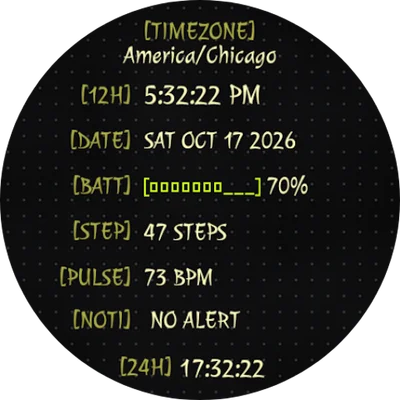
Time Txt ist ein Text-Zifferblatt für Wear OS, das im Google Watch Face Format entwickelt wurde. Ihr Tag wird Zeile für Zeile wie eine Notizseite dargestellt: Jede Zeile hat ein eigenes [LABEL] mit der jeweiligen Anzeige – Uhrzeit mit Sekunden, Datum, Akkustand, Schritte, Herzfrequenz und mehr. Fünf Stile, vier Schriftarten, acht Hintergründe und fünfundzwanzig Farben stehen zur Auswahl.
... FÜNF STILE
- Zeitzone: Ihre Zeitzone, Uhrzeit mit Sekunden, Datum, Akkustand, Schritte, Herzfrequenz, ungelesene Benachrichtigungen und 24-Stunden-Anzeige
- Countdown: Die verbleibenden Sekunden bis morgen, Uhrzeit, Datum, Akkustand, Schritte, Herzfrequenz, ungelesene Benachrichtigungen sowie Tag und Woche des Jahres
- Mondphase: Die Mondphase, Uhrzeit, Datum, Wetter mit Höchst- und Tiefsttemperatur, UV-Index oder Regenwahrscheinlichkeit, Datum der letzten Wetteraktualisierung und Akkustand
- Tägliche Bewegung: Ihre Schritte, Uhrzeit, Datum, Ihr Schrittziel als Fortschrittsbalken, die zurückgelegte Strecke in Kilometern und Meilen, geschätzter Kalorienverbrauch, Herzfrequenz und Akkustand
- Welt: Ihre Heimatstadt mit Sekunden, dann New York, London, Dubai, Tokio und Sydney, jeweils mit eigener Uhrzeit und Wochentag sowie UTC
Zum Wechseln: Halten Sie das Zifferblatt gedrückt, tippen Sie auf „Anpassen“ und anschließend auf „Stil“.
VIER SCHRIFTARTEN
- Klar, Handschriftlich, Schreibmaschine und Terminal – in jedem Stil verfügbar
- Berühren und halten Sie das Zifferblatt, tippen Sie auf „Anpassen“ und dann auf „Schriftart“
ACHT HINTERGRÜNDE, FÜNFUNDZWANZIG FARBEN
- Schwarz, Notizseite, Gerippte Seite, Punktgitter, Blaupause, Tafel, Kraftpapier und Lederjournal – alle dunkel gehalten, damit jede Zeile gut lesbar bleibt
- Fünfundzwanzig Farbsets, die jeweils die Anzeigen, Beschriftungen und Balken einfärben
- Berühren und halten Sie das Zifferblatt, tippen Sie auf „Anpassen“ und dann auf „Hintergrund“ oder „Farbe“
ZEILE ANZEIGEN
- Das Datum öffnet Ihren Kalender, der Akkustand eine eigene Anzeige, die Herzfrequenz Ihre Herzfrequenz-App und unter „Welt“ Ihre Heimatzeit Ihre Wecker
ZWEI STILE ZUR VERFÜGUNG
Zeitzone und Countdown sind in diesem Zifferblatt enthalten, mit allen Schriftarten, Hintergründen und Farben – vollständige, dauerhafte Stile, keine Testversion.
Das Premium-Set schaltet 3 Premium-Stile frei: Mondphase, Tägliche Bewegung und Welt. Eine einmalige Zahlung von 1,49 US-Dollar schaltet alle Designs sofort frei. Kein Abo, keine wiederkehrenden Kosten.
Ein noch nicht freigeschaltetes Premium-Design wird beim Tragen der Uhr von einem schwarzen Panel verdeckt. Darauf wird [PREMIUM] in Gold, die aktuelle Uhrzeit, das Datum und „Zum Entsperren tippen“ angezeigt.
SO FREISCHALTEN SIE DIE FASSUNGEN FREISCHALTEN
1. Installieren Sie die kostenlose Watcholate Watch Faces App auf Ihrem Smartphone und Ihrer Smartwatch. Die Smartphone-App öffnet die richtige Seite auf Ihrer Smartwatch.
2. Öffnen Sie Time Txt in der Smartphone-App und tätigen Sie den einmaligen Kauf über Google Play.
3. Die Premium-Designs werden innerhalb von ein bis zwei Sekunden auf Ihrer Smartwatch freigeschaltet.
Der Kauf ist mit Ihrem Google-Konto verknüpft: Er gilt für alle Smartwatches, auf denen Sie sich anmelden, und wird nach einem Reset oder beim Wechsel zu einer neuen Smartwatch automatisch wiederhergestellt.
IMMER ANGEZEIGT
Reines Schwarz, Uhrzeit und Datum in Ihrer Wunschschriftart und -farbe, nur ein kleiner Teil des Displays ist beleuchtet. Ein noch nicht freigeschaltetes Premium-Design sieht im Always-On-Modus genauso aus wie auf der Smartwatch.
12 ODER 24 STUNDEN
Welt, die Always-On-Uhr und die letzte Wetteraktualisierung richten sich nach der 12- oder 24-Stunden-Einstellung Ihrer Uhr. Die Zeitzone zeigt beide Uhrzeiten an.
GUT ZU WISSEN
- Distanz und Kalorienverbrauch sind Schätzwerte, die anhand Ihrer Schritte berechnet werden (0,762 m und ca. 0,048 kcal pro Schritt); die Uhr selbst zeigt keine Kalorien an.
- Wetter, Mondphase, Schritte, Herzfrequenz, Benachrichtigungen und Akkustand werden von Ihrer Uhr selbst erfasst.
- Die Screenshots zeigen Beispielwerte.
- Funktioniert mit Wear OS 5 und höher (Android 14 oder höher), einschließlich Pixel Watch und Galaxy Watch.
So fügen Sie das Zifferblatt hinzu: Berühren und halten Sie Ihr Zifferblatt, wischen Sie bis zum Ende, tippen Sie auf „Hinzufügen“ und wählen Sie „Zeittext“.
DATENSCHUTZ
Dieses Zifferblatt enthält keinen Code und sammelt keine Daten. Alle angezeigten Daten werden von Wear OS selbst erfasst und verlassen niemals Ihre Uhr. Vollständige Datenschutzrichtlinie: https://watcholate.com/privacy
HINWEIS
Die Gesundheitsdaten stammen von den Sensoren Ihrer Uhr und sind nicht für medizinische Zwecke bestimmt.
Von Watcholate.
Originaltext anzeigen
Time Txt is a text watch face for Wear OS, built in Google's Watch Face Format. Your day is written out line by line, like a page of notes: every row has its own [LABEL] with the reading beside it - the time with seconds, the date, your battery, steps, heart rate and more. Five styles, four fonts, eight backgrounds and twenty-five colors.
FIVE STYLES
- Timezone: your time zone, the time with seconds, the date, battery, steps, heart rate, unread notifications and the 24-hour time
- Countdown: the seconds left until tomorrow, the time, the date, battery, steps, heart rate, unread notifications, and the day and week of the year in turn
- Moonphase: the moon's phase, the time, the date, the weather with the day's low and high, the UV index or the chance of rain, when the weather was last updated, and battery
- Daily Move: your steps, the time, the date, your step goal as a progress bar, the distance in kilometers and miles in turn, an estimate of the calories burned, heart rate and battery
- World: your home city with seconds, then New York, London, Dubai, Tokyo and Sydney, each with its own time and weekday, and UTC
To switch, touch and hold the face, tap Customize, then Style.
FOUR FONTS
- Clean, Handwritten, Typewriter and Terminal, on every style
- Touch and hold the face, tap Customize, then Font
EIGHT BACKGROUNDS, TWENTY-FIVE COLORS
- Black, Notepage, Rippedpage, Dot Grid, Blueprint, Chalkboard, Kraft and Leather Journal, each kept dark so every row stays easy to read
- Twenty-five color sets, each one tinting the readings, the labels and the bars
- Touch and hold the face, tap Customize, then Background or Color
TAP A ROW
- The date opens your calendar, the battery its own screen, the heart rate your heart-rate app, and in World your home time opens your alarms
TWO STYLES ARE YOURS
Timezone and Countdown are included with this watch face, with every font, background and color - complete, permanent styles, not a trial.
The premium set unlocks 3 premium styles - Moonphase, Daily Move and World. One single payment of US$1.49 unlocks all of them at once. No subscription, nothing recurring.
A premium style you have not unlocked is covered by a black panel when you wear it, showing [PREMIUM] in gold, the live time, the date and Tap to unlock.
HOW TO UNLOCK
1. Install the free Watcholate Watch Faces app on your phone, and on your watch - the phone app opens the right page on the watch for you.
2. Open Time Txt in the phone app and make the one-time purchase, handled by Google Play.
3. The premium styles unlock on your watch within a second or two.
The purchase is tied to your Google account: it covers every watch you sign in to and comes back after a reset or on a new watch.
ALWAYS-ON
Pure black, with the time and the date in your font and color, and only a small part of the screen lit. A premium style you have not unlocked looks just the same in always-on.
12 OR 24 HOURS
World, the always-on clock and the weather's last update follow your watch's 12-hour or 24-hour setting. Timezone shows both clocks.
GOOD TO KNOW
- Distance and calories are estimates worked out from your steps (0.762 m and about 0.048 kcal a step); the watch reports no calories
- The weather, the moon phase, steps, heart rate, notifications and battery come from your watch itself
- The screenshots show example readings
- Works on Wear OS 5 and later (Android 14 or later), including Pixel Watch and Galaxy Watch
To add it: touch and hold your watch face, swipe to the end, tap Add and choose Time Txt.
PRIVACY
This watch face contains no code and collects nothing. Everything it shows is read by Wear OS itself and never leaves your watch. Full policy: https://watcholate.com/privacy
DISCLAIMER
Health readings come from your watch's own sensors and are not for medical use.
From Watcholate.
Datensicherheit
Was Watcholate bei Google Play zu den Daten angibt, die diese App erfasst und weitergibt.
- Keine Daten werden mit Drittunternehmen oder -organisationen geteiltWeitere Informationen dazu, wie Entwickler Angaben zur Weitergabe von Daten machen
- Keine Daten erhobenWeitere Informationen dazu, wie Entwickler Angaben zur Datenerhebung machen
Neue Funktionen
Version 1.0.0 · 17.10.2026
First release: a text watch face - your day written out line by line, in five styles (Timezone, Countdown, Moonphase, Daily Move and World), four fonts, eight backgrounds and twenty-five colors.
Kontakt zum Entwickler
- Websitewatcholate.com
- E-Mailsupport@watcholate.com
- Datenschutzerklärungwatcholate.com
- Adresse14727 Cypress Creek Landing Houston, TX 77068-2527 United States
Informationen
- Angeboten von
- Watcholate
- Kategorie
- Personalisierung
- Version
- 1.0.0
- Aktualisiert
- 17.10.2026
- Veröffentlicht
- 17.10.2026
- Altersfreigabe
- USK ab 0 Jahren
- Preis
- Kostenlos
- Paketname
- com.watcholate.timetxt