Unique Digital Watch Face
Pars Watch Faces- USK ab 0 JahrenAltersfreigabe
- PersonalisierungKategorie
- 05.10.2026Aktualisiert
- 1,09 €Preis
Verlinkt auf den offiziellen Google Play-Eintrag von com.watchfacestudio.uniquedigital. Zuletzt geprüft am 19.11.2026.
Über diese App
Automatische Übersetzung von Google. Originalsprache: Englisch (Vereinigte Staaten).
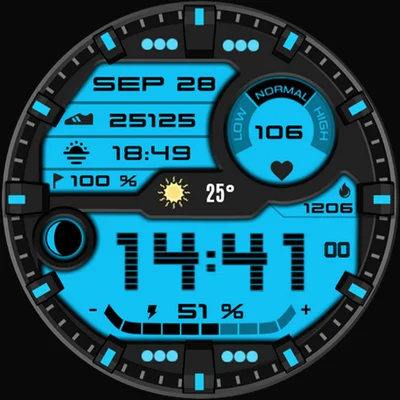
Ein Zifferblatt mit atemberaubenden austauschbaren Farben und einem informativen Display
Das einzigartige digitale Zifferblatt ist ein gut gestaltetes, stilvolles Zifferblatt, mit dem Sie Ihre Uhr mit Hunderten von Farbkombinationen individuell gestalten können.
Das einzigartige digitale Zifferblatt ist mit allen Uhren kompatibel, die Wear OS SDK 34 und Api 34+ verwenden.
WICHTIGER HINWEIS: Die auf Ihrem Telefon installierte Begleitanwendung dient nur zu Informationszwecken. Das Zifferblatt wird automatisch auf Ihrer Uhr installiert. Sie müssen lediglich den Abschnitt „Immer Zifferblatt einstellen“ im Einstellungsmenü der Play Store-Anwendung auf Ihrer Uhr aktivieren. Dadurch wird das Zifferblatt automatisch auf Ihren Startbildschirm gebracht. Weitere Informationen finden Sie unter dem folgenden Link.
https://www.parswatchfaces.com/set/
BITTE BEACHTEN: Bei einigen Uhrenmarken und -modellen funktionieren möglicherweise bestimmte Funktionen für Uhren der Samsung Galaxy-Serie nicht.
* Weitere Informationen finden Sie in den Bildern des Zifferblatts.
HINWEISE:
- Stellen Sie sicher, dass Sie die Zugangssensoren zugelassen haben.
- Schrittziel auf 10.000 gesetzt.
- Das Einschalten des Schrittzählers durch Klicken auf den Schrittzähler-Text funktioniert möglicherweise bei einigen anderen Uhrenmodellen als den Samsung-Uhrenmodellen nicht.
- Dieses Zifferblatt ist mit Samsung Galaxy Watch 4, Watch 5, Watch 6, Watch 7, Pixel Watch usw. kompatibel. Es unterstützt alle Wear OS-Geräte mit API Level 30+.
INSTALLATIONSHINWEISE:
1 - Stellen Sie sicher, dass die Uhr richtig mit dem Telefon verbunden ist.
Die Telefon-App fungiert lediglich als Platzhalter, um das Einrichten und Finden des Zifferblatts auf Ihrer Wear OS-Uhr zu erleichtern
PS: Wenn Sie im Zahlungszyklus stecken bleiben, machen Sie sich keine Sorgen, es wird nur eine Zahlung ausgeführt, auch wenn Sie ein zweites Mal zur Zahlung aufgefordert werden. Warten Sie 5 Minuten oder starten Sie Ihre Uhr neu und versuchen Sie es erneut.
Möglicherweise liegt ein Synchronisierungsproblem zwischen Ihrem Gerät und den Google-Servern vor.
oder
2 - Versuchen Sie alternativ, das Zifferblatt über den Webbrowser auf Ihrem PC zu installieren.
PS: Während der Installation des Zifferblatts hat der Entwickler keine Kontrolle über die Installation.
Bevor Sie einen negativen Kommentar schreiben oder eine 1-Stern-Bewertung abgeben, lesen Sie bitte sorgfältig die Installationsanleitung im untenstehenden Link und kontaktieren Sie uns bitte per E-Mail, wenn Sie ein anderes Problem haben.
https://www.parswatchfaces.com/installation-guide/
HINWEIS: Wenn Sie die Meldung „Ihre Geräte sind nicht kompatibel“ anstelle der App auf dem Telefon erhalten, verwenden Sie bitte den Play Store im WEB-Browser Ihres PCs oder Laptops.
WICHTIGER HINWEIS:
Nach der Installation kann das Zifferblatt das letzte Herzfrequenz-Messergebnis laden, muss es aber nicht.
Das Zifferblatt misst die Herzfrequenz nicht automatisch und zeigt das Herzfrequenzergebnis nicht automatisch an.
Um Ihren aktuellen Herzfrequenzwert anzuzeigen, müssen Sie eine manuelle Messung durchführen.
Sitzen Sie dazu ruhig, warten Sie ein paar Minuten und klicken Sie auf den Herzfrequenz-Anzeigebereich.
Warten Sie ein paar Sekunden. Das Zifferblatt führt eine Messung durch und zeigt das aktuelle Ergebnis an.
Tun Sie dies, wann immer Sie Ihre aktuelle Herzfrequenz sehen möchten.
MEIN GESICHTERKATALOG
https://play.google.com/store/apps/dev?id=7655501335678734997
FOLGEN SIE UNS :
FACEBOOK
https://www.facebook.com/profile.php?id=100078915463662
INSTAGRAM
https://www.instagram.com/parswf/
TELEGRAMM
https://t.me/parswatchfaces
Wenn Sie Fragen haben, wenden Sie sich bitte an mich: info@parswatchfaces.com
Für die Bewertung und Bewertung im Store wäre ich sehr dankbar.
Danke.
Originaltext anzeigen
Unique digital watch face is a well-designed, stylish watch face that allows you to customize your watch with hundreds of color combinations.
Unique Digital Watch Face is compatible with all watches using Wear OS SDK 34 and Api 34+.
IMPORTANT NOTE: The companion application installed on your phone is for informational purposes only. The watch face will be automatically installed on your watch. All you need to do is activate the Always Set Watch Face section from the settings menu in the Play Store application on your watch. This will automatically bring the watch face to your home screen. For more information, please check the link below.
https://www.parswatchfaces.com/set/
PLEASE NOTE: In some watch brands and models, functions specific to Samsung Galaxy series watches may not work.
* Please check the pictures of the watch face for more information.
NOTES:
- Make sure you have allowed the access sensors.
- Step target set to 10k.
- Turning on the pedometer by clicking on the Pedometer text may not work on some watch models other than Samsung watch models.
- This watch face is compatible with Samsung Galaxy Watch 4,Watch 5, Watch 6, Watch 7, Pixel Watch etc.It supports all Wear OS devices with API Level 30+.
ISTALLING NOTES:
1 - Make sure the watch is properly connected to the phone.
The Phone app just acts as a placeholder to make it easy to set up and find the watch face on your Wear OS watch
PS: If you get stuck in the payment cycle, don't worry, only one payment will be made even if you are asked to pay a second time. Wait 5 minutes or restart your watch and try again.
There may be a synchronization issue between your device and Google servers.
or
2 - Alternatively, try to install the watch face from the web browser on your PC.
PS: While installing the watch face, the developer has no any control about the installation.
Before writing a negative comment or giving 1 star rating please read the Installation Guide carefully in the link below and please contact us via e-mail if you get any other problem.
https://www.parswatchfaces.com/installation-guide/
NOTE :If you get the message "Your devices are not compatible" instead of app on phone, please use Play Store in WEB browser from PC or Laptop.
IMPORTANT NOTICE :
After installation, the watch face can load the last heart rate measurement result, but it doesn't have to.
The watch face does not automatically measure and does not automatically display the heart rate result.
To view your current heart rate score, you'll need to take a manual measurement.
To do this, sit still, wait a few minutes and click on the heart rate display area.
Wait a few seconds. The watch face will take a measurement and display the current result.
Do this whenever you want to see your current heart rate.
MY WATCH FACES CATALOG
https://play.google.com/store/apps/dev?id=7655501335678734997
FOLLOW US :
FACEBOOK
https://www.facebook.com/profile.php?id=100078915463662
INSTAGRAM
https://www.instagram.com/parswf/
TELEGRAM
https://t.me/parswatchfaces
if you have any question, please contact with me: info@parswatchfaces.com
I would be very grateful for the rate and review in the Store.
Thanks.
Datensicherheit
Was Pars Watch Faces bei Google Play zu den Daten angibt, die diese App erfasst und weitergibt.
- Keine Daten werden mit Drittunternehmen oder -organisationen geteiltWeitere Informationen dazu, wie Entwickler Angaben zur Weitergabe von Daten machen
- Keine Daten erhobenWeitere Informationen dazu, wie Entwickler Angaben zur Datenerhebung machen
Neue Funktionen
05.10.2026
SDK Update
Kontakt zum Entwickler
- Websiteparswatchfaces.com
- E-Mailinfo@parswatchfaces.com
- Datenschutzerklärungparswatchfaces.com
- AdresseEsentepe Mah.Tuna Caddesi̇.Di̇nlendi̇ Sok. İçsezgi̇ Apt.K:3 D:8, 16120 Nilüfer/Bursa Türkiye
Informationen
- Angeboten von
- Pars Watch Faces
- Kategorie
- Personalisierung
- Aktualisiert
- 05.10.2026
- Veröffentlicht
- 16.03.2025
- Altersfreigabe
- USK ab 0 Jahren
- Preis
- 1,09 €
- Paketname
- com.watchfacestudio.uniquedigital