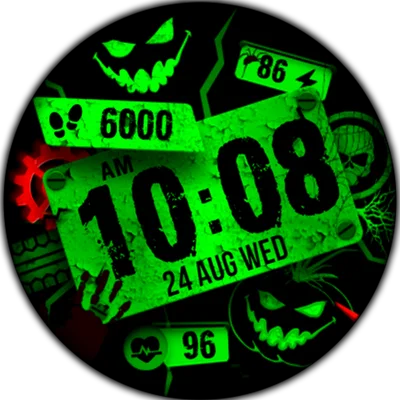
WIN - Halloween MOD
WinWatchfaces- USK ab 0 JahrenAltersfreigabe
- PersonalisierungKategorie
- 16.09.2026Aktualisiert
- 0,89 €Preis
Verlinkt auf den offiziellen Google Play-Eintrag von com.watchfacestudio.halloweenmod. Zuletzt geprüft am 14.11.2026.
Über diese App
Automatische Übersetzung von Google. Originalsprache: Englisch (Vereinigte Staaten).
Halloween-Zifferblatt für Wear OS
Halloween-Zifferblatt für Wear OS
Zifferblatt nur für Wear OS
Dieses Zifferblatt unterstützt alle Wear OS-Geräte mit API-Level 33+, wie z. B. die Samsung Galaxy Watch 4, 5, 6, 7, 8, Pixel Watch usw.
Grundlegende Funktionen:
– Digitalzeitanzeige (12 oder 24 Stunden, abhängig von den Smartphone-Einstellungen)
– Helles und informatives Design
– Farbwechsel möglich
– Benutzerdefinierte Komplikationen
– AOD-Modus
– HINWEISE ZUR INSTALLATION DES ZIFFERBLATTS –
Bei Problemen mit der Installation folgen Sie bitte den Anweisungen: https://bit.ly/infWF
Einstellungen
– Um Ihr Zifferblatt anzupassen, berühren und halten Sie einfach das Display und tippen Sie anschließend auf die Schaltfläche „Anpassen“.
– WICHTIG: Da es hier viele Einstellungen gibt, konfigurieren Sie das Zifferblatt am besten direkt auf der Uhr, wie im Video gezeigt: https://youtu.be/YPcpvbxABiA
Support
– Kontaktieren Sie srt48rus@gmail.com.
Schauen Sie sich meine anderen Zifferblätter im Google Play Store an: https://bit.ly/WINwatchface
Originaltext anzeigen
Halloween Themed Watchface for Wear OS
Watch Face only for Wear OS
This watch face supports all Wear OS devices with API level 33+, such as Samsung Galaxy Watch 4, 5, 6,7, 8, Pixel Watch, etc.
Basic moments:
- Mode for digital time 12 or 24 hours depending on the smartphone settings
- Bright and informative design
- Ability to change color
- Custom complications
- AOD mode
- NOTES FOR INSTALLING WATCH FACE -
If you have problems with installation, please follow the instructions: https://bit.ly/infWF
Settings
- To customize your watch face, simply touch and hold the display, then tap the Customize button.
- IMPORTANT - since there are many settings here, it is better to configure the watchface on the watch itself as shown in the video: https://youtu.be/YPcpvbxABiA
Support
- Contact srt48rus@gmail.com.
Check out my other watch faces in the Google Play store: https://bit.ly/WINwatchface
Datensicherheit
Was WinWatchfaces bei Google Play zu den Daten angibt, die diese App erfasst und weitergibt.
- Keine Daten werden mit Drittunternehmen oder -organisationen geteiltWeitere Informationen dazu, wie Entwickler Angaben zur Weitergabe von Daten machen
- Keine Daten erhobenWeitere Informationen dazu, wie Entwickler Angaben zur Datenerhebung machen
Neue Funktionen
16.09.2026
Wear OS Update:
- Added the ability to select rain probability in custom complications
- New watch face format
Kontakt zum Entwickler
- E-Mailsrt48rus@gmail.com
- Datenschutzerklärungsites.google.com
- Adresseул. Ескалиева, д. 148 кв. 21 090000 Уральск Kazakhstan
Informationen
- Angeboten von
- WinWatchfaces
- Kategorie
- Personalisierung
- Aktualisiert
- 16.09.2026
- Veröffentlicht
- 25.09.2021
- Altersfreigabe
- USK ab 0 Jahren
- Preis
- 0,89 €
- Paketname
- com.watchfacestudio.halloweenmod