X-Watch - Watch Face
EK Watch Faces ™- USK ab 0 JahrenAltersfreigabe
- PersonalisierungKategorie
- 24.09.2026Aktualisiert
- 1,99 €Preis
Verlinkt auf den offiziellen Google Play-Eintrag von com.ekwatchfaces.xwatch. Zuletzt geprüft am 13.11.2026.
Über diese App
Automatische Übersetzung von Google. Originalsprache: Englisch (Vereinigte Staaten).
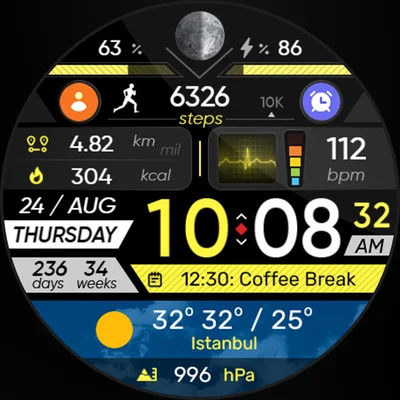
Halten Sie jeden Moment farbenfroh fest, gestalten Sie Ihre Uhr ganz nach Ihrem Stil!
🌟 Für Wear OS entwickelt
[Nur für Wear OS 5+ Geräte (API 34+)]
🖌️ Gestalte jeden Moment farblich und passe deine Uhr deinem Stil an!
FUNKTIONEN
● 🎨 30 Farbvarianten
● 📊 Schritte – Distanz – Kalorien – Akku – Herzfrequenz – Nächstes Ereignis – Kalender – 2 benutzerdefinierte Komplikationen – 2 anpassbare Schnellzugriffe – Live-Mondphasen
● 🕒 12/24-Stunden-Anzeige (basierend auf der Zeiteinstellung Ihres Smartphones)
● 🚧 km/Meilen werden unterstützt (automatische Auswahl basierend auf der Sprache Ihres Smartphones (in den USA und Großbritannien))
● 👀 Always-on-Display wird unterstützt
📌 INSTALLATIONSHINWEISE:
1 – 🔗 Stellen Sie sicher, dass Ihre Uhr ordnungsgemäß mit Ihrem Smartphone verbunden ist. Öffnen Sie die Smartphone-App auf Ihrem Smartphone und tippen Sie auf "AUF DIE UHR HERUNTERLADEN". Folgen Sie anschließend den Anweisungen auf Ihrer Uhr.
⌛ Wenige Minuten nach dem Tippen auf die Installationsschaltfläche Ihrer Uhr wird das Zifferblatt installiert. Anschließend können Sie Ihr neues Zifferblatt auswählen!
📱 Die Smartphone-App dient als Platzhalter, um die Installation und das Auffinden des Zifferblatts auf Ihrem Wear OS-Gerät zu vereinfachen.
⚠️ Hinweis: Sollten Sie in einer Zahlungsschleife feststecken, keine Sorge! Ihnen wird der Betrag nur einmal berechnet, auch wenn Sie erneut zur Zahlung aufgefordert werden. Warten Sie 5 Minuten oder starten Sie Ihre Uhr neu und versuchen Sie es erneut. Dies könnte ein Synchronisierungsproblem zwischen Ihrem Gerät und den Google-Servern sein.
2 - 💻 Alternativ können Sie versuchen, das Zifferblatt über einen Webbrowser auf Ihrem PC zu installieren.
⚠️ Bitte beachten Sie, dass etwaige Probleme auf dieser Seite NICHT vom Entwickler verursacht werden. Der Entwickler hat von dieser Seite aus keinen Einfluss auf den Play Store. Vielen Dank.
🔑 Für den vollen Funktionsumfang aktivieren Sie bitte manuell die Berechtigungen für Sensoren und Komplikationsdaten!
Web: https://www.ekwatchfaces.com
Instagram: https://www.instagram.com/ekwatchfaces
Facebook: https://www.facebook.com/ekwatchfaces
Twitter: https://twitter.com/ekwatchfaces
Pinterest: https://www.pinterest.com/ekwatchfaces
YouTube: https://bit.ly/2TowlDE
Originaltext anzeigen
🌟 Built for Wear OS
[ Only for Wear OS 5+ devices (API 34+)]
🖌️ Color every moment, customize your watch to your style!
FEATURES
● 🎨 30 Colour variants
● 📊 Steps - Distance - Calories - Battery - Heart rate - Next Event - Calendar - 2 custom complications - 2 adjustable shortcuts - Live moon phases
● 🕒 12/24 H (Based on your phone time setting)
● 🚧 Km/Mil supported (Automatically selected based on phone language (in United States and United Kingdom))
● 👀 Always on display supported
📌 INSTALLATION NOTES:
1 - 🔗 Ensure your watch is properly connected to your phone. Open the Phone App on your phone and tap on "DOWNLOAD TO THE WATCH", then follow the instructions on your watch.
⌛ A few minutes after tapping the install button on your watch, the watch face will be installed. You can then select your new watch face!
📱 The phone app serves as a placeholder to make it easier to install and find the watch face on your Wear OS device.
⚠️ Note: If you find yourself stuck in a payment loop, don’t worry! You will only be charged once, even if prompted to pay again. Wait 5 minutes or restart your watch and try again. This could be a synchronization issue between your device and Google servers.
2 - 💻 Alternatively, you can try installing the watch face from a web browser on your PC.
⚠️ Please note that any issues on this side are NOT developer-dependent. The developer has no control over the Play Store from this side. Thank you.
🔑 For full functionality, please manually enable Sensors & receive complication data permissions!
WEB
https://www.ekwatchfaces.com
INSTAGRAM
https://www.instagram.com/ekwatchfaces
FACEBOOK
https://www.facebook.com/ekwatchfaces
TWITTER
https://twitter.com/ekwatchfaces
PINTEREST
https://www.pinterest.com/ekwatchfaces
YOUTUBE
https://bit.ly/2TowlDE
Datensicherheit
Was EK Watch Faces ™ bei Google Play zu den Daten angibt, die diese App erfasst und weitergibt.
- Keine Daten werden mit Drittunternehmen oder -organisationen geteiltWeitere Informationen dazu, wie Entwickler Angaben zur Weitergabe von Daten machen
- Keine Daten erhobenWeitere Informationen dazu, wie Entwickler Angaben zur Datenerhebung machen
Neue Funktionen
24.09.2026
- Security update performed.
Kontakt zum Entwickler
- Websiteekwatchfaces.com
- E-Mailsupport@ekwatchfaces.com
- Datenschutzerklärungekwatchfaces.com
- AdresseNUMUNE EVLER MAH. SOYER 1 SK. DURMUŞ DENİZ APT. SİTESİ HACI DURMUŞ DENIZ APT BLOK NO: 44 İÇ KAPI NO: 4 31600 DÖRTYOL/Hatay Türkiye
Informationen
- Angeboten von
- EK Watch Faces ™
- Kategorie
- Personalisierung
- Aktualisiert
- 24.09.2026
- Veröffentlicht
- 29.11.2025
- Altersfreigabe
- USK ab 0 Jahren
- Preis
- 1,99 €
- Paketname
- com.ekwatchfaces.xwatch