ArchersPlayer
Audio File Playlist Player AU
Entwickelt für iPhone, iPad
Kostenlos
- Altersfreigabe4+
- KategorieMusik
- EntwicklerNicholas McLaren
- SprachenEnglisch
- Größe14,5 MB
Verlinkt auf die offizielle App Store-Seite
Download.org hostet keine Datei von ArchersPlayer. Die Schaltfläche öffnet die App-Seite bei App Store, wo Nicholas McLaren die App veröffentlicht. Eintrag zuletzt geprüft am 13.11.2026.
Screenshots
Info
Der Entwickler hat diesen Text nicht in Ihrer Sprache bereitgestellt.
ArchersPlayer is a lightweight audio file player built as an AUv3 Generator plugin. Load it into your favorite AUv3 host — like AUM, ApeMatrix, or Audiobus — and use it as a sound source alongside your other instruments and effects.
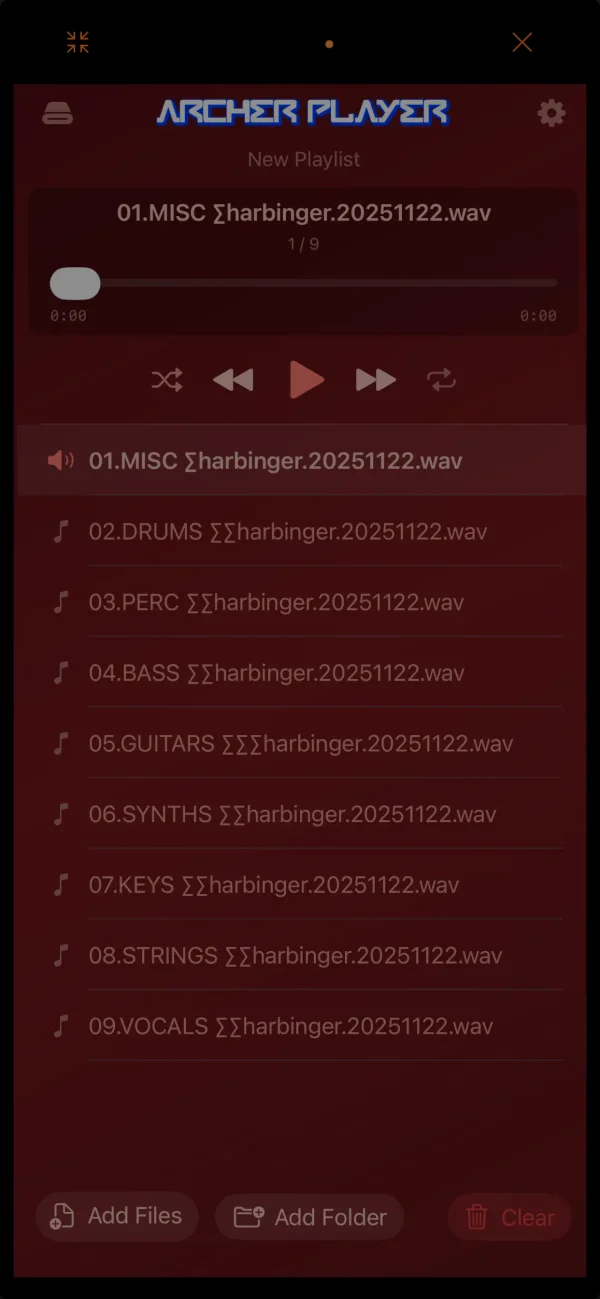
Build a playlist from individual files or entire folders. Tracks play sequentially from top to bottom, and you can reorder them with a long-press drag, shuffle the list, or tap any track to jump straight to it. A seekable playback slider lets you scrub to any point in the current track.
Need a pause between tracks? Enable the configurable track delay to insert a random gap (2–10 seconds) before the next track starts. Great for DJ/radio, live performance, rehearsal playback, or backing tracks that need breathing room.
FEATURES
• AUv3 Generator plugin — works inside any compatible host app
• Load audio files individually or by folder
• Supports MP3, WAV, AIFF, M4A, CAF, FLAC, and AAC
• Sequential playback with shuffle, skip, and previous controls
• Tap any track to play it immediately
• Drag to reorder your playlist
• Swipe left to delete individual tracks
• Swipe right to lock a track's position in place (won't be affected by shuffle)
• Seekable playback slider with elapsed and total time display
• Configurable random delay between tracks (2–10 seconds)
• Automatic sample rate conversion to match the host
• Security-scoped bookmarks for persistent file access
• Save/Load multiple playlists
• Trigger playback controls, tracks, and playlist w/ MIDI
• Set custom start/end times per Track to only play a region of the audio file
• Warp playback pitch and speed in real time, or lock the control to only do one or the other
• Designed for iPhone and iPad
Neue Funktionen
Version 1.5.0 · 23.03.2026
Playlist Improvements
- A "track" now consists of an audio file + a start/stop time, so the same audio file may be used more than once, with a different start/stop time
- Added a new region editor for defining the start/stop time for a track. Pinch to zoom or pan, tap to set position, tap+drag to set start and stop times for the track, refine further by zooming further or by using the fine-tuning controls below the waveform.
- Playlists are now saved with their start/stop time data
- Any of the first 20 track slots (for now) in the playlist may now be MIDI mapped. If you move tracks contained within the slot, the mapping will stay with the slot, not the track that moved away. If there is no track loaded in that slot and it has a MIDI mapping, it will do nothing.
- The Playlists themselves may now be MIDI mapped
- To MIDI map playlists or tracks, drag the playlist or track to the right to expose the MIDI button. Tap it to enter MIDI learn mode.
- In MIDI learn mode, you will be warned if your change would overwrite an existing mapping
- MIDI mappings for track slots and playlists are saved globally, not in the individual playlists themselves.
Optimizations
- More behind-the-scenes optimizations to keep things running smoothly
User Guide
- A link to the User Guide can now be found at the bottom of the Settings window
App-Datenschutz
Was Nicholas McLaren im App Store zum Umgang dieser App mit Daten angibt.
-
Keine Daten erfasst
Der Entwickler erfasst keine Daten von dieser App.
Die Datenschutzpraktiken können variieren, zum Beispiel je nach den von Ihnen verwendeten Funktionen oder Ihrem Alter.
Informationen
- Anbieter
- Nicholas McLaren
- Kategorie
- Musik
- Version
- 1.5.0
- Aktualisiert
- 23.03.2026
- Veröffentlicht
- 23.02.2026
- Größe
- 14,5 MB
- Erfordert
- iOS 17.0 oder neuer
- Altersfreigabe
- 4+
- Preis
- Kostenlos
- Sprachen
- Englisch
- Copyright
- © 2026 Nicholas McLaren