
- Altersfreigabe4+
- KategorieFoto und Video
- Entwickler方 沈
- SprachenEnglisch
- Größe3,8 MB
Verlinkt auf die offizielle App Store-Seite
Download.org hostet keine Datei von Auto Digital Video. Die Schaltfläche öffnet die App-Seite bei App Store, wo 方 沈 die App veröffentlicht. Eintrag zuletzt geprüft am 18.11.2026.
Screenshots



Info
Der Entwickler hat diesen Text nicht in Ihrer Sprache bereitgestellt.
For this professional edition, we could record the video clip as short as only one second and record the video clips one by one. The number of video clips could be more than fifty hundred thousand. The duration of videos could be from one second to thirty minutes. We could select the number of clips according to our needs.
Listen the talking while recording the video, we could use the iPhone or iPad to record the video without watching the iPhone or iPad screen.
Talking the number of video clip , talking the remaining time and talking the recording time in English when recording the video clips.
With this App, when we put the iOs device one meter away, we could instruct the device to record the video by sound. With this App we could record the video by different gestures for the different preferences. With this App, just one action could record several video clips one by one.When we launch this App, it could start recording the video automatically.
Record the video by timer, sound , proximity detection, gestures
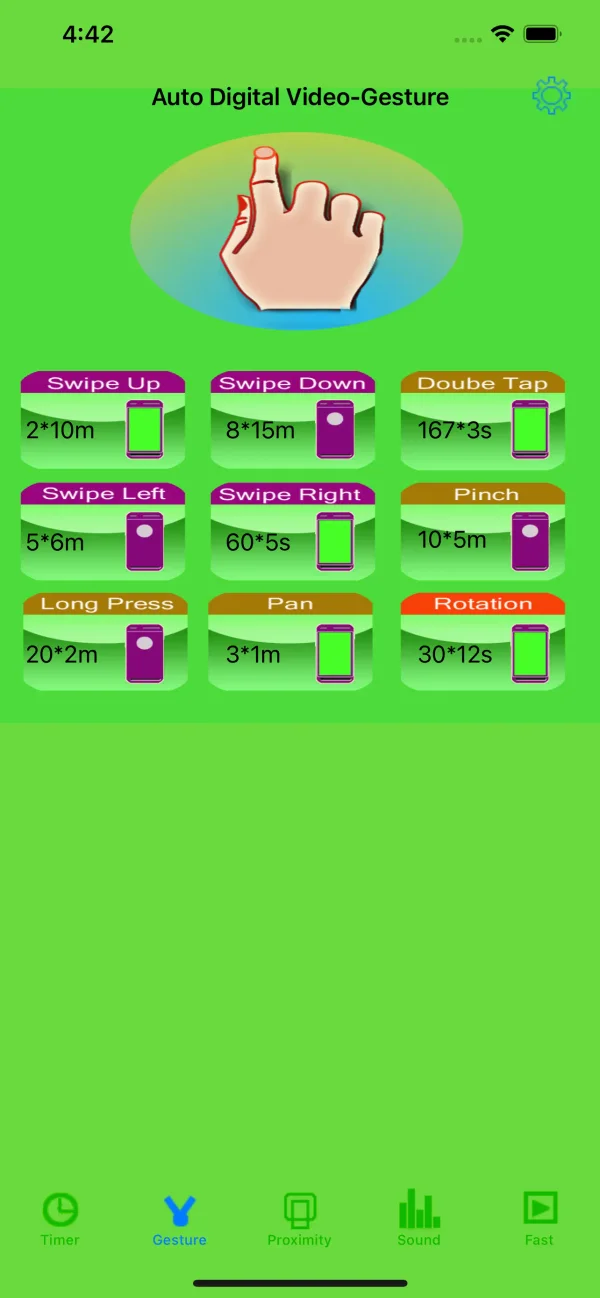
1 Gestures: Support the following nine gestures: rotation, pan, pinch, long press, double tap, swipe up, swipe down, swipe left, swipe right.Different gestures could have the different video action, such as using the different camera type, take the different number of video clips, and setting the different duration of video clips.
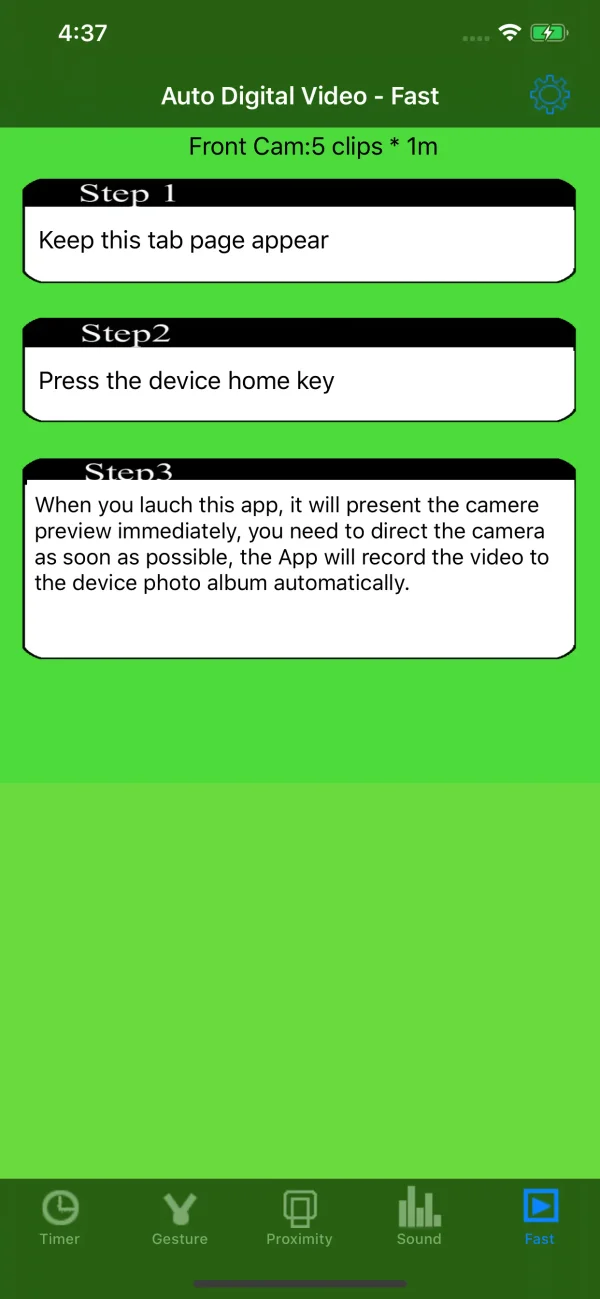
2 Fast: Just tap this App icon , so this App will be launched, after that, this App will record the video clips automatically.
3 Control by sound: Just make a sound, this App will record the video clips one by one.
4 Proximity Detection Sensor: Just cover the iPhone screen or hold the iPhone screen, the app will record the video clips one by one.This feature is only for iPhone , and not available for iPad.
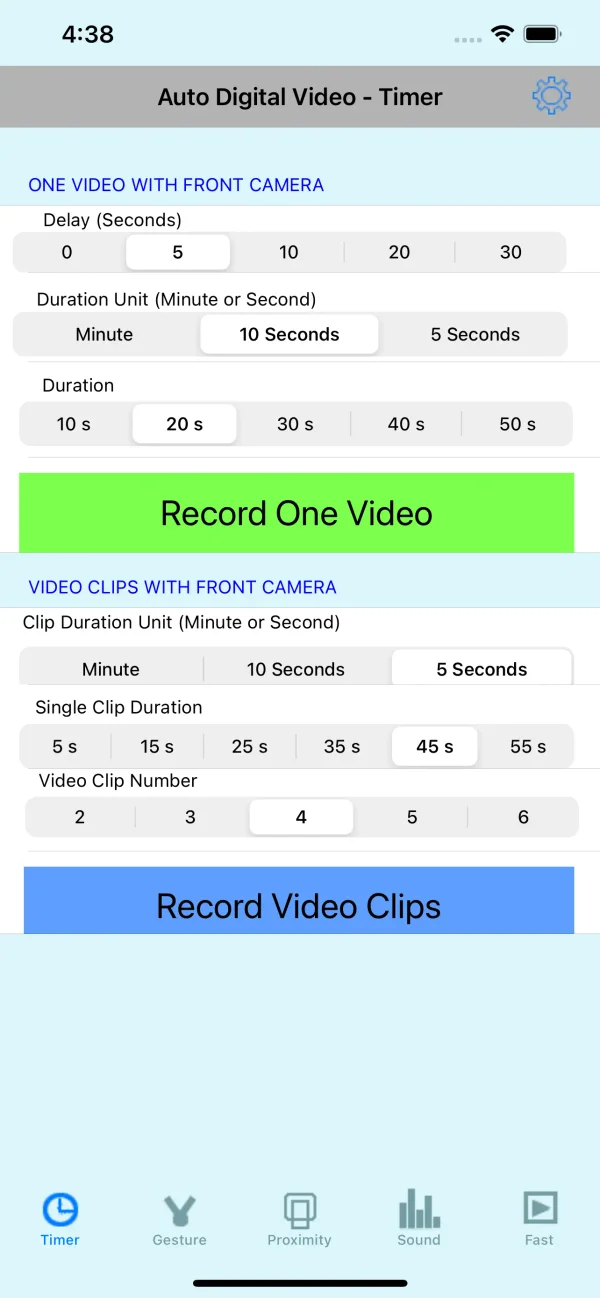
5 Timer:Capture one video by the indicted delay. Capture a number of video clips by the indicted interval.
From the setting view, we could switch between the Rear camera and the front camera. Set the number of video clips.
In the timer tab page, for the feature about recording one video: the video duration could be 1 minute, 3 minutes, 5 minutes ,10 minutes or 20 minutes. We also could make the video as 5 seconds, 10 seconds, 15 seconds, 20 seconds, 25 seconds, 30 seconds, 35 seconds, 40 seconds, 45 seconds, 50 seconds, 55 seconds.
In the timer tab page, for the feature about recording video clips, by selecting the duration unit as minute: the duration could be 1 minute, 2 minute, 3 minute, 4 minutes, 5 minute. by selecting the duration unit 5 seconds, or 10 seconds, the duration of video clips could be 5 seconds, 10 seconds, 15 seconds, 20 seconds, 25 seconds, 30 seconds, 35 seconds, 40 seconds, 45 seconds, 50 seconds, 55 seconds.
In the gesture tab page, the video clip duration for 9 gestures could be from 1 second to 59 seconds, the number of clips could be as many as 1200. If the duration is from 1 minute to 30 minutes, the clips number could be as many as 20.
In the sound tab page, the video clip duration could be from 1 second to 59 seconds,the number of clips could be as many as 1200.If the duration is from 1 minute to 30 minutes, the clips number could be as many as 20.
In the fast tab page, the video clip duration could be from 1 second to 59 seconds,the number of clips could be as many as 1200.If the duration is from 1 minute to 30 minutes, the clips number could be as many as 20.
In the proximity tab page, the video clip duration could be from 1 second to 59 seconds, the number of clips could be as many as 1200.If the duration is from 1 minute to 30 minutes, the clips number could be as many as 20.
From the setting view, we could set the sleeping timer. So if we need to record the video clips for one day or two days, this edition could sleep at the indict time and wake up after the sleep duration and continue to record the remain video clips.
Neue Funktionen
Version 3.4.8 · 31.05.2024
Update the following default preference:
For the fast feature, if the duration unit is second, then the default clip number of video will be 58 instead of 36670. Because the large number is no use for many of users. This setting could be updated from the setting view.
App-Datenschutz
Was 方 沈 im App Store zum Umgang dieser App mit Daten angibt.
-
Keine Daten erfasst
Der Entwickler erfasst keine Daten von dieser App.
Die Datenschutzpraktiken können variieren, zum Beispiel je nach den von Ihnen verwendeten Funktionen oder Ihrem Alter.
Informationen
- Anbieter
- 方 沈
- Kategorie
- Foto und Video
- Version
- 3.4.8
- Aktualisiert
- 31.05.2024
- Veröffentlicht
- 13.09.2014
- Größe
- 3,8 MB
- Erfordert
- iOS 13.0 oder neuer
- Altersfreigabe
- 4+
- Preis
- 0,99 €
- Sprachen
- Englisch
- Copyright
- © 2014-2024 Fang Shen
Das könnte Ihnen auch gefallen
-
 Loop Loop - Practice PerfectFoto und Video
-
 LoopCamcorderFoto und Video
-
 PhotoSesh - Photographer LoginFoto und Video
-
 Autocue Video Teleprompter AppPrompter teleprompt ai script
-
 ShutterCount MobileFoto und Video
-
 Artec: Creator StudioFoto und Video
-
 USB Camera for Detail on MacFoto und Video
-
 Video Teleprompter – EvelizeSkript-Prompter & Recorder
-
 Mavis Camera: Pro-AufnahmeAufnehmen, live streamen, LUTs
-
 CutAI - AI Video EditorFoto und Video