
Burrow Tunnel
SSH & web tunnels via your frp
Entwickelt für iPhone, iPad
Kostenlos · In-App-Käufe
- Altersfreigabe9+
- KategorieDienstprogramme
- Entwickler鑫 姜
- SprachenEnglisch+ 5 weitere
- Größe45,2 MB
Verlinkt auf die offizielle App Store-Seite
Download.org hostet keine Datei von Burrow Tunnel. Die Schaltfläche öffnet die App-Seite bei App Store, wo 鑫 姜 die App veröffentlicht. Eintrag zuletzt geprüft am 12.11.2026.
Screenshots


Info
Der Entwickler hat diesen Text nicht in Ihrer Sprache bereitgestellt.
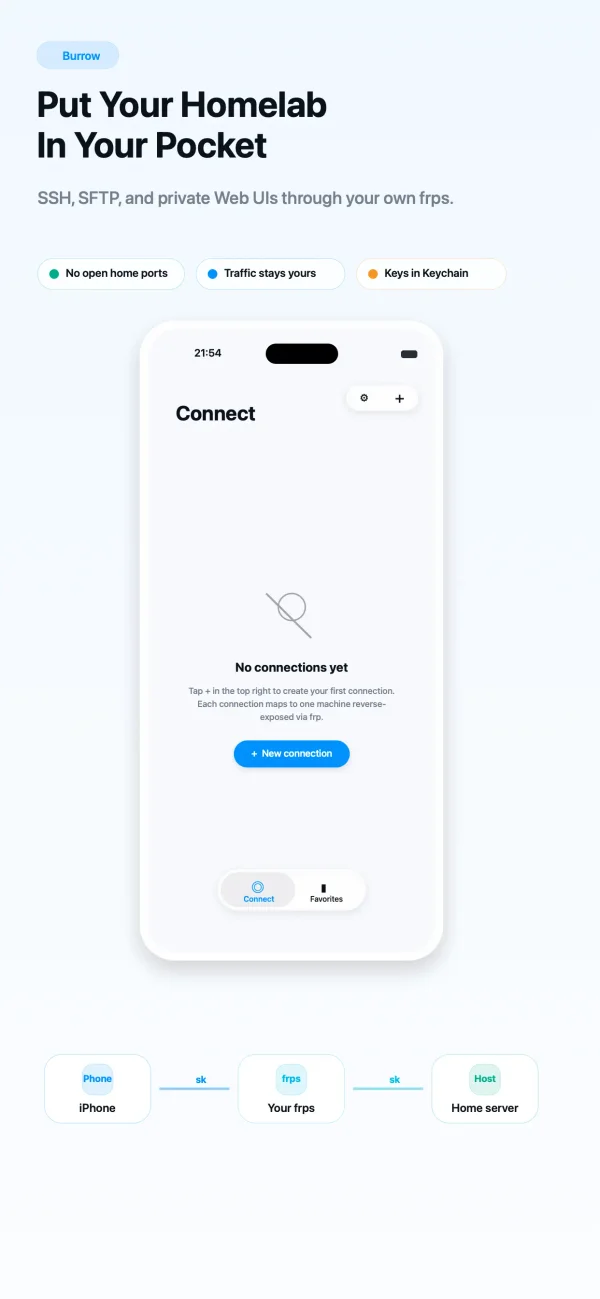
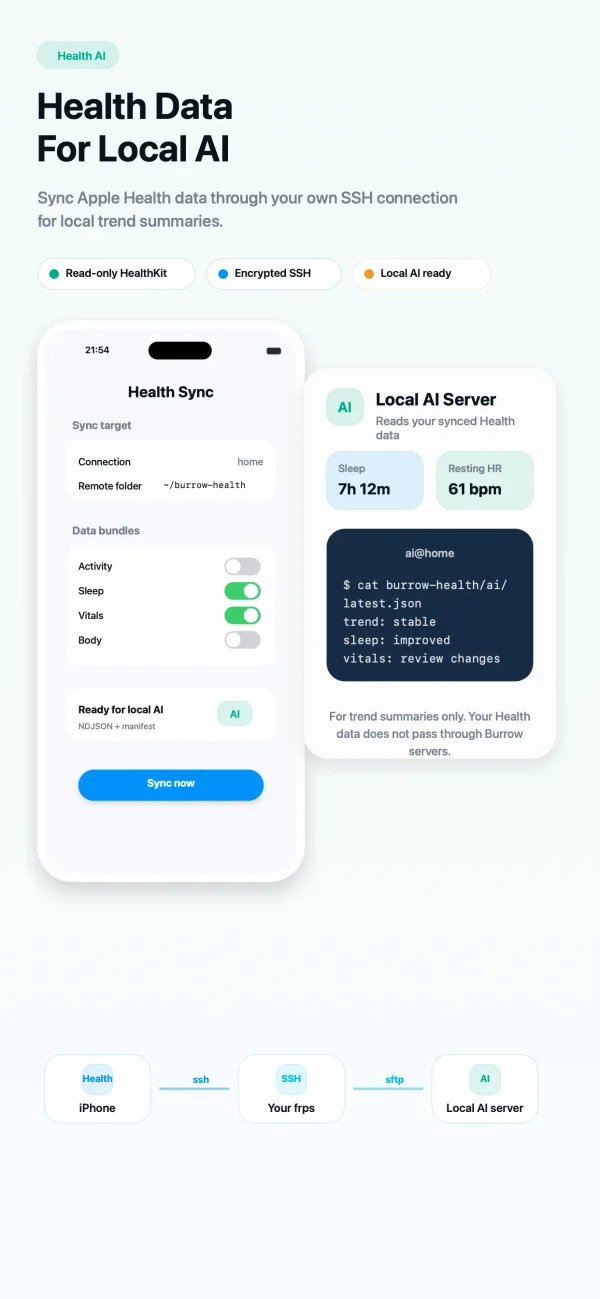
Burrow is a frp client built for developers and homelab tinkerers. It lets you securely connect from your phone to your own Mac, Linux, NAS, or GPU machine at home, and keep doing the things you would normally do in front of a computer.
[Why Burrow]
The local AI agent era is here. You might be running Claude Code, Cursor agents, local LLMs, Stable Diffusion, or other self-hosted services on a workstation, Mac mini, or NAS at home. When you are out, you want to use your phone to check progress, tweak configs, transfer files, run maintenance scripts.
Exposing ports directly to the public internet is dangerous. Commercial remote-desktop tools route your traffic through their servers.
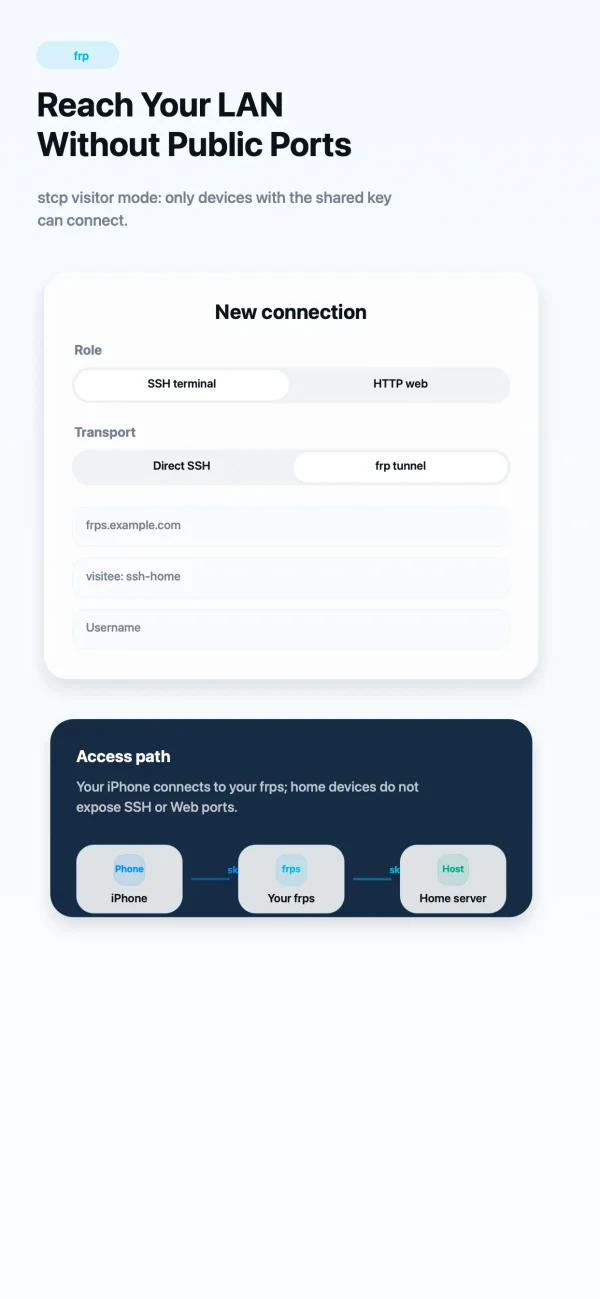
Burrow uses frp's stcp visitor mode:
- End-to-end encrypted; the key stays only between you and your devices
- No public ports exposed on your home machines
- All traffic flows only through your own frps server, with no third-party relay
- We cannot, and never will, see any of your data
[Three access modes]
1. Shell (PTY terminal)
A full SSH terminal with support for vim, htop, tmux, color output, and ANSI escapes.
Password and public-key authentication.
Built-in favorites and runbooks: pin commands like "restart service", "tail logs", or "kick off training run", and execute them in one tap.
2. SFTP (file browser)
Browse the remote filesystem by directory. Upload, download, rename, delete.
Useful for pulling trained model weights, generated images, or logs back to your phone.
3. HTTP (in-app browser)
A built-in WebView for accessing intranet web services: Jupyter, Open WebUI, Home Assistant, Grafana, the frps dashboard, your router admin page, self-hosted photo libraries, and so on.
Self-signed certificate trust supported.
[Who Burrow is for]
- People running AI agents, local LLMs, or self-hosted services at home who need safe remote access
- Developers who want to do server ops, check logs, or run scripts from their phone
- Homelab enthusiasts and self-hosters who already run their own frps and at least one Linux or macOS machine
[Who it is not for]
- Users who want zero-config, install-and-go (you need to understand frp configuration)
- Anyone needing graphical remote desktop (Burrow only does command line, files, and web)
- Anyone expecting the app to run continuously in the background (limited by iOS foreground model)
[What you need before starting]
1. A frps server you have deployed (a VPS, or another machine on your network)
2. A frpc daemon already running on the home machine you want to reach, with an stcp-type proxy configured
3. The same sk (shared key) on both sides
4. SSH enabled on the remote if you want shell, or a web service running if you want HTTP
The "User Guide" section inside the app has a full getting-started walkthrough with example configs.
[Privacy]
Burrow does not collect any user data.
All connection configurations (addresses, passwords, keys) are stored only on your device, in the iOS Keychain.
No accounts. No login. No analytics. No third-party SDKs.
[Feedback]
This is the work of a solo developer. There is a feedback channel at the bottom of the in-app User Guide. If something does not work for you, please tell me.
Neue Funktionen
Version 1.05 · 15.06.2026
This update focuses on a smoother tmux experience.
What is tmux?
tmux is a "terminal multiplexer": it keeps your session running in the background on the server. Lock your phone, switch apps, or drop and reconnect—your shell and running commands stay alive, right where you left them. With Burrow, it gives your remote terminal a "never lose your session" safety net.
What's new
• Swipe to scroll history: in full-screen programs like tmux and Claude Code, you can now swipe up/down with one finger to browse past output (previously you couldn't scroll here at all). Up for older, down for newer.
• New toggle: Settings → Terminal → "tmux mouse scrolling", on by default; turn it off anytime to restore native long-press selection.
• Applied automatically when you enter a tmux session—no manual setup.
Thanks for using Burrow. Send any questions or feedback to freezing.myfriend@gmail.com
App-Datenschutz
Was 鑫 姜 im App Store zum Umgang dieser App mit Daten angibt.
-
Keine Daten erfasst
Der Entwickler erfasst keine Daten von dieser App.
Die Datenschutzpraktiken können variieren, zum Beispiel je nach den von Ihnen verwendeten Funktionen oder Ihrem Alter.
Informationen
- Anbieter
- 鑫 姜
- Kategorie
- Dienstprogramme
- Version
- 1.05
- Aktualisiert
- 15.06.2026
- Veröffentlicht
- 06.05.2026
- Größe
- 45,2 MB
- Erfordert
- iOS 17.0 oder neuer
- Altersfreigabe
- 9+
- Preis
- Kostenlos
- In-App-Käufe
- Ja
- Sprachen
- Englisch, Französisch, Deutsch, Japanisch, Koreanisch, Vereinf. Chinesisch
- Copyright
- © 2026 Xin Jiang
Das könnte Ihnen auch gefallen
-
 LookOnceDienstprogramme
-
 Onefeed!Dienstprogramme
-
 PureWatermark: Photo ProtectDienstprogramme
-
 数字遗产 - 正版Dienstprogramme
-
 Sprach Erinnerung WeckerAlarme mit eigener Stimme
-
 Screen Share CastNowDienstprogramme
-
 Text Scanner AI: OCR & ScanDienstprogramme
-
 PIN VAULT - Secure PasswordsDienstprogramme
-
 GenPad: Phone Number GeneratorDienstprogramme
-
 Einheiten Umrechner -KostenlosWährung Länge Gewicht Fläche