
Doğru Cevap
Create Exams, Scan & Grade!
Entwickelt für iPhone, iPad, iPod touch
Kostenlos
- Altersfreigabe4+
- KategorieBildung
- EntwicklerMUMIN FERHAT KONDAKCI
- SprachenEnglisch+ 1 weitere
- Größe62,8 MB
Verlinkt auf die offizielle App Store-Seite
Download.org hostet keine Datei von Doğru Cevap. Die Schaltfläche öffnet die App-Seite bei App Store, wo MUMIN FERHAT KONDAKCI die App veröffentlicht. Eintrag zuletzt geprüft am 23.11.2026.
Screenshots

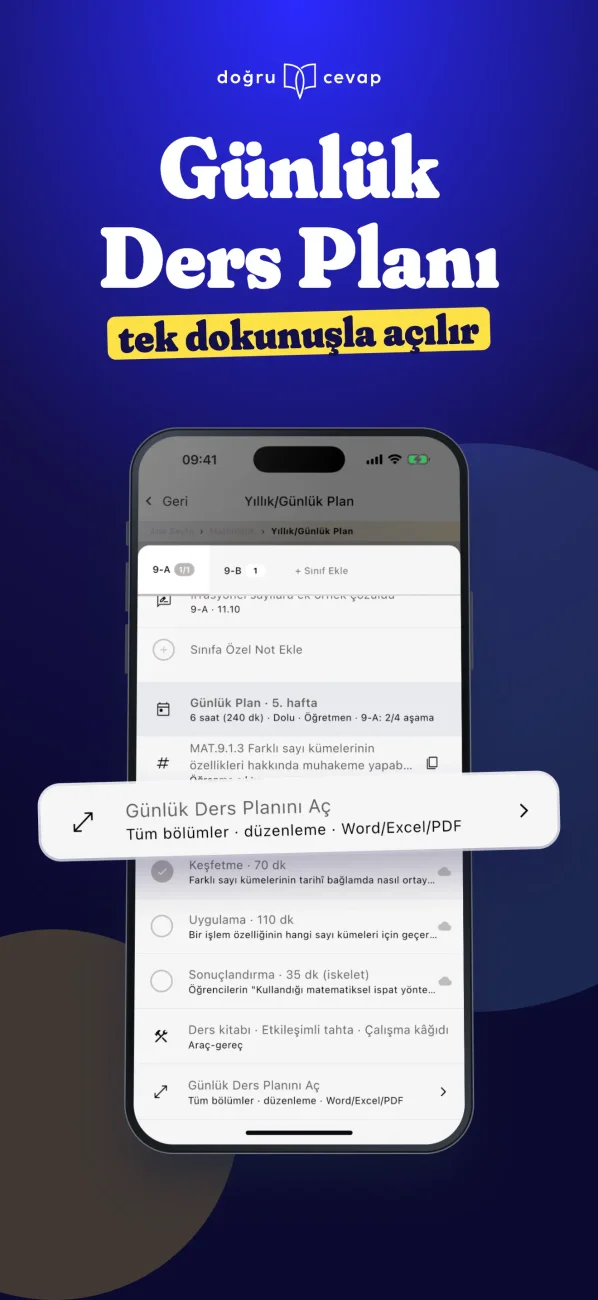


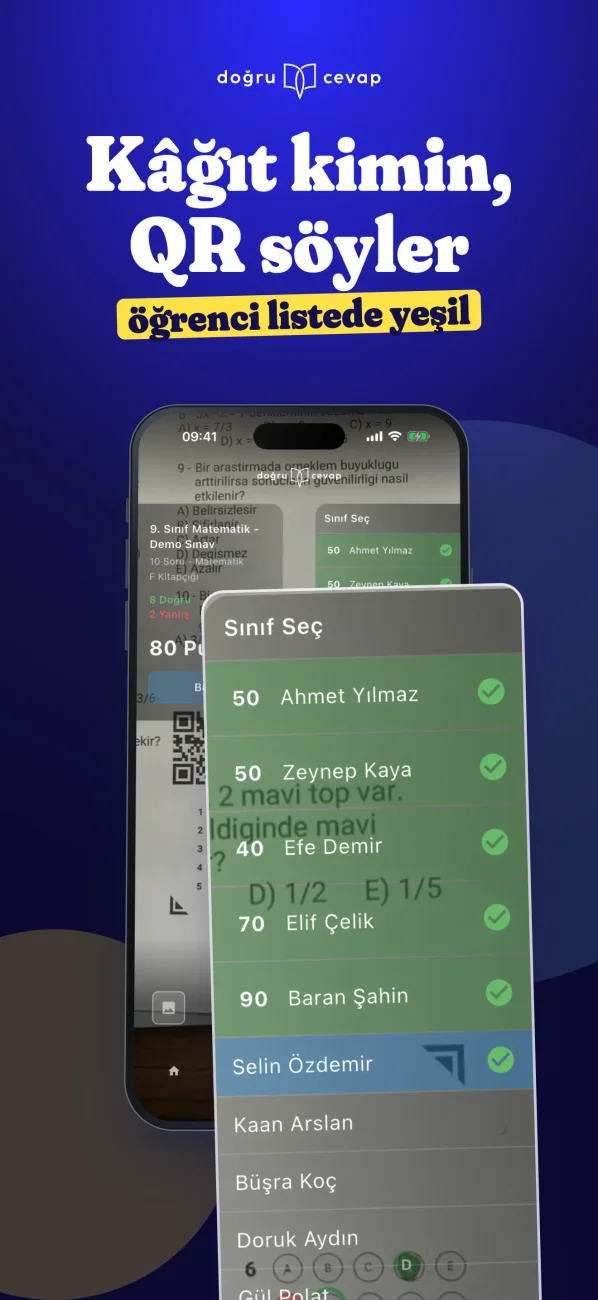

Info
Der Entwickler hat diesen Text nicht in Ihrer Sprache bereitgestellt.
Doğru Cevap is an education platform where teachers manage their entire teaching workflow — take lesson notes, create questions, scan exams and track student progress.
SCAN WITH YOUR CAMERA
Instantly scan optical answer sheets using your phone camera. The on-device optical reading engine works completely offline, delivering results in seconds. A core feature since the very first version.
LESSON NOTES & QUESTION CREATION
- Add questions on the fly as ideas come to you during class
- Photograph your hand-drawn question graphics and convert them into questions
- Build exams based on your lesson notes
- Every question is linked to a topic and learning outcome, so student progress tracking is automatic
CLASS & TOPIC TRACKING
- Track which topics you have covered in each class separately
- See which classes are falling behind on which subjects
- Per-class topic progress overview
GENERATE EXAMS WITH AI
- Pick the lesson, term and topic scope, and let questions be created for you
- You set the difficulty level and the number of questions
- Questions are grounded in the national curriculum; the term and exam you pick scope them to the matching part of the textbook
- Generation runs in the background — questions appear one by one as they are produced
- Generated questions open in the normal question editor, ready for you to edit
INSTANT EXAM RESULTS
- Scores are assigned to students immediately after scanning
- Student score tables and class rankings
- Question-level success analysis and learning outcome evaluation
- Class averages and statistics
QUESTION BANK & SHARED TEACHER POOL
- Thousands of curriculum-aligned ready-made questions
- Filter by topic and learning outcome
- Teachers who teach the same subject can share questions and build a common pool
- Use shared pool questions in your own exams
RESULT NOTIFICATIONS
- Share exam results, weak topics and development insights with students and parents via email
- Topic-based gap reports are generated automatically since every question is linked to its subject
ANNUAL LESSON PLANS
- Create curriculum-aligned annual lesson plans
- Integration with Doğru Plan Oluşturucu (dogru.app)
- Unit and learning outcome based planning
APPLE WATCH
- This week's topic and daily plan stages on your wrist; swipe between weeks
- Tick the topic and stages from your watch; they sync with the plan on your iPhone
ROADMAP
- MEBBİS Integration (September 2026): Improvements to speed up entering student grades into the MEBBİS system.
- Read Exams from Paper, OCR (October 2026): Photograph the question sheet and answer key you wrote by hand; the app reads your handwriting and turns it into an exam. Students' open-ended answer sheets are read and graded from the camera the same way — the whole classic written exam runs from your phone, with no optical forms to print.
- v4.5 — Live Class Quizzes (February 2027): Create instant mini quizzes from the topics you have just covered in class and push them straight to your students' phones. Answers come back to you in real time, and you can track learning progress per student and topic live.
PREVIOUS VERSIONS
- v4.0 — Apple Watch app
- v3.5 — Generate Exam with AI, full version (curriculum-grounded, streamed live); automatic sign-in on saved devices; App Lock with Face ID, Touch ID or fingerprint; exam question preview and scoring
- v3.3.5 — Generate Exam with AI preview; grade and school type in lesson names; exams taken shown in student detail
- v3.0 — AI bots improved release @ 2026
- v2.0 — Full rewrite (NestJS + Flutter) @ 2024
- v1.0 — Unreleased version after MEB banned multiple-choice exams @ 2023
SPECIAL THANKS TO CONTRIBUTORS
We would like to thank the following people for their contributions to the development of this app:
- Taylan Yıldız — @taylanyildiz (GitHub)
- Yasin Korkmaz — @yasinkorkmaz.dev (Medium)
- Semih Yıldırım — @semihyildie (LinkedIn)
- Ahmet Ayhan — @ahmetayhanTR (GitHub)
Web version: dogru.app
Neue Funktionen
Version 4.1.6 · 20.11.2026
v4.1.6
• While writing a question, tapping anywhere in the box starts typing; the whole image column opens image upload (choices and solution too)
• The "close" button above the keyboard now also closes the keyboard
• Superscript (x²), subscript (H₂O) and strikethrough while writing questions; printed correctly on the exam paper
App-Datenschutz
Was MUMIN FERHAT KONDAKCI im App Store zum Umgang dieser App mit Daten angibt.
-
Daten, die zum Tracking Ihrer Person verwendet werden
Können verwendet werden, um Sie über Apps und Websites anderer Unternehmen hinweg zu verfolgen.
- Kennungen
-
Mit Ihnen verknüpfte Daten
Können erfasst und mit Ihrer Identität verknüpft werden.
- Kontaktinformationen
- Benutzerinhalte
- Kennungen
- Nutzungsdaten
- Diagnose
- Sonstige Daten
-
Nicht mit Ihnen verknüpfte Daten
Können erfasst werden, sind aber nicht mit Ihrer Identität verknüpft.
- Standort
Die Datenschutzpraktiken können variieren, zum Beispiel je nach den von Ihnen verwendeten Funktionen oder Ihrem Alter.
Informationen
- Anbieter
- MUMIN FERHAT KONDAKCI
- Kategorie
- Bildung
- Version
- 4.1.6
- Aktualisiert
- 20.11.2026
- Veröffentlicht
- 15.03.2026
- Größe
- 62,8 MB
- Erfordert
- iOS 15.0 oder neuer
- Altersfreigabe
- 4+
- Preis
- Kostenlos
- Sprachen
- Englisch, Türkisch
- Copyright
- © 2026 Ferhat Kondakci
Das könnte Ihnen auch gefallen
-
 YKS GeyikBildung
-
 2-8. Sınıf LGS İngilizce TestBildung
-
 Doğru Cevap AsistanBildung
-
 8. Sınıf Test Çöz Tüm DerslerBildung
-
 7. Sınıf Test Çöz Tüm DerslerBildung
-
 Sinavify: YKS 2027 HazırlıkBildung
-
 YOS Exam — YÖS MathsBildung
-
 DKAB AGS DHBT: Soru BankasıBildung
-
 Madlen Teacher: Plan & MarkBildung
-
 Dijital Öğretmen ProBildung