EqualSet
Calculate a set equal to 1RM
Entwickelt für iPhone, iPad, iPod touch
Kostenlos
- Altersfreigabe4+
- KategorieGesundheit und Fitness
- EntwicklerThomas Dalke
- SprachenEnglisch
- Größe17,1 MB
Verlinkt auf die offizielle App Store-Seite
Download.org hostet keine Datei von EqualSet. Die Schaltfläche öffnet die App-Seite bei App Store, wo Thomas Dalke die App veröffentlicht. Eintrag zuletzt geprüft am 20.11.2026.
Screenshots


Info
Der Entwickler hat diesen Text nicht in Ihrer Sprache bereitgestellt.
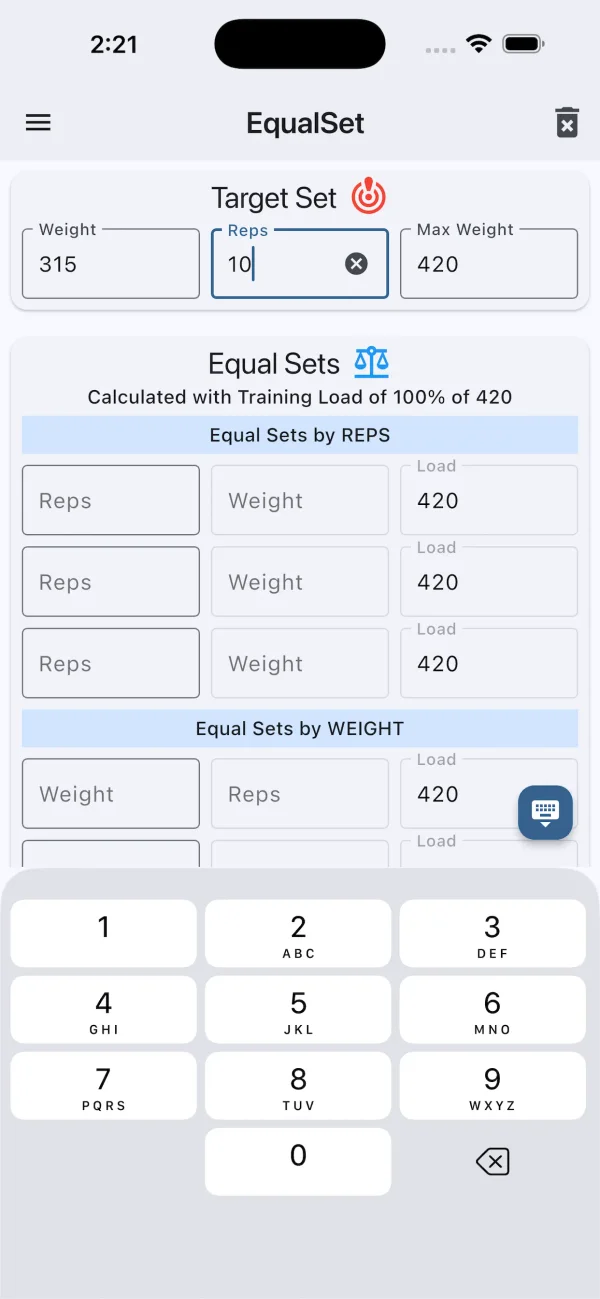
EqualSet is used to calculate a One Repetition Maximum (1RM) Target (from either direct input of the maximum weight, for by entering a Target Set (Weight and Reps)). And from the 1RM, the app will calculate sets that are equal to the 1RM, or Training Load percentage.
Usage
Target Set:
1.) Either enter the Target Set -> One Rep Max or enter the set that will be used to calculate the One Rep Max.
a.) If the Weight and Reps are entered in the Target Set, the One Rep Max will be calculated.
b.) If the One Rep Max is entered directly in the Target Set, the Weight will equal the One Rep Max, and the Reps will equal 1.
Equal Sets:
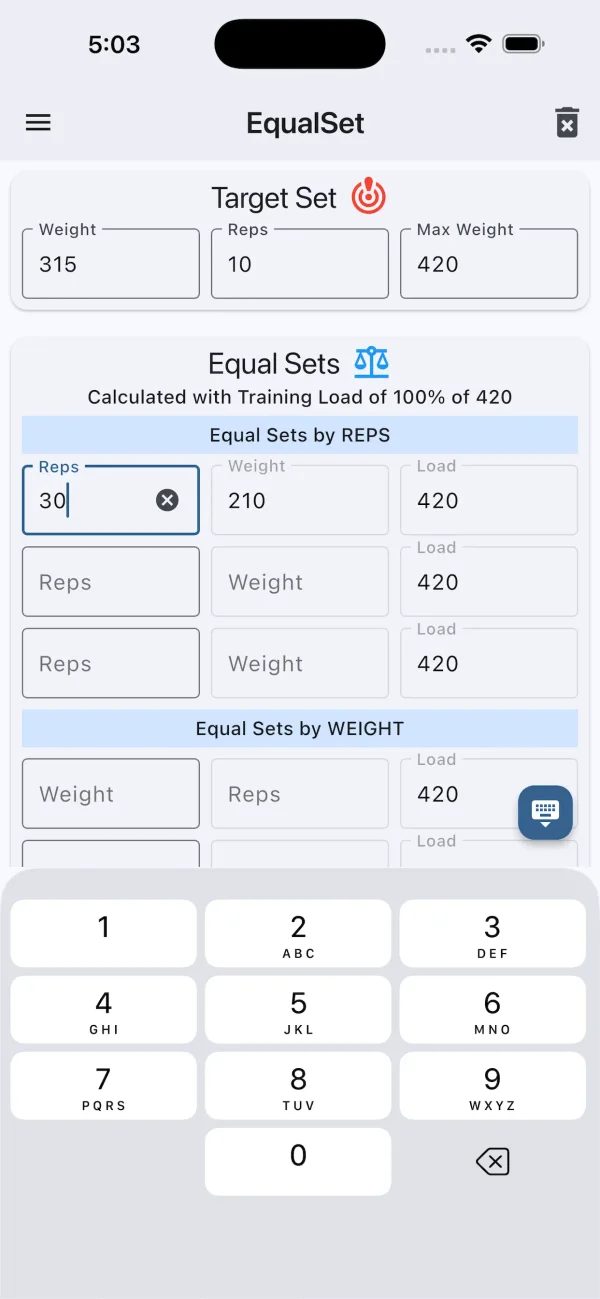
1.) If "Reps" are entered, the "Weight" will be calculated to use to equal the Equal Sets -> Load.
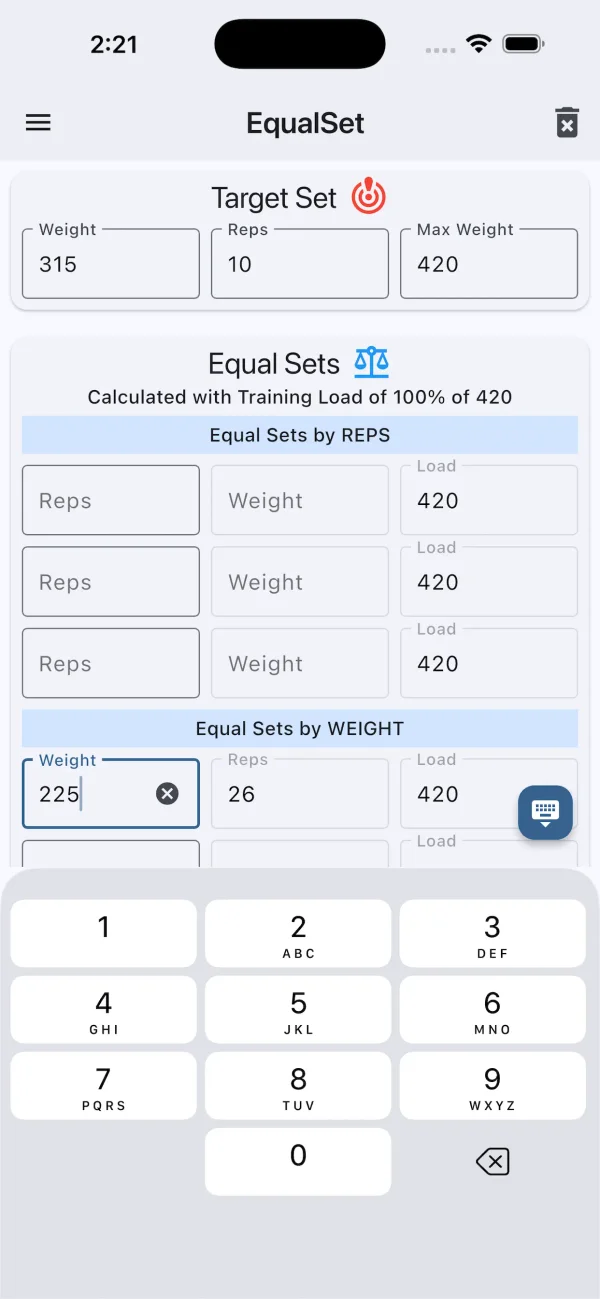
2.) If "Weight" is entered, then the "Reps" will be calculated that are needed to equal the Equal Sets -> Load.
a.) If the Weight is more than the Equal Sets -> Load, or the calculated Reps is less than 1 or more than 99, the Reps will show "NA". The Reps will display a valid number after the Weight has been adjusted.
Training Load Chart:
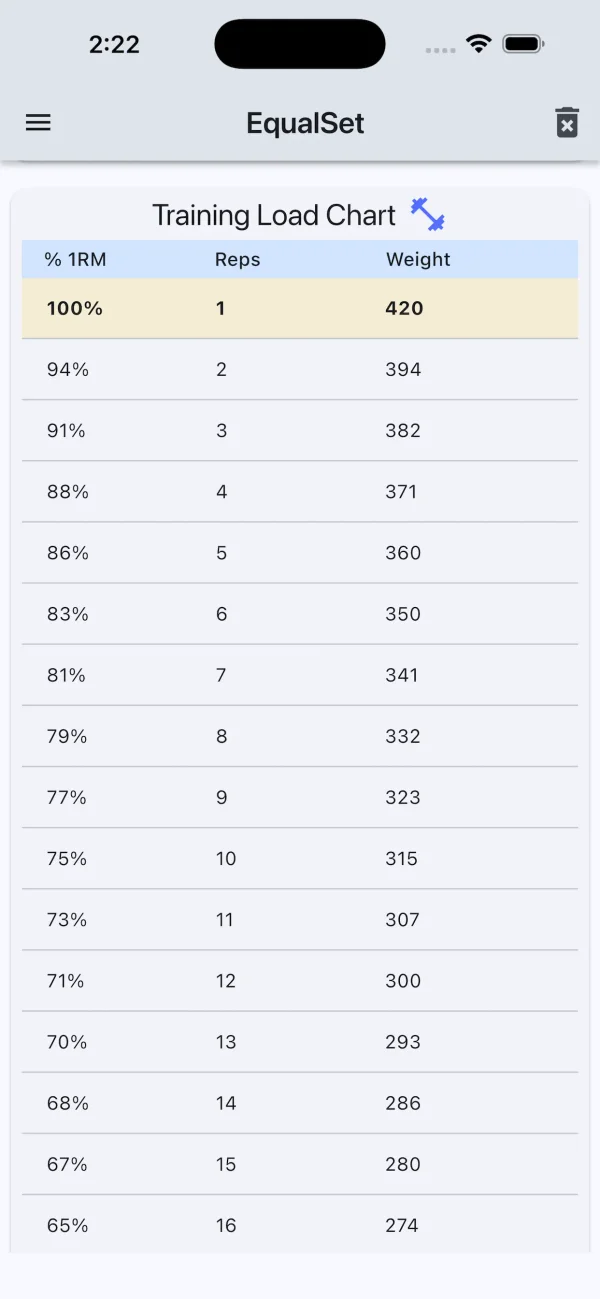
1.) After the "Target Set" is entered and the 1RM is calculated, a "Training Load Chart" will be generated in the bottom part of the screen.
2.) The "Training Load Chart" will display the Percent (% 1RM), Reps, and Weight of the Target Set -> One Rep Max.
a.) The table will display the % 1RM, Reps, and Weight for up to 20 Reps, or 60% of the Training Load.
3.) If you are wanting to do a workout less than 100% (e.g. ~91%) then you would select the row in the Training Load Chart that contains 91% in the % 1RM.
a.) Click on the 91% row and it set the Weight in that row to the Equal Sets -> Load and and recalculate the the calculated Equal Sets (Reps and Weight).
Example Usage:
You are going to do a bench press workout but don't want to do a max workout. You decide to make it a lite day and do a 70% workout.
You know your max is 420, so you enter 420 in the Target Set -> One Rep Max.
You look up the the row in the Training Load Chart for a % 1RM of 70% and select the row.
The weight of 293 for the selected row will appear in the Equal Sets -> Load and the Equal Sets are recalculated (Reps and Weight)
If you are doing 20 Reps or less, you could just use the updated Training Load Chart to see the Weight and Reps you need to lift to equal the Target Set -> One Rep Max, but if you want to do more than 20 reps, or you want to use a weight that is not listed in the Training Load Chart, you would enter those values in the Equal Sets fields to calculate an equivalent set.
For example, you want to do a set with 30 Reps. Enter 30 into Equal Sets -> Reps and it will calculate a Weight of 147. Well that is an odd weight and you know that you have the correct bar and plate combinations for 150, or the machine has a setting for 150, so enter 150 into the Equal Sets -> Weight and it will tell you that you need to do 29 Reps to equal the Equal Sets -> Load of 293, which in turn is 70% of the Target Set -> One Rep Max.
I have used this approach (equal sets) along with lifting to failure for many years and I am still getting stronger!
Neue Funktionen
Version 1.1.0 · 04.03.2026
Added Settings page to allow for choosing display mode (System, Light, or Dark) and to automatically select all text with a text field gains focus.
Add two additional rows to the Equal Sets by Reps and Equal Sets by Weight calculations
App-Datenschutz
Was Thomas Dalke im App Store zum Umgang dieser App mit Daten angibt.
-
Keine Daten erfasst
Der Entwickler erfasst keine Daten von dieser App.
Die Datenschutzpraktiken können variieren, zum Beispiel je nach den von Ihnen verwendeten Funktionen oder Ihrem Alter.
Informationen
- Anbieter
- Thomas Dalke
- Kategorie
- Gesundheit und Fitness
- Version
- 1.1.0
- Aktualisiert
- 04.03.2026
- Veröffentlicht
- 28.01.2026
- Größe
- 17,1 MB
- Erfordert
- iOS 13.0 oder neuer
- Altersfreigabe
- 4+
- Preis
- Kostenlos
- Sprachen
- Englisch
- Copyright
- © 2026 Thomas B. Dalke All Rights Reserved.
Das könnte Ihnen auch gefallen
-
 Vita Bella HealthGesundheit und Fitness
-
 EarplugGesundheit und Fitness
-
 1RM RechnerMaximalkraft mit RPE berechnen
-
 Muskelaufbau Trainingsplan AppKrafttraining im Fitnessstudio
-
 calorie.ai - Calorie TrackerGesundheit und Fitness
-
 VitafitGesundheit und Fitness
-
 Google Health (Fitbit)Persönlicher Gesundheitscoach