Front & Back Video Dual Camera
Split Screen Selfie & Reaction
Entwickelt für iPhone
Kostenlos
- Altersfreigabe4+
- KategorieFoto und Video
- EntwicklerMasaharu Tsukamoto
- SprachenEnglisch
- Größe5,7 MB
Verlinkt auf die offizielle App Store-Seite
Download.org hostet keine Datei von Front & Back Video Dual Camera. Die Schaltfläche öffnet die App-Seite bei App Store, wo Masaharu Tsukamoto die App veröffentlicht. Eintrag zuletzt geprüft am 29.11.2026.
Screenshots
Info
Der Entwickler hat diesen Text nicht in Ihrer Sprache bereitgestellt.
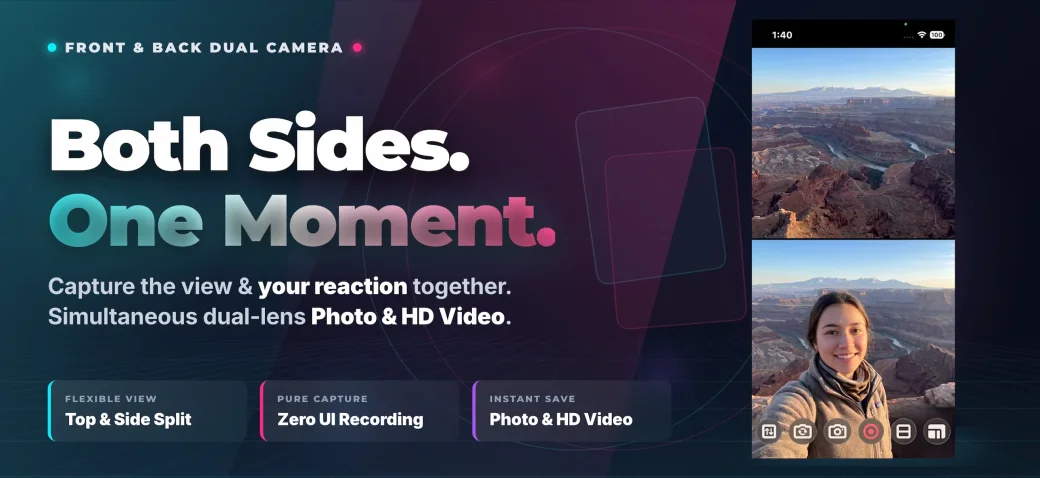
Capture the view in front of you and your genuine reaction at the exact same time.
No editing required—record split-screen videos and photos ready to post straight to your feed.
Turn every moment into a two-sided story with a single tap.
Whether you are screaming your heart out at a live concert, exploring a new city on vacation, unboxing a haul, or capturing spontaneous laughs with friends, you never have to choose between filming the scene or filming yourself. By running your front and rear cameras simultaneously in one unified frame, you can save and share authentic, ready-to-post dual-view videos and photos the second you finish shooting—no tedious multi-track video editing needed. It is built for daily vlogs, short-form social clips, reaction videos, and candid everyday memories.
Everything you need is clean, fast, and intuitive:
• Simultaneous front and back video recording with audio
• Dual-view photo capture combining both cameras into one image
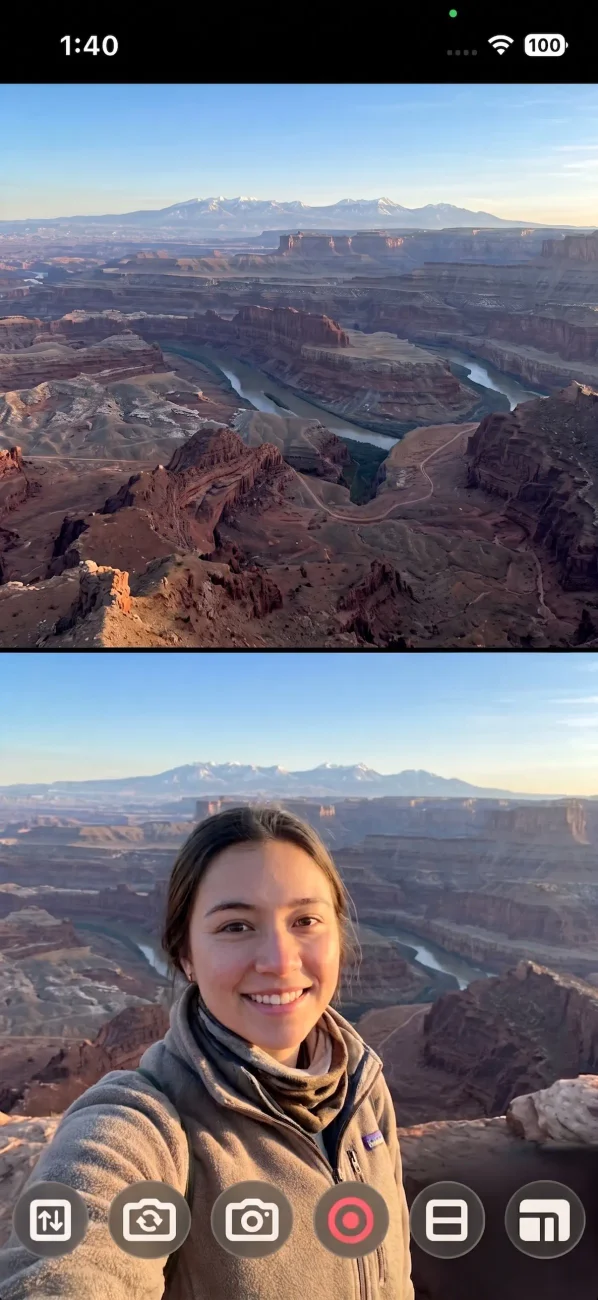
• Top-and-bottom or side-by-side split-screen layout switching
• Instant camera position swapping
• Front camera mirror mode toggle
• Full-bleed fill or uncropped fit aspect ratio switching
• Automatic saving of your preferred screen layout settings
Skip the complicated setup and editing timeline. Open the camera and start sharing both sides of your story right away.
How to Use Each Feature
• Simultaneous Front & Back Video Recording (with Audio)
Tap the red record button in the bottom toolbar to start filming. All on-screen buttons and bars automatically hide while recording so your video stays completely clean with zero UI clutter. To stop recording, press and hold anywhere on the screen for about 1.2 seconds until the center progress bar fills up. Once finished, the preview player opens automatically where you can tap the top-right share icon to save or post your MP4 video.
• Simultaneous Photo Capture
Tap the camera icon in the center of the toolbar to snap a photo of your current two-camera layout. Even when shooting in uncropped fit mode, any black borders are automatically trimmed away for a clean finish. Your photo opens immediately in the preview screen, ready to save or share via the top-right share button.
• Top/Bottom & Side-by-Side Layout Switching
Tap the split-screen icon on the right side of the toolbar to toggle instantly between a vertical (top-and-bottom) stack and a horizontal (side-by-side) layout.
• Swapping Camera Positions
Tap the up-and-down arrow icon on the far left of the toolbar to swap which camera appears on top/bottom or left/right.
• Front Camera Mirror Toggle
Tap the camera rotate icon (second from the left on the toolbar) to turn horizontal mirroring on or off for your front-facing camera.
• Aspect Ratio Switching (Fill vs. Fit)
Tap the aspect ratio icon on the far right of the toolbar to switch between filling the entire frame edge-to-edge or viewing the full uncropped field of view of both lenses. Your layout, swap, mirror, and aspect settings are saved automatically for your next session.
• Removing Banner Ads
Tap "Remove Ads" in the top-left corner of the screen and watch a short rewarded video ad to hide the banner ad.
Note: Requires an iOS device that supports simultaneous front and back camera capture (MultiCam). Please allow camera and microphone permissions when launching the app for the first time.
Neue Funktionen
Version 1.0.1 · 28.11.2026
Fixed minor bugs.
App-Datenschutz
Was Masaharu Tsukamoto im App Store zum Umgang dieser App mit Daten angibt.
-
Daten, die zum Tracking Ihrer Person verwendet werden
Können verwendet werden, um Sie über Apps und Websites anderer Unternehmen hinweg zu verfolgen.
- Nutzungsdaten
-
Nicht mit Ihnen verknüpfte Daten
Können erfasst werden, sind aber nicht mit Ihrer Identität verknüpft.
- Nutzungsdaten
Die Datenschutzpraktiken können variieren, zum Beispiel je nach den von Ihnen verwendeten Funktionen oder Ihrem Alter.
Informationen
- Anbieter
- Masaharu Tsukamoto
- Kategorie
- Foto und Video
- Version
- 1.0.1
- Aktualisiert
- 28.11.2026
- Veröffentlicht
- 19.09.2026
- Größe
- 5,7 MB
- Erfordert
- iOS 17.0 oder neuer
- Altersfreigabe
- 4+
- Preis
- Kostenlos
- Sprachen
- Englisch
- Copyright
- © 2026 Axe1lyze
Das könnte Ihnen auch gefallen
-
 FlexiDual: DualkameraVorn und hinten mit PiP
-
 Tongkuang - Dual Camera VideoFoto und Video
-
 DualFrame Camera - TwinCropFoto und Video
-
 PRISM - Dual-KameraMulticam & Teleprompter
-
 Dual Camera ShotFoto und Video
-
 DualFrame CameraFoto und Video
-
 Dual Camera Vlog Cam - LaiLensFront & Back Multi Cam Video
-
 VIXA Dual CameraDualkamera Aufnahme
-
 DualFrame: Dual Video RecorderFoto und Video
-
 Dual Camera: Front & BackFoto und Video