
- Altersfreigabe4+
- KategorieBildung
- EntwicklerAKIHIRO OHNO
- SprachenEnglisch+ 19 weitere
- Größe14,6 MB
Fruit Timer ist bei App Store derzeit möglicherweise nicht verfügbar
Bei unserer letzten Prüfung war der Store-Eintrag nicht erreichbar. Der Link führt weiterhin zur offiziellen App Store-Seite.
Screenshots

Info
Der Entwickler hat diesen Text nicht in Ihrer Sprache bereitgestellt.
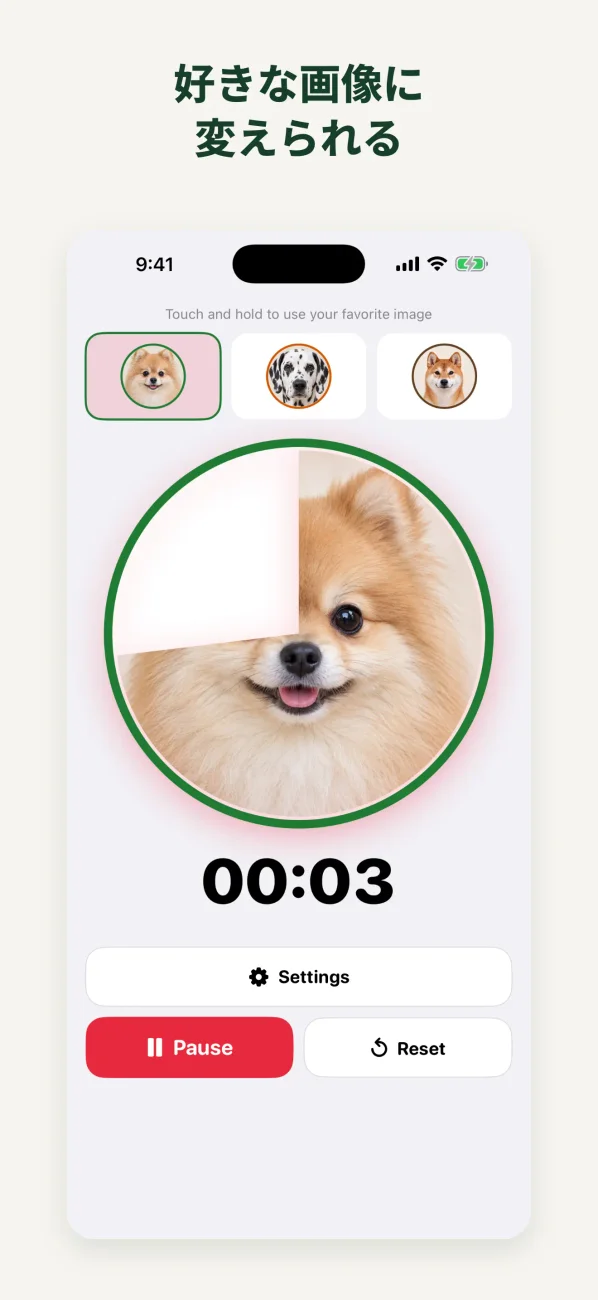
Fruit Timer is a visual countdown timer that gradually reveals an image clockwise as time passes. Follow the picture and large countdown to see how much time remains.
Choose watermelon, orange, or kiwi, use a favorite photo, or try the included Pomeranian, Dalmatian, and Shiba Inu portraits. Use it for studying, focused work, getting ready, tidying up, and taking breaks.
Tap the large time display, choose a duration, and tap Start. Switch images while the timer is running, or pause, resume, and reset whenever you need to.
Make the timer your own
• Touch and hold an image button to choose a dog portrait or a photo
• Zoom and adjust the position to fit the circular display
• Adjust a saved image again or restore the original fruit for each slot
Everyday features
• Set a duration from 1 second to 59 minutes 59 seconds
• Large remaining-time digits and a circular image that shows elapsed time
• Pause, resume, reset, and repeat the same duration
• Separate sound and vibration settings
• A local completion notification when notifications are allowed
• Live Activities with remaining time on the Lock Screen and in the Dynamic Island on supported iPhones
• An option to keep the screen awake during a timer
• On iPad and iPhone Duo, a large layout that fills the screen, with the image beside the controls in landscape
• Portrait display on iPhone; iPhone Duo also supports landscape
• An optional hiragana and katakana display mode when using Japanese
• 21 language and regional localizations
No account is required. There are no ads, in-app purchases, or subscriptions. The timer, included dog portraits, and editing of imported images work offline. Selected photos are stored in the app and are not uploaded to a developer-operated server. Your original photos are not modified.
Notifications and Live Activities depend on your device and system settings. Loading a photo from iCloud or opening store and support pages may require an internet connection.
Neue Funktionen
Version 2.1 · 12.11.2026
• A new app icon.
• On iPad and iPhone Duo, the image, time, and buttons now fill the screen. On iPad too, the image appears beside the controls in landscape.
• iPhone Duo support. Use Fruit Timer on the inner and outer displays; in landscape, the image appears beside the time and buttons.
• Images are now changed by touching and holding an image button on the main screen, which keeps Settings simpler.
App-Datenschutz
Was AKIHIRO OHNO im App Store zum Umgang dieser App mit Daten angibt.
-
Keine Daten erfasst
Der Entwickler erfasst keine Daten von dieser App.
Die Datenschutzpraktiken können variieren, zum Beispiel je nach den von Ihnen verwendeten Funktionen oder Ihrem Alter.
Informationen
- Anbieter
- AKIHIRO OHNO
- Kategorie
- Bildung
- Version
- 2.1
- Aktualisiert
- 12.11.2026
- Veröffentlicht
- 10.08.2026
- Größe
- 14,6 MB
- Erfordert
- iOS 17.0 oder neuer
- Altersfreigabe
- 4+
- Sprachen
- Englisch, Arabisch, Niederländisch, Französisch, Deutsch, Hindi, Indonesisch, Italienisch, Japanisch, Koreanisch, Polnisch, Portugiesisch + 8 weitere
- Copyright
- © 2026 AKIHIRO OHNO
Das könnte Ihnen auch gefallen
-
 Past ChicagoBildung
-
 ことばのたね - 発語を促す写真の絵カードBildung
-
 DoneTimer Morgenroutine KinderBelohnungstafel & Kinder Timer
-
 Toko! – Token BoardBildung
-
 WaCard - どこでも使える音声対応絵カードBildung
-
 BibleKey: Smart Bible AppNachschlagewerke
-
 Dot to Dot Copy PracticeBildung
-
 Kinder-Bildkarten MirumiruVisuelle Routinen für Kinder
-
 英検®1級 の英単語5000 頻出単語、熟語を効率よく暗記Bildung
-
 Crazy Kitty TapBildung