GoodReader Pro PDF Editor
PDF Annotator, File Manager
Entwickelt für iPhone, iPad
99,99 €
- Altersfreigabe4+
- KategorieProduktivität
- EntwicklerGood.iWare, Inc.
- SprachenEnglisch
- Größe53,2 MB
Verlinkt auf die offizielle App Store-Seite
Download.org hostet keine Datei von GoodReader Pro PDF Editor. Die Schaltfläche öffnet die App-Seite bei App Store, wo Good.iWare, Inc. die App veröffentlicht. Eintrag zuletzt geprüft am 12.11.2026.
Screenshots
Info
Der Entwickler hat diesen Text nicht in Ihrer Sprache bereitgestellt.
GoodReader® Pro and our famous classic GoodReader app are essentially the same app, but this one comes with Pro Pack® pre-activated, no subscription or in-app purchase needed.
First released in 2009, GoodReader® is truly a veteran of the App Store.
In the modern app business, it's not easy to stay relevant that long. We're proud to say that after 17 years and counting, we've been delivering wonderful updates with extraordinary new features. And we're going to keep doing that!
GoodReader is a perfect combination of document-reading and file-managing capabilities. It's your one-stop shop for all your document needs on your iOS device.
Use the app once, and you'll be hooked. Soon you'll be wondering how you ever managed to work without it.
-= File Reading =-
PDF, TXT, MS Office, iWork, HTML, pictures, music & audio-books, videos. This is what you can view in GoodReader, plus you can also annotate PDF files and edit TXT files.
-= PDF Reading and Annotating =-
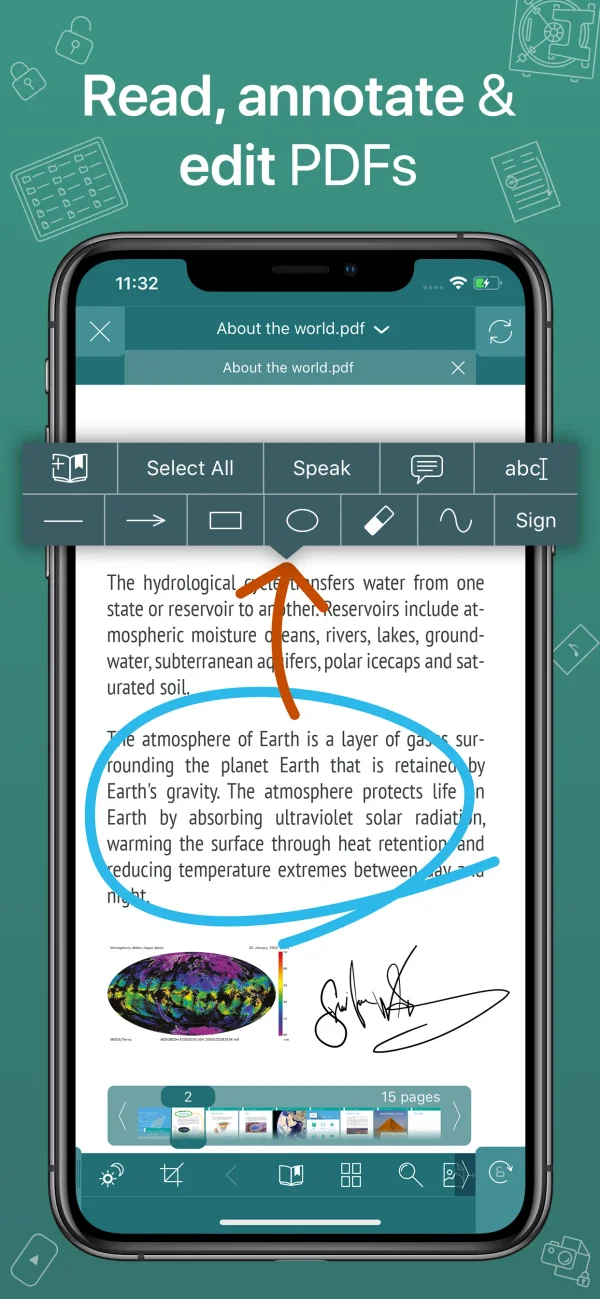
PDF files is where GoodReader truly shines. Reading experience is so superior, it's hard to describe. To rephrase one of our customers' review, "try it, and you'll see." While you're at it, give our PDF Reflow feature a try. You'll be surprised how much better PDF reading goes when you don't have to scroll left/right all the time, for every single line of text.
Annotating PDFs is another star feature of our app. Adding notes and drawings, highlighting text, and then sharing your annotated files or annotation summaries will be your main productivity and collaboration asset.
-= File Management =-
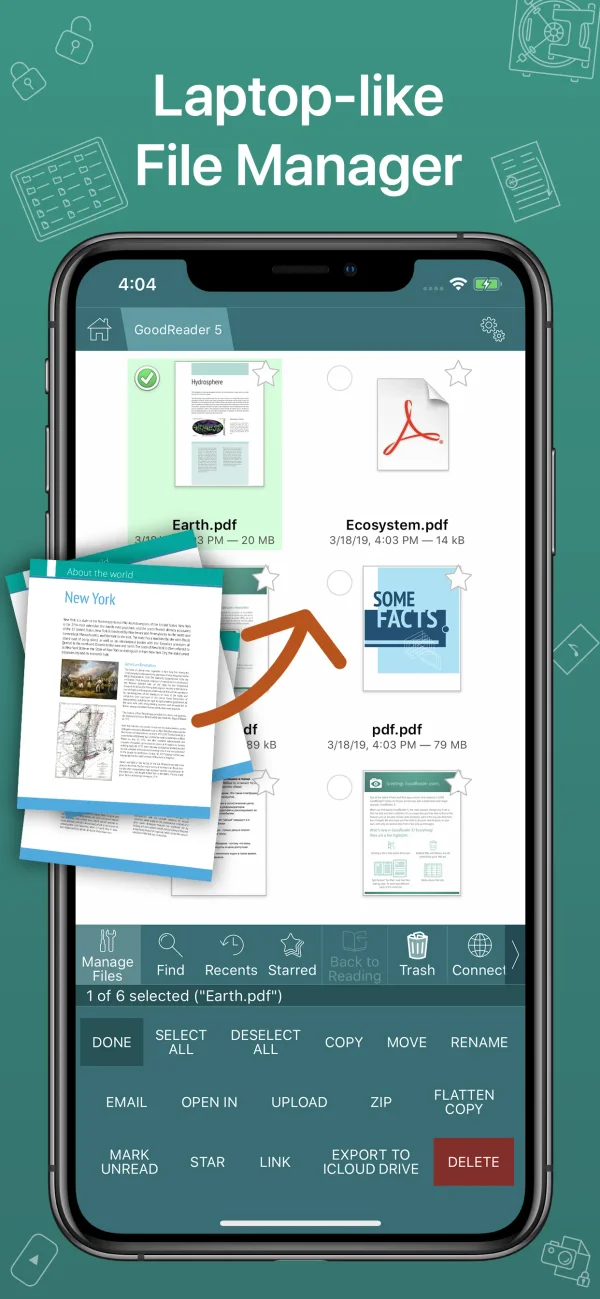
While reading files is a big part of GoodReader, it's not all it can do. It can also serve as a central hub for all your files, even those that can't be opened by GoodReader itself. It's like bringing your personal computer experience to your mobile device — easily managing huge collections of files and folders will make you forget you don't have your laptop around.
-= Connecting =-
Dropbox, OneDrive, Google Drive, Box.com, WebDAV, SMB, FTP, SFTP — these are all accessible from inside GoodReader. Download, upload, and sync individual files or huge folder collections.
-= Security =-
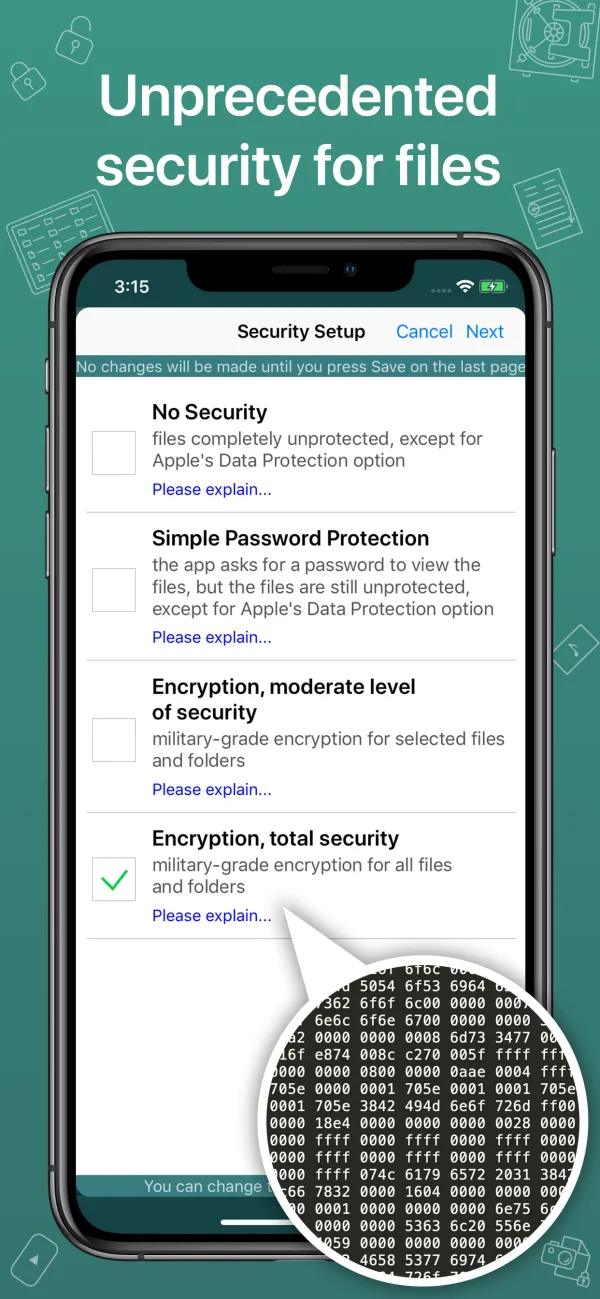
With GoodReader, your data security steps up to the level previously only dreamt of. With Pro Pack®, our new set of professional-level super-features, you'll get AES-256, a military-grade encryption, for all your data, at a price of a cup of coffee! And it's completely independent from the built-in Apple's Data Protection, so even if a hacker steals and unlocks your device, your data will still be protected by another strong layer of security, our own.
-= Multi-Windows =-
Seamlessly view and manage multiple files simultaneously on iPad.
-= Notes =-
Capture ideas and comments while reading or studying a technical document without even leaving the app. Sort and group your notes into categories.
Neue Funktionen
Version 6.0.1236 · 01.10.2026
• Fixed the bug that caused incorrect displaying of PDF Outlines (Table of Contents).
Was New in 6.0:
GoodReader 6 is here! Explore our powerful new features and workflow enhancements:
• MULTI-WINDOW SUPPORT: Seamlessly view and manage multiple files simultaneously on iPad.
• INTUITIVE DRAG-AND-DROP: Move files and folders into and out of the app instantly. Skip the Import from Files dialog—just drag a downloaded file directly into GoodReader.
• MAC COMPATIBILITY: Enjoy the full GoodReader experience on your Mac.
• PDF ANNOTATIONS: Undo/Redo and Copy/Paste capabilities for effortless editing.
• INTRODUCING NOTES: Capture ideas and comments instantly without ever leaving your document. Organize your thoughts into categories, and use Widgets or Shortcuts for instant, one-tap access.
• TEXT FORMAT STRIPPER: Automatically strip rich text formatting from Pasteboard. Turn web clips into plain text suitable for emails.
• PDF HYPERLINKS: Create tappable PDF links to web pages or local files. Supports standard URL schemes (http, https, mailto, file).
• GOOGLE DRIVE UPGRADES: Sync files and folders directly from your "Shared with Me" section.
• ENHANCED FILE TABS: Starred files now display their specific color tags on your tabs.
• BOOKMARK & OUTLINE SEARCH: Quickly find exactly what you need within your Bookmarks and PDF Outlines.
We’ve also included countless minor improvements and performance optimizations. Enjoy!
App-Datenschutz
Was Good.iWare, Inc. im App Store zum Umgang dieser App mit Daten angibt.
-
Nicht mit Ihnen verknüpfte Daten
Können erfasst werden, sind aber nicht mit Ihrer Identität verknüpft.
- Nutzungsdaten
- Diagnose
Die Datenschutzpraktiken können variieren, zum Beispiel je nach den von Ihnen verwendeten Funktionen oder Ihrem Alter.
Informationen
- Anbieter
- Good.iWare, Inc.
- Kategorie
- Produktivität
- Version
- 6.0.1236
- Aktualisiert
- 01.10.2026
- Veröffentlicht
- 09.03.2019
- Größe
- 53,2 MB
- Erfordert
- iOS 17.6 oder neuer
- Altersfreigabe
- 4+
- Preis
- 99,99 €
- Sprachen
- Englisch
- Copyright
- © Good.iWare, Inc., 2009-2026. All rights reserved.
Das könnte Ihnen auch gefallen
-
 Mil Fuel CheckProduktivität
-
 FMS 737Produktivität
-
 iA WriterDie Schreibmaschine
-
 FlightSafety InternationalProduktivität
-
 Highlights: PDF Reader & NotesProduktivität
-
 PDF Pro - Lesen und BearbeitenReader, Editor und Formulare
-
 UpNote - notes, diary, journalBeautiful. Simple. Easy to use
-
 BIM 360Produktivität
-
 BluebeamPDF-Abläufe auf der Baustelle
-
 PDF Viewer by NutrientEditor: ausfüllen & signieren