HomeMapper
Smart Home Network Inventory
Entwickelt für iPhone, iPad
Kostenlos · In-App-Käufe
- Altersfreigabe4+
- KategorieDienstprogramme
- EntwicklerVault Hunters NM LLC
- SprachenEnglisch+ 7 weitere
- Größe37,2 MB
Verlinkt auf die offizielle App Store-Seite
Download.org hostet keine Datei von HomeMapper. Die Schaltfläche öffnet die App-Seite bei App Store, wo Vault Hunters NM LLC die App veröffentlicht. Eintrag zuletzt geprüft am 15.11.2026.
Screenshots
Info
Der Entwickler hat diesen Text nicht in Ihrer Sprache bereitgestellt.
Your entire smart home network. One view.
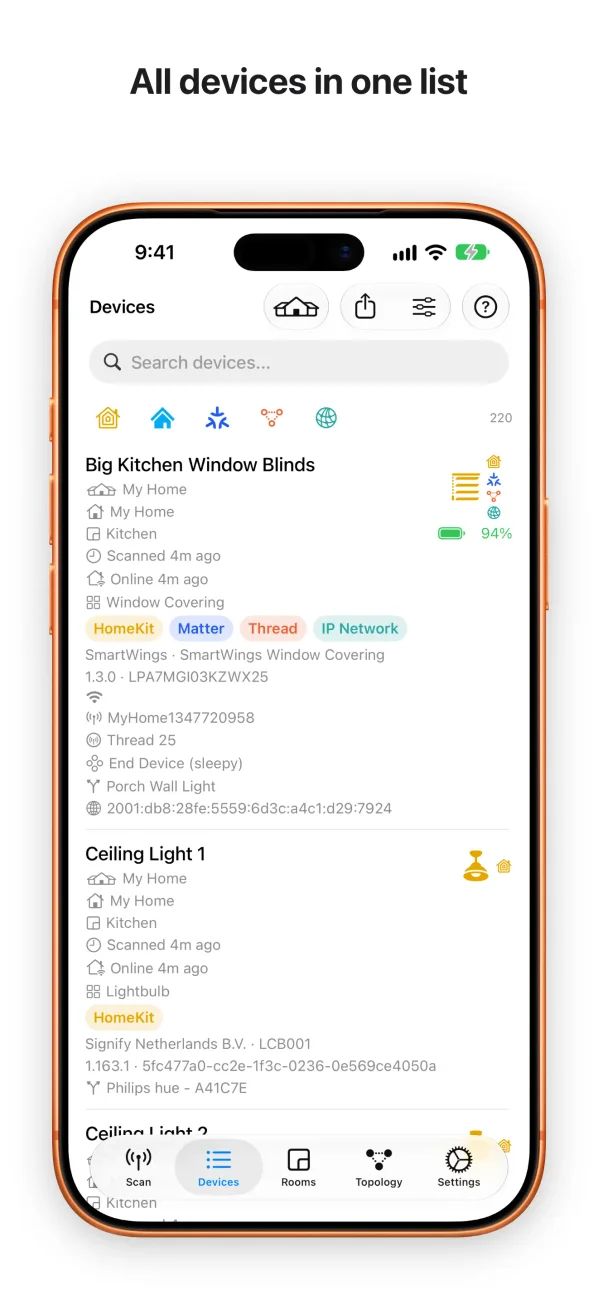
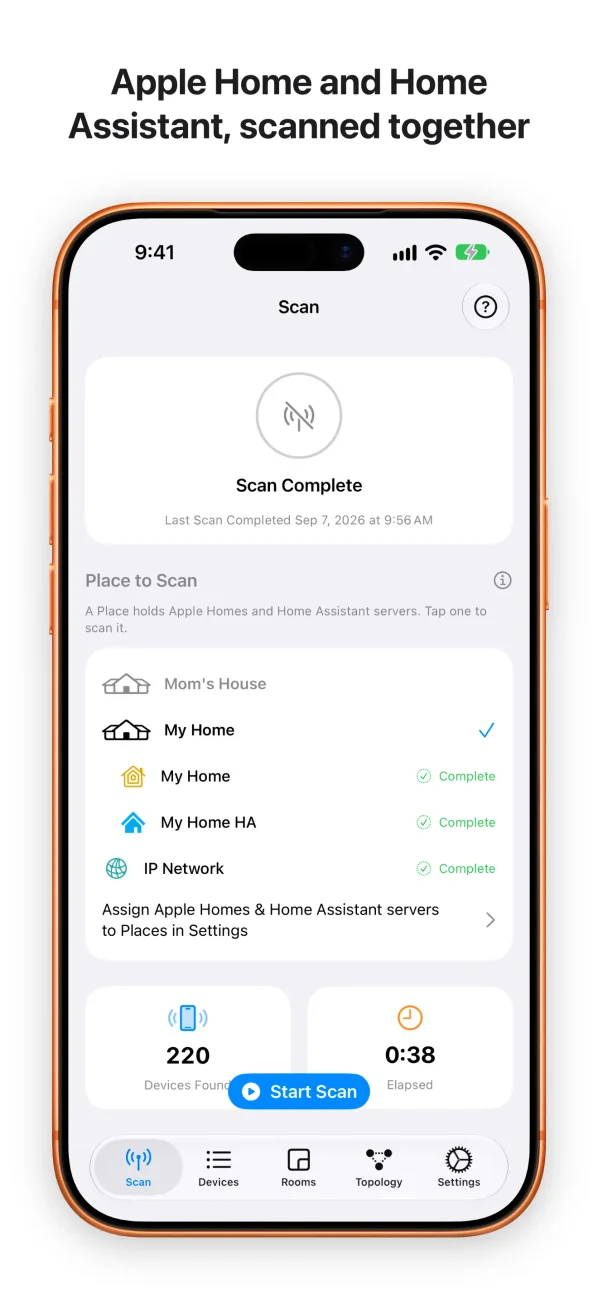
HomeMapper builds a unified inventory of every device on your network, scanning HomeKit, Home Assistant, Thread, Matter, and IP at once and correlating them by hardware identifiers.
DISCOVER
Every method runs at once:
• Apple's ecosystem. HomeKit via Apple's framework, plus Thread accessories, Border Routers, and Matter.
• The network itself. Bonjour, subnet scans, and protocols like SSDP/UPnP. Printers, NAS boxes, and other local-only devices show up too.
• Home Assistant. Direct read of your device registry: Matter, Thread, Zigbee, Z-Wave, ESPHome, and MQTT.
When a device appears through several methods, HomeMapper merges it by seven hardware identifiers, not names. If HomeMapper isn't sure two entries are the same device, it lists both.
YOUR DEVICES, EVERY DETAIL
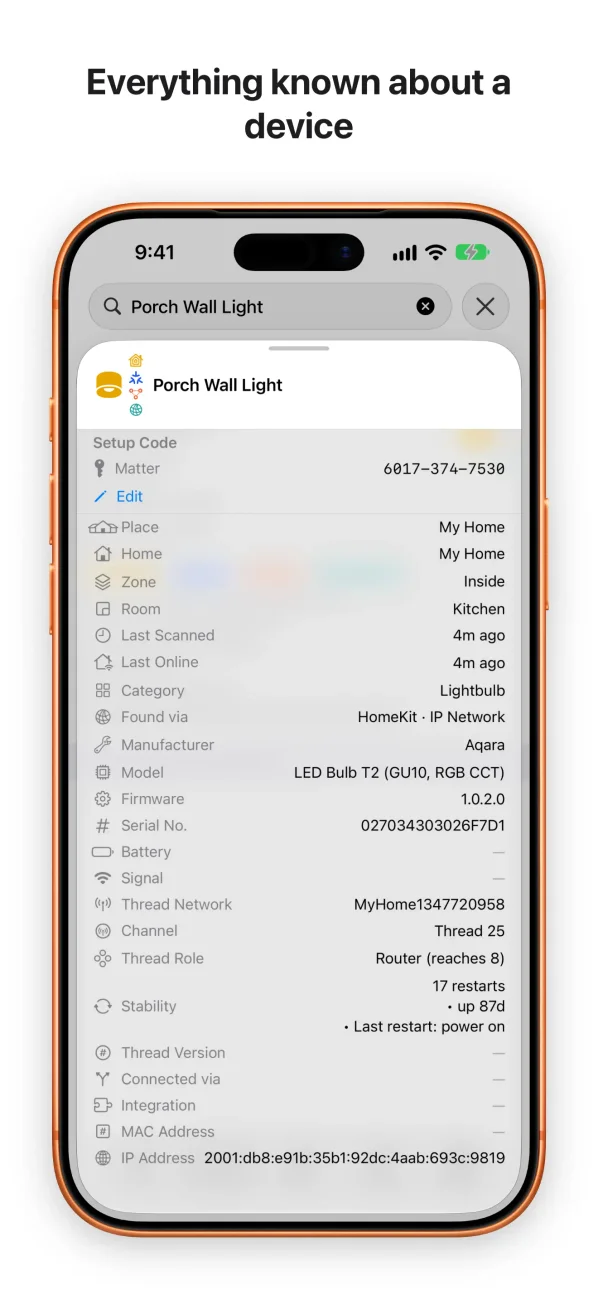
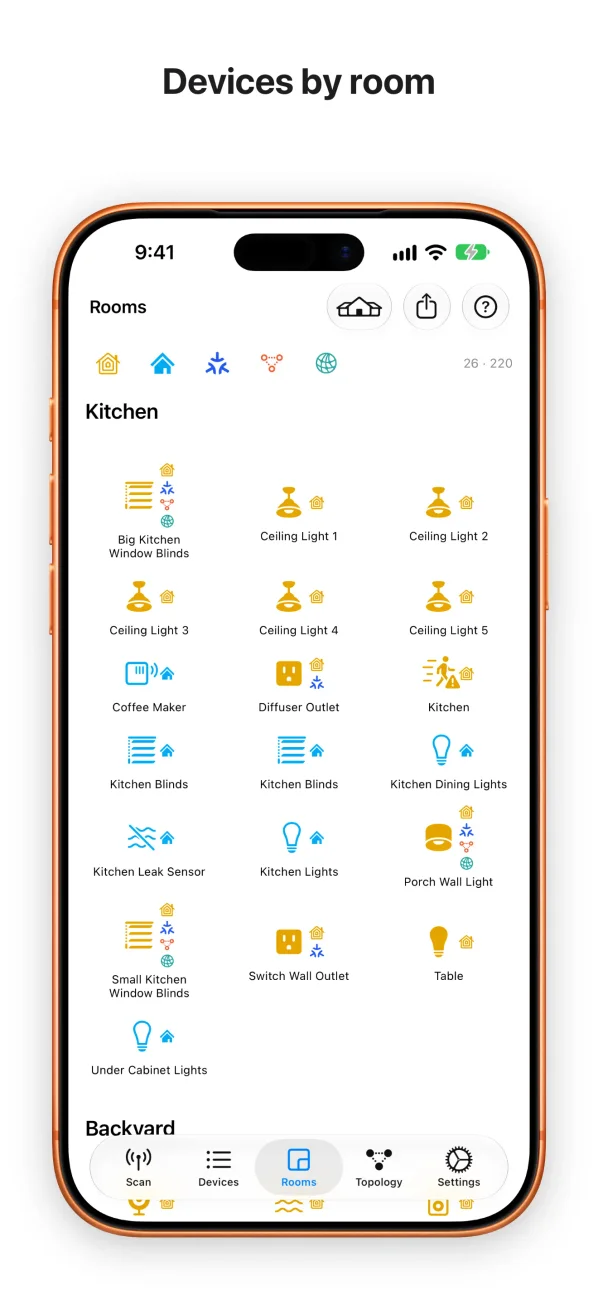
See devices Apple's Home app can't, and details it doesn't show: manufacturer, model, firmware, serial number, battery, IP and MAC address, and how each device connects, in columns like Connected via, Signal, Channel, and Stability. A room-based view groups them by room.
TOPOLOGY MAP
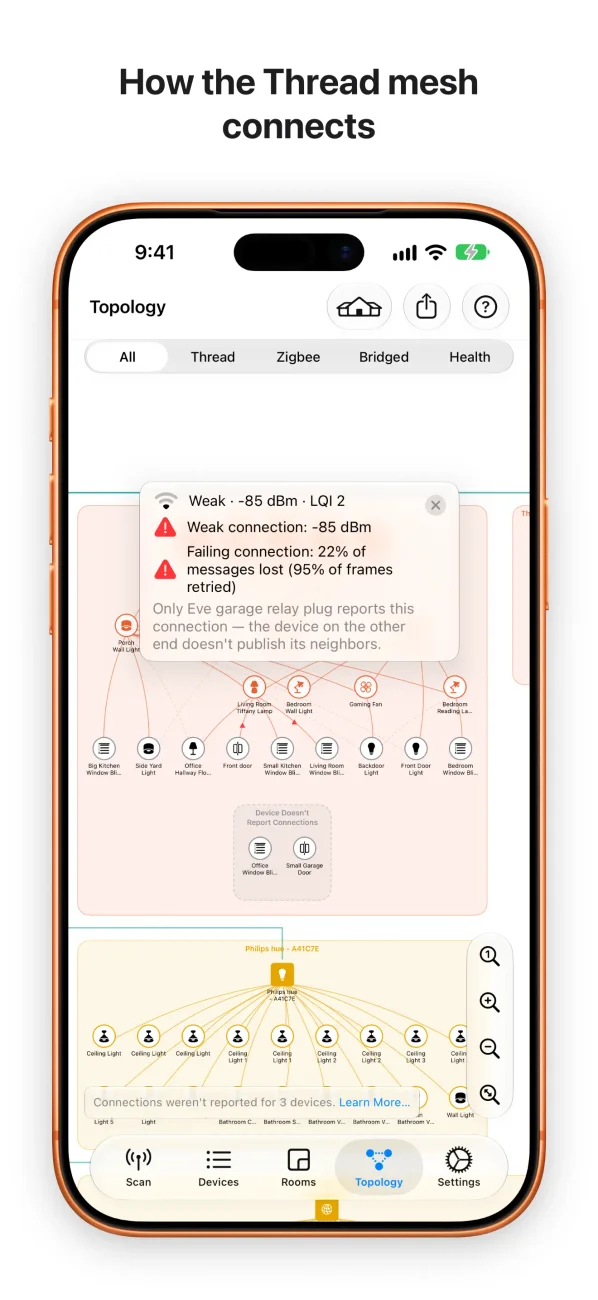
The Topology map shows how your devices connect: your Thread mesh, from the border routers down to the end devices they carry, your Zigbee network from Home Assistant, and each HomeKit bridge with the accessories behind it. It draws only connections it can measure.
Tap a device for its full detail, or tap a connection to see its signal strength and how stable it has been. A red triangle marks a connection that is not working: weak, dropping traffic, or gone quiet. When a device will not report how it connects, HomeMapper shows that rather than guessing.
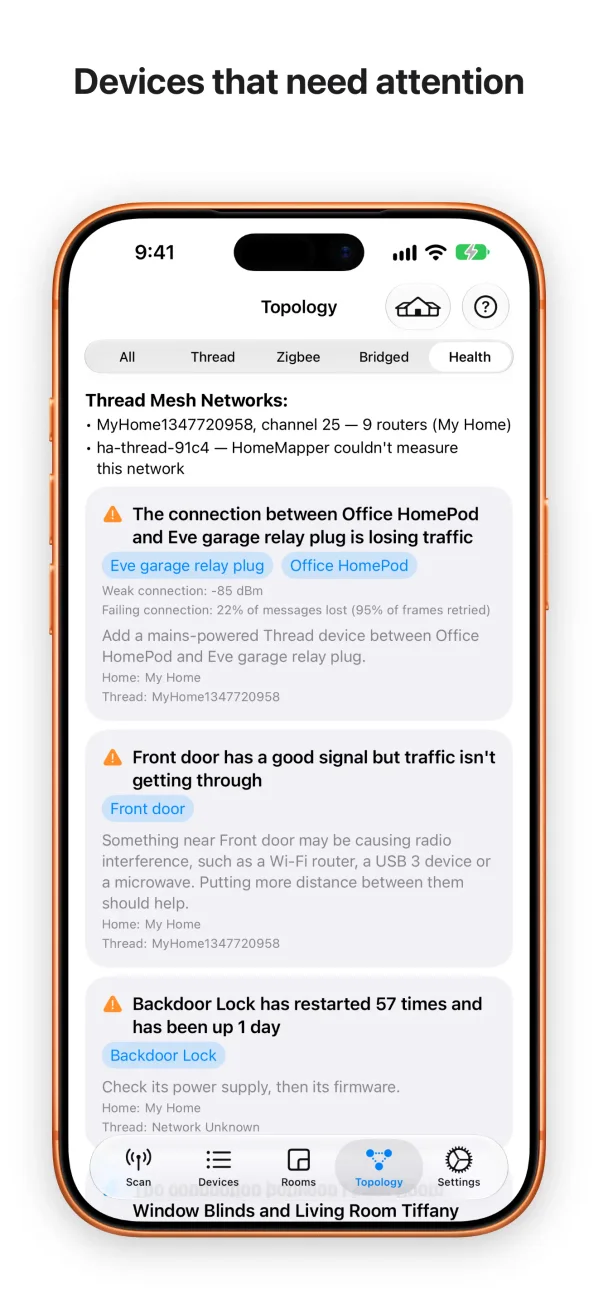
A Health view lists what needs attention on your mesh, worst first: what is wrong, which devices, and one thing to try. Most homes show "Everything looks healthy."
Export the map as a PNG, PDF, or SVG, titled with the home and dated.
HOME ASSISTANT
HomeMapper scans your Home Assistant servers as deeply as HomeKit, including the Thread mesh behind their border routers. Zigbee, Z-Wave, ESPHome, MQTT: devices HomeKit can't see appear alongside the ones it can. Pick a Primary Platform, and its room names win when a device is known to both.
PLACES
Scan more than one location, like your home and a relative's. Each Place holds its own Apple Homes and Home Assistant servers, and the app shows one Place at a time. HomeMapper picks the Place from devices on its local network, not your location.
SETUP CODE VAULT
Every HomeKit, Matter, and Z-Wave device has a setup code on a sticker that fades or gets lost. You need it to pair the device, and again if you reset or move it. No scan can recover one: setup codes never travel over the network.
Save each code while you still have it: scan the QR with the camera, pull it from a photo, or type it in. It reads printed 8-digit codes too, for older accessories without a QR. A room-by-room list shows which devices are still missing one. Have a lot? Export a CSV worksheet, fill it in on a computer, and import it back.
Your codes are stored on your device, in your backups, and synced through your own iCloud.
EXPORT AND BACK UP
Export your inventory to CSV, filtered how you want, for Numbers, Excel, or Sheets. Back up your inventory, settings, and setup codes to iCloud Drive or a local folder, and restore on another device.
PRIVACY
No ads and no tracking. Nothing leaves your device unless you send it. No account, and the only login is your own Home Assistant.
FREE AND PRO
HomeKit scanning, the device list, the room-based view, and switching between Apple Homes are free forever, with no scan or time limits.
Pro adds multi-protocol scanning, all 20+ columns, Places, Home Assistant, the Topology map, the setup code vault, backup and restore, and CSV export. Subscribe yearly with a 7-day free trial, or buy Lifetime once and it never expires.
Runs on iPhone, iPad, and Mac, including iPhone Duo.
Terms of Use: https://homemapper.app/terms/
Neue Funktionen
Version 26.5.1 · 14.11.2026
• iPhone Duo support. Folding or unfolding keeps your place, including your scroll position and any device you have open, and the Topology map draws on the unfolded screen.
• On the unfolded iPhone Duo, choose a table or cards for Devices in Settings → Appearance → Devices Layout.
• A HomeKit accessory that hasn't been added to a home yet now shows in the Devices list.
• On iPad and Mac, Devices shows the table in any window wide enough for it, starts with columns that fit the window, and offers Auto-Fit Columns wherever the table can appear.
• On the Topology map, zooming keeps the middle of the map in place, and your zoom stays when the window is resized or the device is turned.
• The setup code camera reads printed codes in landscape.
• On iPad and Mac, HomeMapper opens in a single window, so alerts and prompts no longer appear twice.
• Various other minor fixes & improvements.
App-Datenschutz
Was Vault Hunters NM LLC im App Store zum Umgang dieser App mit Daten angibt.
-
Keine Daten erfasst
Der Entwickler erfasst keine Daten von dieser App.
Die Datenschutzpraktiken können variieren, zum Beispiel je nach den von Ihnen verwendeten Funktionen oder Ihrem Alter.
Informationen
- Anbieter
- Vault Hunters NM LLC
- Kategorie
- Dienstprogramme
- Version
- 26.5.1
- Aktualisiert
- 14.11.2026
- Veröffentlicht
- 29.05.2026
- Größe
- 37,2 MB
- Erfordert
- iOS 18.4 oder neuer
- Altersfreigabe
- 4+
- Preis
- Kostenlos
- In-App-Käufe
- Ja
- Sprachen
- Englisch, Niederländisch, Französisch, Deutsch, Italienisch, Portugiesisch, Rumänisch, Spanisch
- Copyright
- ©2025-2026 Vault Hunters NM LLC
Das könnte Ihnen auch gefallen
-
 Thread Doctor - MatterDienstprogramme
-
 Haven: KopplungscodesSmart-Home-Codes Sichern
-
 HomeSnap - Smart Home InsightsDienstprogramme
-
 HomeBar for HomeKitDienstprogramme
-
 ThreadMapperDiagnose fürs Smart-Home-Netz
-
 HomeBridgerDienstprogramme
-
 Itsytv: Remote for Apple TVFernbedienung, Tastatur, Apps
-
 LoopJuiceBatterien im Smart Home
-
 HomeHub+Dienstprogramme
-
 Dashboard: Smart Home & RTSPWandpanel für Apple Home