
Hum2MIDI
鼻歌からMIDI生成-作曲支援ツール-
Entwickelt für iPhone, iPad
Kostenlos · In-App-Käufe
- Altersfreigabe4+
- KategorieMusik
- EntwicklerMatsumoto Shigekazu
- SprachenEnglisch
- Größe5,9 MB
Verlinkt auf die offizielle App Store-Seite
Download.org hostet keine Datei von Hum2MIDI. Die Schaltfläche öffnet die App-Seite bei App Store, wo Matsumoto Shigekazu die App veröffentlicht. Eintrag zuletzt geprüft am 12.11.2026.
Screenshots
Info
Der Entwickler hat diesen Text nicht in Ihrer Sprache bereitgestellt.
Hum2MIDI — App Overview
In one line
Just hum, and your melody is converted to MIDI — ready to edit and export.
Overview
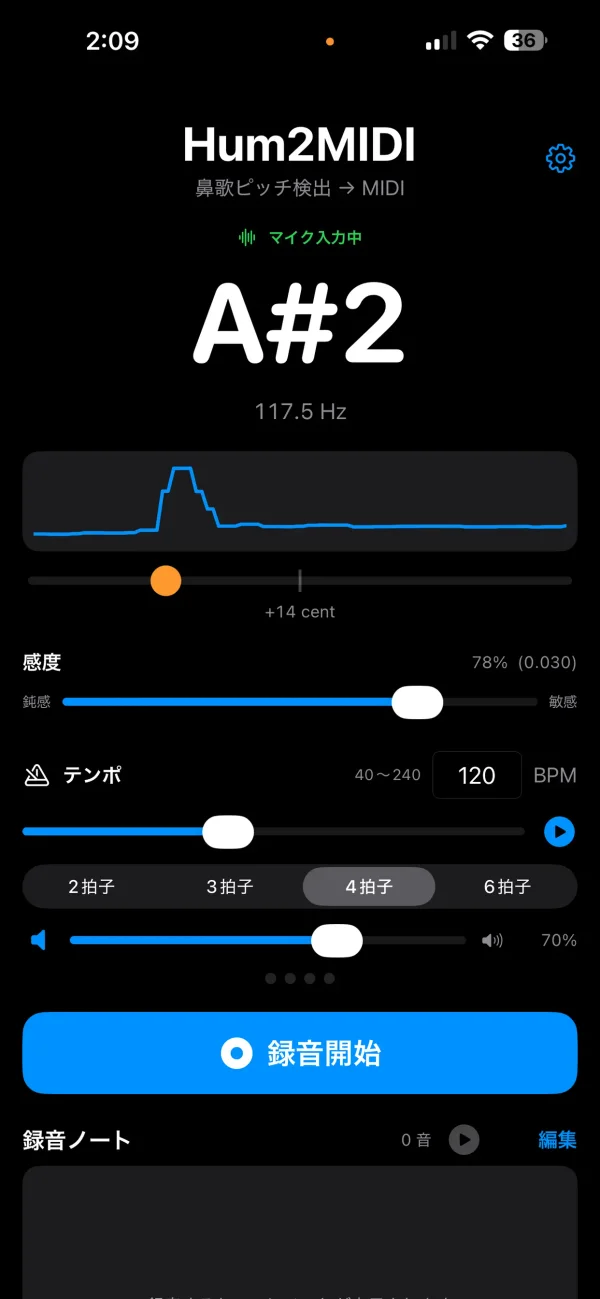
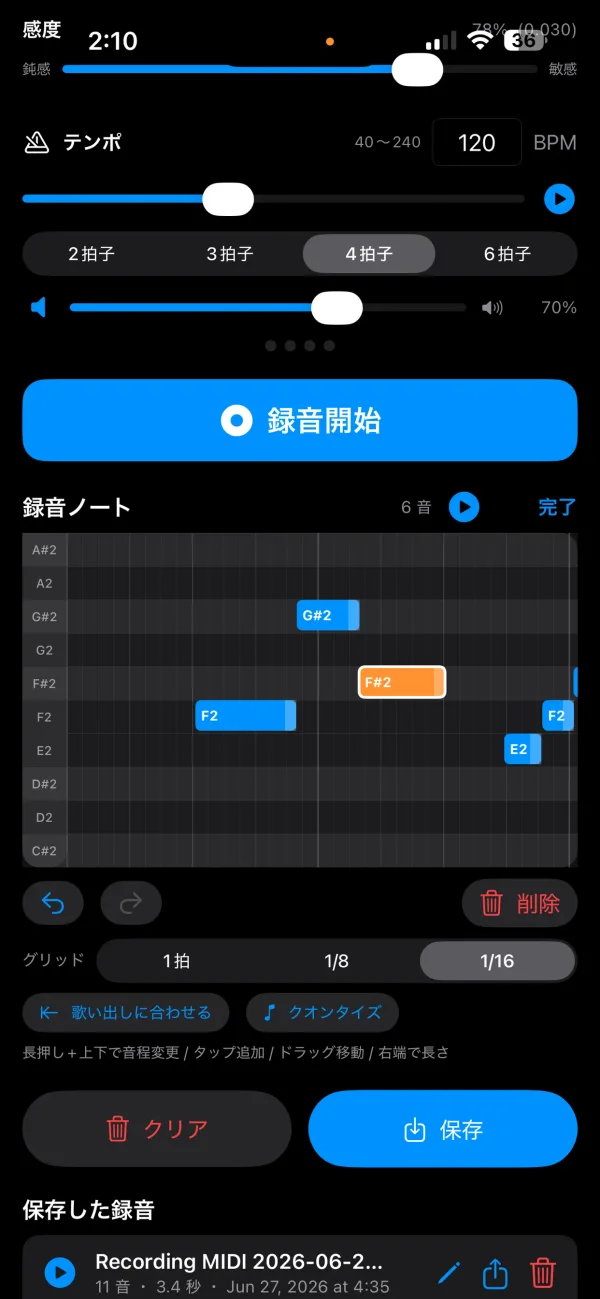
Hum2MIDI detects pitch from your microphone in real time and converts it into MIDI notes. Even if you can't play an instrument, you can capture any melody that pops into your head as musical data (MIDI), edit it on a piano roll, and export or share it as a standard MIDI file. Perfect for brainstorming composition ideas and getting something into your DAW fast.
Features
Input & Detection
Real-time pitch detection via microphone (AudioKit) → converted to MIDI notes
Live pitch display while active: note name, frequency, tuning meter, pitch graph
Recording & Playback
Recorded notes displayed on a piano roll (note names, beat/bar grid, fixed pitch axis)
Piano-sound preview playback
Metronome: tempo (manual input), time signature (2/3/4/6), volume, mute
Editing
Add, move, resize, and delete notes
Long-press focus editing (zoom + haptic feedback, simultaneous pitch & start-time adjustment, guide tone)
Undo/redo, snap to melody start, quantize (1/4, 1/8, 1/16)
Saving & Export
Save multiple recordings (renameable), re-edit anytime
Export as MIDI and share to a DAW or other app via the share sheet
Other
Japanese/English language toggle (selected on first launch + available in Settings)
Pricing (one-time purchase)
Free: Detection, display, recording, playback, editing, metronome — up to 3 saved recordings
Pro (one-time purchase): MIDI export & sharing, unlimited saved recordings
Target Users
Composers and producers who want to capture ideas quickly
Non-instrumentalists who want to preserve melodies they think of
Vocalists who want to convert vocal/harmony lines into MIDI as a foundation for production
Workflow
Record → Hum → Stop → Review & edit on piano roll → Save → Export MIDI → Drop into your DAW.
App-Datenschutz
Was Matsumoto Shigekazu im App Store zum Umgang dieser App mit Daten angibt.
-
Keine Daten erfasst
Der Entwickler erfasst keine Daten von dieser App.
Die Datenschutzpraktiken können variieren, zum Beispiel je nach den von Ihnen verwendeten Funktionen oder Ihrem Alter.
Informationen
- Anbieter
- Matsumoto Shigekazu
- Kategorie
- Musik
- Version
- 1.1
- Aktualisiert
- 02.07.2026
- Veröffentlicht
- 02.07.2026
- Größe
- 5,9 MB
- Erfordert
- iOS 26.5 oder neuer
- Altersfreigabe
- 4+
- Preis
- Kostenlos
- In-App-Käufe
- Ja
- Sprachen
- Englisch
- Copyright
- © Shigekazu Matsumoto
Das könnte Ihnen auch gefallen
-
 HumTrack: Hum to MIDI DAWMusik
-
 Memody - Voice to MIDIMusik
-
 Hummidi: Audio zu MIDISummen & Singen zu Noten
-
 HummingSheetMusik
-
 HUM - Your Music, Your VoiceMusik
-
 Noten summen - Musik schreibenMelodie erstellen, auch leise
-
 Wormhole: Sampler & BeatmakerSample alles. Bau den Beat.
-
 Vocal Remover, Karaoke MakerMusik
-
 VocalMic: Sing, Record KaraokeMusik
-
 LuLaLa - Summen in NotenMelodie summen, Klavier hören