
- Altersfreigabe4+
- KategorieBildung
- EntwicklerLynne Bolduc
- SprachenEnglisch
- Größe18,1 MB
Verlinkt auf die offizielle App Store-Seite
Download.org hostet keine Datei von iWorld US Lite. Die Schaltfläche öffnet die App-Seite bei App Store, wo Lynne Bolduc die App veröffentlicht. Eintrag zuletzt geprüft am 16.11.2026.
Screenshots
Info
Der Entwickler hat diesen Text nicht in Ihrer Sprache bereitgestellt.
iWorldGeography is used by schools, libraries, and families in 74 countries!!!!
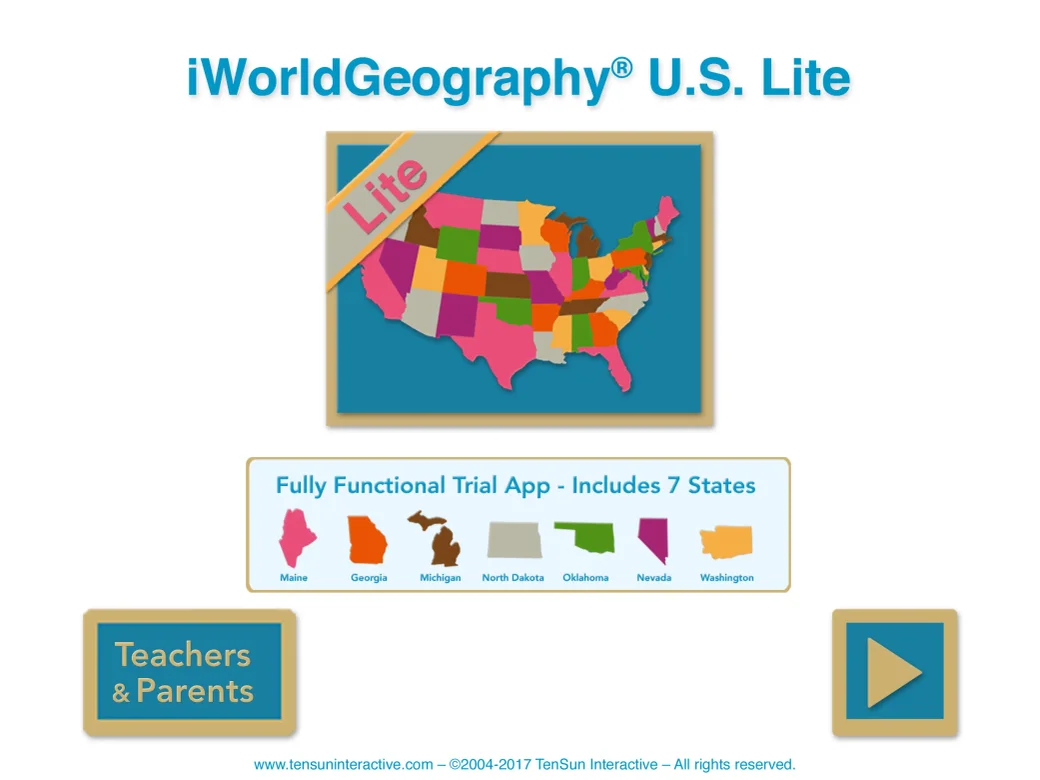
This FREE TRIAL includes 7 states in a fully functional version of iWorldGeography United States. Give it a try! Includes: Maine, Georgia, Michigan, North Dakota, Oklahoma, Nevada, and Washington.
"Your iWorld apps were the first we found that we could endorse whole-heartedly … Thank you for your quality, real, Montessori apps."
-- montessoritech.net
Just like the full version of iWorldGeography United States, US Lite includes a Montessori 3-part-lesson [introduce, recall, reconstruct], plus labeling. Student-centered, self-correcting, independent work blends seamlessly with existing curriculum or stands alone for home use. Free worksheets can be printed for follow-up, physical-world activities at home or in the classroom. Available to all at TenSunInteractive.com - Extras.
This introduction to United States and Capitals was designed by former Lead Developer at MIT's Center for Educational Computing Initiatives. Created for 6-to-9 year olds. Narrated by a child. United States includes an introduction to state names and capitals plus quiz, puzzle, and label activities …
Content:
• Active Intro - Touch any state to hear its name.
• Passive Intro - Movie introduces each state name.
• Quiz - Name is played. Touch any state to reveal answer.
• Puzzle - Freely drag pieces to reconstruct map.
• Label - Pins drag freely to label states and capitals.
Features:
• Self-Correcting Activities
• Student-Controlled Manipulatives - pins & pieces drag freely on screen
• Fresh Challenge - randomized content appears in a new order each time
Student-Managed Options:
Puzzle
• "Grid" - scatters pieces to screen edges.
• "Toss" - scatters pieces randomly across screen.
• "Lines/No Lines" - toggle to work with or without outline.
Labels
• "Pass" - skips current label.
• "Lightbulb" - toggles to show or hide control map.
• Control visual-background information:
• --- "Label" - color background, pin shows label only
• --- "Color" - outline background, pin shows color only
• --- "Label & Color" - outline background, pin shows label & color
Learning Style:
• Independent work
• Self-correcting activities
• Challenge increases as activities progress
• Options allow students to manage challenge level and visual style
• Children control navigation; never locked into an activity
• No penalty for wrong answer; correct answer simply reinforced
• No distracting bells and whistles
• Worksheets support transition back to physical world activities
TenSun puts children in charge of their learning by allowing them to control the challenge level and depth of their lesson. Activities are self-correcting. Children are free to work independently, in a small group, or with the help of a supervising adult at home or in the classroom.
ONLINE MAPS AND LABELS
Touch Classroom Printouts button on app's Teacher & Parent screen to access printouts for additional color, trace, and label activities. Or, visit TenSunInteractive.com's Extras page.
TWITTER NEWS
Follow us on Twitter @tensuninteract for App, Update, and Online Extra alerts.
Follow TenSun Interactive on FaceBook.
EDUCATION PRICING
50% discount for 20+ apps with Apple's Volume Discount Program for Education
EDUCATIONAL NOTE
iWorldGeography colors match American Montessori Society classroom materials.
iWorldGeography Series blends self-correcting, child-directed-activity design with Geography curriculum used in Montessori Children's House and Lower Elementary classrooms. Concept and visual design is thoughtfully integrated to supplement existing curriculum and classroom materials. The series was inspired by 3-year's observation in Lexington (MA) Montessori School Children's House classrooms where MyWorld, TenSun's desktop-based version of this series, has been used since 2004.
Neue Funktionen
Version 1.2.9 · 21.09.2026
Updated and including iOS 26.4.
App-Datenschutz
Was Lynne Bolduc im App Store zum Umgang dieser App mit Daten angibt.
-
Keine Daten erfasst
Der Entwickler erfasst keine Daten von dieser App.
Die Datenschutzpraktiken können variieren, zum Beispiel je nach den von Ihnen verwendeten Funktionen oder Ihrem Alter.
Informationen
- Anbieter
- Lynne Bolduc
- Kategorie
- Bildung
- Version
- 1.2.9
- Aktualisiert
- 21.09.2026
- Veröffentlicht
- 24.10.2014
- Größe
- 18,1 MB
- Erfordert
- iOS 26.4 oder neuer
- Altersfreigabe
- 4+
- Preis
- Kostenlos
- Sprachen
- Englisch
- Copyright
- © 2004-2026 TenSun Interactive, LLC
Das könnte Ihnen auch gefallen
-
 USA Map Puzzle HDBildung
-
 States of USA | SPARCBildung
-
 JigsawGeo3D-Globus-Geografie-Puzzle
-
 世界地図パズル 168国Bildung
-
 Map Study: United StatesBildung
-
 Montessori Ultimate GeographyBildung
-
 Weltkarte für jedermannWeltkarte und Ländernamen
-
 USA Map: Kids Geography GamesBildung
-
 Flags and CapitalsBildung
-
 World Map Challenge! GeographyBildung