- Altersfreigabe4+
- KategorieSport
- EntwicklerNewton Japan Inc.
- SprachenEnglisch+ 1 weitere
- Größe7,0 MB
Verlinkt auf die offizielle App Store-Seite
Download.org hostet keine Datei von LessonPad. Die Schaltfläche öffnet die App-Seite bei App Store, wo Newton Japan Inc. die App veröffentlicht. Eintrag zuletzt geprüft am 25.11.2026.
Screenshots
Info
Der Entwickler hat diesen Text nicht in Ihrer Sprache bereitgestellt.
LessonPad is an app for explaining and analyzing the movement in the videos you shoot.
It's perfect for coaching sports and all kinds of activities — especially those where form and balance matter most!
Seeing is believing.
The best lesson is watching the video you just recorded on your iPhone or iPad, right there on the spot.
■ Videos you can use
Load videos saved in the Photos app. You can also record directly inside LessonPad, and the videos you record are saved to Photos as well. Review a game you just filmed right at the venue to plan your strategy, or bring in a pro's video and study it side by side with your own form.
Right after recording, or after loading a video, you can trim the start and end to keep only the part you need. You can also load photos (still images) and draw on them or compare them just like videos.
■ Compare two videos
LessonPad lets you compare videos. For example:
・Compare the form of two players
・Compare your movement at your best and in a slump
・Compare yourself yesterday with yourself today
Comparisons like these are easy.
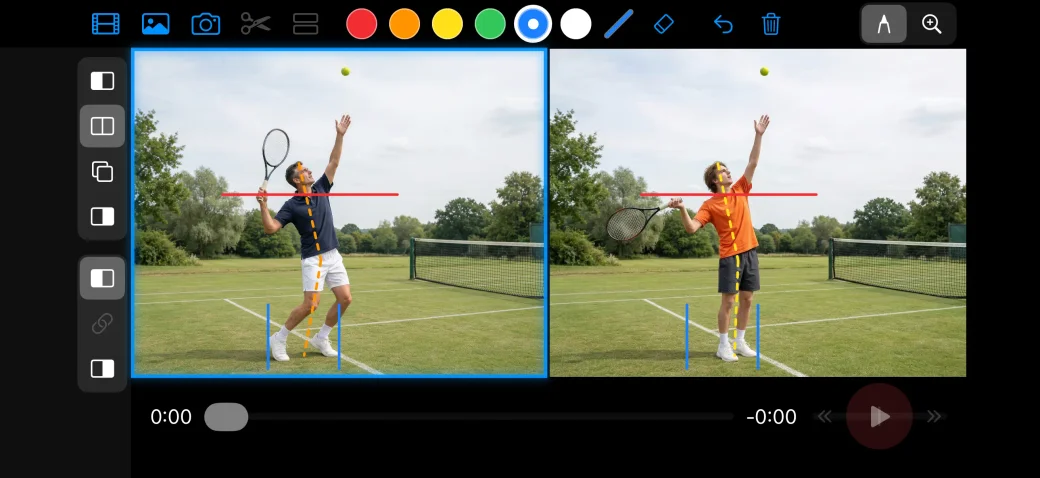
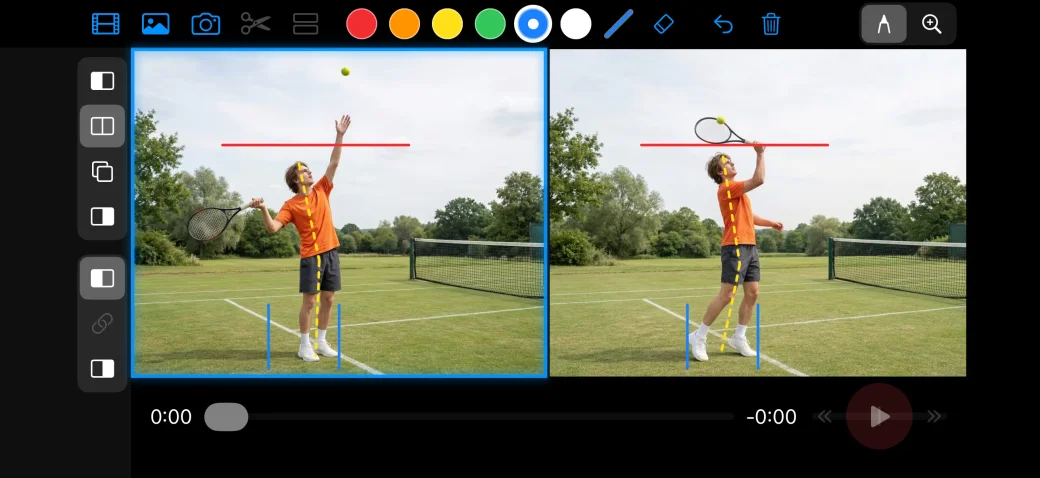
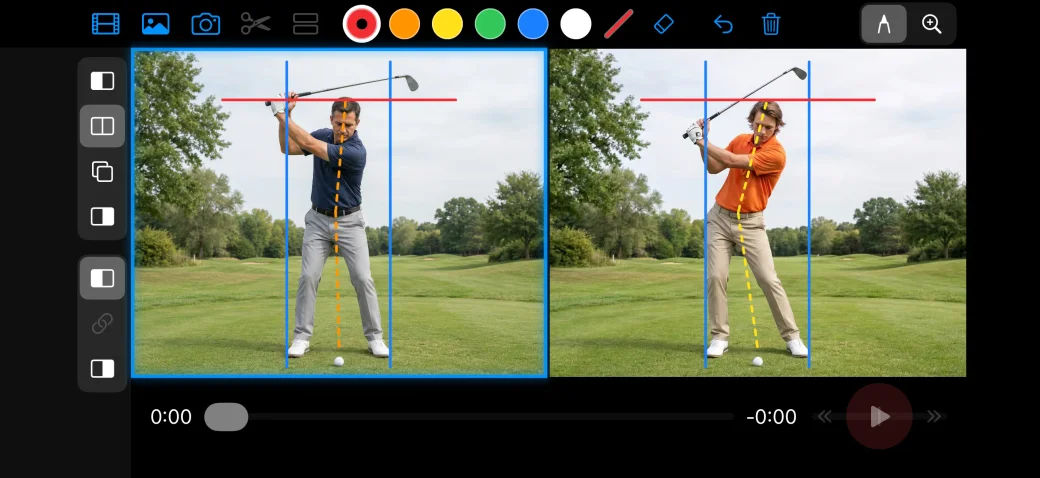
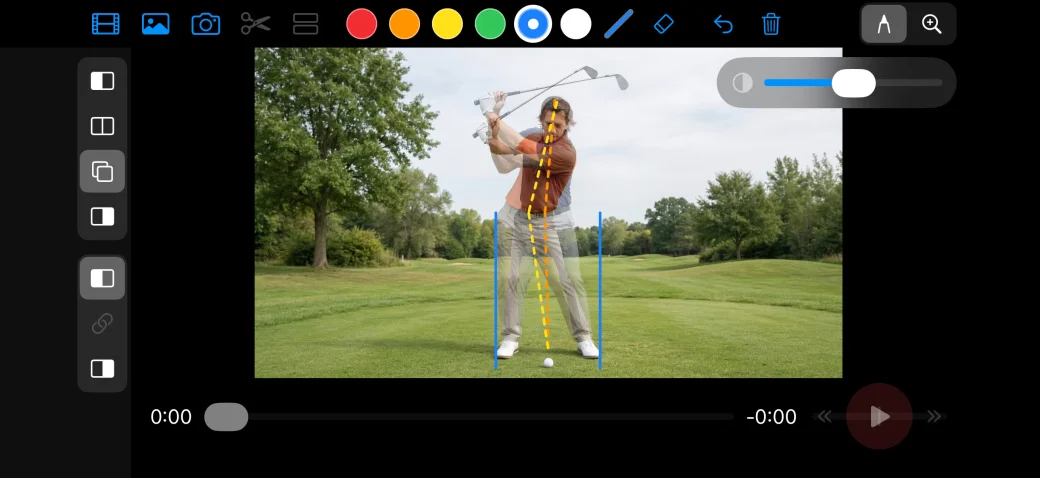
Play two videos side by side at the same time, or "overlay" one on the other and see through it. You can adjust how transparent the overlay is. Hold your iPad upright and the two videos stack top and bottom.
Link the two videos to play and stop them together. Even while linked, you can move just one of them to line up the timing, so it's easy to match the start of a movement and compare. Noticing — and helping others notice — the technique hidden in the difference between two movements is the shortest path to improvement.
■ Slow-motion playback
Tilt the red play button to the right for slow motion forward, or to the left for slow motion backward. The further you tilt, the faster it goes (0.1x to 0.5x), and the current speed is shown above the button. Replay the decisive moment in slow motion again and again — all with one thumb.
On iPad, you can also use the buttons to step one frame forward or back. Jump straight to the scene you want from the thumbnail list.
■ Explain and analyze movement
Keep your lines on the screen while you play the video or watch it in slow motion, and you can:
・Explain the ideal form
・Spot wasted movement
・See where balance breaks down
Draw freehand with one finger, or touch the screen with two fingers at once to draw a straight line. Apple Pencil is supported too: pause briefly at the end of a line and it becomes straight.
You can also zoom in and draw on fine details. Your lines zoom in and out together with the video, so they never drift out of place.
■ Pens
7 pen colors on iPad, 6 on iPhone. Tap the pen you're using to change its width in three steps.
Press the dashed-line button to draw in dashed lines with any color. Draw the body's axis as a dashed line and the positions of the hands and feet as solid lines, and your explanation becomes much easier to read.
Use the eraser to erase lines bit by bit, or tap the trash can icon to clear all lines at once. The Undo button takes back your last drawing, up to 10 times.
■ Pick up where you left off
Even after you close the app, the next time you open it you'll be right where you left off — with the lines you drew on your videos still in place.
■ Save the screen (screenshots)
Save your annotated screen to the Photos app by taking a screenshot (a standard iPhone and iPad feature).
Screens saved in Photos work just like any other photo: email them or post them on social media (standard features of the Photos app). Add your notes to a game video and share it with the whole team.
■ Show it on a TV or projector
Use screen mirroring or a cable to show your screen on a big TV or projector and hold meetings while sharing it with your players (a standard iPhone and iPad feature). Play the game video on the TV, watch it in slow motion, and draw your explanations right on the screen.
LessonPad is the ultimate tool for sharing technique and strategy with your whole team.
Neue Funktionen
Version 20.1.0 · 24.11.2026
• Lines you draw now appear and disappear in sync with the video, so you can annotate each scene separately.
• Long-press a line to change when it starts to appear. You can also select several lines at once.
• You can now export videos with your drawings. Two videos shown side by side can be combined into one.
• Tilt the slow-motion knob all the way to fast-forward at up to 8x.
App-Datenschutz
Was Newton Japan Inc. im App Store zum Umgang dieser App mit Daten angibt.
-
Keine Daten erfasst
Der Entwickler erfasst keine Daten von dieser App.
Die Datenschutzpraktiken können variieren, zum Beispiel je nach den von Ihnen verwendeten Funktionen oder Ihrem Alter.
Informationen
- Anbieter
- Newton Japan Inc.
- Kategorie
- Sport
- Version
- 20.1.0
- Aktualisiert
- 24.11.2026
- Veröffentlicht
- 16.03.2012
- Größe
- 7,0 MB
- Erfordert
- iOS 26.0 oder neuer
- Altersfreigabe
- 4+
- Preis
- 17,99 €
- Sprachen
- Englisch, Japanisch
- Copyright
- © Newton Japan Inc.