
- Altersfreigabe4+
- KategorieProduktivität
- EntwicklerWarren Zajac
- SprachenEnglisch
- Größe1,8 MB
M² Editor ist bei App Store derzeit möglicherweise nicht verfügbar
Bei unserer letzten Prüfung war der Store-Eintrag nicht erreichbar. Der Link führt weiterhin zur offiziellen App Store-Seite.
Screenshots
Info
Der Entwickler hat diesen Text nicht in Ihrer Sprache bereitgestellt.
Your Markdown documents, with AI edits you control.
M² Editor is a native writing workspace for iPhone and iPad. Open files from Files, iCloud Drive, or another file provider. Write in plain text, preview the result, and connect an AI server when you want help revising.
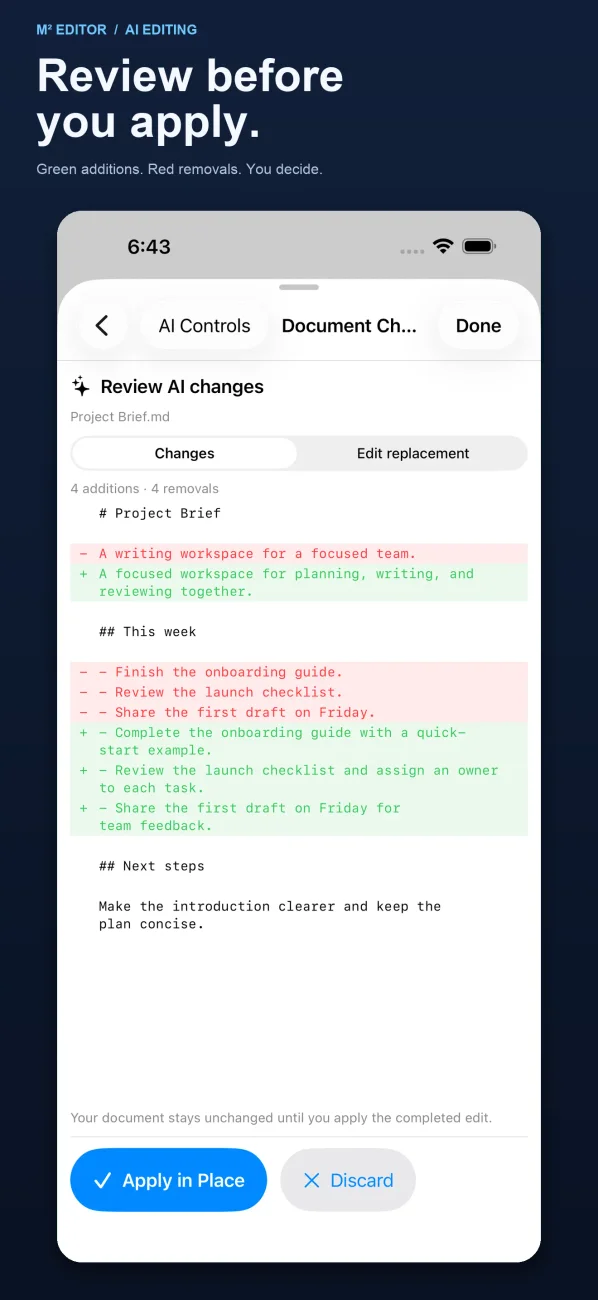
REVIEW BEFORE YOU APPLY
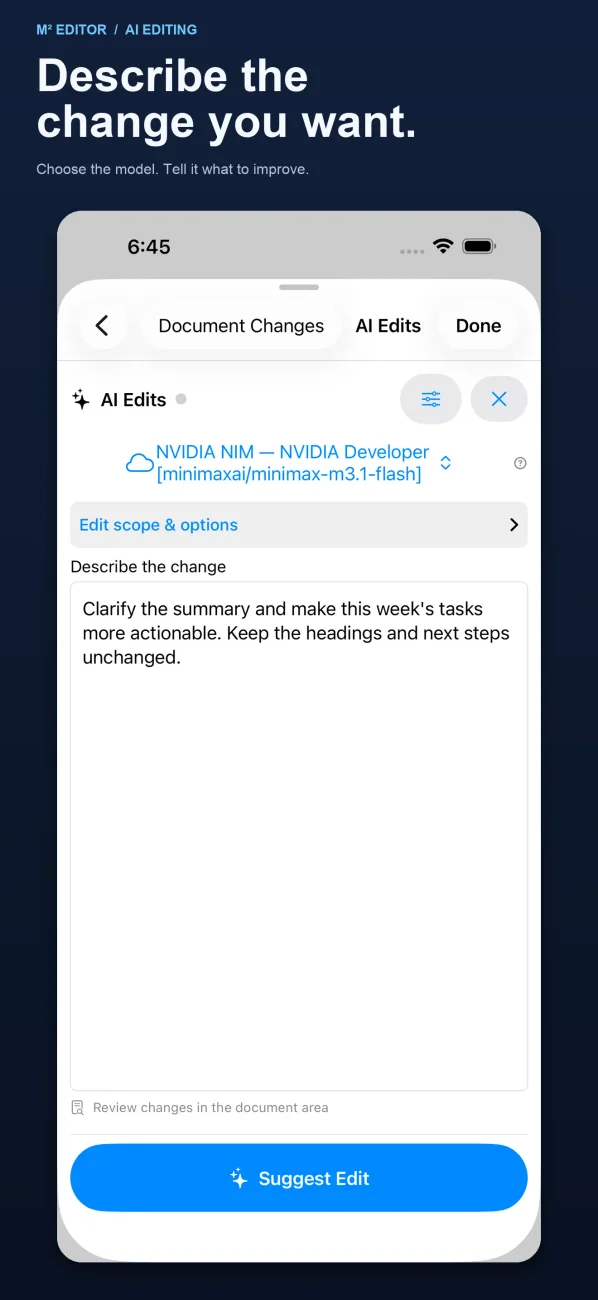
Ask for clearer wording, a better structure, or a focused revision. Choose selected text, the visible section with surrounding lines, or the whole document. Review streamed green additions and red removals, adjust the replacement, then Apply in Place or Discard. Your original stays unchanged until you apply. Native Undo/Redo restores or reapplies the edit.
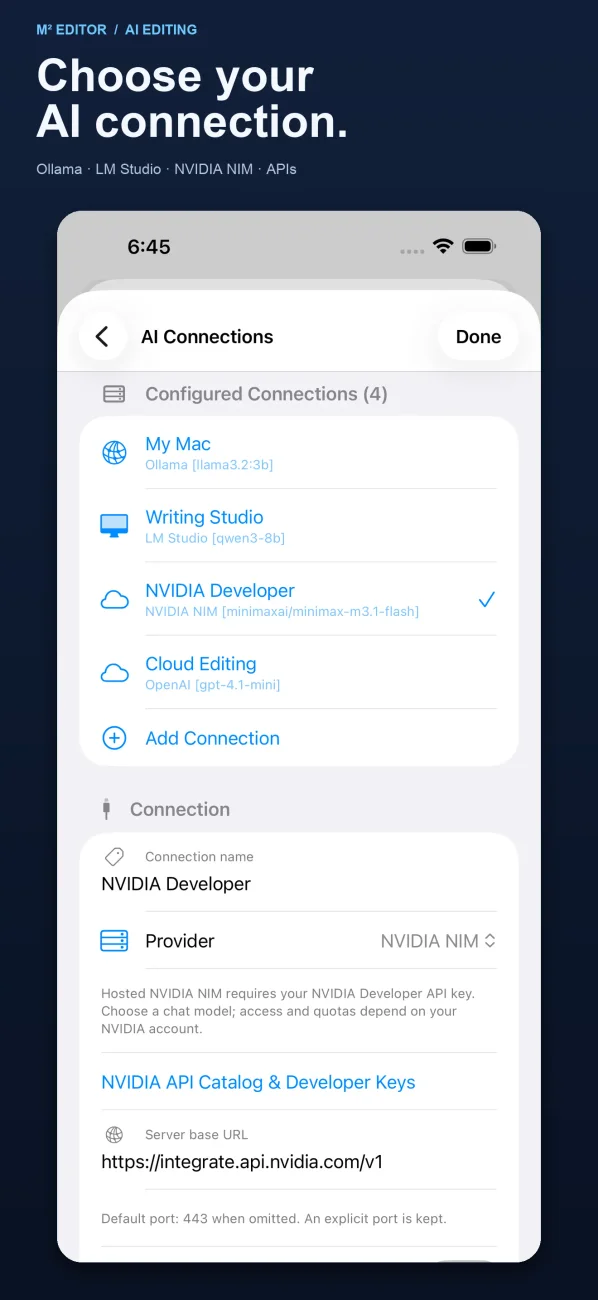
CONNECT TO YOUR AI
Use Ollama or LM Studio on a reachable Mac/server, OpenAI, vLLM, NVIDIA NIM, or another OpenAI-compatible endpoint. Save multiple named connections, discover models, and switch resources with the options collapsed. Missing ports use provider defaults. Backend status and confirmed loaded-model indicators help show connection state where supported. NVIDIA NIM uses your NVIDIA Developer API key. Keys stay in device Keychain; saved previews show only the first four characters.
The iPhone and iPad connect to the selected server; they do not run inference models themselves. Use a reachable LAN/Tailscale server or a cloud endpoint. Localhost refers to the phone or tablet. Public endpoints require HTTPS; trusted private-network HTTP is opt-in.
MADE FOR BOTH SCREENS
On iPad, keep AI controls beside the document and review changes in the workspace. On iPhone, a dedicated Document Changes screen keeps the review readable. Switch between Editor and Preview, use the centered formatting bar, and adjust appearance and font sizes. Create Document shows progress with Cancel and automatically opens a genuinely blank local file when ready.
KEEP YOUR EDIT HISTORY
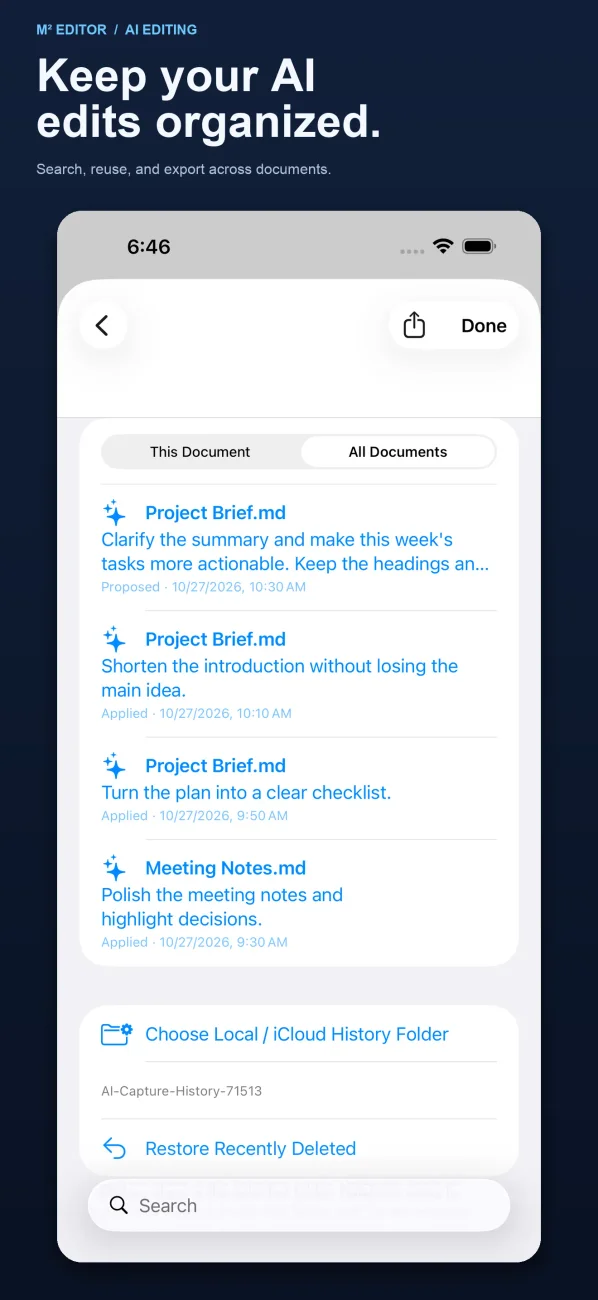
Search this document or all documents, reuse instructions, and export Markdown or JSON through Files. Keep history local or select an iCloud Drive folder. Deleted history goes to Recently Deleted and can be restored. API keys are excluded from history and exports.
NATIVE MARKDOWN TOOLS
• Live rendered preview and syntax highlighting
• Headings, nested lists, task lists, aligned tables, links, images, and code blocks
• Formatting shortcuts for bold, italic, code, headings, links, lists, and quotes
• Native Undo/Redo, adjustable fonts, and light/dark appearance
• Linked editor/preview scrolling on iPad and Find in the rendered preview
• Documents saved at the file locations you choose
OPTIONAL AI, CLEAR DESTINATIONS
Ordinary editing needs no AI service or app account. You supply the endpoint and any required credentials; third-party providers may have their own accounts, limits, and charges. Approve the displayed AI server and scope before the first suggestion. Only requested document text and your instruction go to that destination; model-list checks send no document text. There is no automatic cloud fallback. Remote providers handle submitted text under their own policies.
Markdown parsing and preview layout run locally. Remote image URLs are fetched from their hosts. No analytics, advertising SDKs, or tracking are included. Document HTML/PDF export and printing are Mac features.
Designed and built by Warren Zajac.
Neue Funktionen
Version 1.1 · 28.10.2026
AI editing comes to iPhone and iPad
Connect to Ollama or LM Studio on a reachable Mac/server, vLLM, OpenAI, NVIDIA NIM, or another compatible API endpoint. Save multiple named connections, discover available models, and switch models with the options collapsed. Missing ports use the selected provider’s defaults.
Request edits for selected text, the visible section with surrounding context, or the whole document. Review streamed suggestions with green additions and red removals before Apply. Undo and Redo work with the native editor.
• iPad keeps AI controls beside the document; iPhone provides a dedicated Document Changes screen.
• NVIDIA NIM supports your NVIDIA Developer API key with secure Keychain storage.
• Streaming change previews stay visible as updates arrive, avoiding repeated blank-screen flashes.
• Clearer bottom AI actions with prominent Suggest Edit and Apply buttons, consistent sizing, and review icons.
• Backend status and confirmed loaded-model indicators make connection state clearer.
• AI History supports this document or all documents, search, instruction reuse, and Markdown/JSON export.
• Keep history locally or choose an iCloud Drive folder. Deleted iOS history can be restored from Recently Deleted.
• Stronger control contrast and a cleaner Editor/Preview toolbar.
• Centered bottom formatting controls, with scrolling when space is limited.
• Find support in the rendered preview.
• Create Document now shows progress with Cancel and automatically opens a genuinely blank editor when ready. New files are saved locally and can be moved through Files.
Before the first suggestion, approve the displayed server and document scope.
AI is optional and runs on the endpoint you configure. Your iPhone/iPad does not run the model itself. API keys stay in device Keychain, and suggestions are reviewed before they change your document.
App-Datenschutz
Was Warren Zajac im App Store zum Umgang dieser App mit Daten angibt.
-
Keine Daten erfasst
Der Entwickler erfasst keine Daten von dieser App.
Die Datenschutzpraktiken können variieren, zum Beispiel je nach den von Ihnen verwendeten Funktionen oder Ihrem Alter.
Informationen
- Anbieter
- Warren Zajac
- Kategorie
- Produktivität
- Version
- 1.1
- Aktualisiert
- 28.10.2026
- Veröffentlicht
- 01.06.2026
- Größe
- 1,8 MB
- Erfordert
- iOS 17.0 oder neuer
- Altersfreigabe
- 4+
- Sprachen
- Englisch
- Copyright
- © Warren Zajac
Das könnte Ihnen auch gefallen
-
 DocuTrialProduktivität
-
 ArikhProduktivität
-
 Raw Text EditorProduktivität
-
 MagicConnect ViewerProduktivität
-
 Streqa: GewohnheitstrackerSerien aufbauen, dranbleiben
-
 GenAI - AI ChatbotProduktivität
-
 Operoo CentralProduktivität
-
 Phraser - Paste KeyboardProduktivität
-
 OrNET VPNProduktivität
-
 Bitwarden AuthenticatorProduktivität