
MarkWrite
WYSIWYG Markdown Editor
Entwickelt für iPhone, iPad, Mac
Kostenlos · In-App-Käufe
- Altersfreigabe4+
- KategorieProduktivität
- EntwicklerGuy Shaviv
- SprachenEnglisch+ 4 weitere
- Größe15,7 MB
Verlinkt auf die offizielle App Store-Seite
Download.org hostet keine Datei von MarkWrite. Die Schaltfläche öffnet die App-Seite bei App Store, wo Guy Shaviv die App veröffentlicht. Eintrag zuletzt geprüft am 17.11.2026.
Screenshots

Info
Der Entwickler hat diesen Text nicht in Ihrer Sprache bereitgestellt.
WYSIWYG Markdown editor that allows embedding pictures and natural language mathematics.
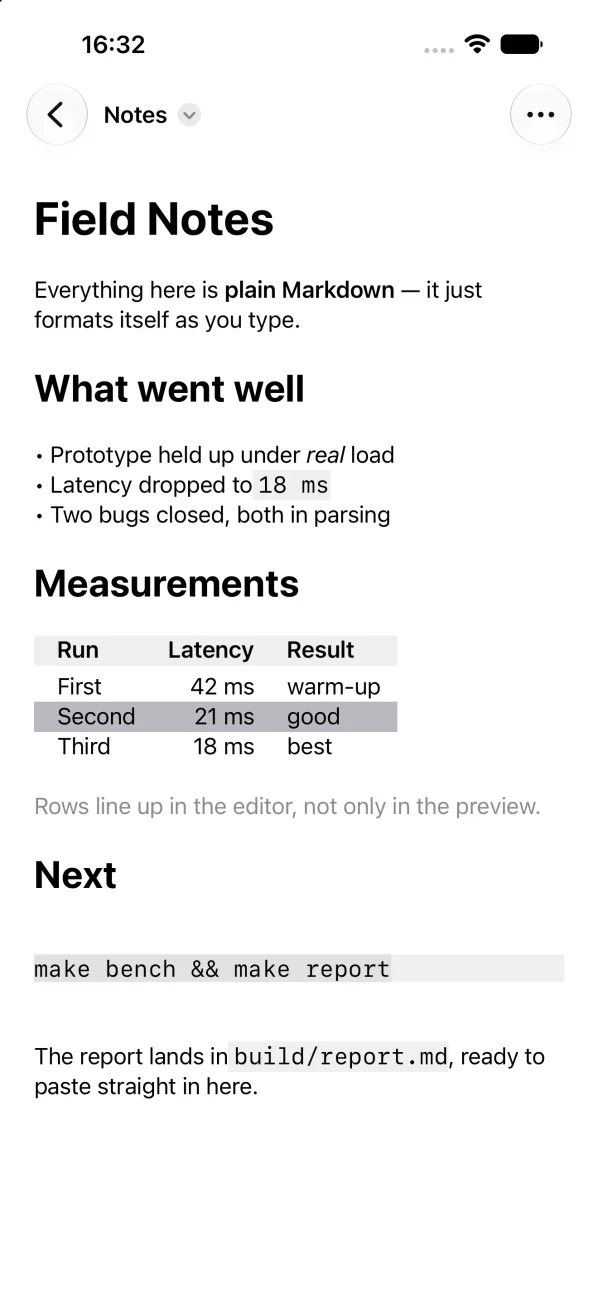
MarkWrite is a fast, focused Markdown editor for Mac, iPad and iPhone. Your writing formats itself as you type — headings, bold, lists, quotes, tables and code appear the moment you write them, while the Markdown syntax stays visible only on the line you are editing. Nothing to toggle, no split screen required.
EMBED IMAGES, NOT LINKS
Drag a picture into your document and it is really there. Grab its corner to resize it and MarkWrite writes the new size back into the Markdown for you. Text and images are saved together in one self-contained document you can move, rename, duplicate or send without leaving a single broken link behind. Images can be embedded in any of the common formats: VS Code, Pandoc or HTML.
WRITE EQUATIONS BY DESCRIBING THEM
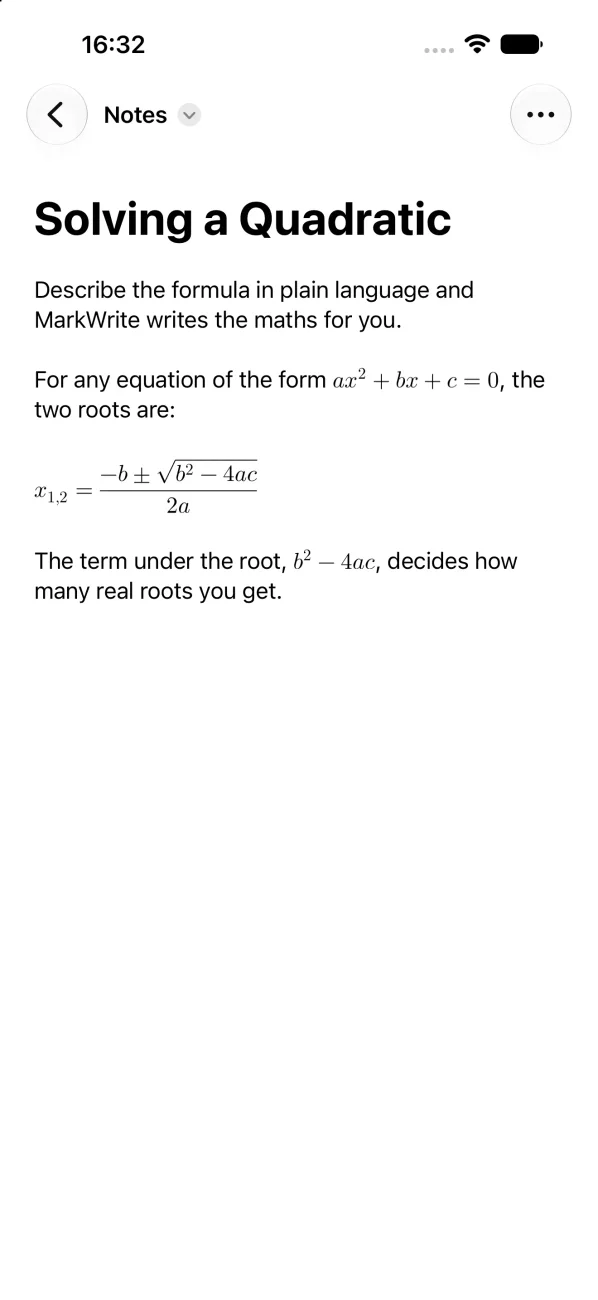
Say what you mean: "x equals minus b, plus or minus the square root of b squared minus four a c, all over two a." MarkWrite turns that sentence into a properly typeset formula. There is no LaTeX to memorise — though you can type LaTeX directly whenever you would rather. Powered by on-device Apple Intelligence; requires a supported device.
ALSO
• Tables that line up in the editor, not only in the preview
• Live preview that follows your cursor, side by side or full width
• Themes: fonts, colours, spacing, line height, list spacing — saved as presets
• Callouts, footnotes, highlights, code blocks and inline code
• Export to PDF or print, with your theme applied
• Open a whole folder in tabs and work across files
• Find and replace, including regular expressions
STILL JUST MARKDOWN
MarkWrite writes ordinary .md files. Nothing is trapped in a proprietary format, nothing is locked in a cloud, and nothing you have written is ever held behind a subscription. Open your work in any other editor, any time, or share it with anyone and they will be able to open it with any Markdown viewer, including the embedded images.
Terms of Use: https://www.apple.com/legal/internet-services/itunes/dev/stdeula/
Neue Funktionen
Version 2.0.0 · 28.10.2026
- RTL markdown
- Tables wider than the doc with cells splitting lines
App-Datenschutz
Was Guy Shaviv im App Store zum Umgang dieser App mit Daten angibt.
-
Keine Daten erfasst
Der Entwickler erfasst keine Daten von dieser App.
Die Datenschutzpraktiken können variieren, zum Beispiel je nach den von Ihnen verwendeten Funktionen oder Ihrem Alter.
Informationen
- Anbieter
- Guy Shaviv
- Kategorie
- Produktivität
- Version
- 2.0.0
- Aktualisiert
- 28.10.2026
- Veröffentlicht
- 17.08.2026
- Größe
- 15,7 MB
- Erfordert
- iOS 26.4 oder neuer
- Altersfreigabe
- 4+
- Preis
- Kostenlos
- In-App-Käufe
- Ja
- Sprachen
- Englisch, Französisch, Vereinf. Chinesisch, Spanisch, Tradit. Chinesisch
- Copyright
- © TivStudio
Das könnte Ihnen auch gefallen
-
 HipMark - Markdown EditorProduktivität
-
 FocusBlocks — Deep WorkProduktivität
-
 git.md — Editor MarkdownProduktivität
-
 Markdly - Markdown EditorProduktivität
-
 Markdown CardsProduktivität
-
 Clutch: Screenshot-ErinnerungTo-do-Liste & Aufgaben
-
 Metis: Markdown NotesProduktivität
-
 Thread Mark: Markdown NotesProduktivität
-
 Naggy ReminderProduktivität
-
 QuickHoldProduktivität