Memo Keeper: Notes & Reminders
Voice to Text, Alarms, Widgets
Entwickelt für iPhone, iPad, Mac
In-App-Käufe
- Altersfreigabe4+
- KategorieProduktivität
- Entwickler纯沁 吴
- SprachenEnglisch+ 2 weitere
- Größe20,3 MB
Memo Keeper: Notes & Reminders ist bei App Store derzeit möglicherweise nicht verfügbar
Bei unserer letzten Prüfung war der Store-Eintrag nicht erreichbar. Der Link führt weiterhin zur offiziellen App Store-Seite.
Screenshots
Info
Der Entwickler hat diesen Text nicht in Ihrer Sprache bereitgestellt.
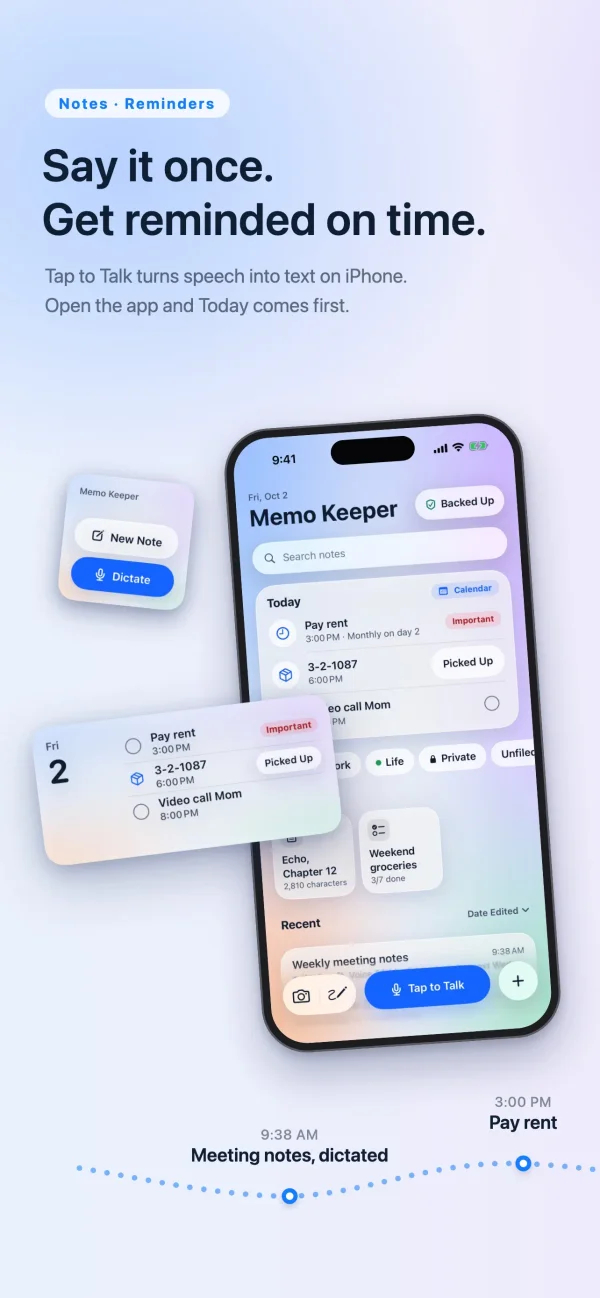
Tap to talk, tap again, and it’s written down. Memo Keeper turns what you say into a note and reminds you right on time.
Your notes live on your iPhone, not on our servers: no account, no ads, no subscription.
Type “Pay rent tomorrow at 3pm” and it offers to set the reminder. Take notes from the Lock Screen, Home Screen, Control Center or Siri, and open the app to see Today: everything to remember today, in one place.
TAP TO TALK
Tap to start, tap again to save, or hold if you prefer. What you say is turned into text right on your iPhone, and the original recording stays on your iPhone so you can play it back. Free: up to 1 minute per note. Pro: 5 minutes at a time.
HANDWRITING, PHOTOS AND DICTATION
Write with your finger, or snap a whiteboard, a receipt or a screenshot: the text is recognized on your iPhone, so search finds it. While editing, tap the mic above the keyboard and your words appear at the cursor, with line breaks, punctuation and formatting as you go.
REMINDERS THAT MATCH HOW MUCH IT MATTERS
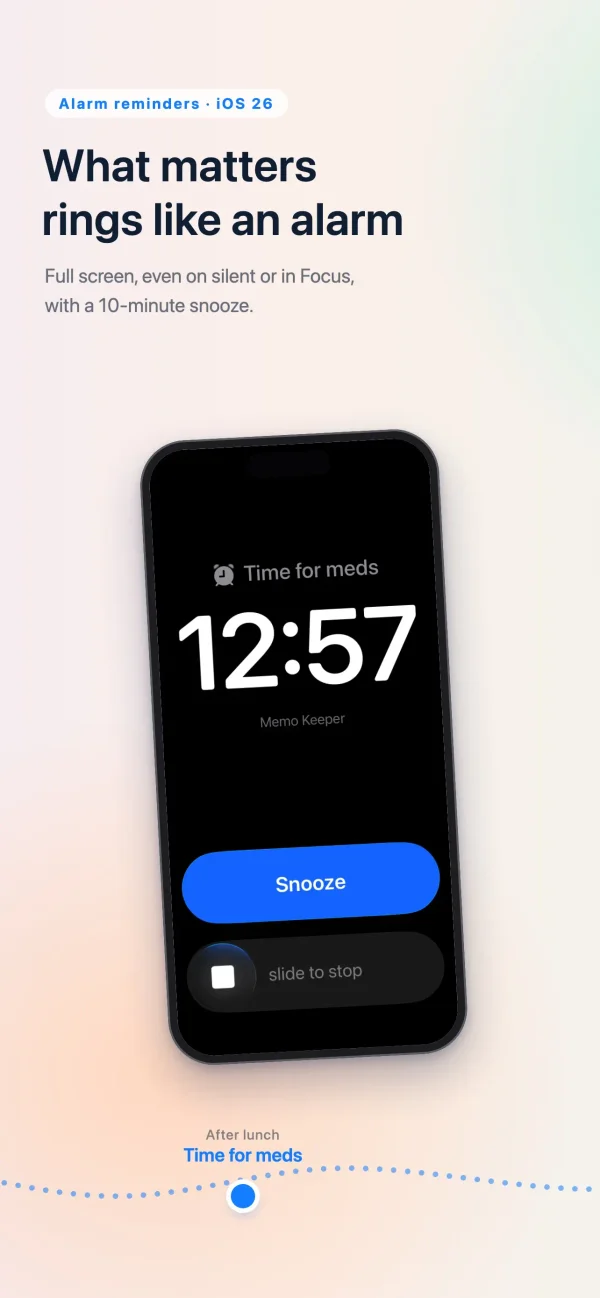
A Normal reminder is a notification. Important ones come through even in Focus. Alarm reminders ring full screen like an alarm clock on iOS 26, even on silent, with a 10-minute snooze. With Pro, turn on Until Done: stopping the alarm doesn’t count as done, so it rings again a few minutes later, up to 3 more times, and stops as soon as you tap Done. Pick its sound, or record your own voice.
PICKUP CODES, WITHOUT DIGGING THROUGH MESSAGES
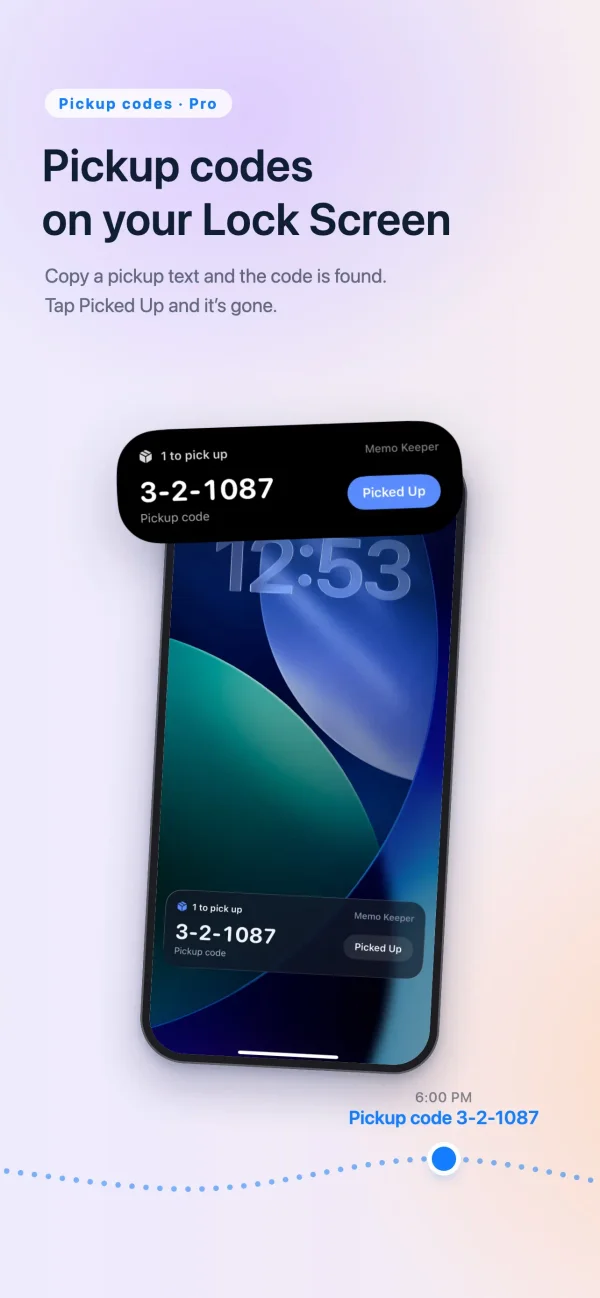
Copy a message with a pickup code, or share a screenshot, and the code lands in Today and on your widgets. A Messages automation in Shortcuts can save codes as texts arrive. With Pro it also goes on the Lock Screen and in the Dynamic Island.
CALENDAR, RECORDINGS AND THEMES (PRO)
Tap Calendar next to Today to see how many things you have each day, and add the Calendar widget. Share a Voice Memo or a meeting recording to Memo Keeper and it becomes text on your iPhone, even an hour-long one (iOS 26). Pick one of five color themes, with matching app icons.
NOTHING GETS LOST
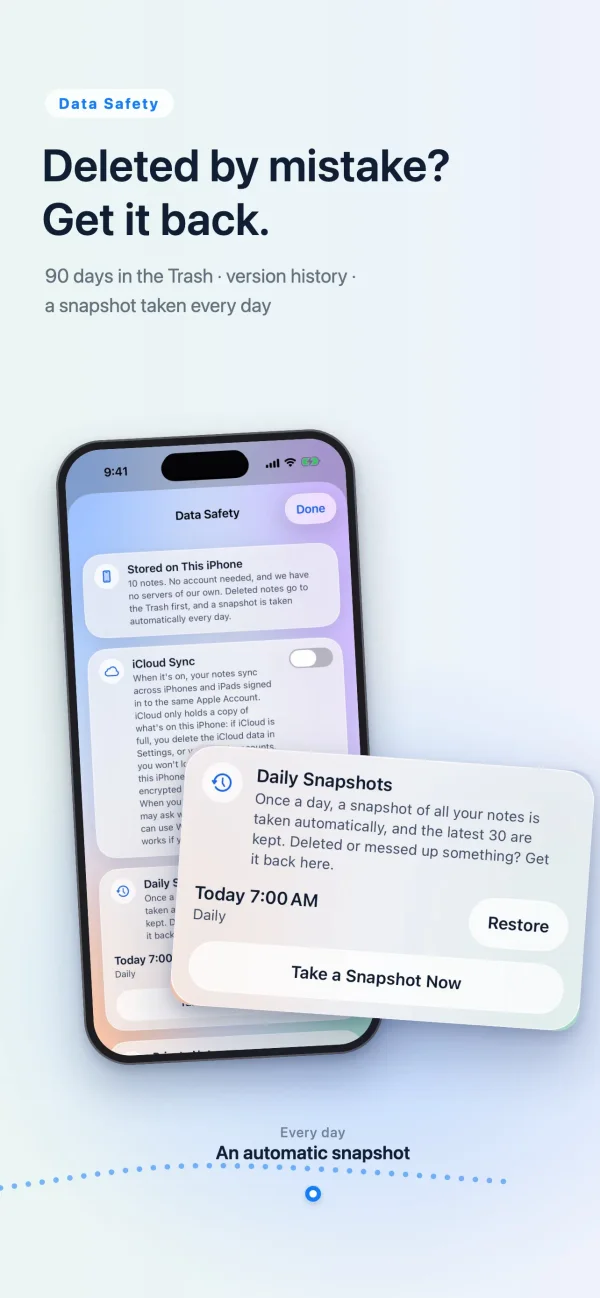
The copy on your iPhone is the original. Deleted notes stay in the Trash for 90 days, every note keeps its versions, and a snapshot of all your notes is taken daily. iCloud Backup stays off until you turn it on, and even then iCloud only holds a copy: if iCloud fills up or you switch accounts, you won’t lose a single note on your iPhone.
BRING YOUR APPLE NOTES
Export your Apple Notes as Markdown on a Mac and bring them all over at once, or share them in one by one.
PRIVATE FOLDERS
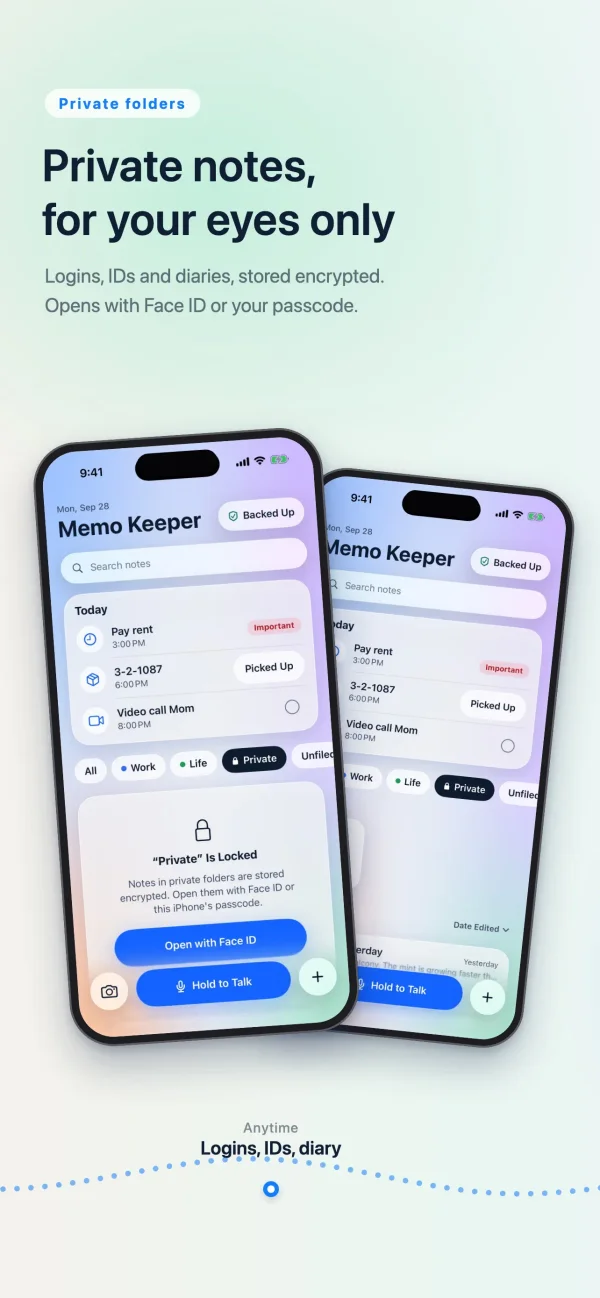
Keep passwords, IDs and diaries in a private folder. Its notes are stored encrypted and open with Face ID or your passcode. With iCloud Keychain on, they open on your new iPhone too, and there’s a printable recovery code just in case.
NOTES THAT LOOK GOOD AND TRAVEL WELL
Headings, bold, highlights, text colors, lists and dividers are a tap away in Format. Paste Markdown from an AI chat and it turns into formatting. Share a note as a long image, or save it as an A4 PDF.
IPHONE, IPAD AND MAC
On iPad and Mac, see folders, list and note side by side. On a Mac, pin a note to the desktop. With iCloud Backup on, a new device picks up your notes.
WHAT MEMO KEEPER DOESN’T DO
No account to sign up for.
No servers of our own: we can’t see what you write.
No ads.
No subscription: pay once and it’s yours.
WHAT’S FREE
Notes, handwriting, images, search, reminders, iCloud Backup, the Trash, version history, daily snapshots and Export All, plus up to 3 Alarm reminders at a time, 1 private folder and long images on white paper.
WHAT PRO ADDS, ONE-TIME PURCHASE
Each day’s details in the Calendar, Transcribe a Recording, themes and app icons, Until Done alarms with your choice of sound or your own voice, unlimited Alarm reminders, pickup codes on the Lock Screen and in the Dynamic Island, widgets that show everything, 5 minutes per recording, paper colors and PDF for long images, and unlimited private folders.
Say it once. Memo Keeper remembers.
Neue Funktionen
Version 1.5 · 12.11.2026
Memo Keeper is now on iPad and Mac: three columns to see more at once, and with iCloud Backup on, a new device picks up all your notes. China’s 2027 holiday schedule is in too.
New
· iPad: three columns in landscape (sidebar, list, note) and two in portrait, with menus and shortcuts on a hardware keyboard and handwriting with Apple Pencil
· Mac: a version built for the Mac, with Mac windows, menus and keyboard shortcuts. The Format and dictation panels sit below the note, and settings open in their own window
· Mac stickies: right-click a note and choose Pin to Desktop to keep it in a small window; edits save right away. Free: 1 at a time. Pro: unlimited
· Several devices: with iCloud Backup on, a new device offers to pick up where you left off and shows its progress, Data Safety lists the devices backing up, and if two devices change the same note, the other version goes into its history
· 2027 holidays: reminders set to China workdays skip public holidays and ring on make-up workdays (Pro)
Improved
· Pro is a one-time purchase that works on iPhone, iPad and Mac with the same Apple Account
· Features a device can’t use are hidden: Alarm reminders ring only on iPhone and show as Important on iPad and Mac, and the Mac has no camera capture or handwriting
App-Datenschutz
Was 纯沁 吴 im App Store zum Umgang dieser App mit Daten angibt.
-
Keine Daten erfasst
Der Entwickler erfasst keine Daten von dieser App.
Die Datenschutzpraktiken können variieren, zum Beispiel je nach den von Ihnen verwendeten Funktionen oder Ihrem Alter.
Informationen
- Anbieter
- 纯沁 吴
- Kategorie
- Produktivität
- Version
- 1.5
- Aktualisiert
- 12.11.2026
- Veröffentlicht
- 30.09.2026
- Größe
- 20,3 MB
- Erfordert
- iOS 18.0 oder neuer
- Altersfreigabe
- 4+
- In-App-Käufe
- Ja
- Sprachen
- Englisch, Vereinf. Chinesisch, Tradit. Chinesisch
- Copyright
- © 2026 吴纯沁
Das könnte Ihnen auch gefallen
-
 SlipGrove: School FormsProduktivität
-
 Simple.NotesNotizen, Notizbücher & Sprache
-
 Ringleader: Meeting AlarmsProduktivität
-
 Earthian 环球公民Produktivität
-
 Countdown Calendar:RemindersProduktivität
-
 Strong ReminderProduktivität
-
 Space4LinksProduktivität
-
 MinumistProduktivität
-
 PlanEaseProduktivität
-
 Retrace - Rewind for NotesProduktivität