
Mobile VR Station®
Virtual Reality Media Player
Entwickelt für iPhone, iPad, iPod touch
Kostenlos · In-App-Käufe
- Altersfreigabe4+
- KategorieUnterhaltung
- EntwicklerMichael Fuller
- SprachenEnglisch+ 1 weitere
- Größe76,7 MB
Verlinkt auf die offizielle App Store-Seite
Download.org hostet keine Datei von Mobile VR Station®. Die Schaltfläche öffnet die App-Seite bei App Store, wo Michael Fuller die App veröffentlicht. Eintrag zuletzt geprüft am 12.11.2026.
Screenshots


Info
Der Entwickler hat diesen Text nicht in Ihrer Sprache bereitgestellt.
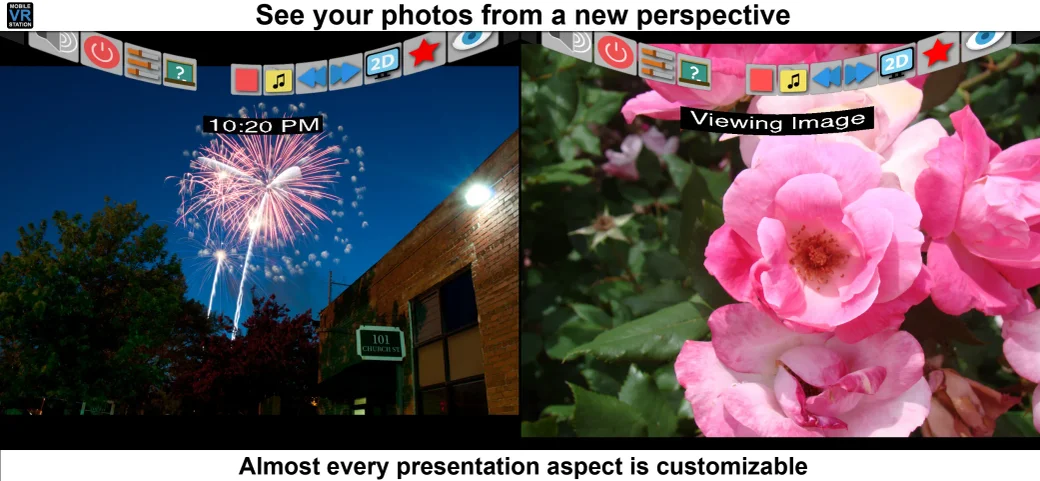
Mobile VR Station is a media player designed for Virtual Reality with head tracking. With this app you can view your Photos, Panoramas, Videos & Files projected onto a virtual screen floating in space. Our app supports displaying standard 2D and 3D Side By Side/Over Under content. The app can't display DRM protected content, such as content bought from iTunes.
"The most feature-packed VR media player available, with editable profiles that let you adjust the viewing experience across multiple devices and VR adapters. Excellent all around!"
-Quote from Manuel M, Beta Tester
If you need help we provide links inside the app to view our Facebook, Twitter and YouTube channel.
Usages:
- Works with every headset, very flexible configuration
- Watch movies in a virtual theater
- Watch 3D 180 Degree content.
- Explore 360/Spherical movies (Great for demos).
- Experience 3D content (Left/Right, Right/Left and Top/Bottom).
- See your device's photos & videos in a new way.
- View panoramas with some depth.
- Access external video content with UPNP.
- Watch HTML5 Video from Mobile Safari with Micro VR Station extension.
Details:
- Native App, written in Obj-C with SceneKit
- Watch App for Remote control capabalities
- This app is currently only available in English
- Free version limits video playback to the "first" five minutes.
- Supported formats: MOV, MP4 & M4V.
- Supported HMDs: None (Mono), None (SBS), Cardboard, Altergaze, Firefly, Custom, ....
- Cardboard QR scanner available for quick setup
- Supported Devices: Any device running iOS 8.1 can install the app, but iPhone 5S/iPad Mini (Retina) and above provide a great experience.
- Projections: Dome, Full Dome, Curved (Large curve), Plane (Flat), Cylinder & Spherical
- Skyboxes: 47 built in options.
- Profiles: Each user/headset can have their own specific configuration.
- Audio: Language switching available.
- Subtitles: The app can load UTF-8 formatted *.srt files, after a movie has been started
- Files: Each file has its own preview icon and meta data. You can either generate a icon or upload your own. Please see the FAQ on how to make your own icons.
- Bluetooth Remote: If your headset has Play/Pause & Next/Previous buttons, you can use them to control video playback.
- UPNP: Basic support for viewing & downloading video & image content. Music can play if you mess with a few settings.
- Other File Formats: We are researching how other formats and higher quality content could be displayed, we understand the need and want to deliver in the future.
-1080P @ 60 FPS is available on 5S+ and beyond. Devices under 5S should consume 720P.
- 4K @ 30FPS is available for 6S, 6S+, 5SE & iPad Pro
- Support for SanDisk™ iXpand Drives
- Please see the guide book for more information
Tips:
- If video playback starts to lockup, or a setting doesn't stick please turn your device off and on again.
- It's strongly recommended to go through Training at least once and check out the help videos if you have time.
- Every projection is editable, just dig into "Manage Presets" for the details.
- If you really need help, ask on our Facebook page, Twitter account, or reddit /r/iOSVR/
Controls:
- MFI Controller/Bluetooth keyboard support (While in VR).
- When not using a HMD device buttons can be tapped.
- Tap anywhere in the right eye or empty space to recenter view.
- Tap 3 fingers on screen to quickly exit VR.
- Support for Occipital Bridge Controller
Neue Funktionen
Version 2024.09 · 02.09.2024
This app has been updated by Apple to prepare for watchOS 27 compatibility. No new features are included.
1. New build, it has been a over a year since an update.
2. Fixed an issue with the Cardboard QR Scanner not working.
App-Datenschutz
Was Michael Fuller im App Store zum Umgang dieser App mit Daten angibt.
-
Keine Daten erfasst
Der Entwickler erfasst keine Daten von dieser App.
Die Datenschutzpraktiken können variieren, zum Beispiel je nach den von Ihnen verwendeten Funktionen oder Ihrem Alter.
Informationen
- Anbieter
- Michael Fuller
- Kategorie
- Unterhaltung
- Version
- 2024.09
- Aktualisiert
- 02.09.2024
- Veröffentlicht
- 04.03.2015
- Größe
- 76,7 MB
- Erfordert
- iOS 12.0 oder neuer
- Altersfreigabe
- 4+
- Preis
- Kostenlos
- In-App-Käufe
- Ja
- Sprachen
- Englisch, Spanisch
- Copyright
- © 2015-2022 Michael Glen Fuller JR
Das könnte Ihnen auch gefallen
-
 VRPlayer : 2D 3D 360° Video2D 3D 360° Video Player for VR
-
 VR Tube - 360 Video Player360-Grad Video Entertainment
-
 rPlayer: VR & 3D Video PlayerPowerful VR & 3D Video Player
-
 LightPlay AI: Create Watch 1B+Unterhaltung
-
 Google CardboardUnterhaltung
-
 VR Movies : 3D 360° VideosVirtual Reality 360° Player
-
 iVRyUnterhaltung
-
 VUZ: Live 360 VR VideosUnterhaltung
-
 VR Real Feel RacingUnterhaltung
-
 Reality Augmented (VR)Unterhaltung