
- Altersfreigabe4+
- KategorieProduktivität
- EntwicklerVan Nhat Vu Nguyen
- SprachenEnglisch
- Größe147,1 MB
Verlinkt auf die offizielle App Store-Seite
Download.org hostet keine Datei von Nommoji. Die Schaltfläche öffnet die App-Seite bei App Store, wo Van Nhat Vu Nguyen die App veröffentlicht. Eintrag zuletzt geprüft am 26.11.2026.
Screenshots


Info
Der Entwickler hat diesen Text nicht in Ihrer Sprache bereitgestellt.
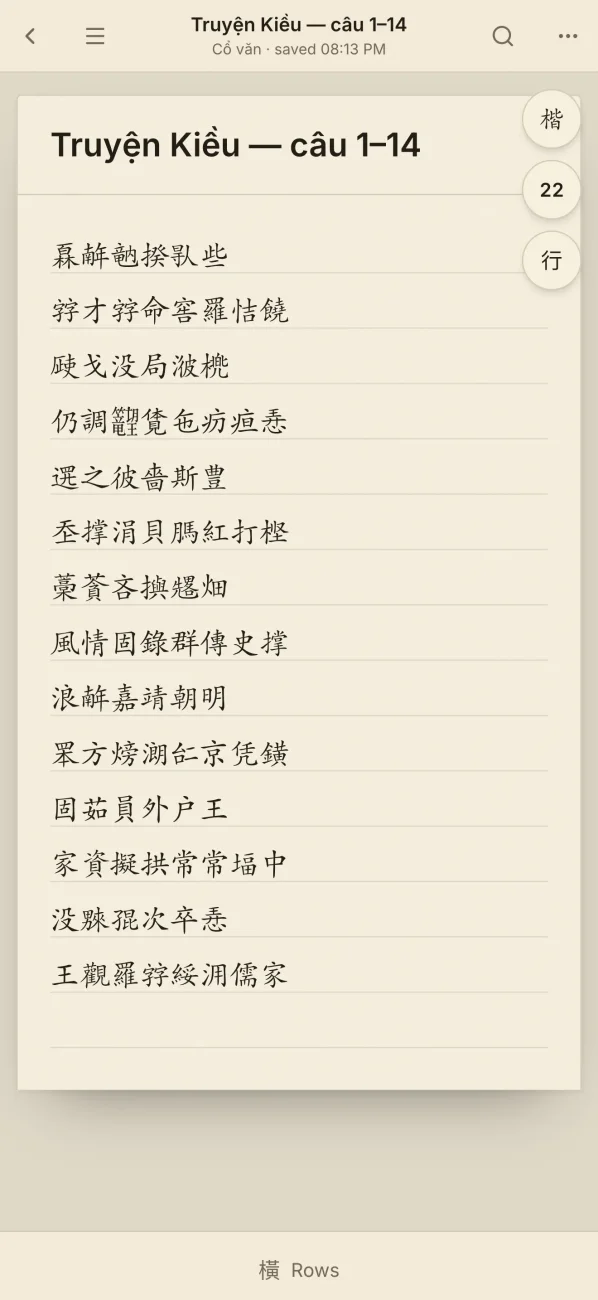
Nommoji is a notes app built for Vietnamese classical script. Write, keep and re-read chữ Nôm and chữ Hán without tofu boxes, broken font fallbacks, or characters that disappear when you reopen the file.
Mainstream editors fail on Nôm for three reasons: the rarer characters live in Unicode Extension B and above, thousands more sit in Private Use Area blocks that no system font covers, and no standard keyboard turns Vietnamese syllables into Nôm. Nommoji bundles its own fonts and its own Nôm keyboard, so the text renders and stays yours.
WRITE NÔM WITH A VIETNAMESE KEYBOARD
Nommoji comes with the Nôm keyboard. Turn it on in Settings → Keyboards and type the way you already type — Telex. "nguwowif" becomes "người", and a candidate bar offers the Nôm characters for that syllable. It works in Nommoji and in every other app, and with Allow Full Access on you can also write a character by hand. Nothing to download, nothing to sign in to.
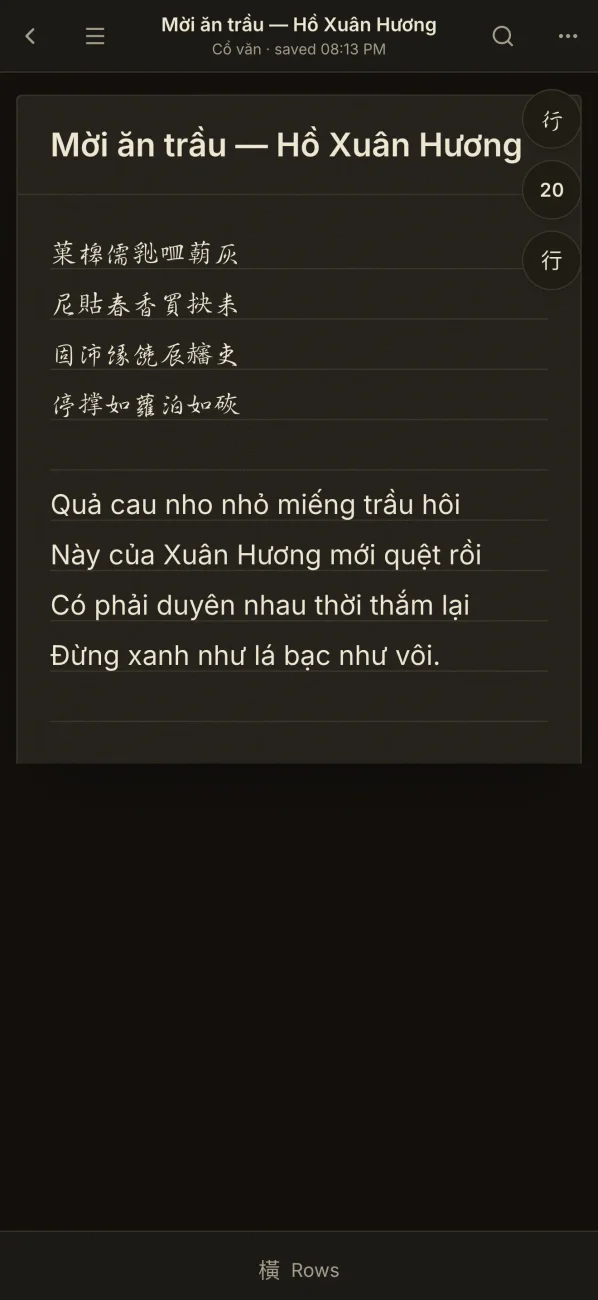
SIX CALLIGRAPHIC STYLES
Regular, Kai (楷書), Running (行書), Cursive (草書), Clerical (隸書) and Seal (篆書). Choose the style per document.
PAPER, NOT A BACKGROUND
Five papers drawn from Hán-Nôm practice: plain (素), ruled (行), 界欄 — the ruled frame and column rules of a woodblock page — and the 田字格 and 米字格 practice grids. The ruling is pitched off your own type size, so characters sit on it instead of drifting across it, and the sheet carries a 宣紙 texture rather than a flat colour.
SET IT LIKE A PRINTED PAGE
The proportions a woodblock canvas is cut to: type size, 行間 (the gap between columns), 字間 (the gap between characters), and a 天頭 margin above the text block deeper than the one below it. Pinch to zoom in on a glyph and check a stroke.
CLASSICAL VERTICAL LAYOUT
Write in columns — top to bottom, right to left — the way the texts were originally set, with the Nôm keyboard working the same way it does horizontally. Switch back to horizontal whenever you want.
PLAIN TEXT, ON PURPOSE
Nommoji keeps what you type as plain text — no bold, no headings, no lists. A page of Nôm is set by its script, its paper and its proportions; formatting marks belong to a different kind of document. Your file stays a file.
KEEP AND FIND YOUR WORK
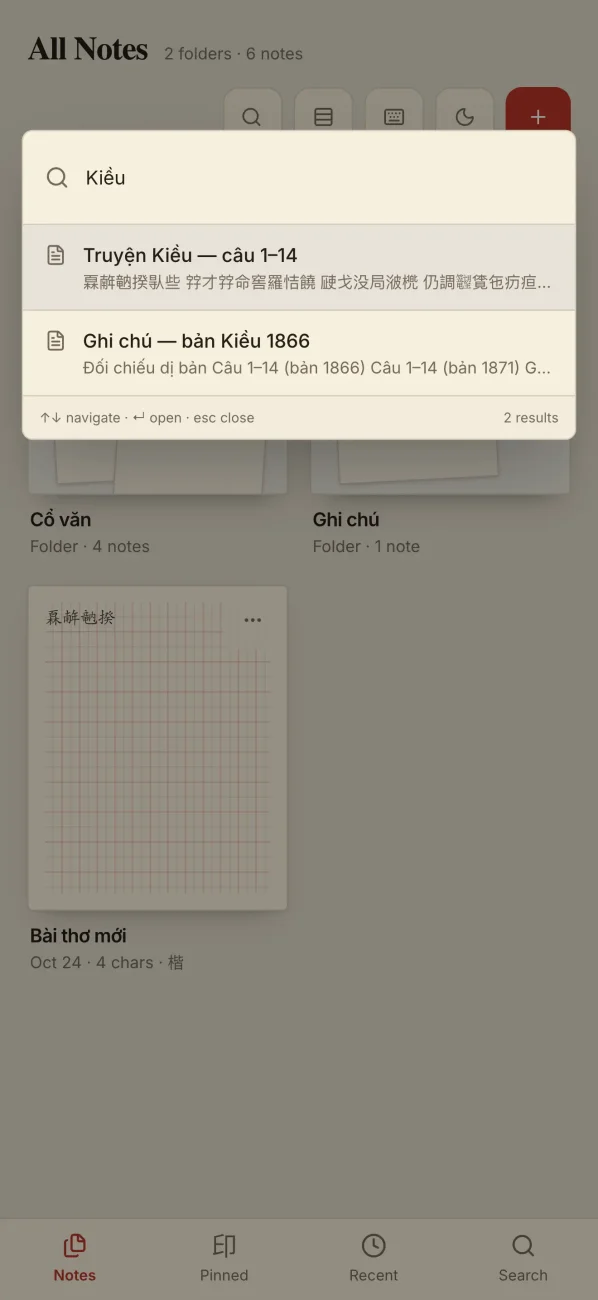
Pin the documents you keep returning to, file the rest into folders, and search every note by title or by body text.
YOUR WORK, ON YOUR DEVICE
Nommoji keeps everything locally. No account, no sign-in, no sync server, no analytics, no tracking. It works with the network switched off — on a plane, or in an archive reading room. The one exception is optional handwriting in the keyboard: with Allow Full Access on, a character you draw is sent to the Nôm Na Việt server to be recognised. What you type never leaves your device.
EXPORT AND IMPORT
Send any document to the iOS share sheet as Markdown or as a .nom file — save it to Files, mail it, or open it in another app. Bring .nom files back with the import button in the library, or open one from Files, Mail or AirDrop. The .nom format is plain JSON, so your text stays readable by other tools for as long as you keep the file.
COMPANION TO NÔM NA VIỆT
Nommoji is where you write. Nôm Na Việt — free on the App Store — is where you look things up: a Hán-Nôm dictionary with readings and meanings, a converter, and a reader for classical texts.
FONTS
Nommoji bundles NomNaTong, BabelStone Han, Plangothic P1 and P2, Han-Nom Khai, TW-MOE Std Kai, MoE Lishu, Chong Xi Small Seal, WHT Hsing Shu and Liu Jian Mao Cao. Our thanks to everyone who made these available.
Neue Funktionen
Version 0.4.9 · 25.11.2026
New style: Decree (Lệnh thư, 令), the script of the Lê dynasty's royal decrees (sắc phong). The font was learned from public-domain photos of Lê decrees.
App-Datenschutz
Was Van Nhat Vu Nguyen im App Store zum Umgang dieser App mit Daten angibt.
-
Keine Daten erfasst
Der Entwickler erfasst keine Daten von dieser App.
Die Datenschutzpraktiken können variieren, zum Beispiel je nach den von Ihnen verwendeten Funktionen oder Ihrem Alter.
Informationen
- Anbieter
- Van Nhat Vu Nguyen
- Kategorie
- Produktivität
- Version
- 0.4.9
- Aktualisiert
- 25.11.2026
- Veröffentlicht
- 11.09.2026
- Größe
- 147,1 MB
- Erfordert
- iOS 17.4 oder neuer
- Altersfreigabe
- 4+
- Preis
- Kostenlos
- Sprachen
- Englisch
- Copyright
- © 2026 Nôm Na Việt
Das könnte Ihnen auch gefallen
-
 Lịch Âm Số: Văn Khấn & AIProduktivität
-
 TheBrain: Smart Notes & LinksProduktivität
-
 Âm Lịch ViệtProduktivität
-
 TATEditorProduktivität
-
 TatePad - Vertical WritingProduktivität
-
 Koreanisch live übersetzenSprache, Foto & Offline
-
 Ui Browser MiniProduktivität
-
 HueWACO CSKHProduktivität
-
 Dual Space: Dual App ParallelProduktivität
-
 DNAILISProduktivität