Now Planner
Write it. Place it. Start it.
Entwickelt für iPhone, iPad, iPod touch
Kostenlos · In-App-Käufe
- Altersfreigabe4+
- KategorieProduktivität
- EntwicklerChang Joo Park
- SprachenEnglisch+ 2 weitere
- Größe38,8 MB
Verlinkt auf die offizielle App Store-Seite
Download.org hostet keine Datei von Now Planner. Die Schaltfläche öffnet die App-Seite bei App Store, wo Chang Joo Park die App veröffentlicht. Eintrag zuletzt geprüft am 12.11.2026.
Screenshots

Info
Der Entwickler hat diesen Text nicht in Ihrer Sprache bereitgestellt.
A to-do planner that fits what's on your mind into the free time on your day.
Write it. Place it. Start it. Less to sort, fewer things to decide.
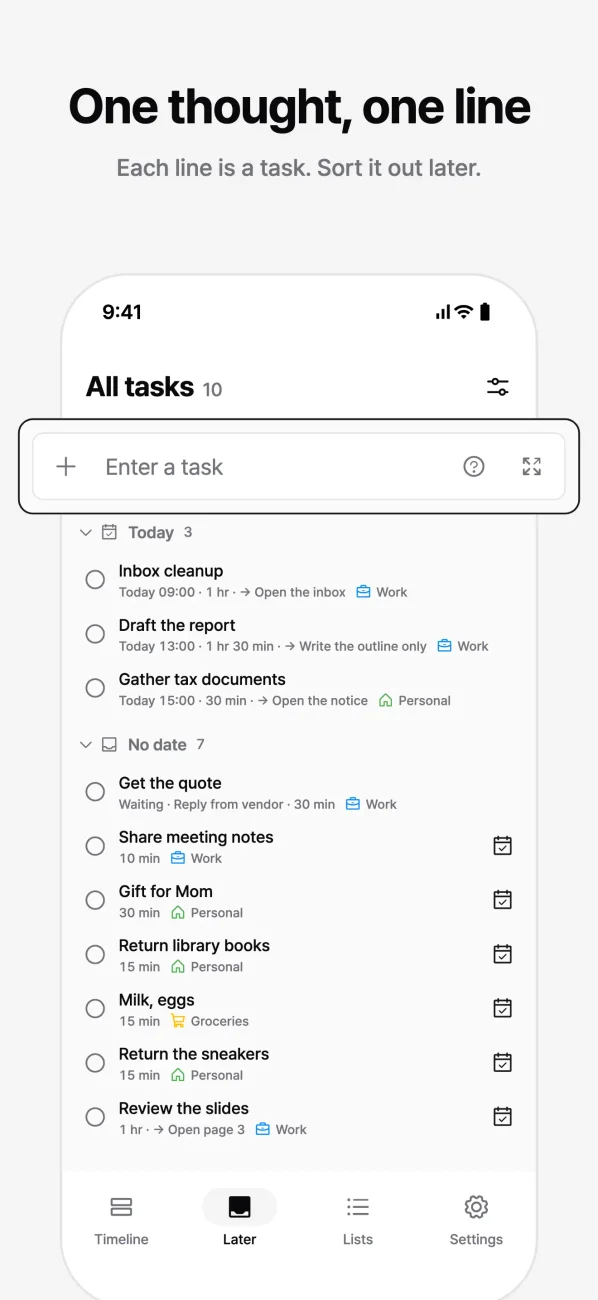
ONE THOUGHT, ONE LINE
· Each line is a task. A title is enough.
· Tasks without a date go to Later. Sort them out when you want to.
· When your head is full, write many lines at once and turn only the ones you need into tasks.
· Add "#Work" for a list and "30m" or "1h" for a duration.
· Attach a place and a link, and connect related tasks.
FIT IT INTO FREE TIME
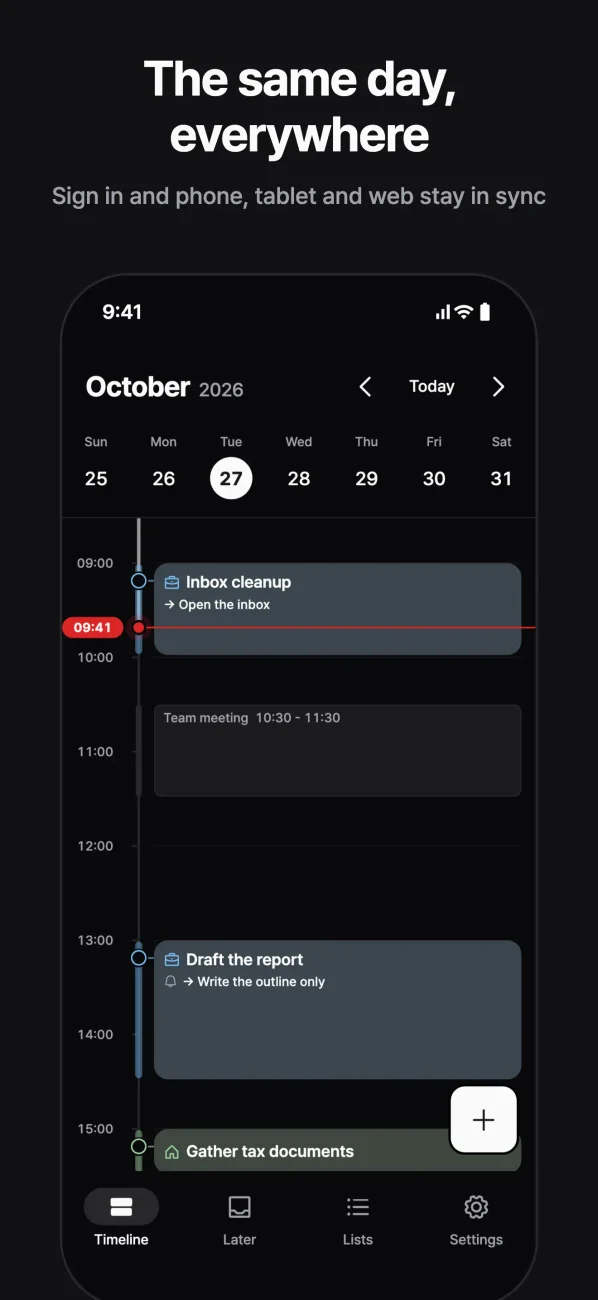
· Meetings and appointments from your device calendar show up faintly on the timeline, and that time stays free of tasks. Events are read only, never changed.
· Drag a task from Later onto the timeline, or use Find time to pick the nearest free slot.
· Early mornings and late nights outside your active hours fold away. On iPad and the web, Week view shows the whole week.
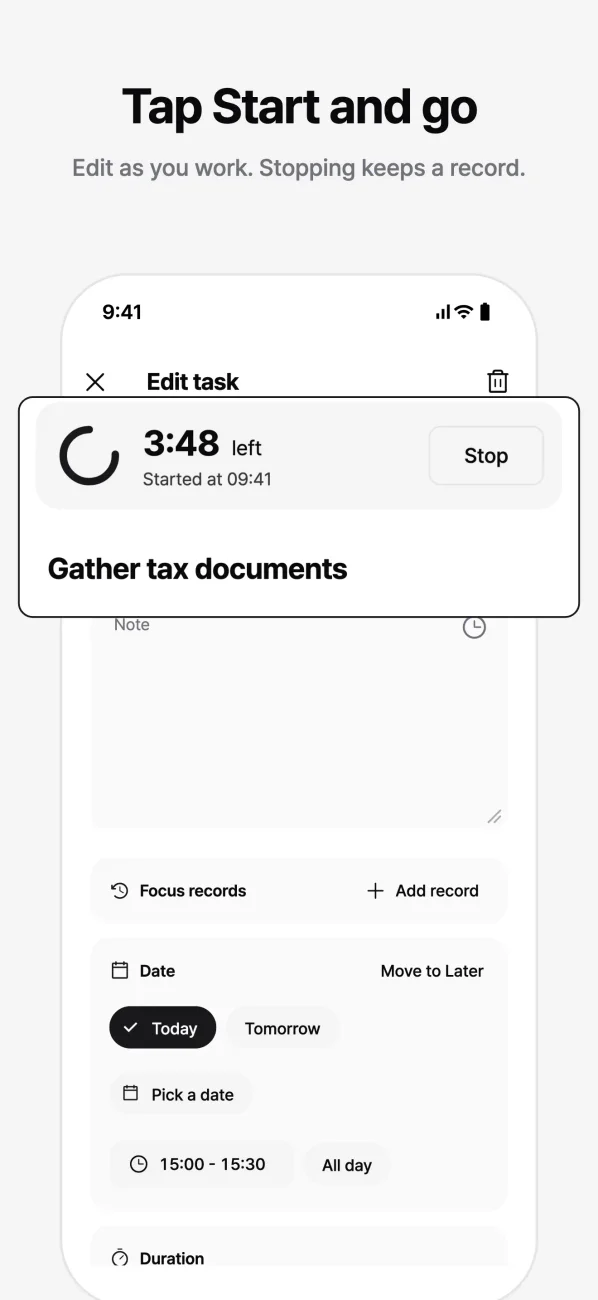
TAP START AND GO
· Tap Start and the timer runs right away. No time limit; it counts the time you spend.
· Edit the task and its notes while you work. It keeps going when you close the screen.
· When you stop, the start and end times are kept as a focus record. Edit records or add them by hand.
· No streaks, no scores.
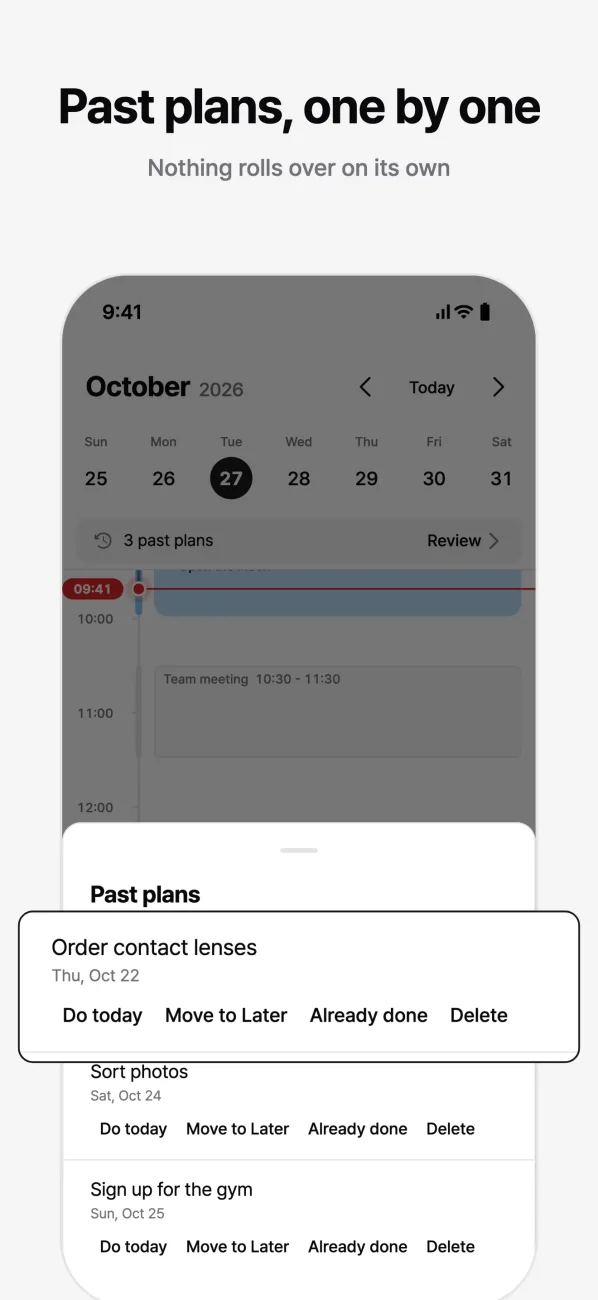
PAST PLANS, ONE BY ONE
· Unfinished past plans don't roll over to today. They show up as one line, "3 past plans", above today's timeline.
· Choose for each: Do today · Move to Later · Already done · Delete.
· Put something off twice and it asks what is blocking it. Not sure where to start: pick a first step. Too big: split it. Low energy: do 2 minutes. Waiting on someone: move it to Waiting.
THE SAME DAY, EVERYWHERE
· Sign in to see the same tasks on iPhone, iPad and the web.
· Write tasks without opening the app: Home and Lock Screen widgets, a Control Center button, Siri and Shortcuts.
· Reminders arrive before a task starts, leading with its first step when it has one. "10:00 · Open the notice first"
· Morning briefing sends today's plan every morning.
· On iPad and the web: a ⌘K command palette and keyboard shortcuts.
· Light and dark mode, several themes, and a color and icon for each list.
Every feature is free. No ads.
App-Datenschutz
Was Chang Joo Park im App Store zum Umgang dieser App mit Daten angibt.
-
Daten, die zum Tracking Ihrer Person verwendet werden
Können verwendet werden, um Sie über Apps und Websites anderer Unternehmen hinweg zu verfolgen.
- Kennungen
- Nutzungsdaten
-
Mit Ihnen verknüpfte Daten
Können erfasst und mit Ihrer Identität verknüpft werden.
- Kennungen
- Nutzungsdaten
-
Nicht mit Ihnen verknüpfte Daten
Können erfasst werden, sind aber nicht mit Ihrer Identität verknüpft.
- Kontaktinformationen
Die Datenschutzpraktiken können variieren, zum Beispiel je nach den von Ihnen verwendeten Funktionen oder Ihrem Alter.
Informationen
- Anbieter
- Chang Joo Park
- Kategorie
- Produktivität
- Version
- 1.0
- Aktualisiert
- 05.11.2026
- Veröffentlicht
- 05.11.2026
- Größe
- 38,8 MB
- Erfordert
- iOS 15.0 oder neuer
- Altersfreigabe
- 4+
- Preis
- Kostenlos
- In-App-Käufe
- Ja
- Sprachen
- Englisch, Japanisch, Koreanisch
- Copyright
- © 2026 Team Dada
Das könnte Ihnen auch gefallen
-
 My Week – Wochenplaner & To-DoAufgaben, Wochenplan & Liste
-
 Set · ADHS-AufgabenplanerPlane deinen Tag, bleib dran.
-
 Day Planner - Time BlokkerEinfaches Time Blocking & ToDo
-
 Ellie - Daily PlannerProduktivität
-
 AXGate VPNProduktivität
-
 국민 메모장 솜노트 - SomNoteProduktivität
-
 Disciplined: Gewohnheits AppTägliche Gewohnheiten & Streak