
PatronArchiver
Archive Your Creator Posts
Entwickelt für iPhone, iPad, Mac
Kostenlos · In-App-Käufe
- Altersfreigabe12+
- KategorieUnterhaltung
- EntwicklerShizukuSoft LLC.
- SprachenEnglisch+ 2 weitere
- Größe9,9 MB
Verlinkt auf die offizielle App Store-Seite
Download.org hostet keine Datei von PatronArchiver. Die Schaltfläche öffnet die App-Seite bei App Store, wo ShizukuSoft LLC. die App veröffentlicht. Eintrag zuletzt geprüft am 18.11.2026.
Screenshots
Info
Der Entwickler hat diesen Text nicht in Ihrer Sprache bereitgestellt.
PatronArchiver makes it easy to save posts from your favorite creator platforms directly to your device. Whether you want to keep a personal backup or read content offline, PatronArchiver has you covered.
Save in Multiple Formats
Each post is archived as a web archive, a PDF, and individual media files — all neatly organized in a single folder. Pick the formats that work best for you: Apple's native web archive, the widely supported MHTML, PDF, or any combination.
Keep Everything Offline
Once archived, your saved posts are yours to keep. Read them anytime, anywhere — no internet connection required.
Preserve the Full Post
PatronArchiver captures text, images, videos, attachments, and even comments. It scrolls through the entire page to make sure lazy-loaded content is included too.
Stay Organized
Posts are automatically sorted into folders by creator name and post title. On Mac, posts are tagged with Finder tags and origin URLs for easy search and reference.
Works on iPhone, iPad, and Mac
Archive posts on any of your Apple devices.
Simple to Use
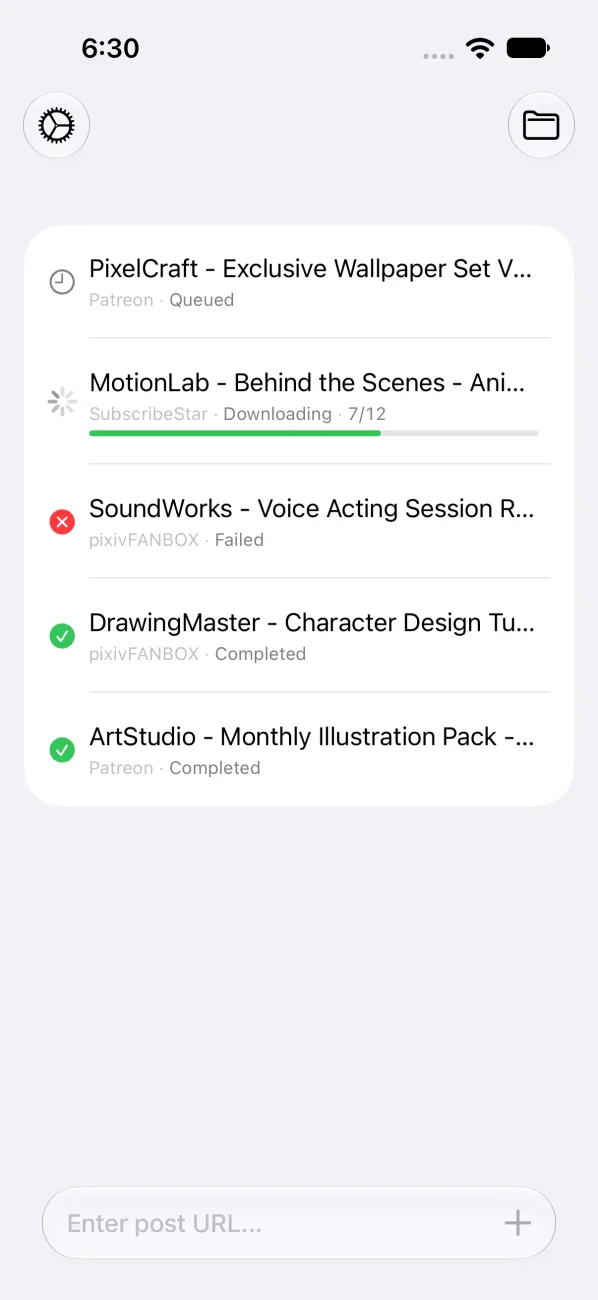
Just paste a post URL, and PatronArchiver takes care of the rest. Track progress in real time, retry failed jobs, and customize settings like rendering width and save location.
Neue Funktionen
Version 2.0.0 · 12.10.2026
New
- Posts can now be saved as WebArchive, Apple's native web archive format that opens directly in Safari.
- Settings has a new Formats section. Pick any combination of WebArchive, MHTML, and PDF, or turn them all off to save media files only.
- While media downloads, the job shows how many files are done, and its progress bar advances as each file arrives.
Improvements
- Posts are now saved as WebArchive and PDF by default. MHTML is off unless you turn it on in Settings.
- The newest job now appears at the top of the list, so a job you just added is visible right away.
- On iPad and in wide windows, the URL field now sits at the top of the window in one capsule with the Add button, as it does on Mac.
- Enhanced Security now runs at version 2, with guard objects and hardware-checked pointer arithmetic.
Fixed
- Posts with very long titles failed to save and discarded their downloaded media.
- A media file the server refused was saved with the error page as its contents and the job reported as completed. The job now fails and says why.
- A post whose page came back as a server error was archived as-is. The job now fails instead.
- A job's progress bar stood still while the page was being saved and media downloaded, and never showed the Downloading status.
- The URL field in the iPhone and iPad bottom toolbar shrank to its text on iOS 27.
- Post links from a supported site were not recognized when the address had a number inside the title part.
Requirements
- This version requires macOS 26 or iOS 26. On Mac, it runs on Apple silicon only.
App-Datenschutz
Was ShizukuSoft LLC. im App Store zum Umgang dieser App mit Daten angibt.
-
Keine Daten erfasst
Der Entwickler erfasst keine Daten von dieser App.
Die Datenschutzpraktiken können variieren, zum Beispiel je nach den von Ihnen verwendeten Funktionen oder Ihrem Alter.
Informationen
- Anbieter
- ShizukuSoft LLC.
- Kategorie
- Unterhaltung
- Version
- 2.0.0
- Aktualisiert
- 12.10.2026
- Veröffentlicht
- 06.07.2026
- Größe
- 9,9 MB
- Erfordert
- iOS 26.0 oder neuer
- Altersfreigabe
- 12+
- Preis
- Kostenlos
- In-App-Käufe
- Ja
- Sprachen
- Englisch, Japanisch, Koreanisch
- Copyright
- © 2026 ShizukuSoft LLC
Das könnte Ihnen auch gefallen
-
 INCTV NOW STREAMINGUnterhaltung
-
 TrueFans FMUnterhaltung
-
 SCF - 서브컬쳐 페스티벌Unterhaltung
-
 Neon PC Remote PlayUnterhaltung
-
 Confession StoriesAnonyme Beichten
-
 Roparty - Game. Chat. Party!Unterhaltung
-
 Custom Crosshair Pro Aim V2Unterhaltung
-
 FANDING x NEMOZUnterhaltung
-
 Shaders for Minecraft MCUnterhaltung
-
 IPTV Smarters Pro Player+IPTV Smarters pro, M3U, XTREAM