
PayDay: Shift Tracker
Hours, tips and pay by job
Entwickelt für iPhone
Kostenlos
- Altersfreigabe4+
- KategorieProduktivität
- EntwicklerIvo Peterka
- SprachenEnglisch+ 3 weitere
- Größe3,5 MB
Verlinkt auf die offizielle App Store-Seite
Download.org hostet keine Datei von PayDay: Shift Tracker. Die Schaltfläche öffnet die App-Seite bei App Store, wo Ivo Peterka die App veröffentlicht. Eintrag zuletzt geprüft am 14.11.2026.
Screenshots

Info
Der Entwickler hat diesen Text nicht in Ihrer Sprache bereitgestellt.
PayDay keeps track of what you work and what you're owed.
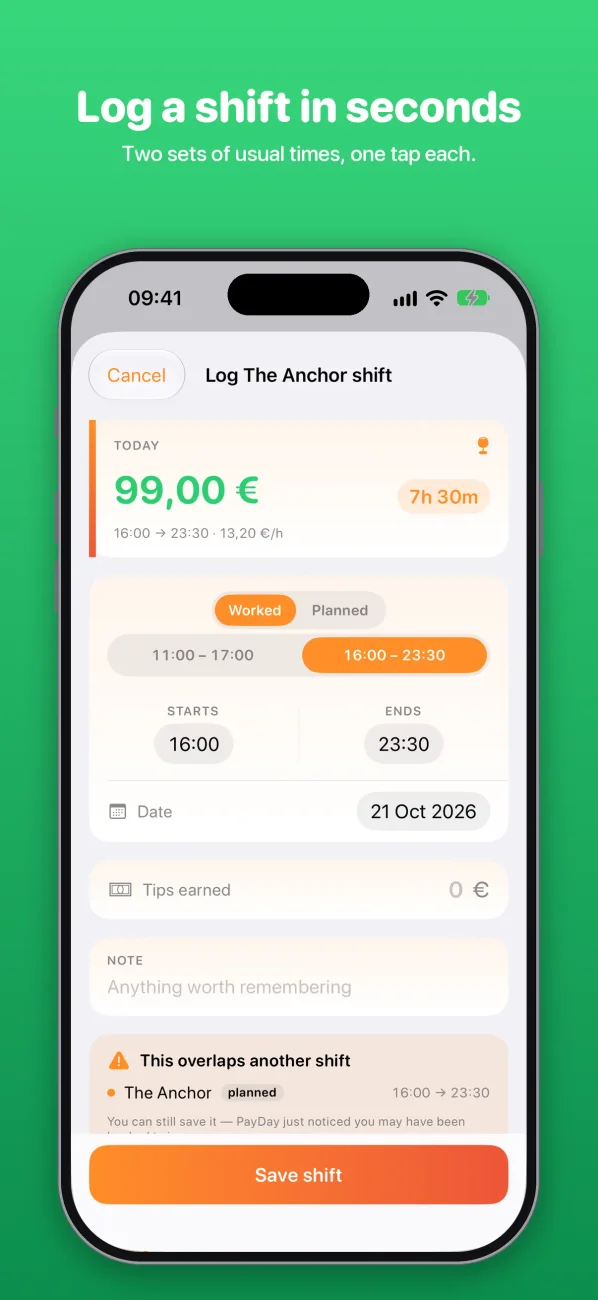
Add a job — a bar, a shop, an office, as many as you like. Each one gets its own tab, its own colour and its own hourly rate. Log a shift in a couple of taps and PayDay works out what it paid.
A TAB PER JOB
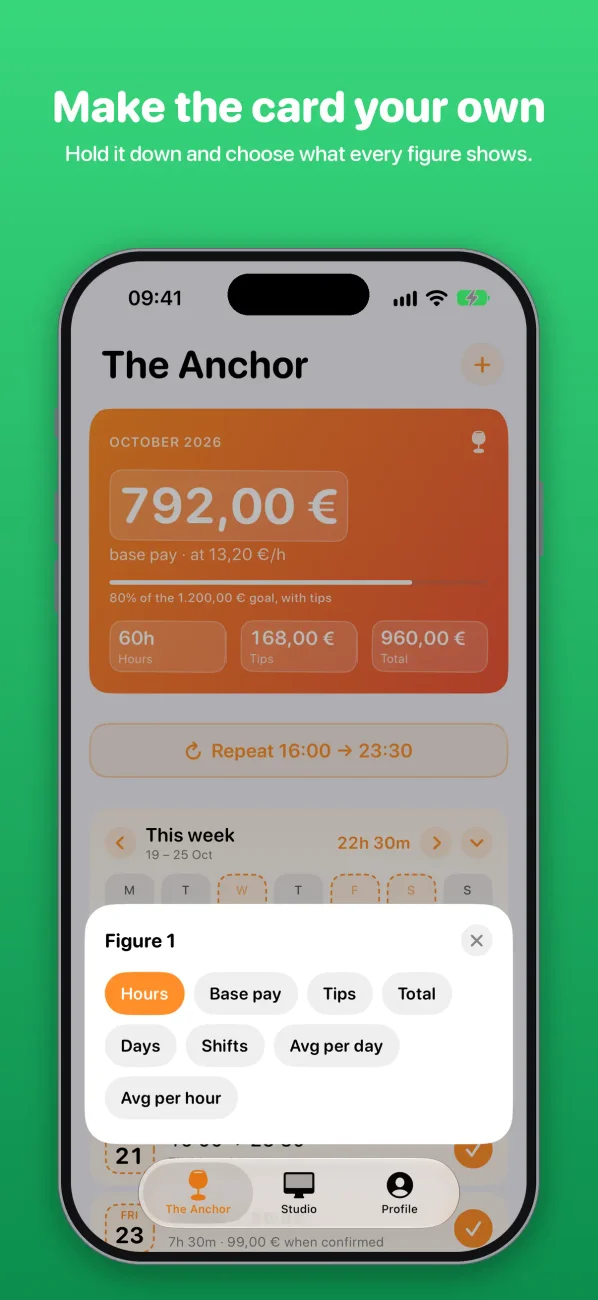
Every job keeps its own rate, usual hours, colour and icon. Switch between them from the tab bar.
SHIFTS, LOGGED IN SECONDS
Repeat your last shift with one tap, or pick a day straight from the calendar. Shifts that run past midnight are handled properly — they still count toward the day they started.
TIPS
Turn them on for the jobs that have them, off for the ones that don't.
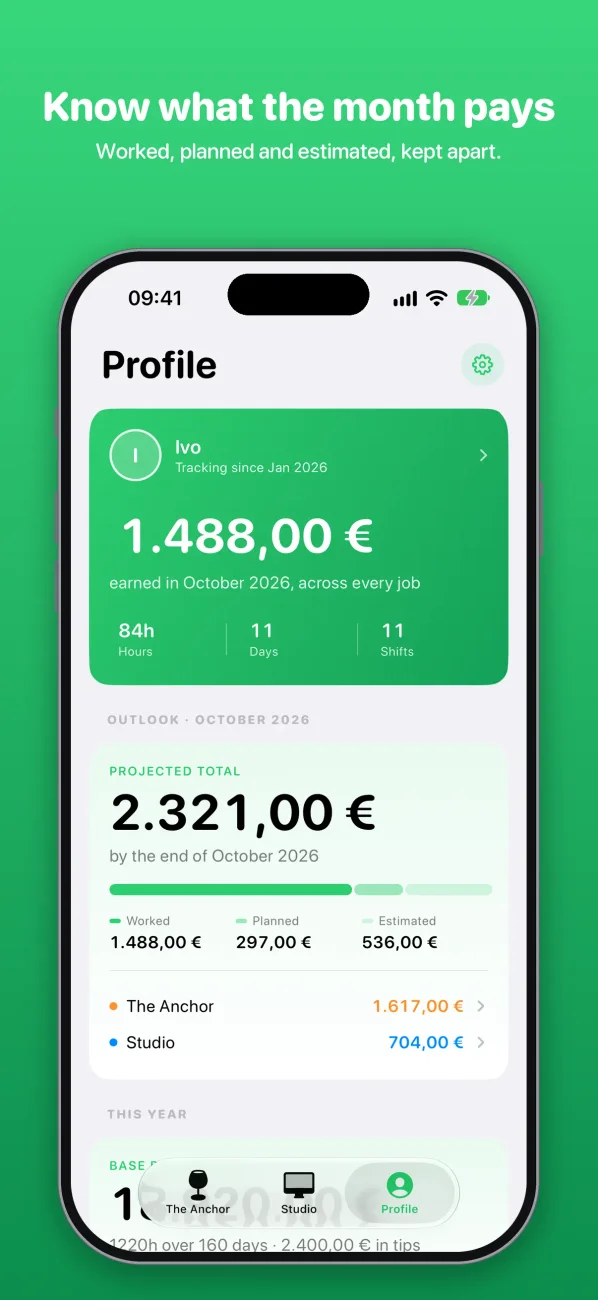
KNOW WHAT THE MONTH WILL PAY
PayDay projects the rest of the month from how you actually work, weighting each remaining day by how often you work that weekday. Set a monthly goal in hours or money and watch it fill.
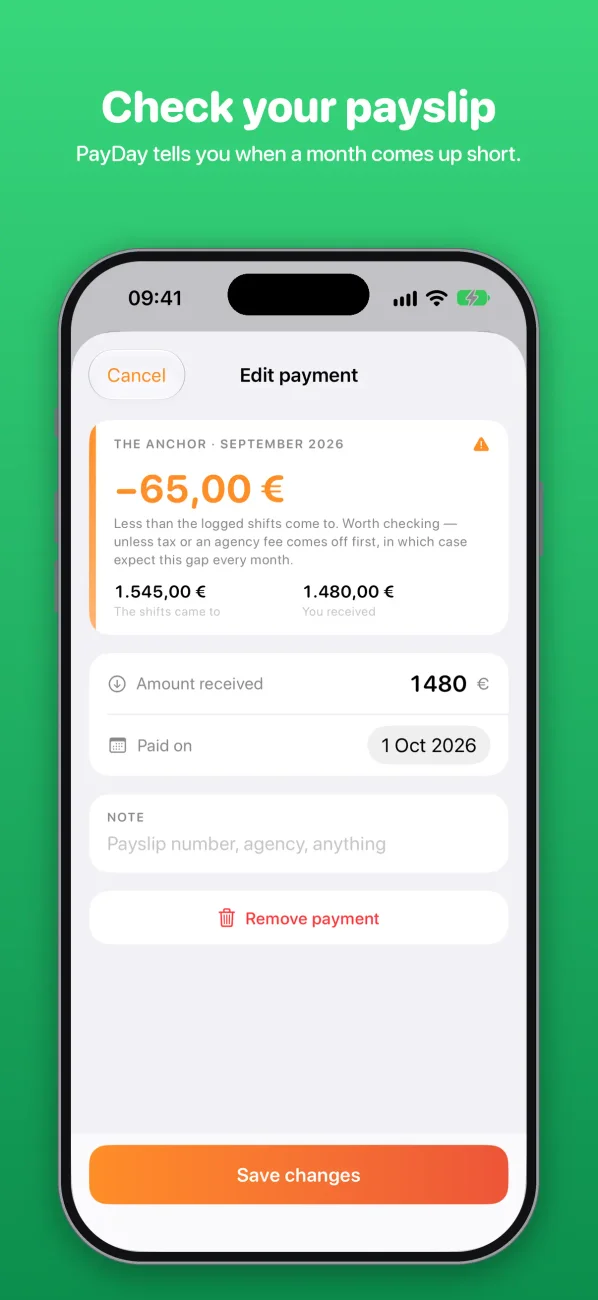
CHECK YOUR PAYSLIP
Mark a month as paid, enter what actually landed in your account, and PayDay tells you whether it matched what the shifts came to.
TIMESHEETS
Any month as a clean table of dates, times and hours, exported as a PDF to print or send, or a CSV for a spreadsheet.
YOURS, AND ONLY YOURS
No account. No ads. No tracking. No analytics. Your shifts are kept in your own private iCloud, where nobody but you can read them — and the app works fully without iCloud too.
Neue Funktionen
Version 1.3 · 27.10.2026
**Days off.** Worked, Planned and now Leave. Track holidays, sick days or other leave as paid or unpaid. Paid leave counts toward your monthly earnings and timesheet. Either way, PayDay knows you aren't expected to work, keeping your forecast accurate.
**Work by appointment.** Hairdressers, barbers, nail technicians, massage therapists, tattoo artists, tutors and driving instructors can now track appointments instead of hourly shifts. Choose between hourly pay and per-appointment pricing when setting up a job.
Create an editable price list with prices and durations, then tap to book appointments into your day. Adjust times, leave gaps between appointments and add client names. Appointments appear in your monthly calendar and timesheet, with each day's work clearly organised.
Eight trades come with ready-made price lists: Hairdresser, Barber, Nails, Massage, Beauty, Pet Grooming, Tutoring and Driving Lessons.
**Know what you actually earn.** Add monthly costs to each job, from taxes to regular contributions. Set recurring costs or record amounts for specific months. Your job cards, forecasts and yearly overview now show what's left after expenses.
**Paid holiday tracking.** Set your annual allowance for paid holiday days. When booking a holiday, see how many days remain. Sick days and other leave don't reduce your holiday allowance.
**Archive jobs instead of deleting them.** Keep your shifts, timesheets and payment history when you leave a job. Archived jobs stop appearing in your active tabs, future shifts and recurring costs are handled accordingly, and all past records stay intact. Find archived jobs under "No longer worked" in your Profile and restore them whenever needed.
**Home Screen widgets.** See your earnings, monthly figures and next planned shift without opening the app. Choose a small or medium widget for one job or all your jobs. Tap the widget to jump straight to the relevant job.
**Clearer earnings and payments.** Monthly summaries now focus on your base pay, with tips and total earnings shown separately. Payment amounts match what your job owes you. Paid months appear in green, underpaid months in orange, and unrecorded months retain their job colours.
**A refreshed interface.** Job settings are organised into three clear groups: job details, pay and working hours. Price lists and monthly costs have dedicated screens. The same cleaner layout extends across shift logging, leave booking, payments, profile and app settings.
Times and dates are easier to edit, with larger controls and pickers that open directly inside their cards. Appointment schedules now display times in a dedicated column, alongside the service, client and price.
Cards feature refined borders, softer corners and subtle gradients. Monthly summaries, calendars and payment details are better organised, making your work history easier to scan.
**Other improvements**
- Monthly earnings targets now use money rather than hours.
- Notes are marked on the calendar for easy reference.
- The week strip and month navigation are cleaner.
- Empty tabs have improved layouts.
- Edit mode resets when leaving a tab.
- The Profile tab returns to the top when selected.
- More interface elements are translated correctly.
- The unpaid-break option has been removed for new shifts. Existing shifts retain their recorded hours.
App-Datenschutz
Was Ivo Peterka im App Store zum Umgang dieser App mit Daten angibt.
-
Keine Daten erfasst
Der Entwickler erfasst keine Daten von dieser App.
Die Datenschutzpraktiken können variieren, zum Beispiel je nach den von Ihnen verwendeten Funktionen oder Ihrem Alter.
Informationen
- Anbieter
- Ivo Peterka
- Kategorie
- Produktivität
- Version
- 1.3
- Aktualisiert
- 27.10.2026
- Veröffentlicht
- 19.10.2026
- Größe
- 3,5 MB
- Erfordert
- iOS 17.0 oder neuer
- Altersfreigabe
- 4+
- Preis
- Kostenlos
- Sprachen
- Englisch, Deutsch, Italienisch, Slowenisch
- Copyright
- © Ivo Peterka 2026
Das könnte Ihnen auch gefallen
-
 GaussianCaptureProduktivität
-
 QuickScan: Dokumenten ScannerPDF, Text, OCR, Fotos Scannen
-
 WorkingHours • ZeiterfassungStundenzettel & Stempeluhr
-
 WorkTime: SchichtkalenderDienstplan & Stundenzettel
-
 HeptabaseProduktivität
-
 Working Hours 4bProduktivität
-
 MeisterTask - Task ManagementBrainstormen & Notizen machen
-
 No Scroll - Limit Screen TimeProduktivität
-
 Smile App LauncherEin minimalistisches Dumbphone
-
 Werdsmith: Writing AppWrite stories, scripts, books