PhotoDot
PhotoColors Palettes
Entwickelt für iPhone, iPad
Kostenlos · In-App-Käufe
- Altersfreigabe4+
- KategorieFoto und Video
- Entwickler永杰 刘
- SprachenEnglisch+ 7 weitere
- Größe17,6 MB
Verlinkt auf die offizielle App Store-Seite
Download.org hostet keine Datei von PhotoDot. Die Schaltfläche öffnet die App-Seite bei App Store, wo 永杰 刘 die App veröffentlicht. Eintrag zuletzt geprüft am 18.11.2026.
Screenshots



Info
Der Entwickler hat diesen Text nicht in Ihrer Sprache bereitgestellt.
You took that photo because of how it looked. Then it slid into a camera roll with ten thousand others and you never opened it again.
Screenshots flatten a photo. Filters replace what was already there. Neither one lets you keep the thing you actually noticed — the light, the colour, the particular mood of that afternoon.
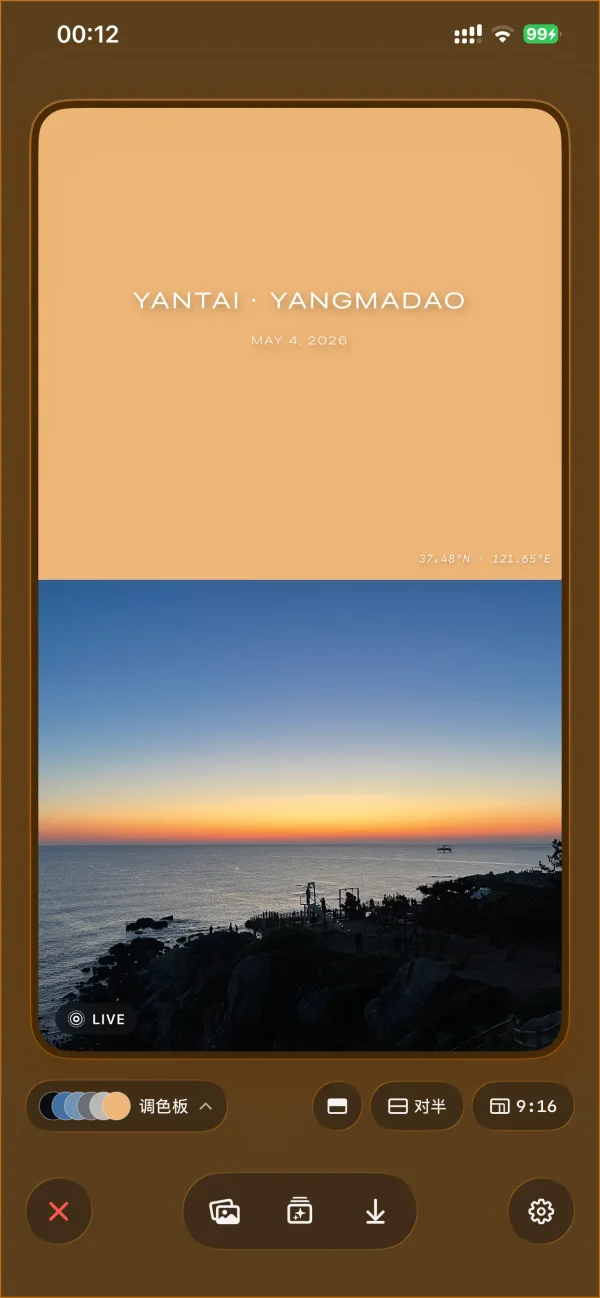
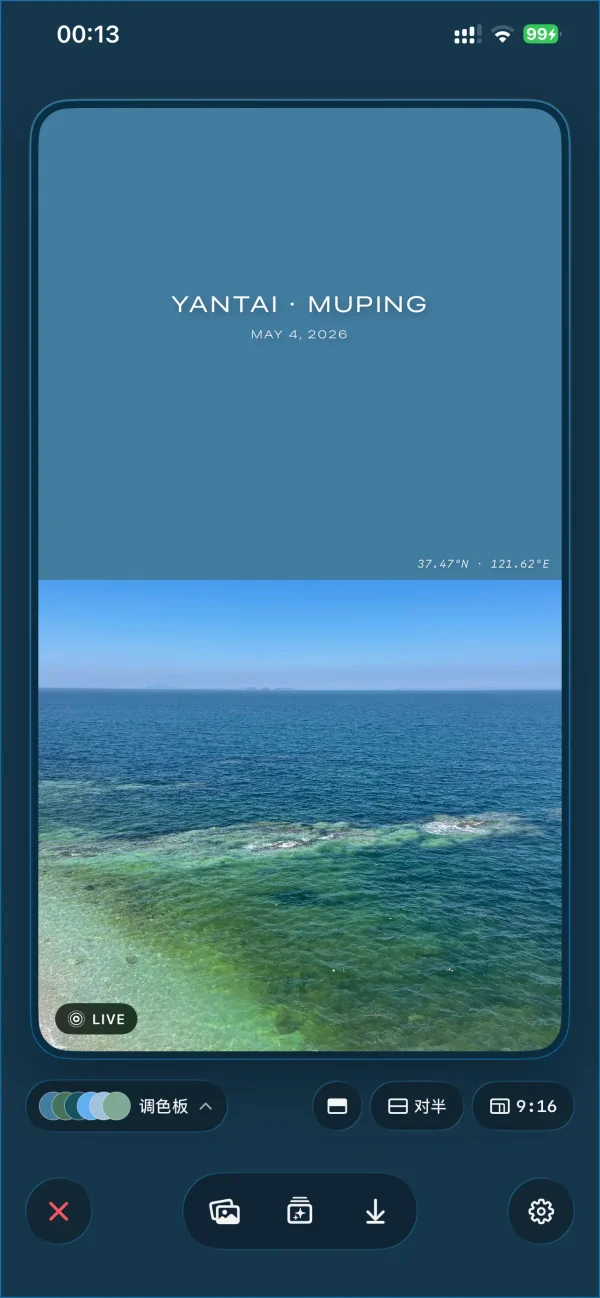
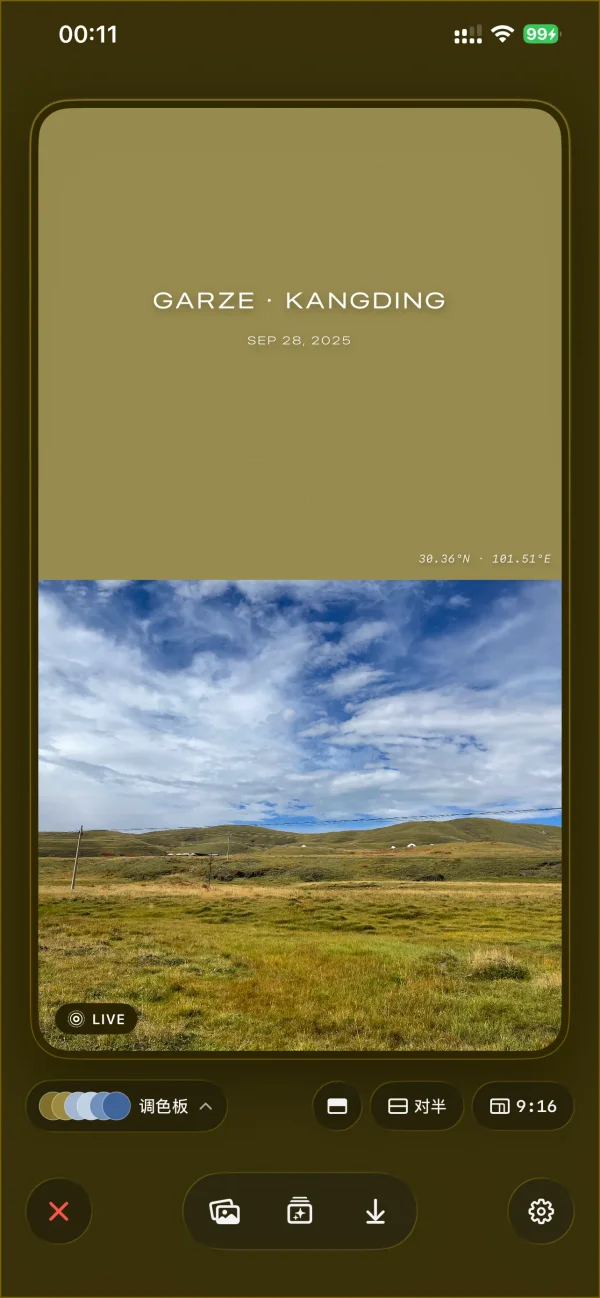
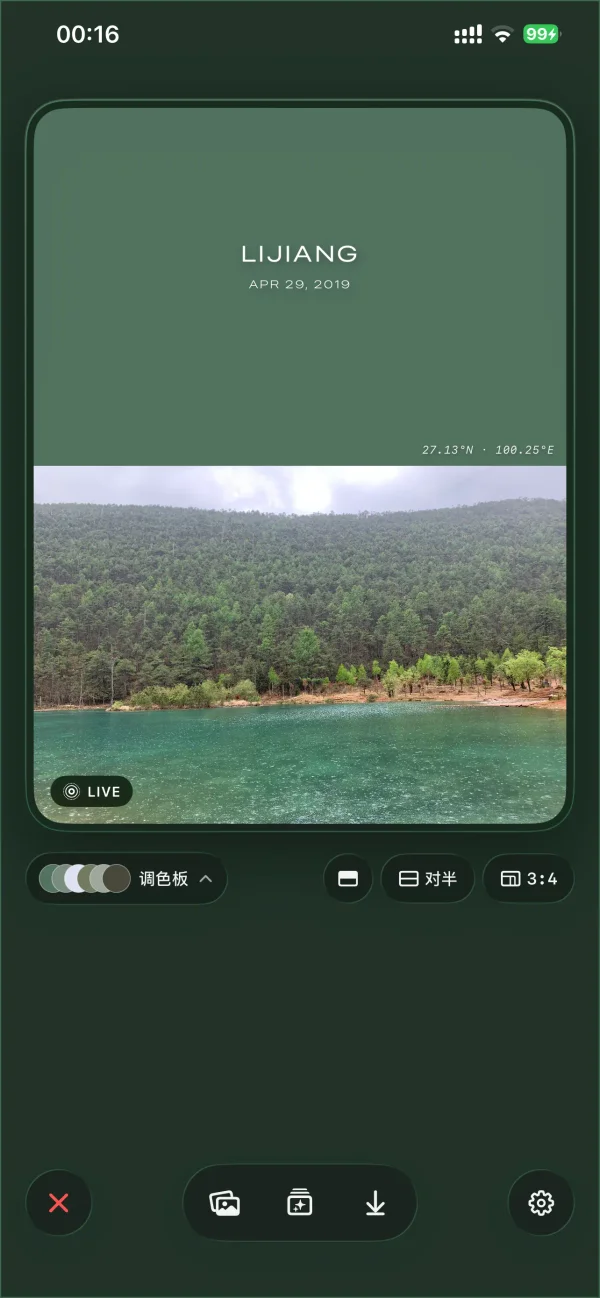
PhotoDot turns one photo into something worth keeping: a clean card built from that photo's own colours, with the subject lifted out, a title written for it, and the date set quietly underneath. Everything runs on your device. No account, no server, nothing uploaded.
Your photo, read as colour
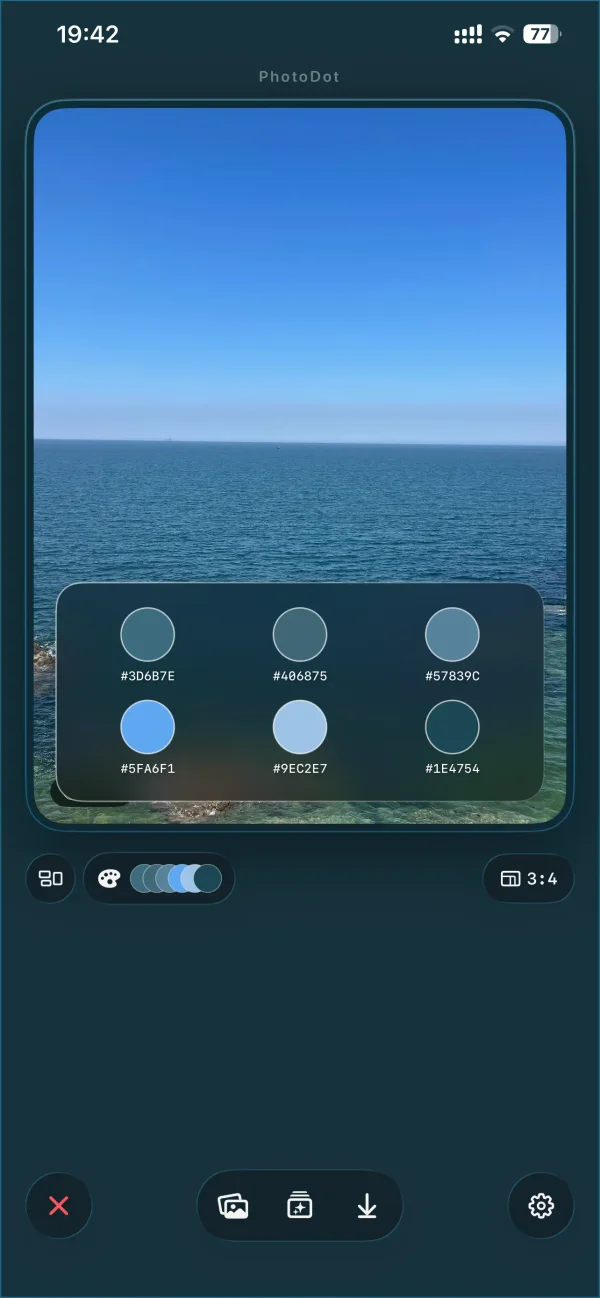
Pick a photo and PhotoDot pulls out the six colours that actually carry the frame, then builds the card around the strongest one. Tap any swatch to promote it to the main colour and the whole card recolours instantly, with the hex code copied to your clipboard. From that colour it derives complementary, analogous, triadic, split-complementary and tetradic schemes, so you can push the background somewhere unexpected without it clashing — or reach for the system colour picker and choose your own. Eight background textures layer on top: paper grain, grid, noise, dots, diagonal, check and vignette.
A sticker workshop, not a filter
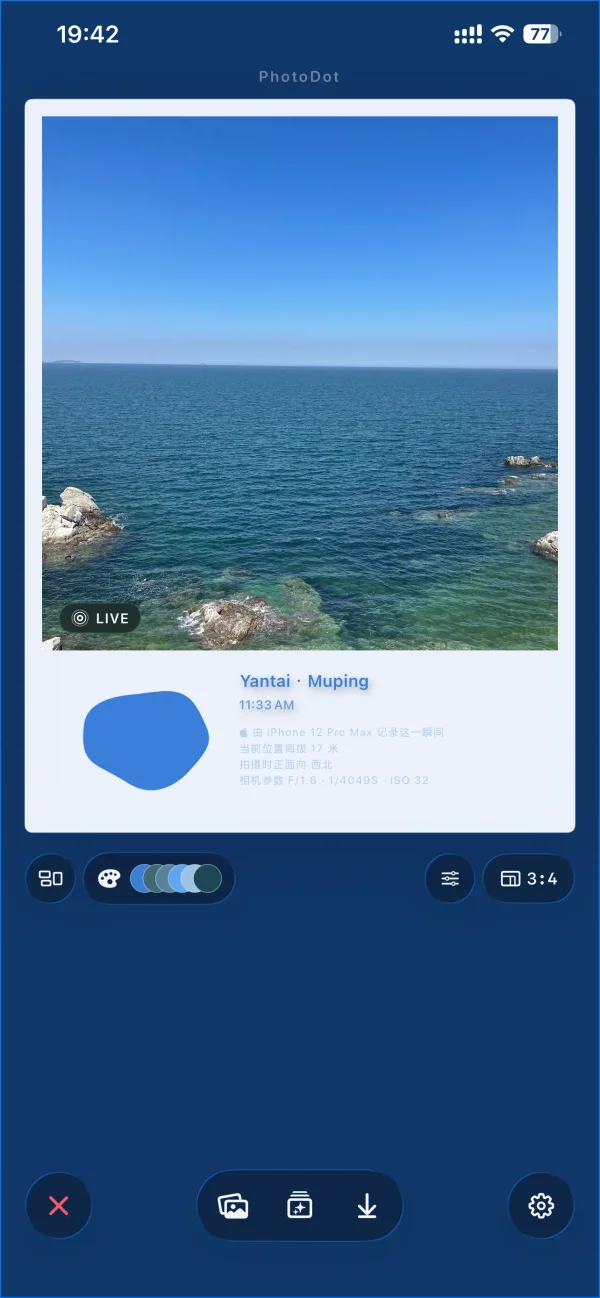
PhotoDot lifts the subject out of your photo and hands it back as a sticker. Wrap it in a thick paper-white outline, anywhere from a hairline to 40pt, or repaint it as an illustration, a poster, or an oil painting. Drop in a polaroid frame with a strip of beige tape and the exact time the shot was taken, or a fridge magnet in one of six shapes. Every sticker and every line of text drags, pinches to scale, and rotates with two fingers, and a guide line appears the moment you hit the centre. Reorder layers, reset a transform in one tap. Cut-outs file themselves into My Stickers, so a subject from today's photo can turn up on a card you make next month.
Titles that don't sound automatic
When a photo carries no location, PhotoDot writes a line for it from the colour and mood of the frame — short, restrained, never "Golden Hour". On devices with Apple Intelligence it rewrites that line using Apple's on-device model, so the photo never leaves your phone to get a better title. You choose whether it writes in English or Chinese, separately from your interface language. Photos with GPS get their place name instead, plus a small monospaced coordinate stamp that reads like camera data.
Cards that still move
Start from a Live Photo and the card you save keeps moving. Press and hold it in your camera roll and it plays, exactly like the original. When the video can't be composed, PhotoDot saves the still image rather than leaving you with nothing.
How it works
1. Pick a photo in the app, or send one straight over from Photos using the PhotoDot share extension.
2. Open the sticker workshop to switch on the subject, a frame, or new text, then drag everything where you want it.
3. Save once. The card lands in your camera roll and in the in-app Memory Library at the same time.
What makes PhotoDot different
- Six colours pulled from your own photo, never a preset palette
- Subject cut-out with a paper-white outline you can tune from 1 to 40pt
- Real typography: five typeface families, nine weights, four widths, per-card colour
- Live Photo cards that still animate after they're back in your camera roll
- On-device AI titles, in English or Chinese, with a local fallback on every device
- Fully offline — no account, no analytics, no server, nothing uploaded
- Your last texture, outline width, style and card ratio carry over to the next photo
Free, all of it
PhotoDot is free and nothing is locked behind a paywall. There is no subscription and no pro tier. If a card helped you hold on to something, there's an optional tip in Settings — it unlocks nothing at all, it just says thanks.
Neue Funktionen
Version 1.5.0 · 17.11.2026
Update App Features
App-Datenschutz
Was 永杰 刘 im App Store zum Umgang dieser App mit Daten angibt.
-
Nicht mit Ihnen verknüpfte Daten
Können erfasst werden, sind aber nicht mit Ihrer Identität verknüpft.
- Nutzungsdaten
Die Datenschutzpraktiken können variieren, zum Beispiel je nach den von Ihnen verwendeten Funktionen oder Ihrem Alter.
Informationen
- Anbieter
- 永杰 刘
- Kategorie
- Foto und Video
- Version
- 1.5.0
- Aktualisiert
- 17.11.2026
- Veröffentlicht
- 10.08.2026
- Größe
- 17,6 MB
- Erfordert
- iOS 17.0 oder neuer
- Altersfreigabe
- 4+
- Preis
- Kostenlos
- In-App-Käufe
- Ja
- Sprachen
- Englisch, Französisch, Deutsch, Japanisch, Koreanisch, Vereinf. Chinesisch, Thai, Tradit. Chinesisch
- Copyright
- © PhotoDot
Das könnte Ihnen auch gefallen
-
 Flit Photo EditorFoto und Video
-
 Lingdong PhotoFoto und Video
-
 ONANYFoto und Video
-
 PhotoMuse CanvasLive Photo Art & Privacy
-
 PhotoColorsLive, KI-Retusche, edle Karten
-
 PhotoPalette: Story CardsFotos zu Geschichten
-
 Palt: Color, Layout, WatermarkFoto und Video
-
 Zup Cam - Film CameraFoto und Video
-
 VibeColorReferenzlook & Live-PLOGs
-
 HuePhoto: Ästhetische VorlagenSchöne Foto Collagen & Rahmen