
Pole Lap Logger: Lap Timer
GPS telemetry for track days
Entwickelt für iPhone, iPad, iPod touch
Kostenlos · In-App-Käufe
- Altersfreigabe4+
- KategorieSport
- EntwicklerTasuku Endo
- SprachenJapanisch+ 4 weitere
- Größe59,0 MB
Verlinkt auf die offizielle App Store-Seite
Download.org hostet keine Datei von Pole Lap Logger: Lap Timer. Die Schaltfläche öffnet die App-Seite bei App Store, wo Tasuku Endo die App veröffentlicht. Eintrag zuletzt geprüft am 23.11.2026.
Screenshots

Info
Der Entwickler hat diesen Text nicht in Ihrer Sprache bereitgestellt.
The lap you drove, read back to you.
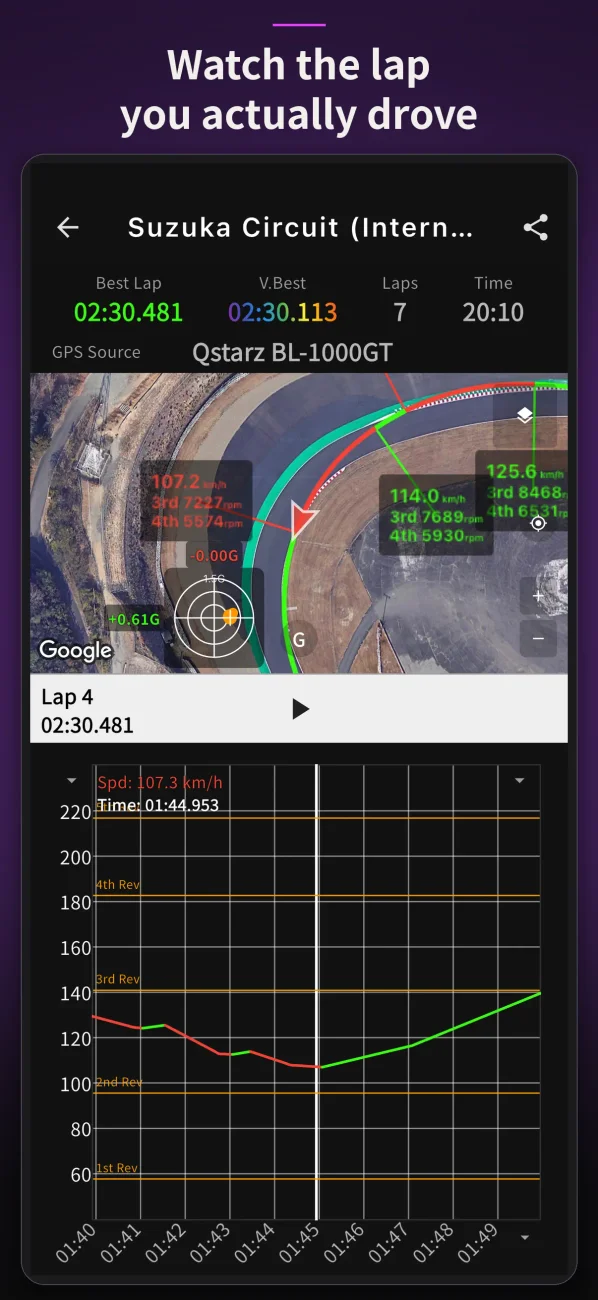
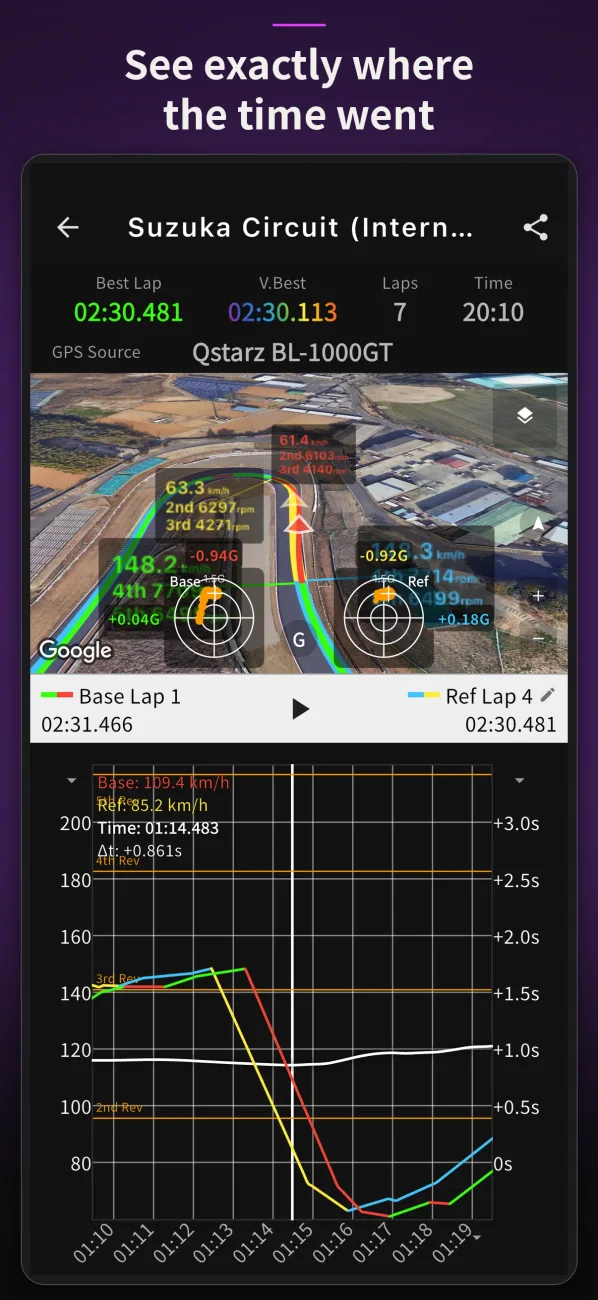
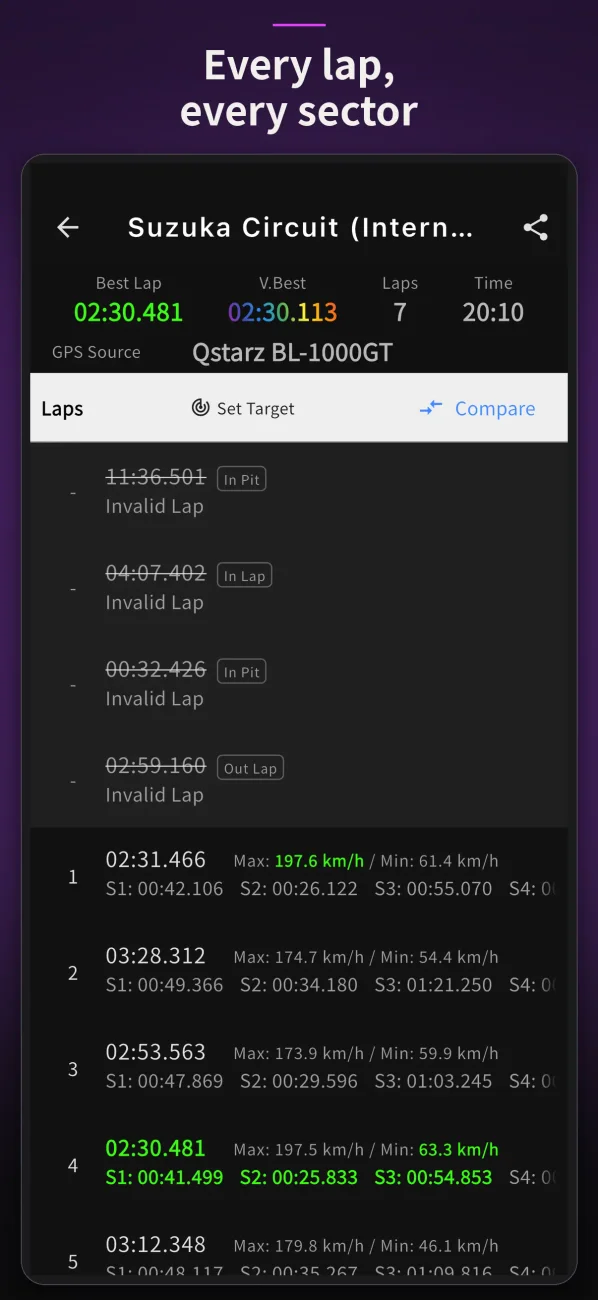
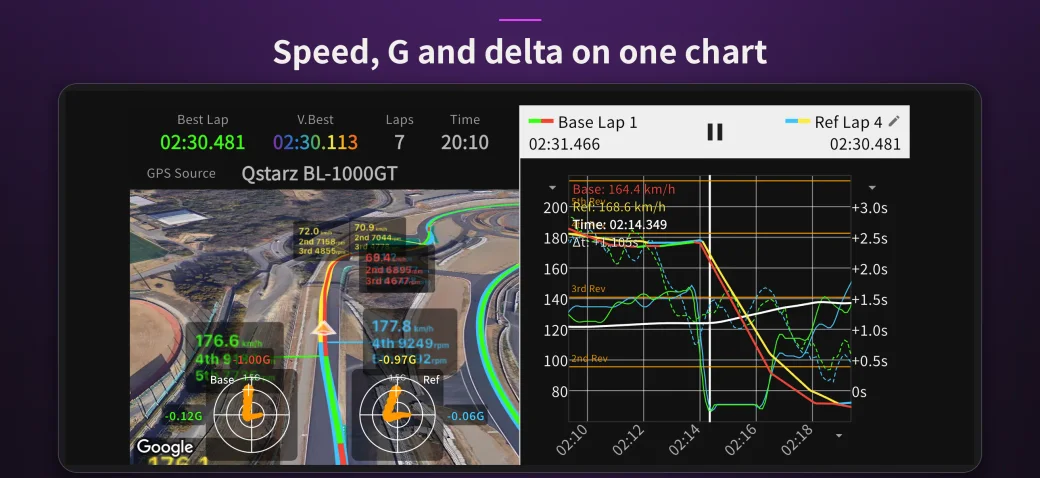
Pole Lap Logger records lap times, sector times, speed, G and your GPS line, then replays the whole lap on a map so you can see exactly where the time went — and lays it over your in-car video.
RECORDING
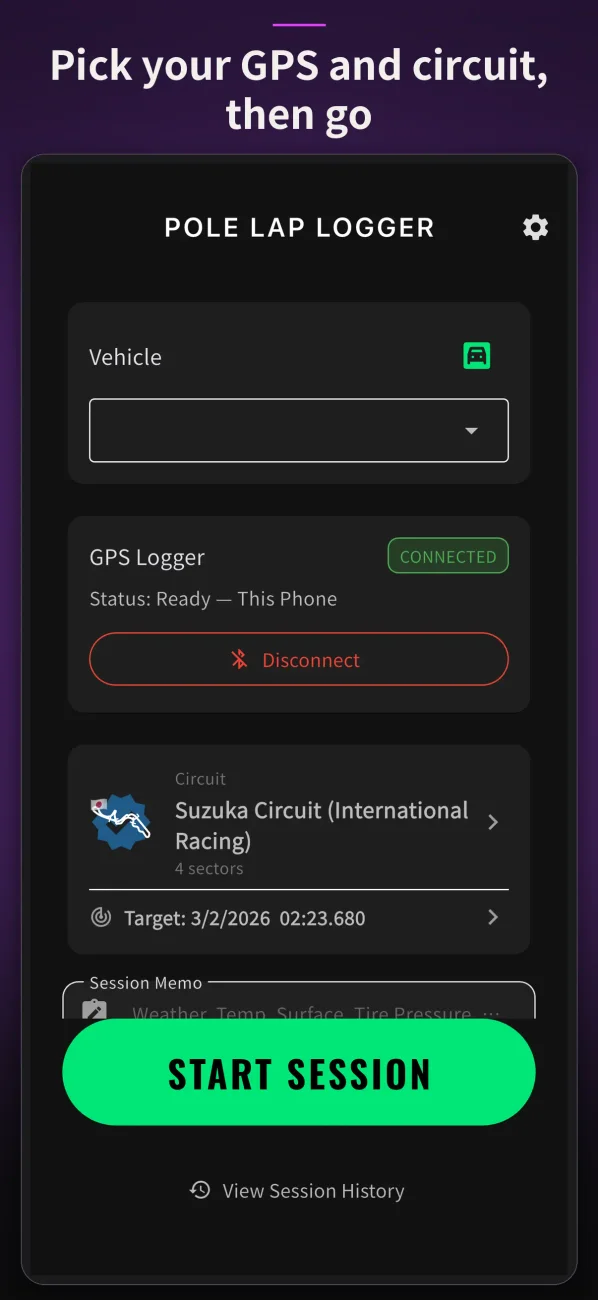
• The phone you already have is enough to record a session — mount it with a clear view of the sky and its built-in GPS does the work.
• For higher precision, pair a supported Bluetooth LE GPS receiver. It samples far more often than a phone, which sharpens lap and sector times.
• Start/finish and sector lines are detected automatically as you cross them. Built-in layouts carry pit lines as well, so out laps and in laps stay separate and never spoil a best time.
ANALYSIS
• Replay any lap on a satellite map and watch it trace the line you actually drove.
• Compare two laps at once and watch the delta build and fall, corner by corner.
• Plot speed, longitudinal G and lateral G against time or distance — or sync the two laps by position instead of time.
• Enter your gear ratios, final drive and rev limit, and the map shows the gear and engine speed at each corner, with rev-limit lines on the graph.
• Your best at each circuit, across every saved session, is highlighted — or pin one earlier session to measure against.
VIDEO OVERLAY
• Lap time, delta, sectors, speed, G and a course map are drawn into your in-car video and saved as a new video.
• Link several videos to one session. They play in time order. With Premium, add a second camera as a picture-in-picture inset.
• Line each video up with the session from the GPS that most GoPro models record, from the time it was shot, or by hand at a moment you choose, such as crossing the start line.
• Replay a lap with its synced video beside the map and graph; the video follows the graph.
• Export the whole video or one lap with a few seconds either side. MP4 and MOV in H.264 or HEVC, including GoPro recordings split across files.
• The video is processed on your device and never uploaded. The result goes to your photo library with the Pole Lap Logger name in the corner, which Premium can hide.
CIRCUITS
• Built-in layouts arrive with their start/finish, sector and pit lines already placed.
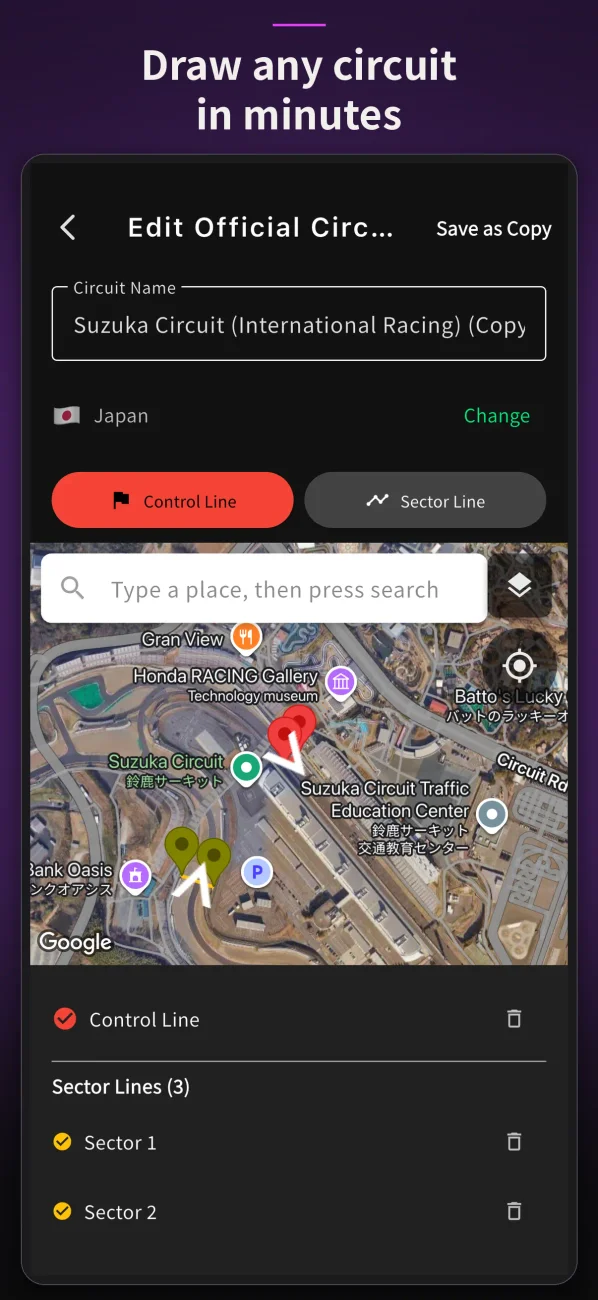
• Draw any other circuit yourself by placing the lines on a satellite map.
• Just cruising? Record without a circuit and keep the trace anyway.
YOUR DATA STAYS YOURS
• Sessions are stored on the device. There is no account and no sign-in.
• Export any session as GPX, CSV or NMEA.
• Open files shared with you in the app.
• No advertising of any kind.
FREE AND PREMIUM
Recording, playback, comparison, graphs, the circuit editor and data export are never limited. Video Overlay is free with one layout and exports up to 1080p. The free version keeps three saved sessions on the device. Premium removes that cap and adds every Video Overlay layout, your own layouts mixing parts from every layout, each part adjustable, the picture-in-picture video, exports up to 4K, custom export ranges, the reference lap's video, lap confirmation and a switch to hide the watermark. Features added later may also be part of Premium.
Premium is available as a monthly or yearly subscription, or as a one-time purchase that never expires. Prices are set per region and shown on this page and in the app. Subscriptions renew automatically unless cancelled at least 24 hours before the end of the current period. You can manage or cancel them in your Apple Account settings. Purchases are tied to the App Store account used to make them.
BEFORE YOU START
• Lap times and telemetry come from GPS. Accuracy depends on the receiver, the device and the conditions, and this app is not an official timing device.
• Use it on closed courses, keep your eyes on the track and never operate the app while driving.
• Do not rely on any figure it shows for decisions that affect your safety.
Terms of Use: https://polelaplogger.com/terms/
Privacy Policy: https://polelaplogger.com/privacy
Neue Funktionen
Version 1.5.0 · 19.11.2026
• Video Overlay: link several videos to one session and they play back and export as one, in the order they were recorded. Between videos the screen stays black and the gauges keep running. Set each video as Main or PiP, and edit the overlay once for the whole session.
• Video Overlay (Premium): PiP videos play in a small window over the Main video, in the preview and in the export. Move the window anywhere in your own layouts.
• Analysis screen: PiP videos now play in a small window over the Main video, on each lap's video when you compare two laps.
• My layouts (Premium): add parts by type, with a preview of each, and set each part's background, graph and session info on its own. The built-in layouts A–D now always use their standard look; to show the driver's name or a different graph, make your own layout.
• Video Overlay: the preview now plays the sound you chose. When you compare two laps, it shows black where the Ref lap has no video.
• Fixes: in layout A on portrait videos, the lap time's background now fits the digits. When comparing two laps in Video Overlay, the preview no longer loops on Android, and the lap numbers match the ones you picked. In the analysis screen, when you compare two laps, the Ref marker no longer shakes or points the wrong way in corners.
App-Datenschutz
Was Tasuku Endo im App Store zum Umgang dieser App mit Daten angibt.
-
Nicht mit Ihnen verknüpfte Daten
Können erfasst werden, sind aber nicht mit Ihrer Identität verknüpft.
- Käufe
- Standort
- Suchverlauf
- Kennungen
- Nutzungsdaten
- Diagnose
Die Datenschutzpraktiken können variieren, zum Beispiel je nach den von Ihnen verwendeten Funktionen oder Ihrem Alter.
Informationen
- Anbieter
- Tasuku Endo
- Kategorie
- Sport
- Version
- 1.5.0
- Aktualisiert
- 19.11.2026
- Veröffentlicht
- 15.09.2026
- Größe
- 59,0 MB
- Erfordert
- iOS 15.0 oder neuer
- Altersfreigabe
- 4+
- Preis
- Kostenlos
- In-App-Käufe
- Ja
- Sprachen
- Japanisch, Spanisch, Französisch, Portugiesisch, Englisch
- Copyright
- © 3rd & Forward
Das könnte Ihnen auch gefallen
-
 ひまわりサーキット ラップタイマーSport
-
 G86 Racing: LaptimerGPS-Telemetrie & Kurvenanalyse
-
 Race Day - Track FinderSport
-
 Trackday PlotSport
-
 RaceCoach: AI Lap AnalysisSport
-
 DOWNLINK: Motorrad SchräglageBeschleunigungsmessung, 0-100
-
 TrakioSport
-
 TrackTuner トラックチューナーSport
-
 Sutututu - GPSラップタイマーSport
-
 Lapster: Rundenzeiten GPSAuto, Motorrad & Kart Racing