
Precast
Review Podcasts Effortlessly
Entwickelt für iPhone, iPad
Kostenlos · In-App-Käufe
- Altersfreigabe4+
- KategorieProduktivität
- EntwicklerPetrus Sprangers
- SprachenNiederländisch+ 5 weitere
- Größe10,5 MB
Verlinkt auf die offizielle App Store-Seite
Download.org hostet keine Datei von Precast. Die Schaltfläche öffnet die App-Seite bei App Store, wo Petrus Sprangers die App veröffentlicht. Eintrag zuletzt geprüft am 19.11.2026.
Screenshots

Info
Der Entwickler hat diesen Text nicht in Ihrer Sprache bereitgestellt.
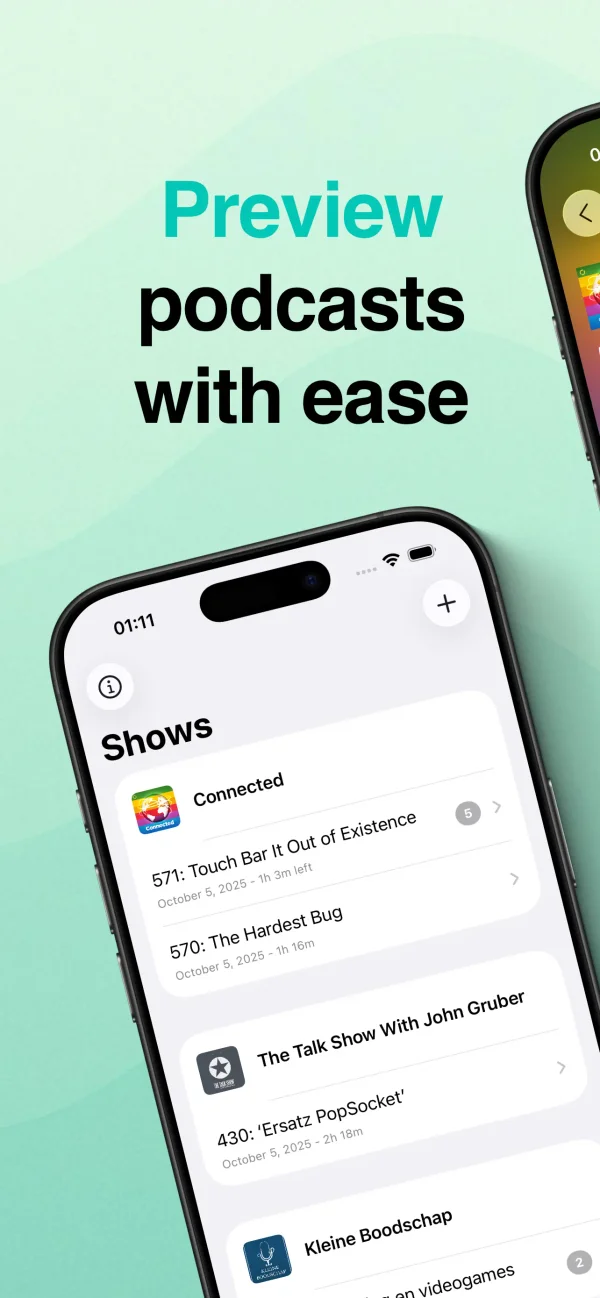
Precast makes it easy to review podcast episodes and mark exactly what needs attention. Listen through your recording, drop markers at the right moment, add notes, and share them instantly with your editor or co-host.
Whether you’re polishing an episode yourself or preparing feedback for someone else, Precast keeps the review process fast, precise, and organized.
ADD EPISODES IN SECONDS
Getting started is simple. Add an episode by pasting the URL to an audio file or by selecting a file directly from the Files app. Once imported, you can immediately start listening and placing markers.
MARK MOMENTS THAT MATTER
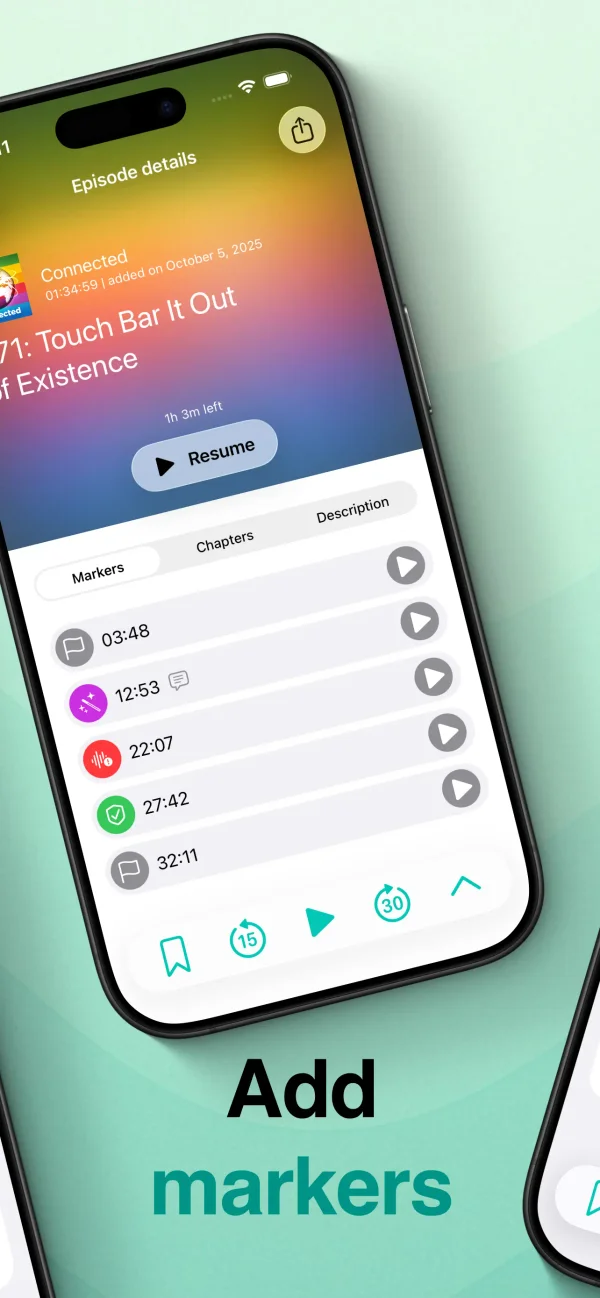
While listening to an episode, drop markers exactly where something needs work. Add notes to explain what should change, whether it’s a cut, a correction, or a timing tweak. Each marker is tied to the exact timestamp, so nothing gets lost in vague feedback.
SEE THE AUDIO AROUND YOUR MARKER
Quickly understand the context around every note. Precast shows the waveform around a marker so you can scrub and adjust the exact moment before sharing your feedback. This makes it easy to fine-tune the exact point in the audio that needs attention.
SHARE CLEAR FEEDBACK
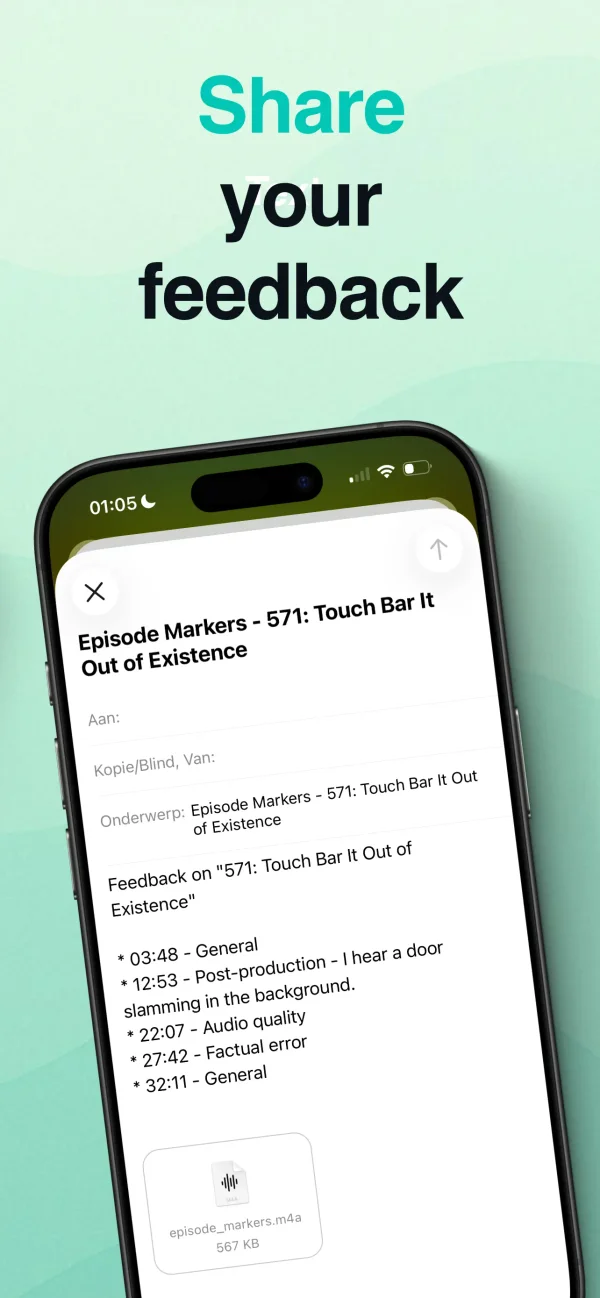
Export markers and notes directly through the share sheet. Send them by email, Messages, WhatsApp, or any other app you use to collaborate. Your editor receives a clear list of timestamps and comments, making it easy to find every point that needs work.
WIDGETS FOR QUICK ACCESS
Precast includes Home Screen widgets so you can quickly access your recent episodes and jump straight back into your review session.
APP INTENTS AND SHORTCUTS
Precast supports App Intents, allowing you to control common actions from Shortcuts, Siri, and the system. You can start or pause playback, add markers, or add new episodes without opening the app, making it easy to integrate Precast into your workflow.
FREE TO TRY
Precast lets you review episodes and place markers right away. In the free version you can view and share the first three markers per episode, which is perfect for trying the workflow and seeing how it fits into your podcast production process.
UNLOCK UNLIMITED MARKERS
If you regularly review podcasts, you can unlock the full experience and add as many markers as you like. With the unlock you can add unlimited markers to every episode, view all markers you placed, and share complete marker lists with collaborators.
The unlock is available as a non-recurring subscription. You can choose between two months of access or one year of access. Once purchased, the app remains fully usable during the selected period and will not renew automatically.
BUILT FOR PODCAST WORKFLOWS
Precast is designed specifically for podcast review sessions. You can quickly jump between markers, add notes to markers or to the episode as a whole, review long recordings efficiently, and share feedback in seconds.
Whether you’re a host, producer, or editor, Precast helps turn a rough recording into a polished episode faster.
Terms of Use (EULA): https://www.apple.com/legal/internet-services/itunes/dev/stdeula/
Neue Funktionen
Version 1.5.2 · 15.10.2026
Includes new large size widgets with direct marker category buttons. Mini player in the app has optional waveform display and up to 6 visible marker category buttons. Updated to work on iPad and iPhone Duo.
App-Datenschutz
Was Petrus Sprangers im App Store zum Umgang dieser App mit Daten angibt.
-
Keine Daten erfasst
Der Entwickler erfasst keine Daten von dieser App.
Die Datenschutzpraktiken können variieren, zum Beispiel je nach den von Ihnen verwendeten Funktionen oder Ihrem Alter.
Informationen
- Anbieter
- Petrus Sprangers
- Kategorie
- Produktivität
- Version
- 1.5.2
- Aktualisiert
- 15.10.2026
- Veröffentlicht
- 20.03.2026
- Größe
- 10,5 MB
- Erfordert
- iOS 26.0 oder neuer
- Altersfreigabe
- 4+
- Preis
- Kostenlos
- In-App-Käufe
- Ja
- Sprachen
- Niederländisch, Deutsch, Englisch, Französisch, Italienisch, Spanisch
- Copyright
- © 2026 Petrus Sprangers
Das könnte Ihnen auch gefallen
-
 Project ChesterProduktivität
-
 Timecode QuickNotesProduktivität
-
 SceneSync für HueSync Hue Szenen zu Home app
-
 SideNotes MobileSchnelle Notizen & Aufgaben
-
 ETC LibraryProduktivität
-
 Rocket TypistText Expander
-
 TeamTime – InterflexProduktivität
-
 RmoniWebProduktivität
-
 Timetell OnlineProduktivität
-
 ChanLiteProduktivität