
QuikCad
Draw Projects in Minutes
Entwickelt für iPhone, iPad
Kostenlos · In-App-Käufe
- Altersfreigabe4+
- KategorieProduktivität
- EntwicklerBlake Bender
- SprachenEnglisch
- Größe263,0 MB
Verlinkt auf die offizielle App Store-Seite
Download.org hostet keine Datei von QuikCad. Die Schaltfläche öffnet die App-Seite bei App Store, wo Blake Bender die App veröffentlicht. Eintrag zuletzt geprüft am 16.11.2026.
Screenshots



Info
Der Entwickler hat diesen Text nicht in Ihrer Sprache bereitgestellt.
Design faster. Draw cleaner. Build with confidence.
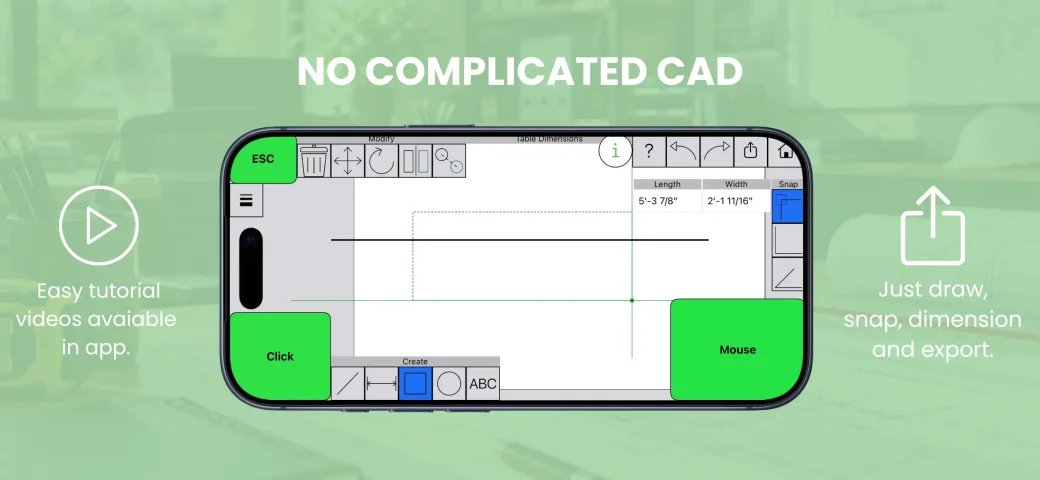
QuikCad is a precision 2D CAD app built for creators who need speed and accuracy, without the learning curve of traditional CAD software.
Now on iPad with full Apple Pencil support.
A bigger workspace. A more natural way to design.
Start with a 7-day free trial.
Built for real-world projects. Furniture. Workshops. Renovations. Jobsites. Concepts. If you can sketch it, you can build it.
Why QuikCad
• Fast, responsive 2D drafting
• Precision snapping and dimension tools
• Clean, professional drawings every time
• Effortless editing and layout control
• Export and print with confidence
• Works offline, anywhere
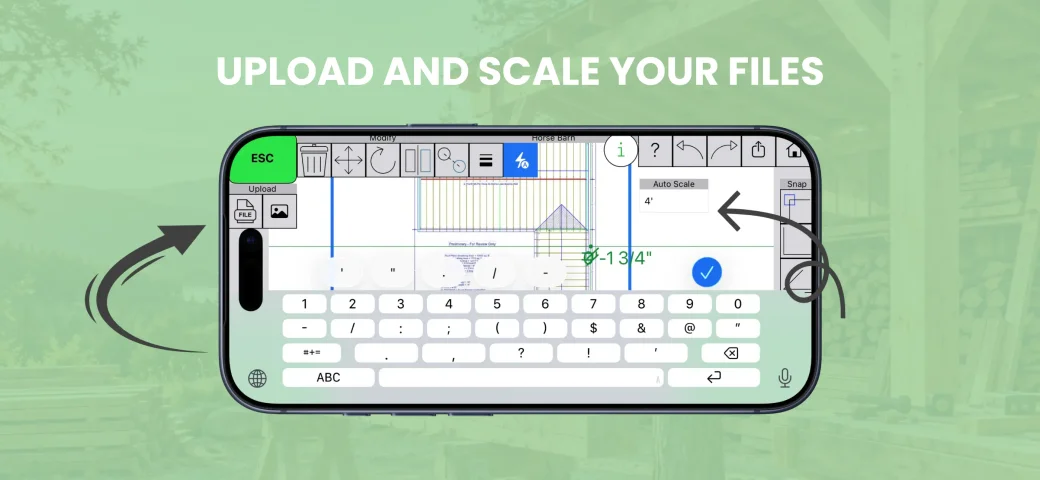
• Upload DXF, SVG, PDF & JPG
Simple Pricing
Full access with a yearly subscription.
iPhone — QuikCad Yearly
$24.99/year (price may vary by region)
iPad — QuikCad iPad Yearly
$49.99/year (price may vary by region)
Includes a 7-day free trial for all new users.
Subscription Details
• Payment will be charged to your Apple ID account at confirmation of purchase
• Subscription automatically renews unless auto-renew is turned off at least 24 hours before the end of the current period
• Your account will be charged for renewal within 24 hours prior to the end of the current period
• Manage or cancel anytime in your Apple ID Account Settings
Terms of Use:
https://www.apple.com/legal/internet-services/itunes/dev/stdeula/
Privacy Policy:
https://blakebender.github.io/quikcad-privacy/
Neue Funktionen
Version 1.5 · 03.10.2026
• Create a QuikCad account and keep your projects in sync
• New Business Accounts for teams
• Share projects with your crew
• Join a business using a Company Code
• Improved account and project management
• Bug fixes and performance improvements
App-Datenschutz
Was Blake Bender im App Store zum Umgang dieser App mit Daten angibt.
-
Mit Ihnen verknüpfte Daten
Können erfasst und mit Ihrer Identität verknüpft werden.
- Käufe
-
Nicht mit Ihnen verknüpfte Daten
Können erfasst werden, sind aber nicht mit Ihrer Identität verknüpft.
- Nutzungsdaten
- Diagnose
Die Datenschutzpraktiken können variieren, zum Beispiel je nach den von Ihnen verwendeten Funktionen oder Ihrem Alter.
Informationen
- Anbieter
- Blake Bender
- Kategorie
- Produktivität
- Version
- 1.5
- Aktualisiert
- 03.10.2026
- Veröffentlicht
- 19.02.2026
- Größe
- 263,0 MB
- Erfordert
- iOS 18.5 oder neuer
- Altersfreigabe
- 4+
- Preis
- Kostenlos
- In-App-Käufe
- Ja
- Sprachen
- Englisch
- Copyright
- © 2026 Blake Bender
Das könnte Ihnen auch gefallen
-
 iPocket Draw LiteProduktivität
-
 Shed Sketch 3D: Shed DesignerProduktivität
-
 HomeCAD – Zuhause gestaltenHauspläne, Zeichnungen & PDF
-
 ArcSite: Grundrisse und CADEntwerfen Skizzieren Zeichnen
-
 WoodCraft: Wood Plans & GuidesProduktivität
-
 RenoPlan - Floor Plan CreatorProduktivität
-
 Metaroom - 3D Raum Scanner3D-Modelle und 2D-Grundrisse
-
 3D Viewer by Chief ArchitectProduktivität
-
 Home Design 3D Outdoor&GardenGarten und Terrasse Gestalten
-
 Küchenplaner 3D PRORaumplaner: Zimmer Einrichten