Roll Camera
Viewfinder, Call Sheets & Crew
Entwickelt für iPhone, iPad
Kostenlos
- Altersfreigabe4+
- KategorieFoto und Video
- EntwicklerWEIRU SONG
- SprachenEnglisch+ 2 weitere
- Größe57,6 MB
Verlinkt auf die offizielle App Store-Seite
Download.org hostet keine Datei von Roll Camera. Die Schaltfläche öffnet die App-Seite bei App Store, wo WEIRU SONG die App veröffentlicht. Eintrag zuletzt geprüft am 23.11.2026.
Screenshots


Info
Der Entwickler hat diesen Text nicht in Ihrer Sprache bereitgestellt.
A director's viewfinder when you're on your own. A production workspace on your phone when you're with a crew.
ON YOUR OWN (no sign-in needed)
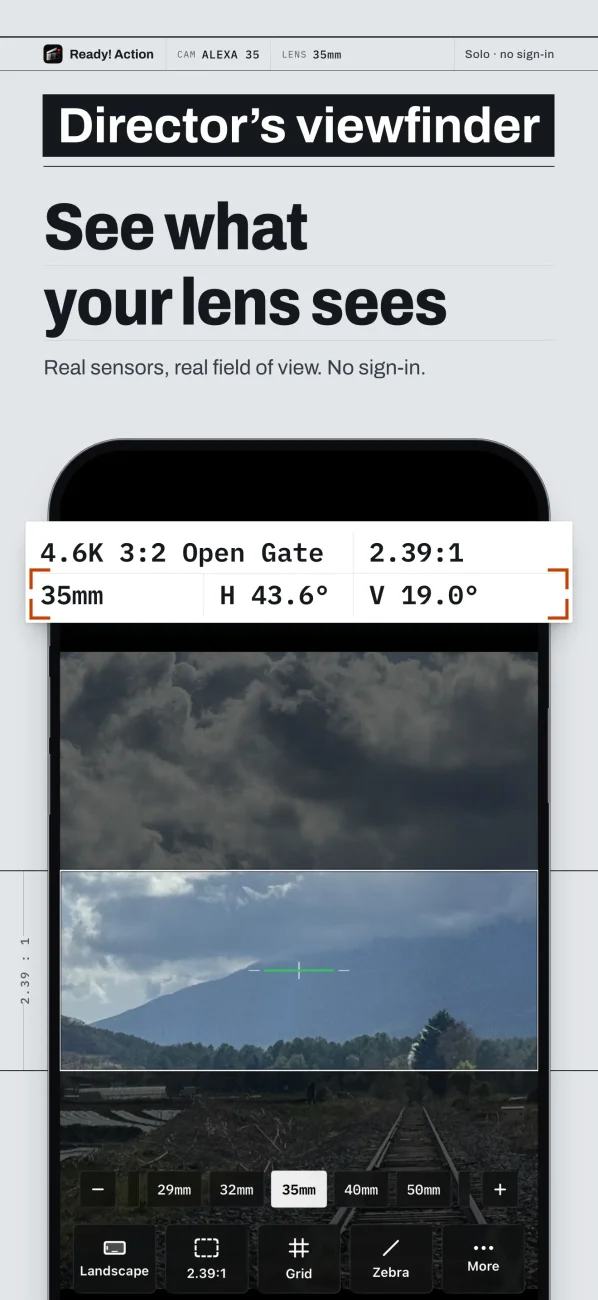
VIEWFINDER
• True field of view for the camera you're shooting on: a library of ARRI, Sony, RED, Blackmagic, Canon, Panasonic and other bodies, or enter a custom sensor size
• Lens sets and focal lengths
• Frame lines, a second frame line, grid, safe areas and center mark
• Level, compass, sun position, sunrise and sunset
• Exposure compensation or manual exposure (ISO, shutter angle)
• Tap to focus and meter, long-press to lock AE/AF
• Zebras from 70 to 100%
• LiDAR rangefinder: distance to the focus point (LiDAR-equipped Pro models)
• Portrait or landscape
• Ten built-in Cine looks, or import your own .cube LUTs
• Record video with the frame lines burned in
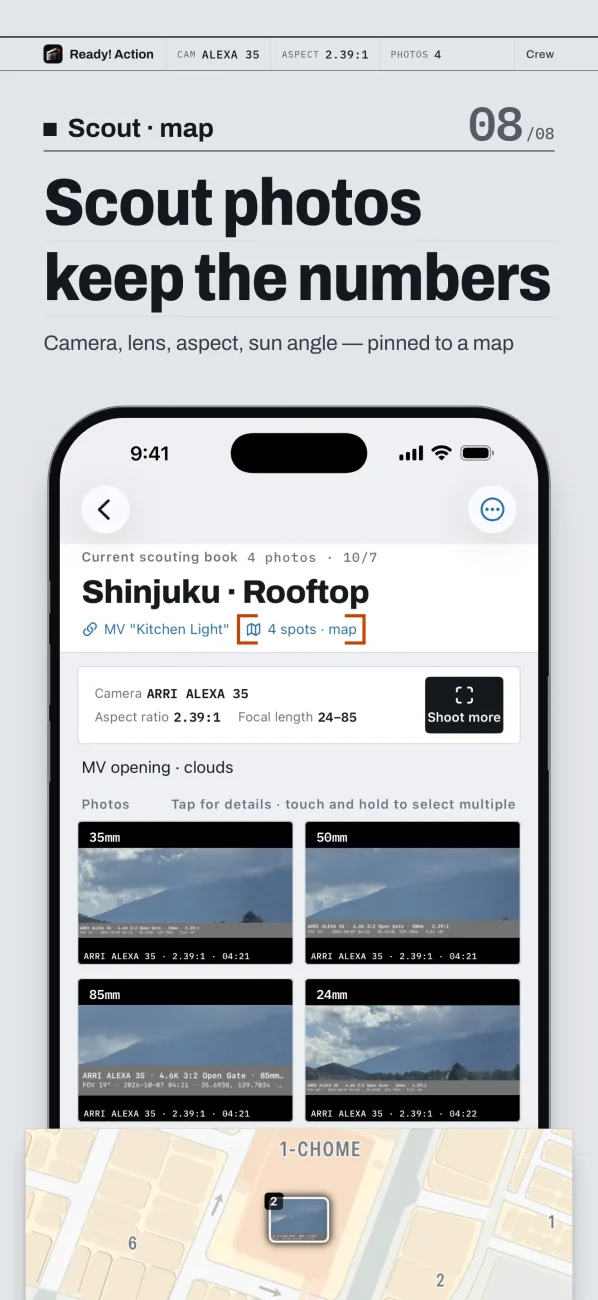
SCOUTING BOOK
• Every photo is tagged with camera, focal length, aspect ratio, field of view, location, heading, tilt and sun position
• See the whole scout pinned on a map
• Export the book as a PDF
• Attach it to a project so the whole crew can see it
WITH YOUR CREW (sign in with Apple or a CREA account)
TODAY
• Call time in big type
• Where the project stands, from prep to wrap
• What needs you now
• On the project list: this week's shoot days across all your projects, side by side
• The night before each shoot day, once the call sheet is out, the crew gets a push: “Shoot tomorrow: Kitchen Light · call 07:30 · sunrise 05:42 · Clear · 18–24°C”
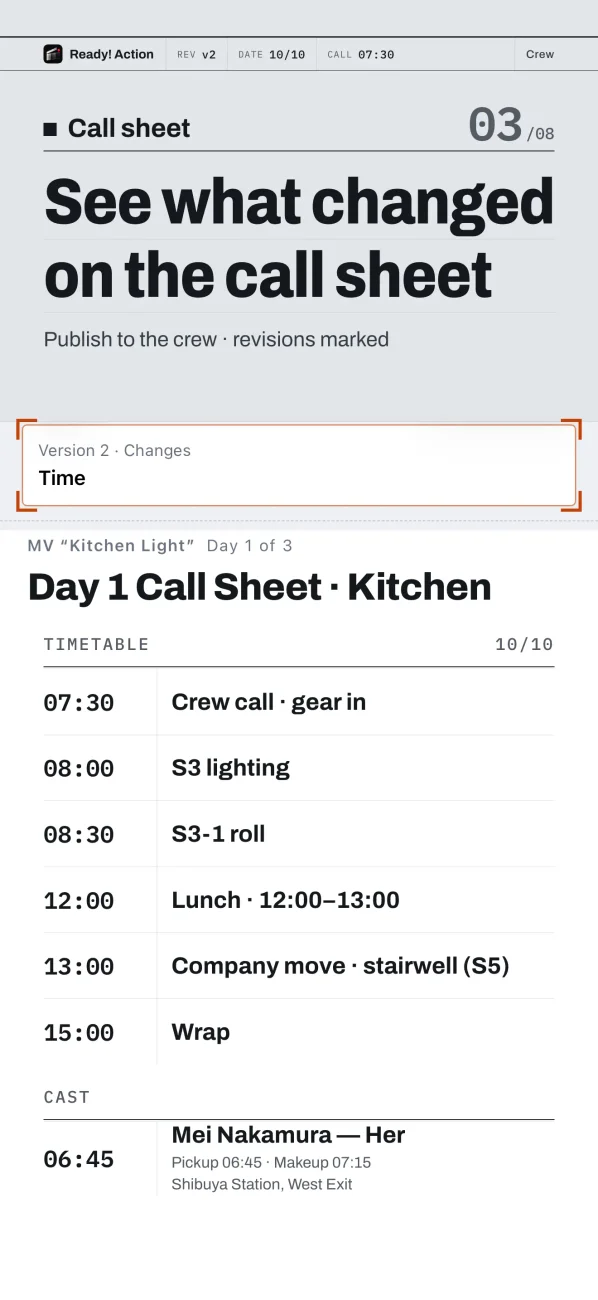
CALL SHEETS
• Leads build and publish from their phone; the whole crew gets a push
• New versions mark what changed
• Everyone taps “Got it”; the lead sees who has read it and who has confirmed
• Weather, sunrise and sunset, magic hour
• Locations with a map and travel time
• Meal counts: regular, vegetarian or none
CALENDAR (NEW)
• Scouts, purchasing, meetings, prep, post and delivery, alongside the shoot days
• Anyone on the team can add events and @mention people, who get a notification
• Subscribe in iPhone Calendar and it updates on its own, or add a single event
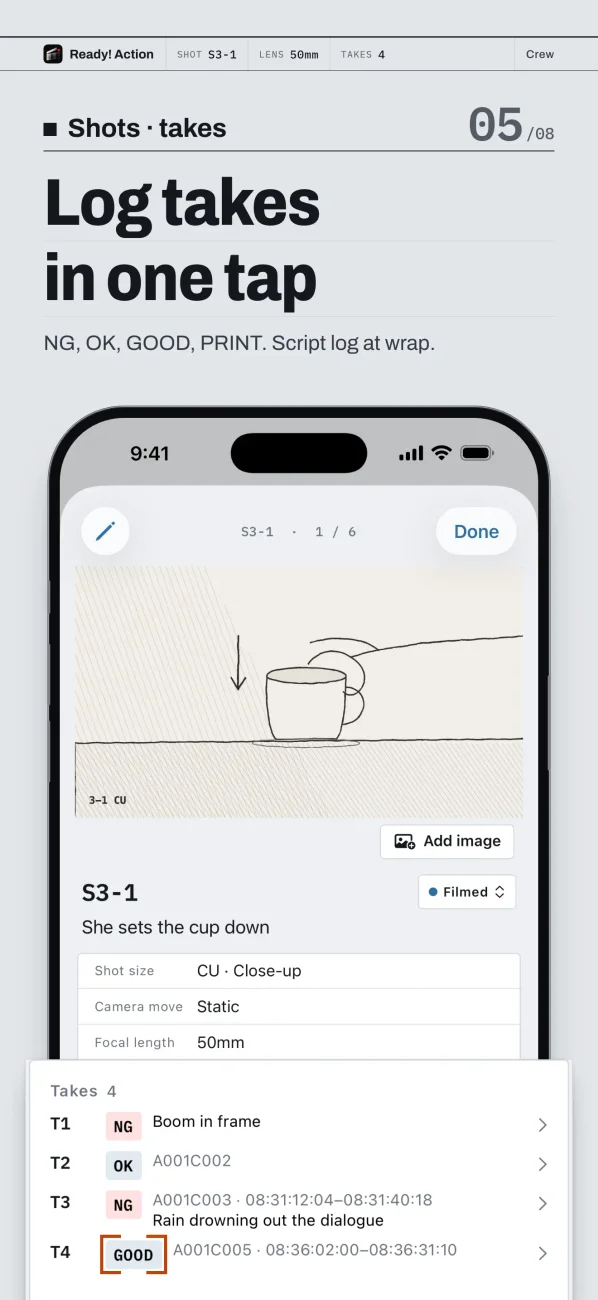
SHOTS AND TAKES
• Storyboard frames, reference images and video for each shot
• Log takes in one tap: NG, OK, GOOD, PRINT (project lead or delegate)
• Script supervisor notes on each take: camera file number, sound file number, timecode
• At wrap, export the script log as a PDF for editorial: every take by shot, with its rating, file numbers and timecode
HOURS
• Everyone punches in at call and out at wrap
• Hours and overtime add up automatically, totaled per person
• Export the timesheet as a PDF
BULLETINS
• Company move, meal, call, running late, wrap: one post pushes to the whole crew
• Everyone taps “Got it,” and you can see who hasn't
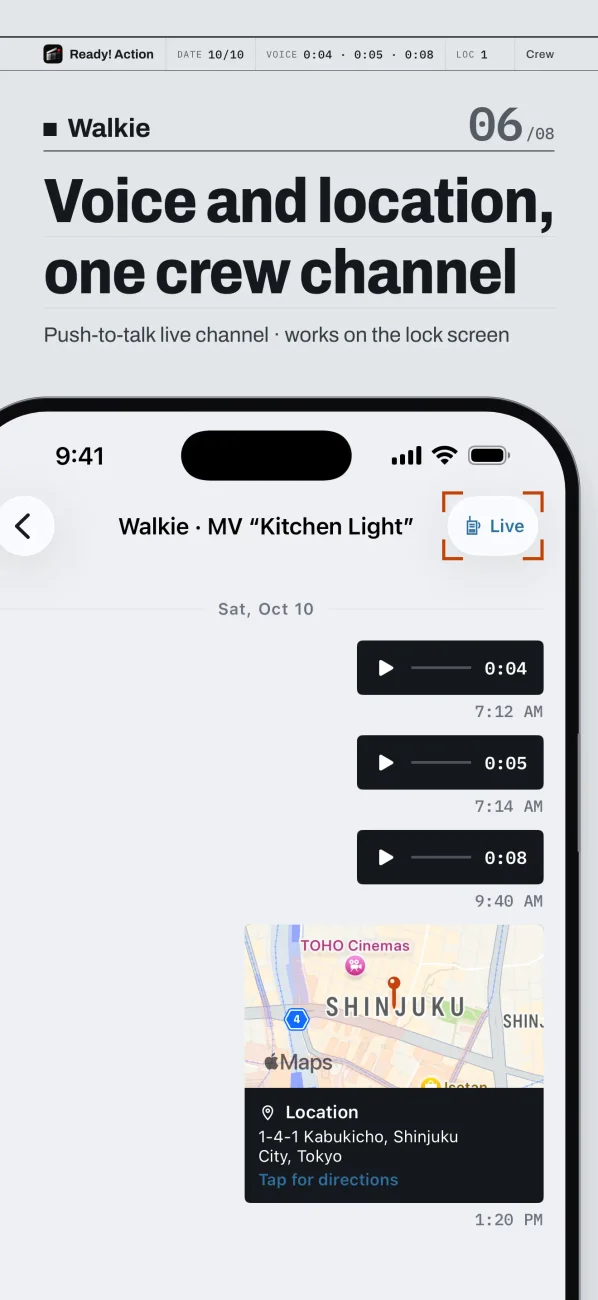
WALKIE
• Crew chat, voice messages, photos and “I'm here” location cards
• A live push-to-talk channel: hold to talk, and keep listening with your phone locked
• On iPhones with an Action button, set it to jump straight into the channel
ALSO ON THE PROJECT
• Task board
• Docs: read the script offline
• Crew list with one-tap calling
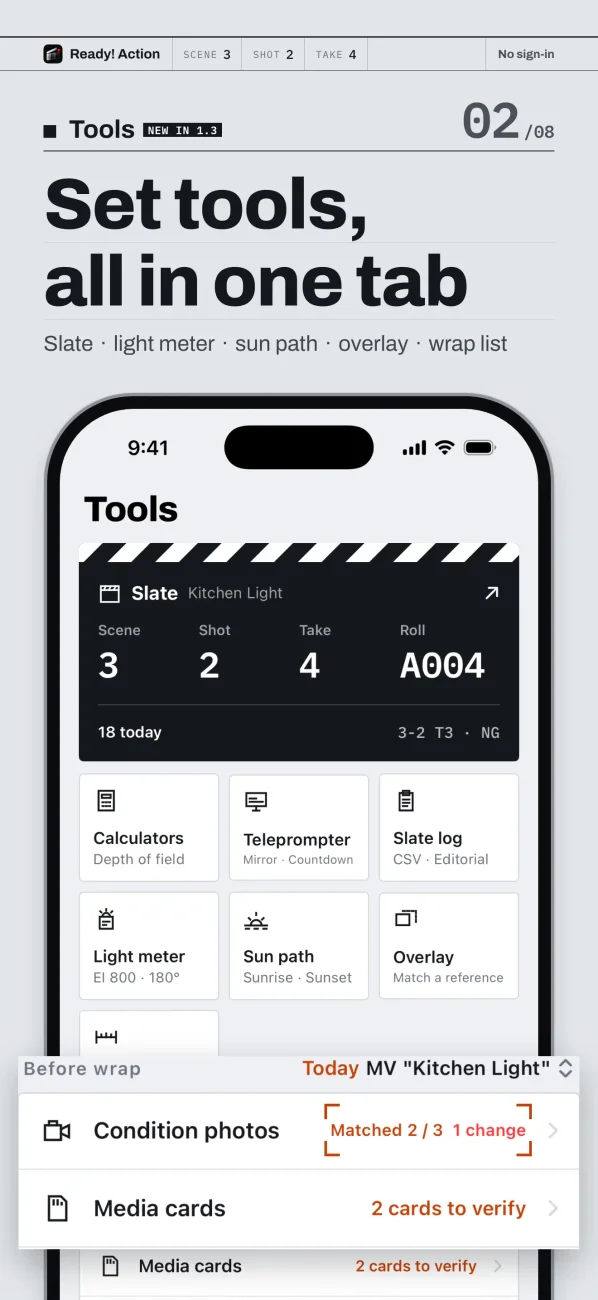
• Gear lists: preset library, check-off, drag to reorder, PDF
• Expenses: photograph the receipt on set, the lead approves from their phone
• Budget: passcode-protected, PDF export
• Avail checks: yes, maybe or no for each date
• Members, plus a delegate who can run the project with you
• Project map
OFFLINE AND ACCOUNT
• Call sheets, docs, gear, budget and your project list open with no signal. Edits queue up and upload when you're back online.
• Projects live in your CREA account, the same one you use at crea.website. Change something in the web workspace and it shows up on your phone right away.
iPhone and iPad. Light and dark mode. English, Japanese and Simplified Chinese.
Neue Funktionen
Version 1.3.6 · 21.11.2026
• The app is now called Roll Camera.
• Call sheets: cleaner layout; open the next call sheet from “Next day”; fixed look and shot counts.
• Rundown: once shooting starts, the timeline shows on the first screen.
• Budget: add line items directly to categories that have spending but no budget.
• Looks: add a reference image from the detail screen.
App-Datenschutz
Was WEIRU SONG im App Store zum Umgang dieser App mit Daten angibt.
-
Mit Ihnen verknüpfte Daten
Können erfasst und mit Ihrer Identität verknüpft werden.
- Kontaktinformationen
-
Nicht mit Ihnen verknüpfte Daten
Können erfasst werden, sind aber nicht mit Ihrer Identität verknüpft.
- Standort
- Kontaktinformationen
- Benutzerinhalte
- Kennungen
- Nutzungsdaten
Die Datenschutzpraktiken können variieren, zum Beispiel je nach den von Ihnen verwendeten Funktionen oder Ihrem Alter.
Informationen
- Anbieter
- WEIRU SONG
- Kategorie
- Foto und Video
- Version
- 1.3.6
- Aktualisiert
- 21.11.2026
- Veröffentlicht
- 19.10.2026
- Größe
- 57,6 MB
- Erfordert
- iOS 17.0 oder neuer
- Altersfreigabe
- 4+
- Preis
- Kostenlos
- Sprachen
- Englisch, Japanisch, Vereinf. Chinesisch
- Copyright
- © 2026 CREA / takiyx
Das könnte Ihnen auch gefallen
-
 Cutvey ViewfinderRegiesucher für Film und Foto
-
 Scouter: Film-ViewfinderStoryboard & Sonnenstand
-
 场记板-分镜头场记打板器Foto und Video
-
 FocalFrame - 画角計算・ロケハンFoto und Video
-
 CamPlot Director's ViewfinderFoto und Video
-
 VirtualProductionCameraFoto und Video
-
 Litti - HDR Reversal filmFoto und Video
-
 MnemonicaFoto und Video
-
 ZoraCam - Retro & Vintage FilmFoto und Video
-
 DPBOX:Cam&Lens Specs,Data CalcFoto und Video