- Altersfreigabe12+
- KategorieMusik
- EntwicklerTakeshi Juan
- SprachenJapanisch+ 1 weitere
- Größe8,1 MB
ScoreGlide ist bei App Store derzeit möglicherweise nicht verfügbar
Bei unserer letzten Prüfung war der Store-Eintrag nicht erreichbar. Der Link führt weiterhin zur offiziellen App Store-Seite.
Screenshots

Info
Der Entwickler hat diesen Text nicht in Ihrer Sprache bereitgestellt.
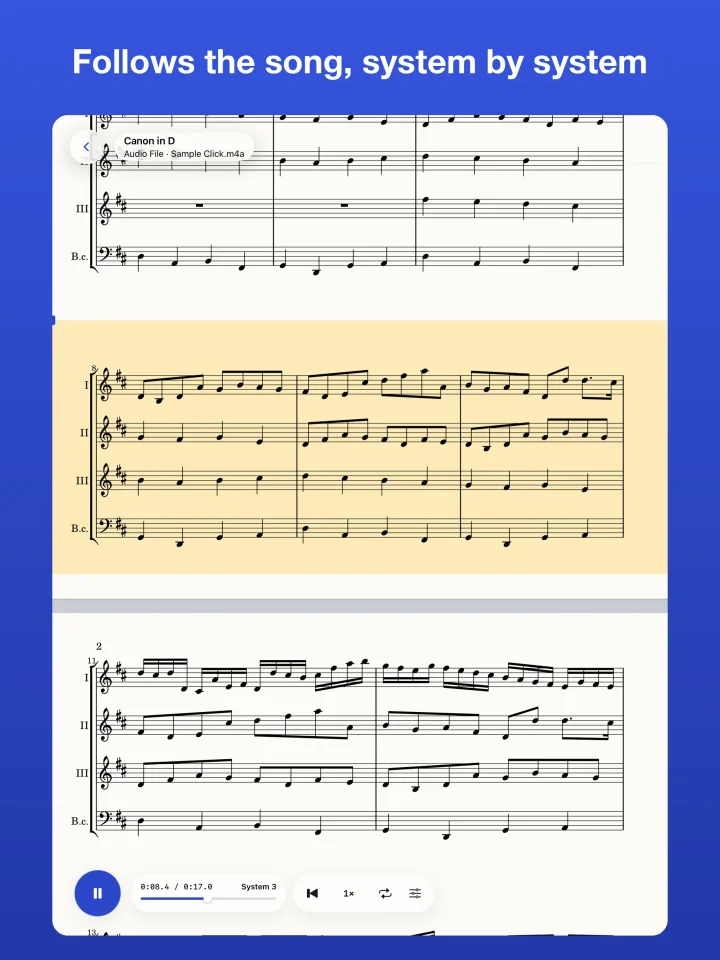
ScoreGlide is a practice app for iPad that moves your own PDF score with the playback position of a song, system by system. Before you practice, you set the timing yourself by tapping while you listen. Use the PDFs you already have: band scores, TAB, piano scores.
■ Features
• It follows the recording itself
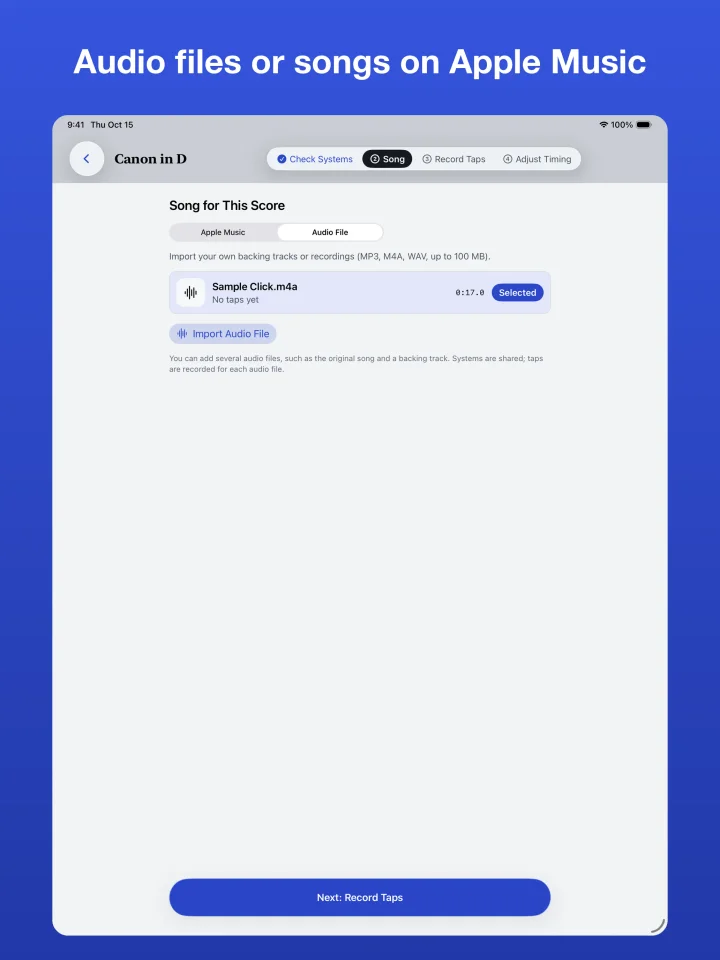
ScoreGlide plays a song on Apple Music, or one of your own audio files, and moves the score with the playback position. There is no tempo to type in and no fixed scrolling speed. Even when the tempo of the song changes, the score still moves where you tapped.
• It moves system by system
The score moves by system (one line of music across the page, with all its staves), not by page. The system you are playing stays where it is easy to read.
• You do not have to tap every system
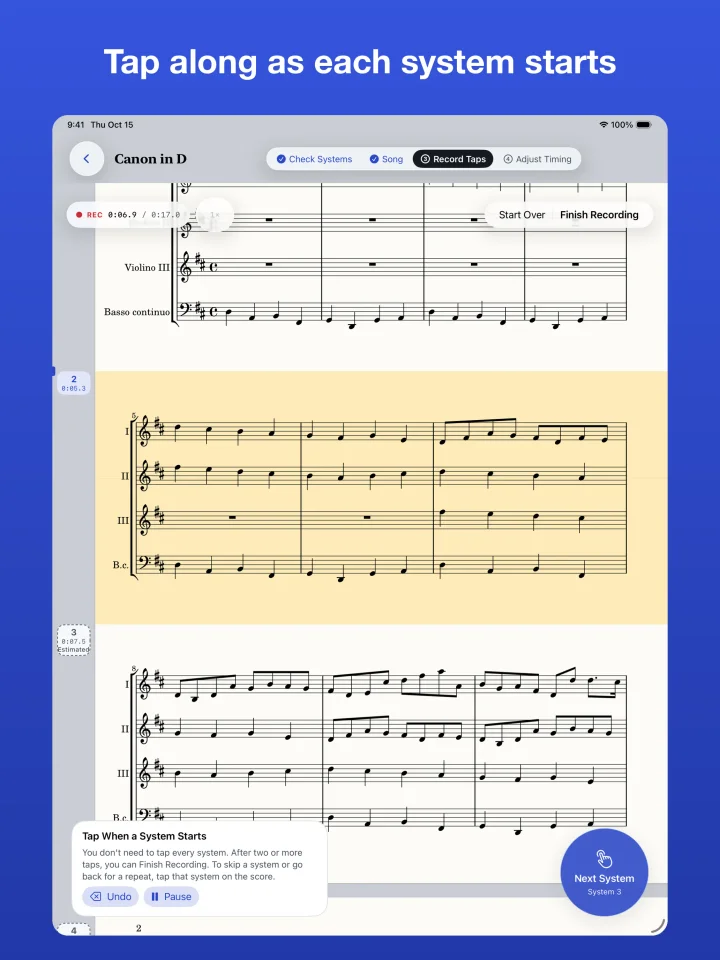
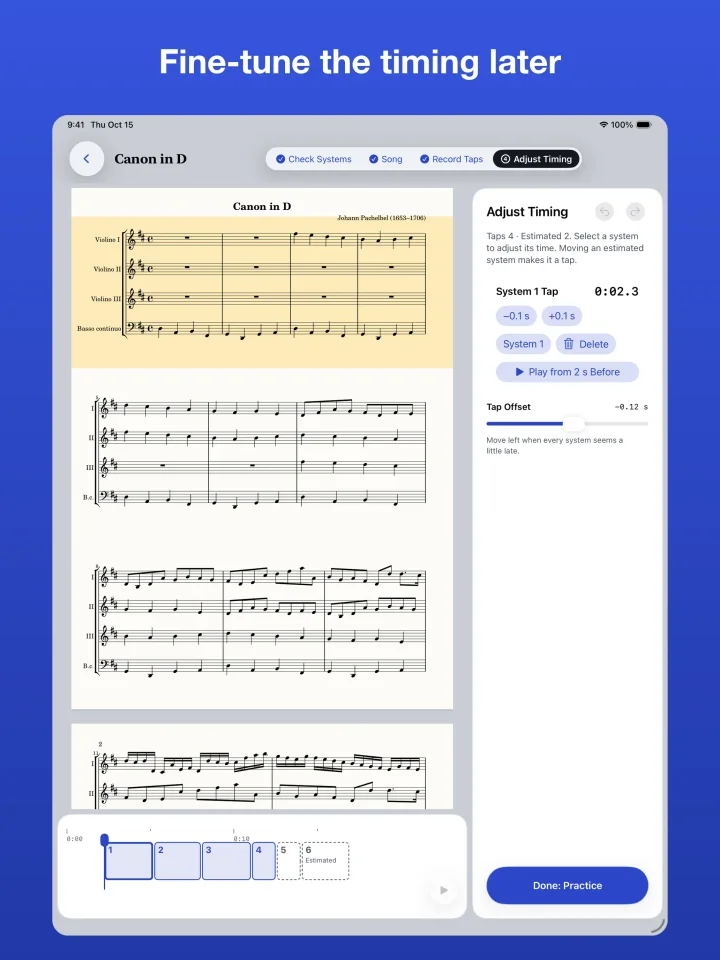
Listen to the song and tap at the start of a system to record the timing. Systems you did not tap are estimated from their neighbors, and you can adjust the timing later.
■ Good for
• Guitar, bass, drums or keys: playing along with the original recording from a band score or TAB
• Piano, strings or winds: playing through a piece with your own recording or backing track
• Hard passages: slowed down and looped
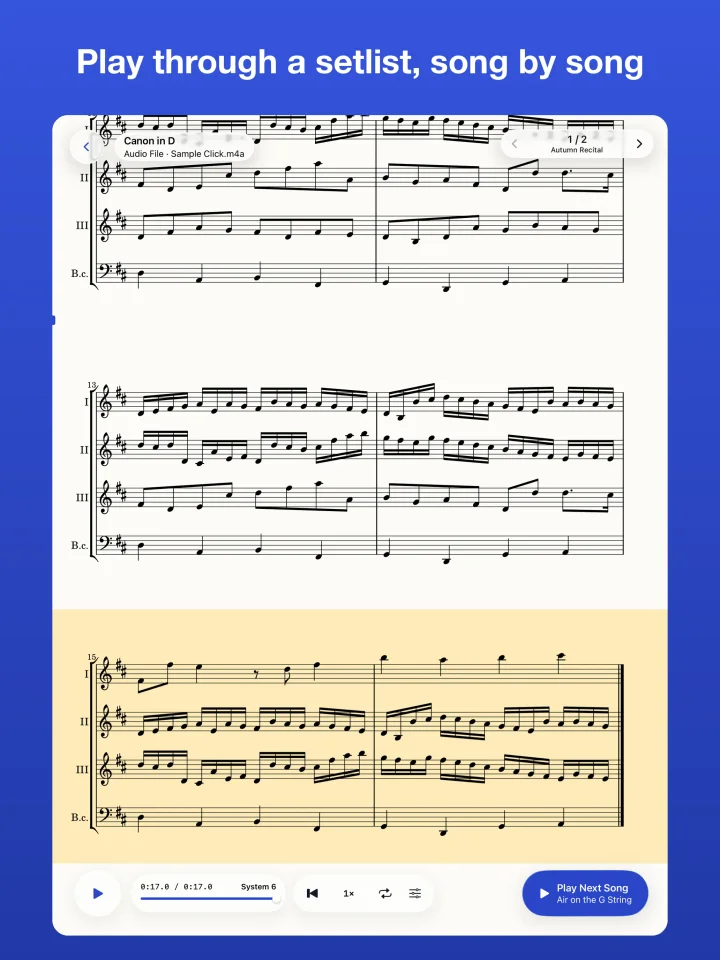
• Before a gig or recital: playing through your setlist in order
■ How it works
1. Import a PDF score and check where its systems are.
2. Choose a song (a song on Apple Music, or an audio file).
3. Listen to the song and tap at the start of each system.
4. Practice.
■ For practice
• Slow the song down to 0.5×, 0.75× or 0.9×. The pitch stays the same.
• Repeat a passage with Section Loop.
• While paused, touch and hold a system to play from it.
• Pick up where you left off.
• Setlists: put your scores in the order of a gig, a recital or a practice routine, and practice them one after another. When a song ends, press Play Next Song to switch to the next score and play it. Each score keeps the timing you tapped for it.
• Notes: in practice, press the pencil to write fingerings, chords or reminders on the score with Apple Pencil or a finger. What you write stays on the page and is shown where you wrote it, even when you turn the iPad or change the width of the window. Writing needs ScoreGlide Pro. Notes are for iPad: on the Mac, they can be neither written nor shown.
• Scores, audio files, timing, setlists and notes sync with iCloud, so you can use them on another iPad signed in to the same Apple Account.
• Try it right away with the sample score and audio that come with the app.
■ What it does not do
• ScoreGlide does not listen to the music and align the score by itself. You record where each system starts by tapping.
• It does not replace a sheet music reader. You write by hand (pen, marker, pencil and the like); there is no typed text, shape or stamp.
• Annotations already in a PDF are shown on the score, but they cannot be erased or edited as ScoreGlide notes. Annotations in a password-protected PDF are not shown.
■ About Apple Music
• Songs on Apple Music need an Apple Music subscription.
• ScoreGlide plays the song with Apple's own player and follows its playback position. It does not save or analyze the audio.
• Every feature also works with audio files alone.
■ Price
• Everything described here is free to use, except for notes and for making more than one setlist. There are no ads.
• One setlist is free, run-throughs included. Notes, and more than one setlist, need ScoreGlide Pro, a one-time in-app purchase; the App Store shows its price.
• Practicing with songs on Apple Music costs nothing in ScoreGlide. Songs on Apple Music still need an Apple Music subscription.
■ Privacy
The app sends no data to the developer. Purchases are handled by Apple, and the app does not send purchase information to the developer.
Apple, Apple Music, Apple Pencil, iPad and iCloud are trademarks of Apple Inc., registered in the U.S. and other countries and regions.
Neue Funktionen
Version 1.2.0 · 19.11.2026
New: write on your scores. In practice, press the pencil and write fingerings, chords or reminders with Apple Pencil or a finger. What you write stays on the page and is shown where you wrote it, even when you turn the iPad or change the width of the window, and it syncs with iCloud to another iPad signed in to the same Apple Account. Writing is a feature of ScoreGlide Pro, the one-time in-app purchase that also allows more than one setlist; everything else stays free. Annotations already in a PDF now show on the score too.
App-Datenschutz
Was Takeshi Juan im App Store zum Umgang dieser App mit Daten angibt.
-
Keine Daten erfasst
Der Entwickler erfasst keine Daten von dieser App.
Die Datenschutzpraktiken können variieren, zum Beispiel je nach den von Ihnen verwendeten Funktionen oder Ihrem Alter.
Informationen
- Anbieter
- Takeshi Juan
- Kategorie
- Musik
- Version
- 1.2.0
- Aktualisiert
- 19.11.2026
- Veröffentlicht
- 09.10.2026
- Größe
- 8,1 MB
- Erfordert
- iOS 26.0 oder neuer
- Altersfreigabe
- 12+
- In-App-Käufe
- Ja
- Sprachen
- Japanisch, Englisch
- Copyright
- © 2026 Takeshi Juan