
Screen Time Control: ScrollCat
App Blocker, Focus & Limits
Entwickelt für iPhone
Kostenlos · In-App-Käufe
- Altersfreigabe12+
- KategorieProduktivität
- EntwicklerSamet Ceylan
- SprachenEnglisch
- Größe43,0 MB
Verlinkt auf die offizielle App Store-Seite
Download.org hostet keine Datei von Screen Time Control: ScrollCat. Die Schaltfläche öffnet die App-Seite bei App Store, wo Samet Ceylan die App veröffentlicht. Eintrag zuletzt geprüft am 14.11.2026.
Screenshots




Info
Der Entwickler hat diesen Text nicht in Ihrer Sprache bereitgestellt.
ScrollCat helps you set a real boundary before a quick check turns into another endless scroll session. Choose the apps, categories, or websites that steal your time, set one shared daily limit, and they’ll be blocked when time runs out.
Other blockers give you a cold gray wall. You get a cat with an attitude.
YOUR CAT SCROLLS WITH YOU
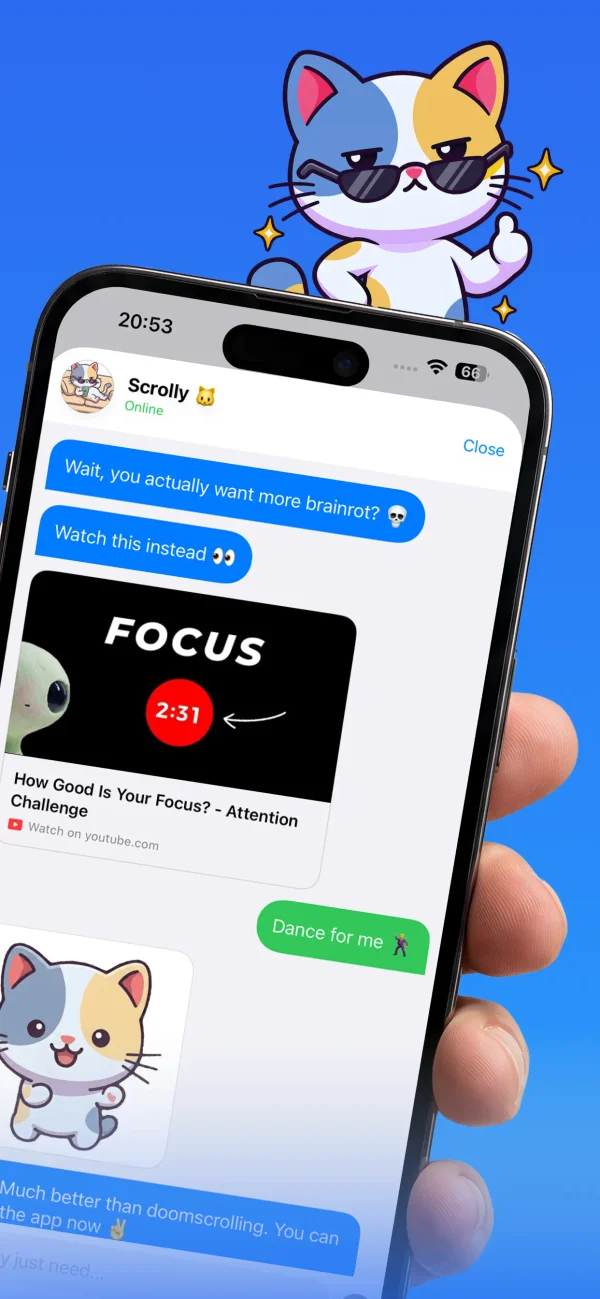
Meet Scrolly, your digital twin.
The more time you spend in your selected apps, the more energy Scrolly loses. Instead of hiding your screen time inside another chart, ScrollCat makes it impossible to ignore. You always see how much time you've used, how much is left, and how your scrolling is affecting your cat.
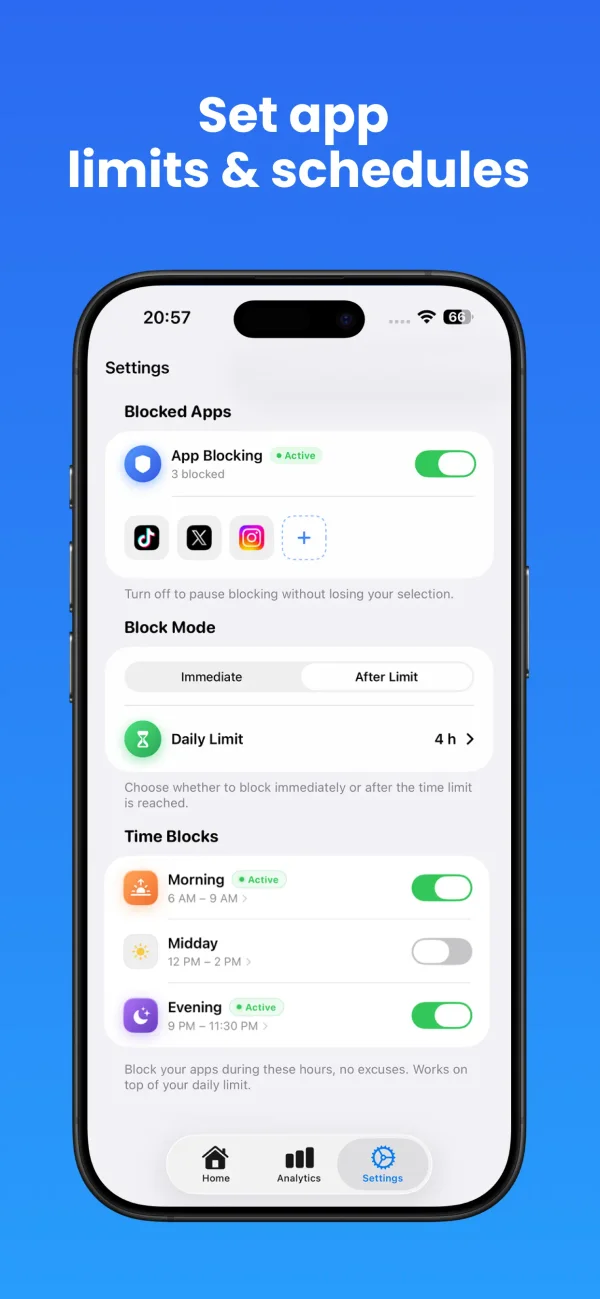
BLOCK YOUR WAY
• After Limit: use your selected apps normally until you hit your shared daily limit.
• Instant Mode: keep distracting apps and websites blocked from the start.
• Time Blocks: schedule blocking for work, study, bedtime, or whenever you need to lock in.
THE CAT THAT BLOCKS BACK
When ScrollCat blocks a distracting app, Scrolly does not leave you staring at a dead end.
Scrolly suggests better ways to use the moment, such as a quick activity, a mindful reset, something productive, or a personalized video recommendation.
Instead of opening the same feed again, you get a clear next step that helps you move on.
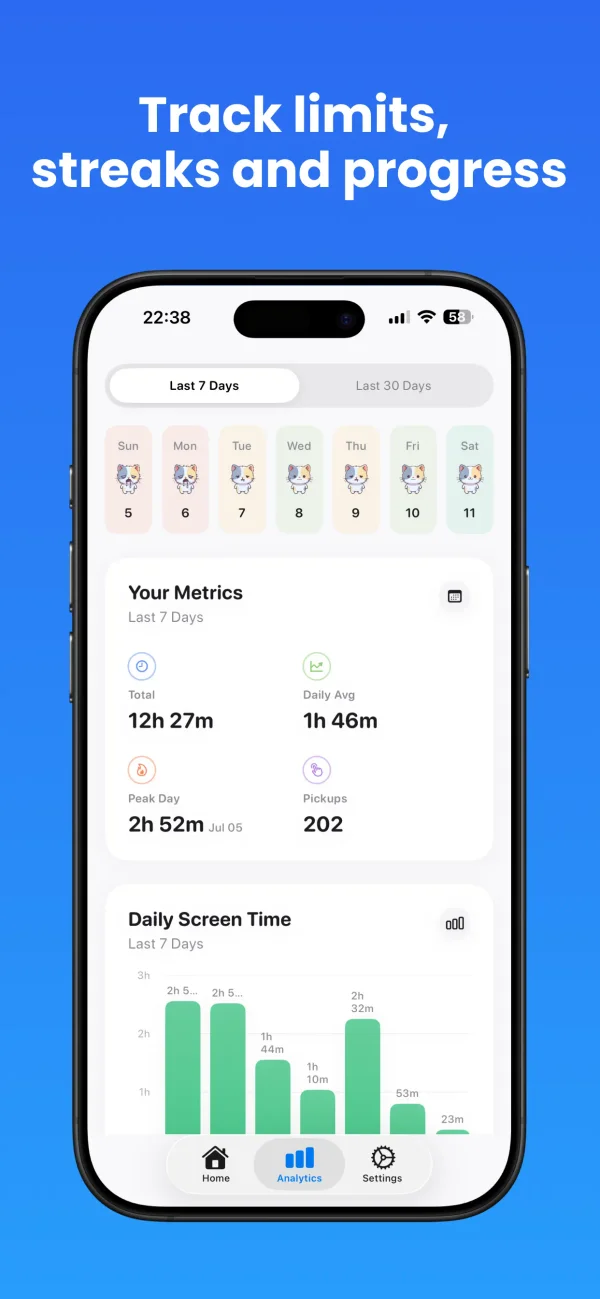
SEE YOUR REAL NUMBERS
• Current screen time and time remaining
• One daily limit across your selected apps
• Streaks, XP, and unlockable badges
• App, category, and website blocking
• Custom block screens with Scrolly
• A cat that changes with your screen time
No shame, just facts. So you actually know where your day goes.
WITH SCROLLCAT PRO
• Scheduled Time Blocks
• Detailed analytics
• App usage, daily averages, and pickups
• Home Screen widgets
• Productive alternatives in chat
• Personalized video suggestions
Scroll less. Touch grass. Let Scrolly handle the rest.
ScrollCat uses Apple's Screen Time API to monitor and block the apps, categories, and websites you select. Your screen time data stays on your device.
The app is free to start. Pro unlocks scheduled Time Blocks, detailed analytics, Home Screen widgets, productive alternatives, and personalized picks.
Terms of Use (EULA): https://www.apple.com/legal/internet-services/itunes/dev/stdeula/
Privacy Policy:
https://app.termly.io/policy-viewer/policy.html?policyUUID=ec191bdf-ded1-4c88-aa11-4d6a66d0aeae
Terms of Use:
https://app.termly.io/policy-viewer/policy.html?policyUUID=47adc836-435b-45a1-b72f-58e4a6aee037
Neue Funktionen
Version 1.0.2 · 31.08.2026
Bug fixes
App-Datenschutz
Was Samet Ceylan im App Store zum Umgang dieser App mit Daten angibt.
-
Mit Ihnen verknüpfte Daten
Können erfasst und mit Ihrer Identität verknüpft werden.
- Käufe
- Kennungen
Die Datenschutzpraktiken können variieren, zum Beispiel je nach den von Ihnen verwendeten Funktionen oder Ihrem Alter.
Informationen
- Anbieter
- Samet Ceylan
- Kategorie
- Produktivität
- Version
- 1.0.2
- Aktualisiert
- 31.08.2026
- Veröffentlicht
- 31.07.2026
- Größe
- 43,0 MB
- Erfordert
- iOS 18.6 oder neuer
- Altersfreigabe
- 12+
- Preis
- Kostenlos
- In-App-Käufe
- Ja
- Sprachen
- Englisch
- Copyright
- © Samet Ceylan
Das könnte Ihnen auch gefallen
-
 Nepsis: Screen Time ControlProduktivität
-
 Scroll Debt AppProduktivität
-
 Scrollar - Screen Time ControlProduktivität
-
 NoRot - Screen Time ControlProduktivität
-
 Roty - Unrot Your BrainProduktivität
-
 Rotcut: BildschirmzeitAufgaben lösen, freischalten
-
 ScrollKitty: BildschirmzeitApp-Blocker, Fokus & Limit
-
 Luma: Bildschirmzeit-BlockerFokus-Timer & Gewohnheiten
-
 Bildschirmzeit: ScreenPupApp Sperre & Fokus Timer