Set Planner
2D plan of the film set
Entwickelt für iPhone, iPad, Mac, iPod touch
- Altersfreigabe4+
- KategorieProduktivität
- EntwicklerOleksandr Kovtun
- SprachenEnglisch
- Größe24,4 MB
Set Planner ist bei App Store derzeit möglicherweise nicht verfügbar
Bei unserer letzten Prüfung war der Store-Eintrag nicht erreichbar. Der Link führt weiterhin zur offiziellen App Store-Seite.
Screenshots
Info
Der Entwickler hat diesen Text nicht in Ihrer Sprache bereitgestellt.
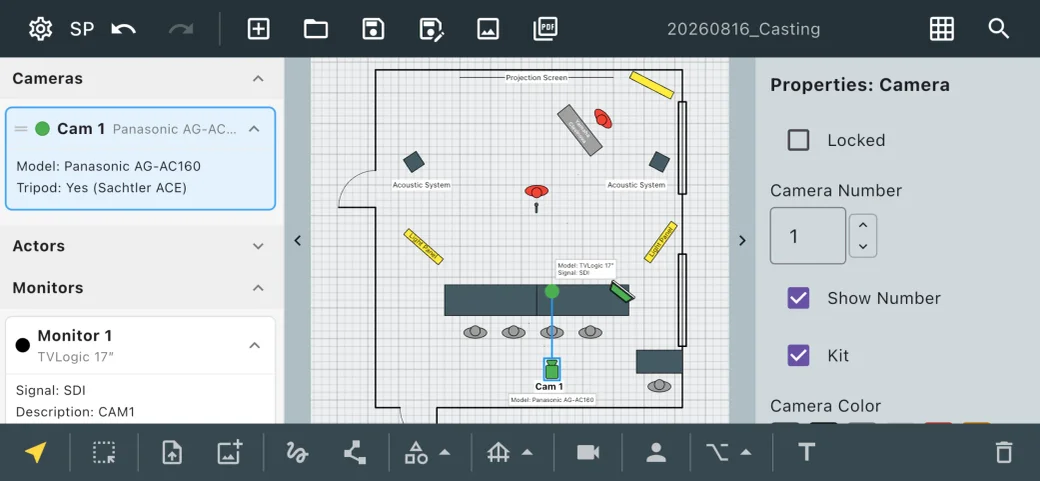
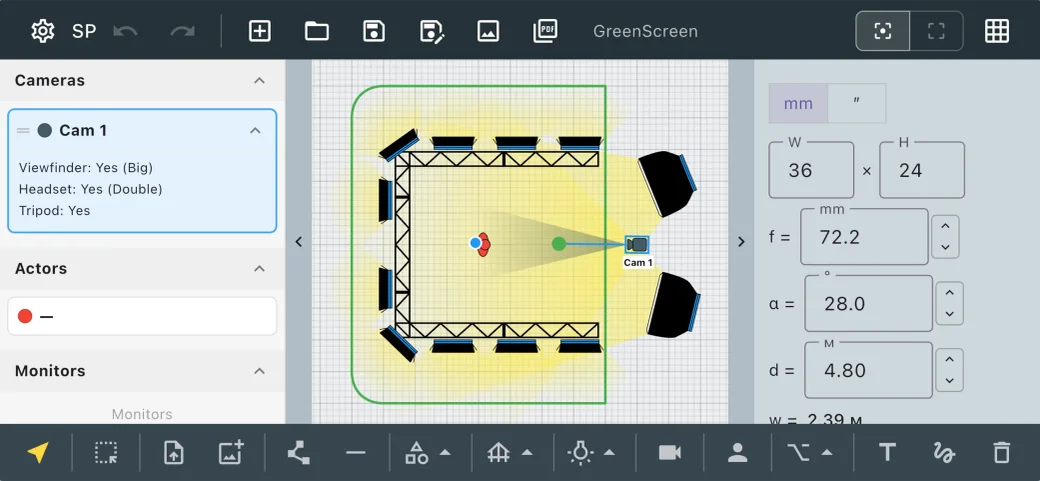
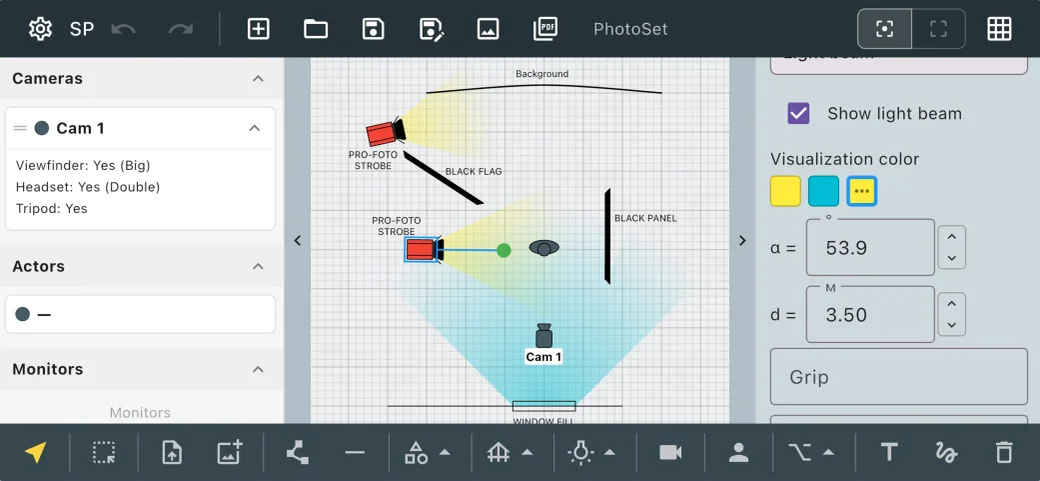
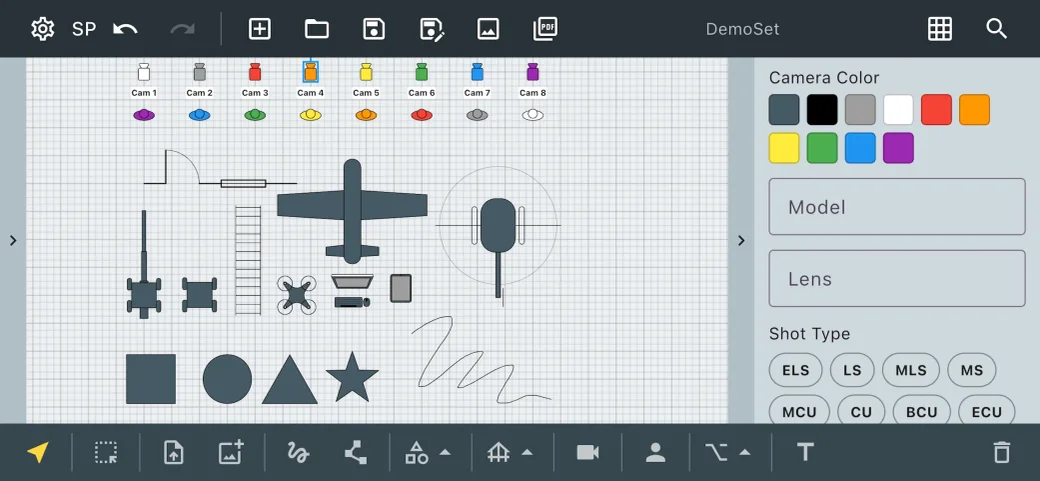
Set Planner is a professional tool for film and TV set design. Build floor plans quickly, communicate your vision to the crew, and export to JPEG or PDF in seconds.
Cameras
Place cameras with customizable lens angle, focal length, and field of view. Name each camera and link a label that moves with it. Lock proportions or enable free resize per element.
Actors & Equipment
Add actors, monitors, keyboards, and custom library items to your plan. Choose which elements can be resized and which stay fixed — per object.
Rigs
Place JIB Crane, Dolly, Rails, and Drone rigs with labeled dimensions. JIB and Rail support height-only resize by default; width resize can be unlocked separately.
Architecture
Draw walls freehand and snap doors and windows directly onto them. Walls, doors, and windows maintain correct proportions when scaled.
Drawing Tools
Pen and Polyline for freehand and multi-point paths
Line and Arrow with optional arrowheads at start and end
Rectangle, Ellipse, Triangle, and Star with adjustable fill and stroke
Text labels anywhere on the canvas
Bezier Curve Editing
Enable Bezier handle levers for any smooth curve — Pen, Polyline, Line, or Arrow. Drag the green control handles on the canvas to shape each segment precisely. Handles move with the object, stay consistent when you add or remove knot points, and arrow heads align to the true curve tangent at the endpoint.
Precision Controls
Enter Width and Height numerically for geometric shapes
Adjust arrow head length (10–50 pt) per element
Set curve simplification distance before applying
Snap to grid with configurable grid size
Group, lock, and reorder elements freely
Export
Save your plan as a native .splan project file, export to JPEG for sharing, or generate a multi-page PDF ready for print.
Works on iPhone, iPad, and Mac.
Neue Funktionen
Version 2.9.9 · 11.10.2026
- **New: Architecture section** in the equipment list panel (Walls, Doors, Windows) — walls that fully enclose a space are automatically grouped into a single **Zone N** entry; everything else keeps its own row. Drag-reorder works here too — moving a Zone moves every wall in that room together.
- **New: per-section show/hide** — each equipment list section now has an eye icon that hides every item in that group on the canvas and in JPG export (without deleting them), and makes them unselectable until shown again.
- **New: Others section** — Keyboard+Mouse, Helicopter, Light Aircraft, Trusses, and every geometric shape are now listed, instead of being placeable but invisible in the panel. Tablet now appears under Monitors.
- **Equipment list panel:** sections reordered (Architecture, Cameras, Special, Monitors, Lights, Actors, Others), and the rig section (Jib/Dolly/Rail/Drone) renamed **Other** → **Special**, in both the panel and the PDF export.
- **Text tool:** the Font picker actually works now — 8 real bundled fonts replace the old OS font name list, which rarely did anything (and never on the web).
- **Import Image / Import SVG:** newly imported files now appear centered in the current view, instead of a fixed spot that could land off-screen.
- **Bottom toolbar:** the trash icon's short tap now deletes just the selected shape (or offers Clear all if nothing's selected); long-press always offers Clear all.
- **Save as JPG / Save as PDF:** exported files now carry "Set Planner" and setplanner.pro in their metadata.
- **Settings → Export → JPG Export:** new **Render Grid** switch to include reference grid lines in the exported file (off by default).
- **Fixed:** double-clicking a .spj file to open it no longer loads an empty canvas on macOS or Windows.
- **Settings → About:** added a short promo description, plus (web) a link to the App Store.
App-Datenschutz
Was Oleksandr Kovtun im App Store zum Umgang dieser App mit Daten angibt.
-
Keine Daten erfasst
Der Entwickler erfasst keine Daten von dieser App.
Die Datenschutzpraktiken können variieren, zum Beispiel je nach den von Ihnen verwendeten Funktionen oder Ihrem Alter.
Informationen
- Anbieter
- Oleksandr Kovtun
- Kategorie
- Produktivität
- Version
- 2.9.9
- Aktualisiert
- 11.10.2026
- Veröffentlicht
- 29.07.2026
- Größe
- 24,4 MB
- Erfordert
- iOS 15.0 oder neuer
- Altersfreigabe
- 4+
- Sprachen
- Englisch
- Copyright
- © 2026 Kovtun OA
Das könnte Ihnen auch gefallen
-
 DailerProduktivität
-
 WALLIO Camera ReportProduktivität
-
 DOT dataCalcProduktivität
-
 Everest FuelProduktivität
-
 LiveEdit CompanionProduktivität
-
 Scenario mobileProduktivität
-
 CineFlo - Drehplan & ShotlistDispo, Drehbuch & Kalkulation
-
 PräsentationsfernbedienungKabelloser Presenter
-
 ARRI Camera CompanionProduktivität
-
 CodeaCreative coding