
Shogi Log
Shogi Records Management App
Entwickelt für iPhone, iPad, iPod touch
Kostenlos · In-App-Käufe
- Altersfreigabe4+
- KategorieBrettspiele
- EntwicklerVida Apps Incorporated
- SprachenJapanisch+ 1 weitere
- Größe134,8 MB
Verlinkt auf die offizielle App Store-Seite
Download.org hostet keine Datei von Shogi Log. Die Schaltfläche öffnet die App-Seite bei App Store, wo Vida Apps Incorporated die App veröffentlicht. Eintrag zuletzt geprüft am 25.11.2026.
Screenshots



Info
Der Entwickler hat diesen Text nicht in Ihrer Sprache bereitgestellt.
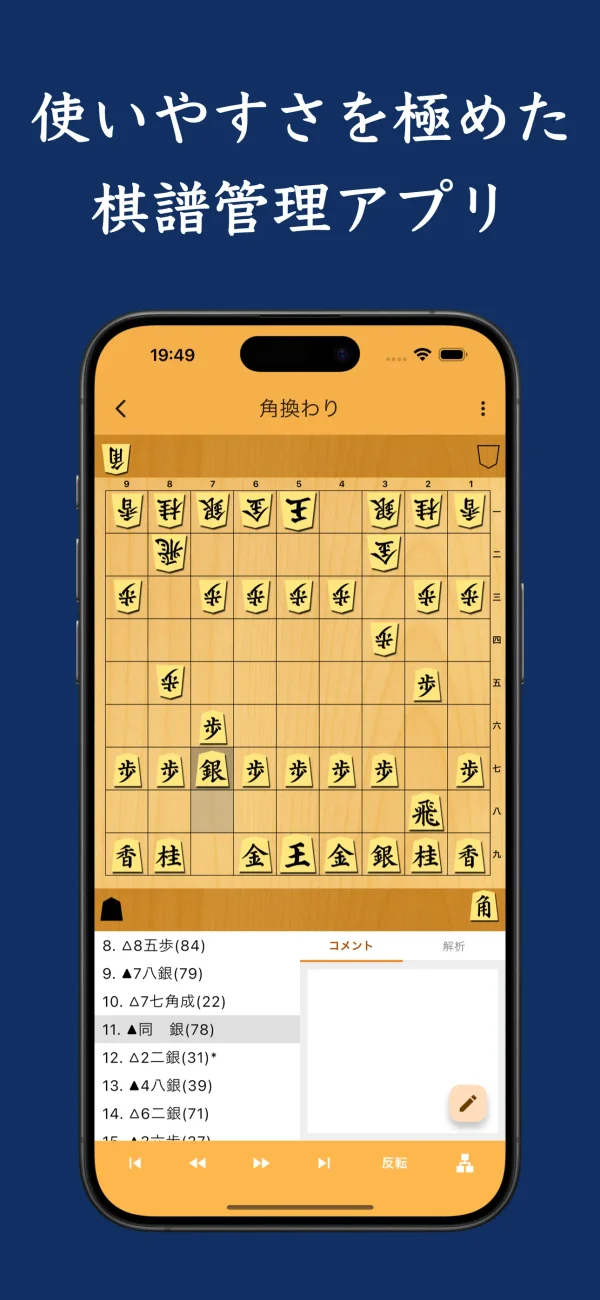
"Shogi Log" is an app for managing shogi game records (kifu).
It provides features for creating, viewing, and organizing your shogi game records.
◆ Main Features of the "Shogi Log" App
- Create new game records (kifu)
- Cloud saving for game records (transfer your data when changing devices and sync across multiple devices)
- Shogi AI game analysis (Premium Plan only)
Supports best-move suggestions, principal variations, evaluation graphs, and automatic detection of bad and questionable moves
- Import KIF format files
- Export KIF format files
- Save and manage your game data
- Folder management for game records (Premium Plan only)
- Search and sort game records (Premium Plan only)
- View and browse game records
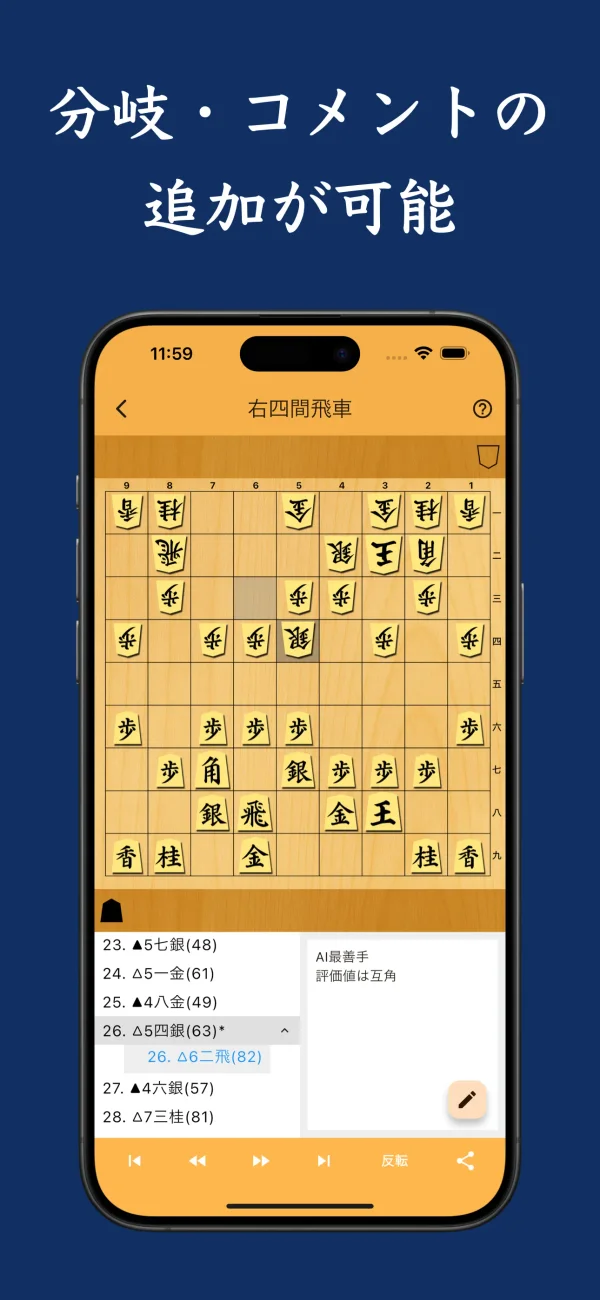
- Supports branching moves (view all variations in a tree format)
- Add comments to each position
- Memorization Mode (practice a game record one move at a time)
- Supports recording tsume shogi problems and custom starting positions
- Kifu Training (a quick drill for reading board coordinates)
- Supports handicap games (creating new handicap games is limited to the Premium Plan)
Supports Lance, Bishop, Rook, Rook-Lance, 2-piece, 4-piece, 6-piece, 8-piece, 10-piece, and 19-piece handicaps
- Flip the board (switch Sente and Gote sides)
- iPad support (including multitasking)
◆ Recommended for:
- Those who want to easily record their shogi games
- Those who want to review their games with Shogi AI
- Those who struggle to memorize opening theory
- Those who want to manage their game records across multiple devices
- People who read shogi books
◆ How to Best Use the App
- Review Your Games with Shogi AI!
Analyze your recorded games with Shogi AI to see how the evaluation changes throughout the game in an easy-to-read graph. Bad and questionable moves are automatically detected, helping you quickly identify positions worth reviewing. You can also save the AI's suggested variations as branches in your game record and use them to improve your future games.
- Read Shogi Books Comfortably!
Use the iPad's multitasking feature to open an e-book shogi book on the left side and this app on the right side. You can move pieces while reading, making it easier to study positions and variations as you go.
The moves you make can also be saved as game records and reviewed at any time, making the app ideal for repeated learning.
- Easily Carry Your Game Records from PC!
Import KIF format files to view and edit them within the app. By importing game records stored on your PC, you can easily take your kifu with you wherever you go.
- Study Openings with Branching Move Support!
You can record all variations of openings with multiple branches. Comments can also be added to each position, making it easy to keep notes about the results and ideas behind different variations.
For openings you want to memorize, Memorization Mode lets you practice them one move at a time, making it ideal for repeated study.
- Easy and Worry-Free Device Transfers!
Once you sign in, your game records are automatically saved to the cloud. Even when you change devices, you can transfer your data seamlessly and access the same game records across multiple devices.
Terms of Use:
https://www.apple.com/legal/internet-services/itunes/dev/stdeula/
Neue Funktionen
Version 2.2.0 · 24.11.2026
Thank you for using our app.
Based on the requests we received through our inquiry form and other channels, we have made the following updates.
【Game Record Lock】
・Added a feature to lock completed game records so that moves and comments cannot be edited or deleted
*The lock status is also saved to the cloud and shared with your other signed-in devices.
【Comment Templates】
・Added a feature to enter template comments such as "42頁第15図" and "57頁参考図" by typing only the numbers
・You can freely add, edit, and reorder your frequently used templates
【Memorization Mode Improvements】
・For game records with branches, questions can now be drawn randomly from all branches
・You can now memorize the line you selected in the branch tree
・Improved how turns are handled in memorization mode for some handicap game records
・Fixed an issue where some branches of a game record could be lost when using memorization mode
・Fixed an issue where a game record could be duplicated by certain operations in memorization mode
【Folder and List Improvements】
・Folders can now be moved into other folders
・The list now keeps its scroll position when you return from a game record
【Operation Settings】
・Added an on/off setting for moving forward and back by tapping the board
・Added the option to choose which move to proceed to at branching positions
・Added the option to record nifu (two pawns on the same file) moves
*You can change these in Settings → 操作設定 (Operation Settings).
【KIF Import Improvements】
・Improved compatibility when importing KIF files
・Added support for the right lance handicap (右香落ち)
【Design Improvements】
・Updated the tab bar and other parts of the iPhone and iPad screens to the latest iOS design (Liquid Glass)
・Added support for iPhone Duo
【Other】
・Comments are now also shown when you long-press a move in the branch tree
・Game records saved on other devices are now reflected when you bring the app back to the foreground
・Fixed several other issues
ーーーーーーーーーーーーーーーーーー
いつもご利用いただきありがとうございます。
問い合わせフォーム等から頂いたご要望も踏まえ、以下のアップデートを実施しました。
【棋譜のロック機能を追加】
・完成した棋譜をロックし、指し手やコメントの編集・削除をできないようにする機能を追加
※ロックの状態はクラウドにも保存され、ログインしている他の端末でも共有されます。
【コメントの定型文入力を追加】
・「42頁第15図」「57頁参考図」などの定型文を、数字だけで入力できる機能を追加
・よく使う定型文を自由に追加・編集・並べ替えできるように対応
【暗記モードの改善】
・分岐のある棋譜で、すべての分岐からランダムに出題できるように対応
・分岐ツリーで選んだ手順で暗記できるように対応
・一部の駒落ちの棋譜で、暗記モードの手番が正しく扱われるように改善
・暗記モード使用時に、棋譜の一部の分岐が消えることがある不具合を修正
・暗記モード使用時に、特定の操作で棋譜が複製されることがある不具合を修正
【フォルダ・棋譜一覧の改善】
・フォルダを別のフォルダへ移動できるように対応
・棋譜を開いて戻ったときに、一覧のスクロール位置を保つように改善
【操作設定を追加】
・盤面タップで手を進める・戻す操作のオン/オフを設定できるように対応
・分岐のある局面で、進む手を選べる機能を追加
・二歩の指し手も記録できる機能を追加
※設定 →「操作設定」から変更できます。
【棋譜の読み込みの改善】
・KIFファイルの読み込みの互換性を向上
・右香落ちの手合割に対応
【デザインの改善】
・iPhone・iPadのタブバーなどを最新のiOSのデザイン(Liquid Glass)に対応
・iPhone Duoに対応
【その他】
・分岐ツリーで指し手を長押ししたときに、コメントも表示するように対応
・他の端末で保存した棋譜が、アプリを前面に戻したときに反映されるように改善
・いくつかの不具合を修正
App-Datenschutz
Was Vida Apps Incorporated im App Store zum Umgang dieser App mit Daten angibt.
-
Daten, die zum Tracking Ihrer Person verwendet werden
Können verwendet werden, um Sie über Apps und Websites anderer Unternehmen hinweg zu verfolgen.
- Benutzerinhalte
- Kennungen
- Nutzungsdaten
- Diagnose
-
Mit Ihnen verknüpfte Daten
Können erfasst und mit Ihrer Identität verknüpft werden.
- Benutzerinhalte
- Kennungen
- Nutzungsdaten
- Diagnose
-
Nicht mit Ihnen verknüpfte Daten
Können erfasst werden, sind aber nicht mit Ihrer Identität verknüpft.
- Diagnose
Die Datenschutzpraktiken können variieren, zum Beispiel je nach den von Ihnen verwendeten Funktionen oder Ihrem Alter.
Informationen
- Anbieter
- Vida Apps Incorporated
- Kategorie
- Brettspiele
- Version
- 2.2.0
- Aktualisiert
- 24.11.2026
- Veröffentlicht
- 28.10.2024
- Größe
- 134,8 MB
- Erfordert
- iOS 15.6 oder neuer
- Altersfreigabe
- 4+
- Preis
- Kostenlos
- In-App-Käufe
- Ja
- Sprachen
- Japanisch, Englisch
- Copyright
- © 2024 Vida Apps Inc.
Das könnte Ihnen auch gefallen
-
 将棋ノート - 詰将棋の管理や棋譜並べにBrettspiele
-
 iShogi - 将棋AI検討Brettspiele
-
 Shogi KifuStrategie
-
 Cat Shogi Studio - 将棋の棋譜管理アプリBrettspiele
-
 FuriBisha - Shogi StrategyStrategie
-
 Technique of Japanese ChessStrategie
-
 Japanese Chess BoardBrettspiele
-
 AiIbisha - Shogi StrategyBrettspiele
-
 81Dojo (World Online Shogi)Brettspiele
-
 棋譜リーダーBrettspiele