- Altersfreigabe4+
- KategorieProduktivität
- EntwicklerChristopher Fuchs
- SprachenEnglisch
- Größe1,2 MB
Verlinkt auf die offizielle App Store-Seite
Download.org hostet keine Datei von SimpleStat. Die Schaltfläche öffnet die App-Seite bei App Store, wo Christopher Fuchs die App veröffentlicht. Eintrag zuletzt geprüft am 18.11.2026.
Screenshots


Info
Der Entwickler hat diesen Text nicht in Ihrer Sprache bereitgestellt.
SimpleStat: Track What Matters in Your Calendar
SimpleStat transforms your calendar into a personal statistics engine. Simply define keywords to filter your calendar events—whether it's "Coding," "Duolingo," or any activity you want to track—and watch SimpleStat automatically calculate how often those events occur across multiple timeframes.
Smart Calendar Filtering
At its heart, SimpleStat filters your calendar events intelligently. Type a keyword, and the app searches your calendar with case-insensitive, localized matching to find every matching event. Whether you're tracking daily habits, weekly goals, or long-term patterns, SimpleStat continuously scans your calendar and builds comprehensive statistics without any manual logging.
Two Ways to Visualize Your Data
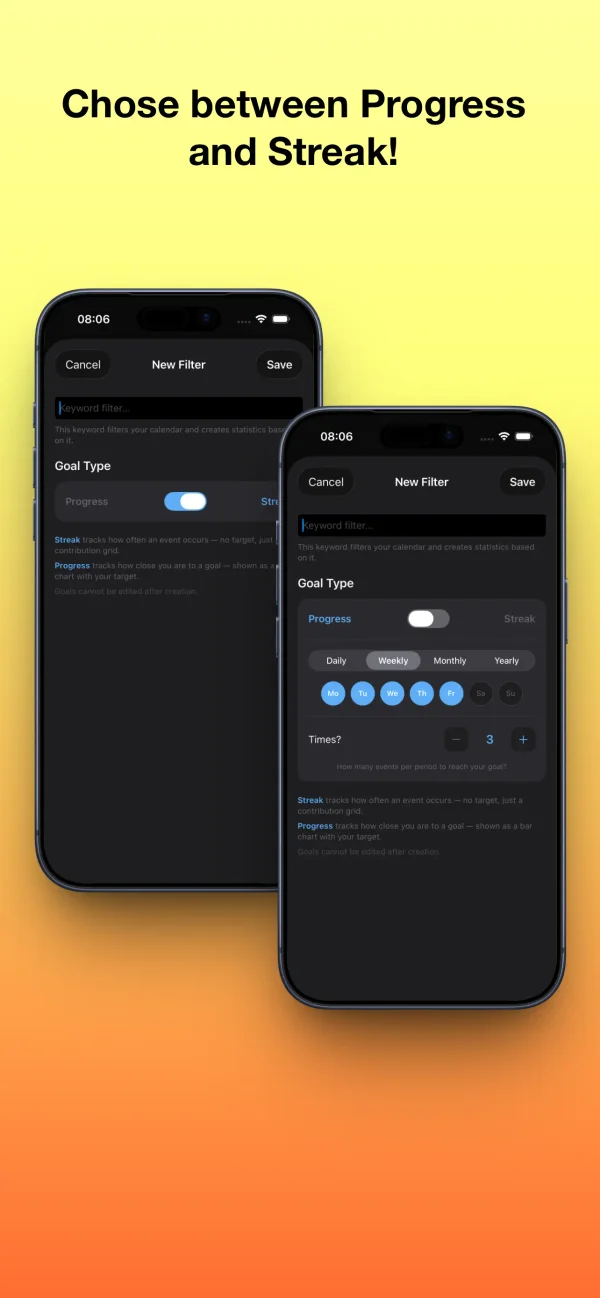
Once you've defined a filter, choose how to track it:
Streaks: View your activity as a GitHub-style contribution grid. See at a glance which days you performed your activity, with no target pressure—just the satisfaction of visual consistency.
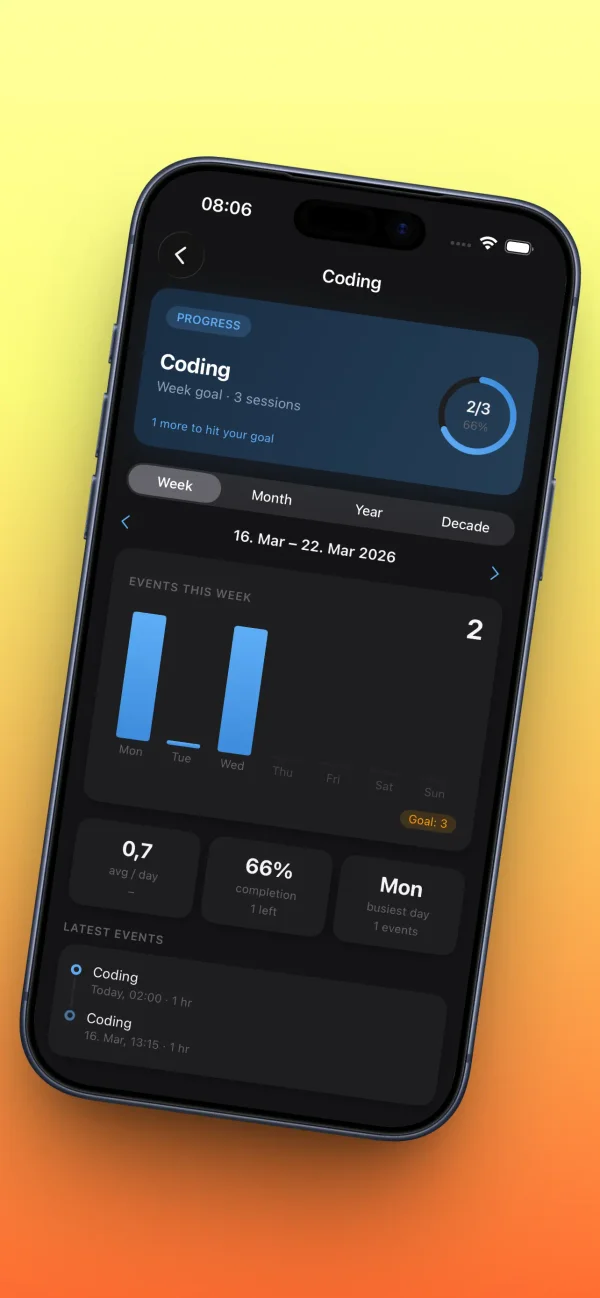
Progress Goals: Set frequency targets (daily, weekly, monthly, or yearly) and watch progress graphs show how close you are to your goals. The home screen displays your current progress clearly, so you know exactly where you stand.
Comprehensive Statistics
SimpleStat calculates statistics across multiple timeframes—daily, weekly, monthly, yearly, and even by decade. View your data from any angle: compare your busiest days, track average frequency, and analyze long-term trends. All statistics are frozen once created, preserving your history while allowing continuous new data collection.
Beyond EventKit's Limits
While iOS EventKit only provides access to the last 12 months of calendar data, SimpleStat stores your accumulated statistics in its own database. This means you can build statistical profiles that span years, tracking patterns and progress long after your calendar events disappear from EventKit's view.
Neue Funktionen
Version 2.0 · 15.10.2026
SimpleStat 2.0 is our biggest update yet.
NEW: DETAIL VIEW
Progress filters have a new view between Month and Year. See your weeks as connected dots and pinch to zoom from two weeks out to a full year. Swipe left and right to travel through time. The chart adjusts its height to the numbers you see, so every pattern stays easy to read.
NEW: ARCHIVE
Swiping a filter no longer deletes it. It moves to the archive at the end of your list, out of the way but never lost. For streak filters the archive shows your last streak. For goal filters it shows whether you reached your goal. Tap an entry to bring it back, or swipe to delete it for good.
NEW: LIGHT MODE
SimpleStat now follows your iPhone's appearance. Use it bright by day and dark by night.
NEW: APP ICON
A fresh icon inspired by the contribution grid, with one orange flame for today's streak.
ALSO IMPROVED
- Yearly charts have slimmer, tidier bars
- Smoother deleting on iOS 18
- Many small layout fixes
HOW IT WORKS
Add a keyword, like "Gym" or "Guitar", and SimpleStat counts every matching event in your calendar. Build streaks, set daily, weekly, monthly or yearly goals, and follow your progress over weeks, months and years. No manual logging, ever.
App-Datenschutz
Was Christopher Fuchs im App Store zum Umgang dieser App mit Daten angibt.
-
Keine Daten erfasst
Der Entwickler erfasst keine Daten von dieser App.
Die Datenschutzpraktiken können variieren, zum Beispiel je nach den von Ihnen verwendeten Funktionen oder Ihrem Alter.
Informationen
- Anbieter
- Christopher Fuchs
- Kategorie
- Produktivität
- Version
- 2.0
- Aktualisiert
- 15.10.2026
- Veröffentlicht
- 24.03.2026
- Größe
- 1,2 MB
- Erfordert
- iOS 17.6 oder neuer
- Altersfreigabe
- 4+
- Preis
- Kostenlos
- Sprachen
- Englisch
- Copyright
- © Christopher
Das könnte Ihnen auch gefallen
-
 Cross: Sync tasksProduktivität
-
 Equi ProfessionalProduktivität
-
 Deferred: Decision DebtProduktivität
-
 Habits & CountersProduktivität
-
 DoSomething - Daily ChallengesProduktivität
-
 jottie: smart notesProduktivität
-
 Flow: Activities & NotesProduktivität
-
 Dailybird: Countdown TageTagezähler bis & seit, Widget
-
 Prism NotesProduktivität
-
 Cal CountdownProduktivität