
Soccer Manager Pro
Manage youth soccer teams live
Entwickelt für iPhone, iPad
Kostenlos · In-App-Käufe
- Altersfreigabe4+
- KategorieSport
- EntwicklerChris Fessler
- SprachenEnglisch
- Größe11,9 MB
Verlinkt auf die offizielle App Store-Seite
Download.org hostet keine Datei von Soccer Manager Pro. Die Schaltfläche öffnet die App-Seite bei App Store, wo Chris Fessler die App veröffentlicht. Eintrag zuletzt geprüft am 18.11.2026.
Screenshots


Info
Der Entwickler hat diesen Text nicht in Ihrer Sprache bereitgestellt.
Soccer Manager Pro is the sideline tool for youth and rec coaches who want fair playing time and stress‑free substitutions — without spreadsheets or guesswork. Supports team sizes up to 9 v 9.
Built for the touchline: big taps, a clock you can’t leave running by accident, and live time meters on every player so you can see at a glance who needs to come on or off.
FAIR PLAYING TIME
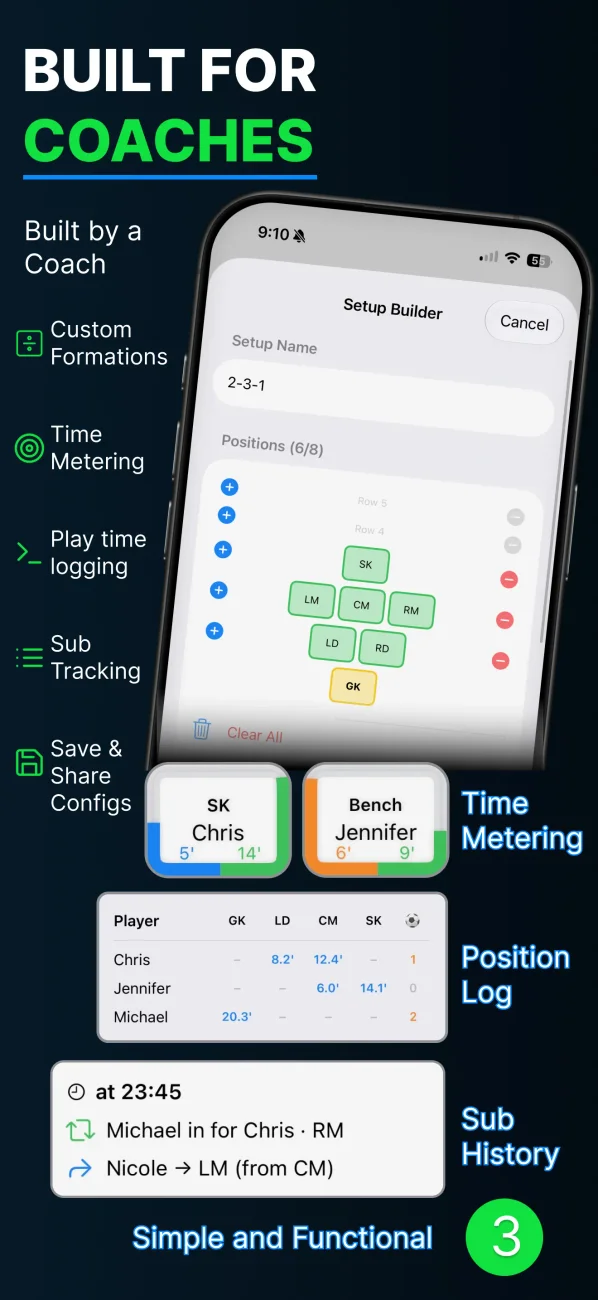
• Live meters on every card — total minutes, current on‑field stint, and bench rest time.
• The stint indicator flashes when a player hits your sub interval, so nobody gets forgotten on the field.
• Field Log grid shows each player’s minutes by position — plus goals — for the whole game.
FAST SUBSTITUTIONS
• Tap a player, tap a spot to move them; whoever they displace waits on the bench to be reassigned.
• Tap a bench player then a position to sub in. Swap two players with a long‑press, a two‑finger swap, or a drag.
• Stage several changes, preview the move arrows, and commit them all at once.
SUB HISTORY
• Every change is logged with the game time. Flash back through your substitutions to see who came on for whom.
QUICK LINEUPS
• Save your starting lineup (or favorite blocks) and recall them in one tap.
SCORE & GOALS
• Double‑tap a team’s score to add, triple‑tap to remove — goals stay linked to the player who scored.
IN‑GAME ALERTS
• Sub, hydration, and half‑time alerts pulse the clock and buzz your phone and watch.
• Set hydration breaks to any time (defaults to quarter and three‑quarter time).
• Exclude the goalie from alerts, or silence vibrations, right from Timer Options.
• Correct a missed pause/resume by setting the clock — player stint times shift with it.
APPLE WATCH
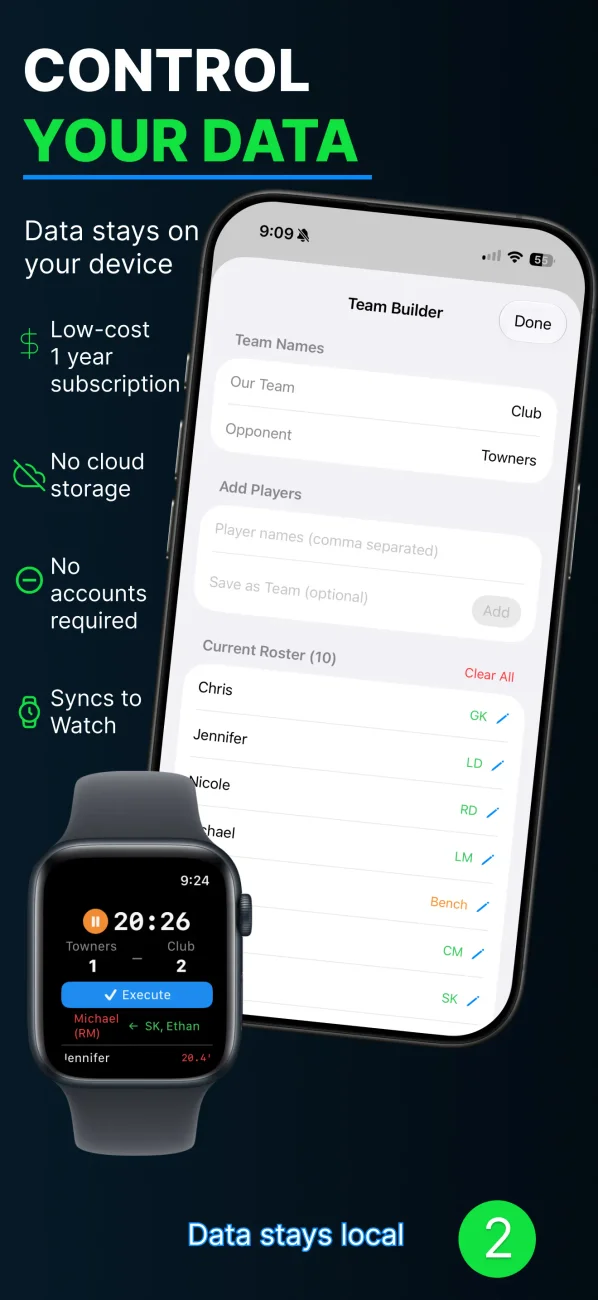
• Mirror the game on your wrist: clock, score, field players, and the same alerts.
• Adjust the score, run staged subs, and start/pause the game right from the watch.
MULTIPLE GAMES & FORMATIONS
• Four independent game slots, each with its own roster, formation, and timer.
• Build custom formations with named positions and color bands, then apply them mid‑game.
SHARE
• Live Share mirrors your game to an iPad tactical board and other iPhones on the same network in real time.
• Send a full saved game — roster, formation, timer, quick lineups, and sub history — to another coach as an encrypted file. Share it by AirDrop, Mail, or Messages; the recipient saves the file, opens it, and confirms the import.
END OF GAME
• Long‑press pause to end the game — stats freeze as FINAL for review, and you can still adjust the score.
No account required. No ads. Your data stays on your device.
LICENSED APPLICATION END USER LICENSE AGREEMENT (EULA)
https://www.apple.com/legal/internet-services/itunes/dev/stdeula/
Neue Funktionen
Version 2.3.0 · 09.11.2026
Game Timer Strip
Three compact timers now appear below the Quick Lineup buttons during a game: a countdown to half, a countdown to the final whistle (turns red inside five minutes), and a live count-up that runs whenever the clock is paused so you always know how long the break has lasted.
Field Log: Playtime Alert
Players who are significantly behind their teammates in total field time now appear in red in the Field Log grid. The comparison uses whole minutes so small gaps don't trigger a flag — only players who are genuinely short on time are highlighted.
Field Log: Total Time
The Field Log now includes a Total column showing each player's cumulative field time for the game, updated live alongside the per-position breakdown.
Save Staged Lineup
Stage your substitutions during a timeout, then long-press a Quick Lineup button and choose "Save Staged Lineup" to lock that plan in without executing it. The slot saves exactly what the field would look like after your changes — ready to recall the moment you need it.
Setup Builder
Tapping Done in the Setup Builder now saves your formation automatically, so you no longer have to remember to tap "Save Setup" before leaving. If the layout isn't complete yet, Done exits without saving as before.
Apple Watch
The watch now reconnects and re-syncs automatically when wrist detection brings the connection back mid-game, and reads the last-known state from storage on launch so the display is never blank while waiting for the phone.
App-Datenschutz
Was Chris Fessler im App Store zum Umgang dieser App mit Daten angibt.
-
Keine Daten erfasst
Der Entwickler erfasst keine Daten von dieser App.
Die Datenschutzpraktiken können variieren, zum Beispiel je nach den von Ihnen verwendeten Funktionen oder Ihrem Alter.
Informationen
- Anbieter
- Chris Fessler
- Kategorie
- Sport
- Version
- 2.3.0
- Aktualisiert
- 09.11.2026
- Veröffentlicht
- 04.08.2026
- Größe
- 11,9 MB
- Erfordert
- iOS 18.4 oder neuer
- Altersfreigabe
- 4+
- Preis
- Kostenlos
- In-App-Käufe
- Ja
- Sprachen
- Englisch
- Copyright
- © 2026 Fesstech, LLC
Das könnte Ihnen auch gefallen
-
 AssistenztrainerAuswechslungen verwalten
-
 Fussball Aufstellung EliteFußball Taktikboard & Trainer
-
 SubTime - Wechsel & SpielzeitAufstellung und Rotation
-
 Soccer - Life SimulatorSport
-
 Team Aufstellung BasicStelle deine Mannschaft auf
-
 Taktikboard für FußballTaktik, Lineup & Übung Creator
-
 GotSport Team AppSport
-
 Kansas City Chiefs & ArrowheadSport
-
 MOJO SportsSport
-
 SpondEinladungen und Gruppen